
You just finalized a robust AI content pipeline. Your team is publishing dozens of technically accurate, well-researched articles every week. Yet, despite the output volume, organic traffic is flatlining and AI engines like ChatGPT and Perplexity are completely ignoring your brand as a source.
The problem is rarely the content itself. The problem is architecture.
When you scale content production rapidly, internal linking becomes the first casualty. Orphaned pages multiply, topical authority fragments, and search crawlers struggle to understand the hierarchy of your site. While Blogseo has captured a lot of attention for its native internal linking features, it is far from the only solution—and if you are running a custom stack, a Headless CMS, or a complex WordPress instance, it might not be the right fit at all.
Automating internal linking for an AI blog requires tools that can analyze semantic context, map keyword clusters, and insert links without creating a spammy, over-optimized mess. This guide breaks down the most effective automation tools and workflows outside the Blogseo ecosystem.
The Content Velocity vs. Architecture Problem
Human writers naturally remember what they wrote last week. When drafting a new piece, a human author instinctively links back to a previous foundational article. AI writers, unless specifically engineered to query your live sitemap during generation, lack this contextual memory.
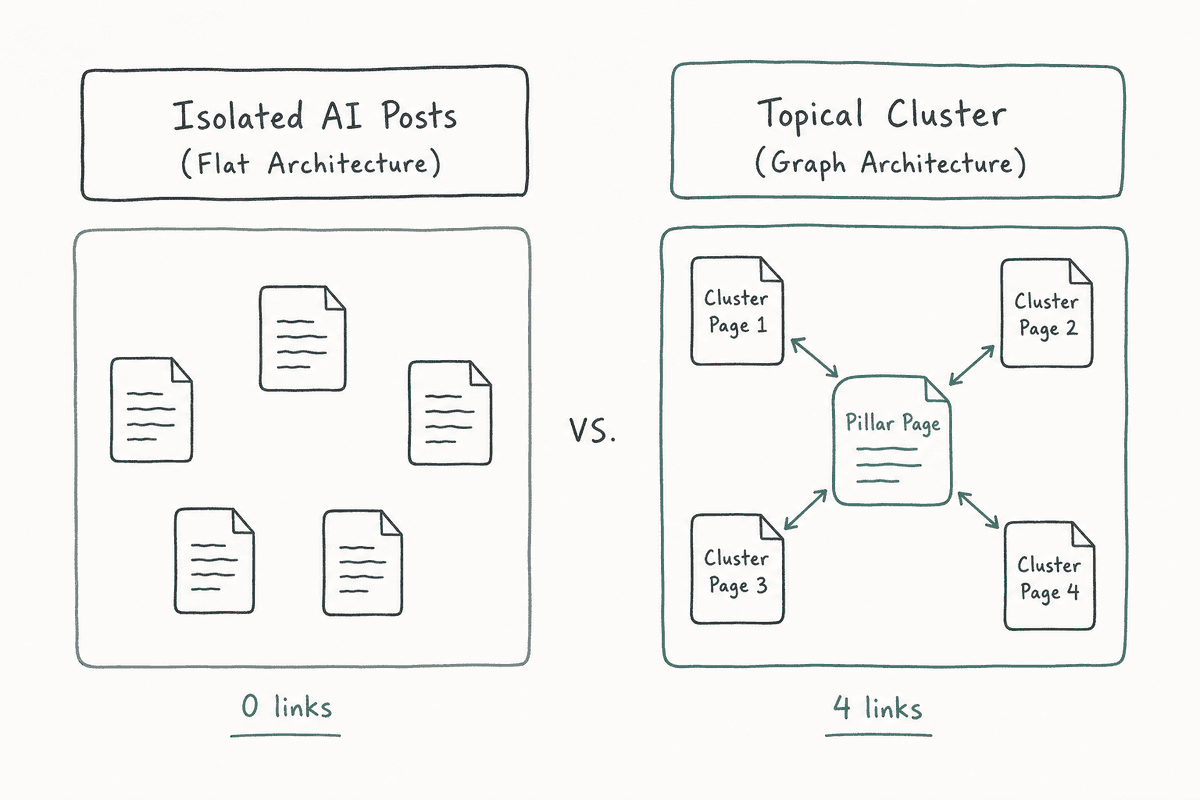
The result is a flat site architecture. Every post sits in isolation.
This isolation directly impacts your visibility in both traditional search engines and AI Overviews. Systems like Google's AI Overviews and Perplexity rely heavily on a site's internal graph to determine topical authority. If you have fifty articles on "SaaS billing metrics" but none of them link to your core feature page, the algorithm assumes you lack a definitive pillar resource on the subject.
Automation bridges this gap. By using natural language processing (NLP) to scan published text against your existing URL database, automated tools identify semantic matches and insert links retroactively or at the point of publication. If you are serious about managing this process, keeping up with the 11 Best SEO Blogs Every SaaS Founder Needs (2026) is a good way to stay ahead of how these graph algorithms evolve.
Top Internal Linking Automation Tools
Choosing the right tool depends heavily on your CMS, your technical resources, and how much control you want over the final anchor text. Here are the strongest alternatives for automating this process.
Rank Math Link Genius (The WordPress Heavyweight)
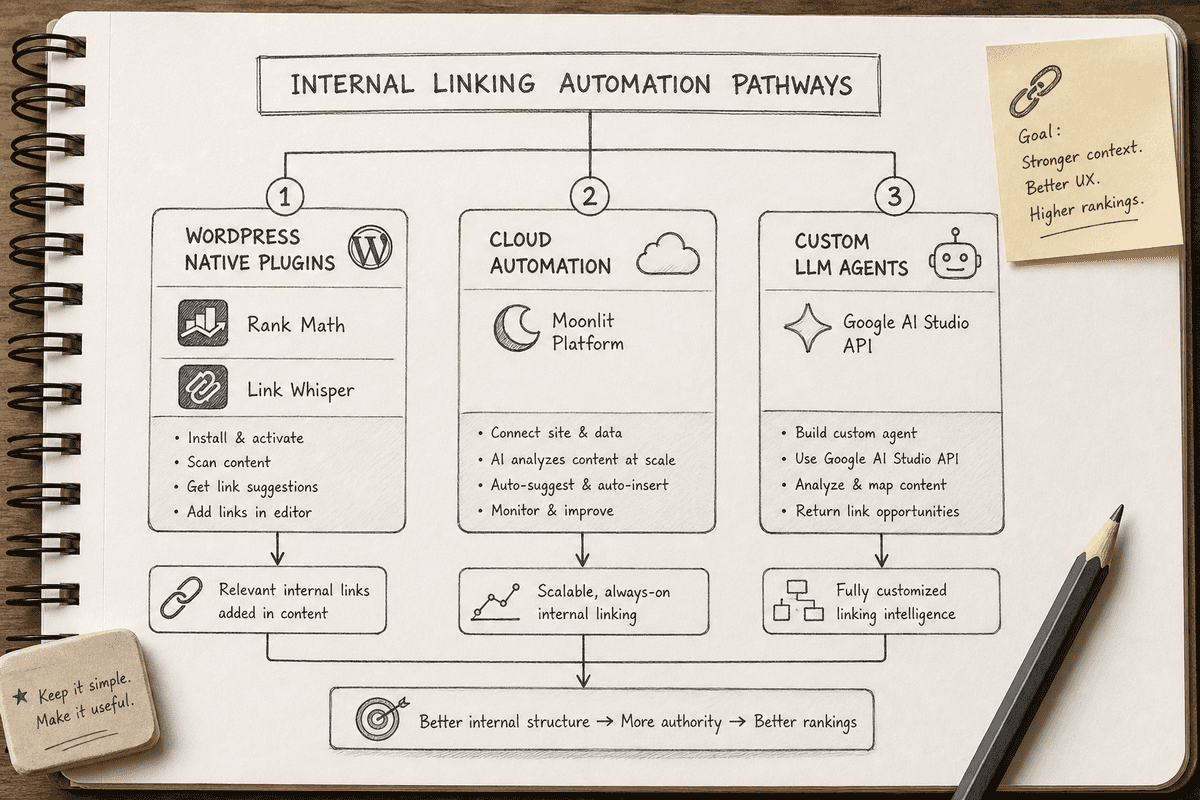
For teams running their AI blogs on WordPress, Rank Math has heavily integrated AI into its SEO suite. Their Link Genius feature focuses on mapping and automated insertion based on strict parameters, reducing the risk of "runaway" linking where every second word becomes a hyperlink.
The system works by allowing you to define keyword maps. You input primary keywords and variations, and then map them to specific pillar URLs. When a new post is published, Rank Math scans the content. If it finds those exact or closely related phrases, it turns them into internal links.
To prevent over-optimization, Rank Math requires you to set a maximum number of auto-links per post. You can enable "Auto-Link on Publish," ensuring that the moment your AI workflow pushes a draft to live, the architecture is instantly updated without human intervention (Rank Math).
Link Whisper AI (The Semantic Suggestion Engine)
Link Whisper approaches the problem differently. Instead of strict keyword mapping, it relies on semantic analysis.
You provide the tool with your sitemap, and it builds a contextual map of your entire blog. When you are reviewing an AI-generated draft, Link Whisper suggests internal links based on the context of paragraphs, not just exact-match keywords. It finds opportunities you likely forgot existed.
The true automation comes from its "Auto-Linking" feature, where you specify a keyword and a target URL, and the tool sweeps your entire database of past articles, inserting the link wherever that phrase naturally occurs. It also includes an orphaned page finder, which is critical for AI blogs where new clusters are often generated in silos.
Moonlit Platform (The Custom Automation Route)
If you are running a custom tech stack, a Headless CMS, or simply want complete programmatic control over how links are inserted, dedicated automation platforms offer a more flexible route.
Tools on the Moonlit Platform allow you to build custom internal linking workflows. You can tune the "page pool" by raising or lowering the sitemap limit to match your site size, or swap in a curated list of high-priority URLs (Moonlit Platform).
This approach is highly effective for B2B growth teams who want to limit internal linking strictly to high-converting bottom-of-funnel pages. Instead of linking to every related blog post, you can configure the AI to prioritize linking informational queries directly to your feature pages or case studies.
Google AI Studio Custom Agents (The DIY Method)
For technical SEOs and developers who prefer not to pay recurring SaaS fees for linking tools, building a custom agent using Google AI Studio is becoming increasingly popular.
Using the Gemini API, you can construct a script that fetches your sitemap, extracts the text of a newly generated draft, and asks the LLM to identify the three most relevant internal URLs based on semantic similarity. Because you control the prompt, you can enforce strict rules, such as "never use the exact target keyword as the anchor text" or "only link when the context provides a direct definition."
This method requires some Python or Node.js knowledge to connect your CMS via API, but it offers unparalleled control and avoids the bloat of standard plugins (YouTube).
Beckyo AI SEO (The Underdog for Zero-Link Pages)
Beckyo AI SEO is a lesser-known but highly targeted tool that focuses specifically on the weakest points of your site architecture: pages with zero incoming links.
When you bulk-publish AI content, it is common to end up with dozens of orphaned URLs. Beckyo analyzes your website to identify these isolated pages, scans your historical content, and suggests highly relevant anchor text to tie them back into the main cluster. It operates on a freemium model, making it a low-risk addition for smaller teams auditing their initial AI content sprint.
Comparing the Tooling Landscape
Designing a Safe Automated Linking Workflow
Automation is powerful, but it carries risks. Search algorithms—and the LLMs powering platforms like Perplexity and AI Overviews—can detect manipulative, low-value link insertion. If every instance of "CRM software" on your blog rigidly points to the same URL, it signals artificial manipulation rather than genuine topical depth.
To automate safely, you need a workflow that prioritizes context over frequency.
Step 1: Map Your Topical Clusters Definitively
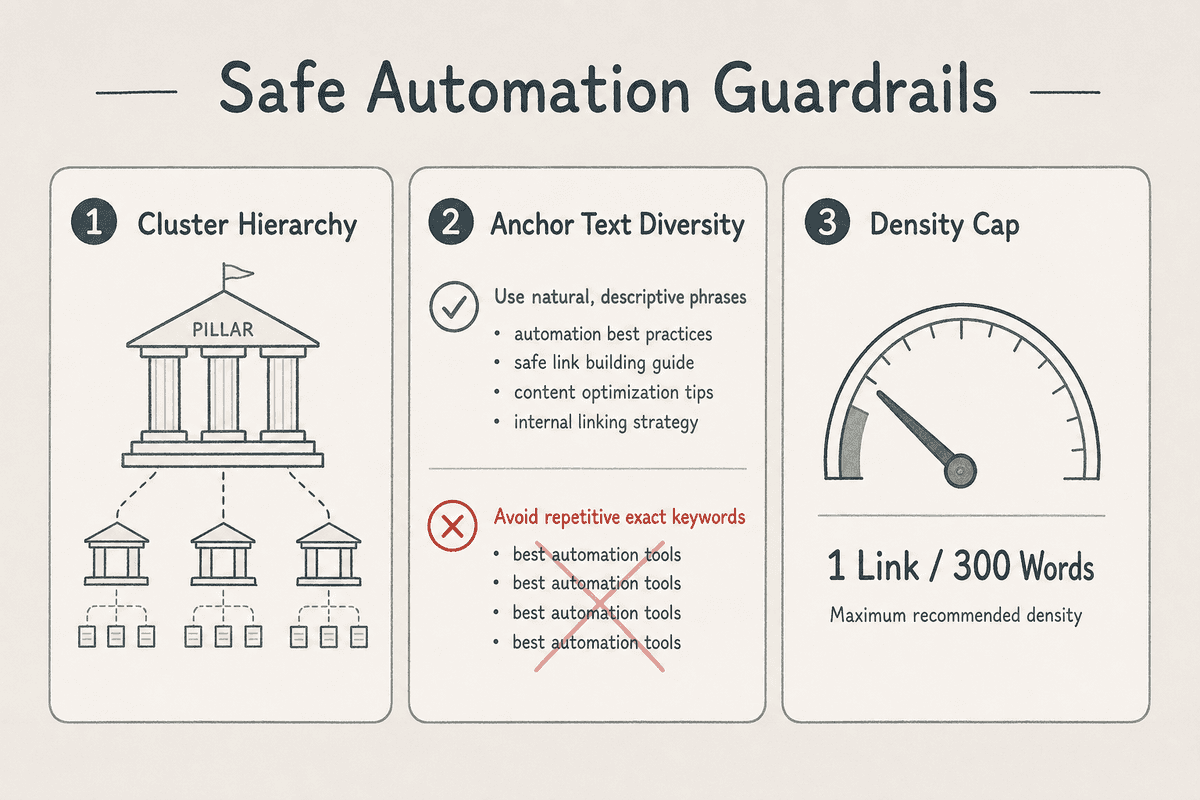
Before you turn on any automation, you must define your hierarchy. Identify your pillar pages (the broad, high-value guides) and your supporting cluster pages (the specific, long-tail articles).
Automated tools need direction. If you simply tell an AI tool to "link related content," it might link two minor supporting articles together while ignoring the pillar page entirely. Feed your automation tool a curated list of priority URLs. If you are pointing internal links toward conversion-focused assets, ensure those destinations are structurally sound by reviewing concepts in How to Build an SEO Landing Page (7-Step Guide).
Step 2: Enforce Natural Anchor Text Variation
The fastest way to ruin an AI blog is by using exact-match anchor text for every internal link.
If you are using a tool like Rank Math or configuring a custom script via Google AI Studio, ensure you input a wide variety of secondary keywords and long-tail phrases. Better yet, instruct the AI to use descriptive, partial-match phrases.
Instead of automating the anchor text "SEO automation," configure the system to look for phrases like "automating your search visibility tasks" or "managing organic workflows efficiently." This creates a natural internal graph that mirrors human editorial standards.
Step 3: Cap the Link Density
More internal links do not equal more authority. Overloading a 1,000-word AI blog post with thirty internal links dilutes the PageRank passed to each destination and creates a frustrating user experience.
Set strict limits in your tooling. A safe baseline is one internal link per 300 words of content, ensuring that the link genuinely adds value or context to the immediate paragraph.
The Intersection of Internal Links and AI Visibility
For businesses focused on AI visibility—monitoring how ChatGPT, Gemini, and Perplexity answer buyer questions—internal linking plays an outsized role in brand citations.
Large Language Models rely on Retrieval-Augmented Generation (RAG) to pull real-time facts from the web. When an LLM crawls your site to gather context for a user's prompt, it follows internal links to understand entity relationships. If an AI assistant is asked, "What are the top enterprise analytics platforms?", it looks for sources that demonstrate comprehensive authority on that exact entity.
A tightly woven internal linking structure proves to the crawler that your domain is a definitive source. When your cluster pages consistently point to a deeply researched, evidence-backed pillar page, you increase the likelihood that an AI assistant will select that specific URL as a citation in its final output.
BeVisible helps teams track these exact outcomes. By monitoring which brands and sources AI assistants cite across buyer prompts, teams can see firsthand how structural improvements—like fixing orphaned pages through automated linking—directly translate into higher citation rates in AI Overviews.
Common Pitfalls and Edge Cases
Even with the best tools, automated internal linking can go wrong. Watch for these common failure modes when scaling an AI blog.
The "Wikipedia Effect"
Because AI tools are efficient at finding related concepts, they often attempt to link every recognized entity in a sentence. This leads to the "Wikipedia Effect," where a single paragraph contains five or six internal links to loosely related topics. This severely damages readability and dilutes the SEO value of the links. Always enforce a "first mention only" rule in your automation settings.
Broken Link Cascades
If you automate internal links heavily and then restructure your site's URL taxonomy or delete underperforming AI content, you risk creating hundreds of broken internal links overnight.
If you are publishing at high velocity, you must pair your internal linking automation with an aggressive crawler (like Screaming Frog or Sitebulb) running weekly checks. Never assume your automated tool will clean up dead links if the destination URL is removed.
Contextual Hallucinations
Semantic link suggestors sometimes misunderstand context. For example, if you have a blog post about "Apple" (the technology company) and a post about "Dietary fiber in apples," a poorly configured AI tool might cross-link them simply because the keyword matches.
Always review automated insertions during your initial rollout. Tools like Link Whisper and Rank Math allow you to approve suggestions before they go live, which is highly recommended until you trust the system's accuracy.
FAQs about Automating Internal Links on AI Blogs
Is automated internal linking safe for SEO? Yes, provided it is managed with strict parameters. The risk comes from exact-match anchor text spam and excessive link density. Tools that use NLP to understand surrounding context and limit the number of links per page are perfectly safe and often necessary for managing large-scale content operations.
Should I automate links before or after publishing? It is generally safer to have your tool suggest links while the post is in a "Draft" state, allowing an editor to quickly approve or reject them. However, for massive AI content operations, tools that auto-link on publish are acceptable if you have spent time carefully configuring your keyword-to-URL mapping rules.
Can I automate internal links retroactively on older posts? Absolutely. This is one of the highest ROI activities for an aging blog. By inputting a new target URL into a tool like Link Whisper or a custom Moonlit workflow, the AI can scan your entire historical database and insert contextual links to your new post, instantly providing it with internal authority.