
Imagine running a sophisticated buyer prompt through ChatGPT, asking for the top software in your specific B2B niche. The response streams in, paragraph by paragraph. Your top competitor is listed first, complete with bulleted benefits and a summary of their pricing. Your brand? Completely absent.
For SaaS founders and growth teams, this missing mention is the modern equivalent of dropping off page one of Google.
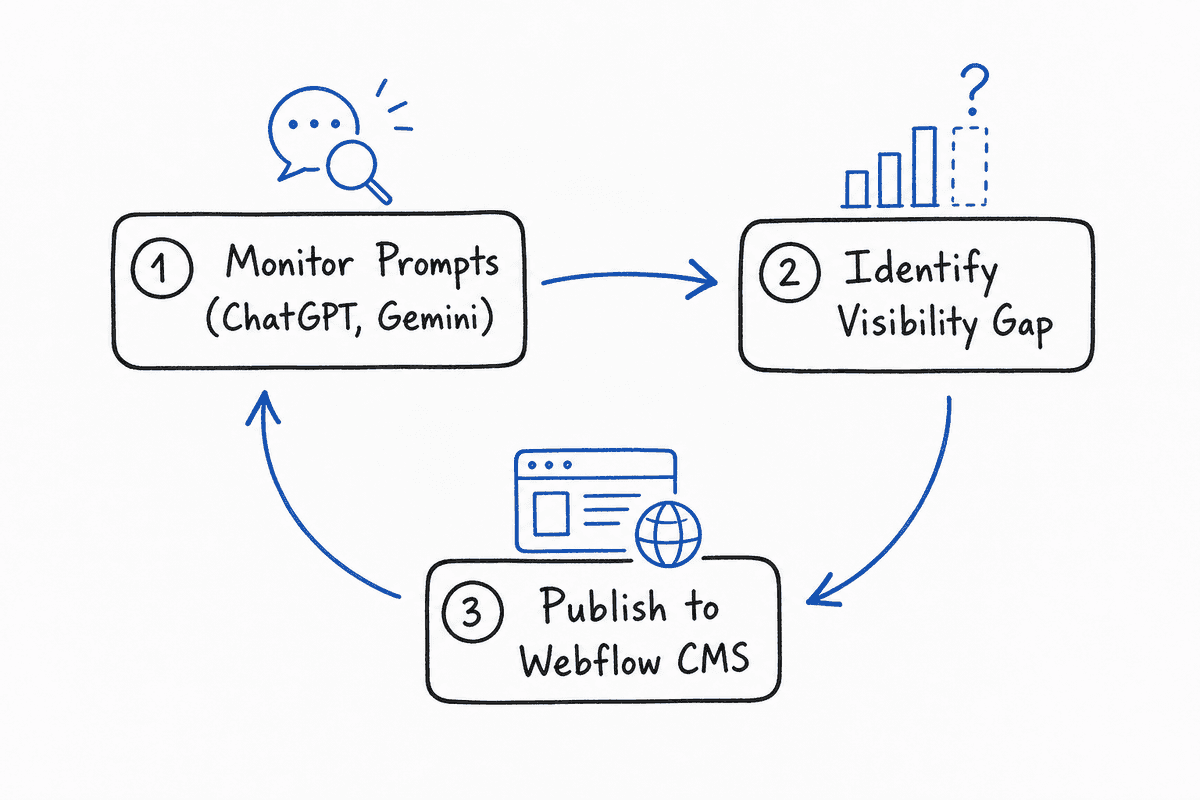
Tracking these AI visibility gaps has given rise to enterprise-grade measurement platforms like Profound. But knowing you have a visibility problem is only half the battle. The real bottleneck lies in execution: how do you take a missing mention, a weak citation, or a competitor win in Gemini or Perplexity, and turn it into a published asset that fixes the gap?
If your marketing site runs on Webflow, you need a workflow that bridges the gap between tracking AI engine responses and publishing structured, optimized content.
In this guide, we will break down the next generation of AI visibility platforms, explore Webflow's native Answer Engine Optimization (AEO) features, and detail how to build a closed-loop system that turns LLM blindspots into published Webflow content.
Why AI Visibility Tracking Needs a Publishing Loop
The fundamental difference between traditional Search Engine Optimization (SEO) and Answer Engine Optimization (AEO) is how the engine treats your content.
Google historically acted as a transit layer, indexing your pages and providing blue links so users could visit your site to find answers. Modern AI assistants—ChatGPT, Gemini, Perplexity, Claude, and Google's AI Overviews—act as synthesis layers. They read your content, extract the facts, and generate a final answer directly in their own interface.
To win in this ecosystem, tracking traditional keyword rank is insufficient. You have to track citations and brand recommendations across conversational prompts.
However, teams using standalone tracking tools often hit a wall. They receive reports showing that Perplexity prefers a competitor's documentation, but they lack a system to efficiently correct the narrative. The fix requires publishing new, highly structured evidence—comparison pages, feature definitions, or updated FAQs—that LLM bots can easily crawl during their next web fetch.
Without a direct line from "visibility gap" to "Webflow publish," your insights sit idle in a dashboard. You need tools that not only monitor the AI landscape but integrate seamlessly with your content execution strategy.
Evaluating the Heavyweights: Profound vs. The Next Generation
Profound has established itself as a robust tool for measuring AI visibility. It excels at parsing large volumes of AI-generated answers and providing a high-level score of your brand's market share within those responses.
For enterprise teams needing executive-level reporting on brand sentiment across LLMs, Profound is a strong choice. But for agile growth teams, content marketers, and agencies managing Webflow sites, Profound presents a few distinct limitations:
- The Execution Gap: Profound tells you what the AI said, but it leaves the "now what?" entirely up to you. There is no built-in workflow to route these gaps into a CMS publishing pipeline.
- Lack of CMS Integration: It operates as a siloed analytics platform. It does not speak natively to Webflow, meaning your content team has to manually translate visibility scores into editorial briefs, log into the CMS, and try to guess how to structure the page for AEO.
- Pricing and Agility: Heavyweight measurement platforms often carry heavyweight price tags, making them less accessible for mid-market SaaS or agency teams who need budget left over for actual content creation.
To actually influence ChatGPT and Perplexity, teams need a stack that moves fluidly from monitoring to execution.
Top AI Visibility & Execution Tools for Webflow Teams
Let's examine the tools that bridge the gap between tracking generative engines and publishing directly to Webflow.
1. BeVisible: The Complete Monitoring and Execution Platform
While traditional tools stop at analytics, BeVisible is engineered specifically to close the loop. It helps teams monitor how AI assistants answer buyer questions, which brands they recommend, and which sources they cite.
BeVisible tracks ChatGPT, Gemini, Perplexity, AI Mode, and AI Overviews across specific buyer prompts. But where it separates itself from tools like Profound is its execution layer.
Instead of just handing you a visibility score, BeVisible turns visibility gaps into evidence-backed opportunities. It organizes missing mentions, weak citations, and competitor wins into actionable review, scheduling, and publishing work. For Webflow teams, this means you can identify exactly why ChatGPT recommended a competitor, generate the structural brief needed to correct the record, and push that requirement straight into your content pipeline.
Core Strengths for Webflow Users:
- Multi-Engine Tracking: Monitors the specific conversational prompts your buyers use across all major LLMs.
- Evidence-Backed Opportunities: Doesn't just say "you lost this prompt." It analyzes why the AI chose the competitor's page and highlights the exact structured data or facts your Webflow site is missing.
- Action-Driven Workflows: Converts insights into publishing tasks, ensuring every tracked gap results in a tangible update to your site.
2. Webflow Native AEO (Answer Engine Optimization)
Recognizing the shift from search engines to answer engines, Webflow has natively introduced major features explicitly targeting this space under the umbrella of Webflow AEO.
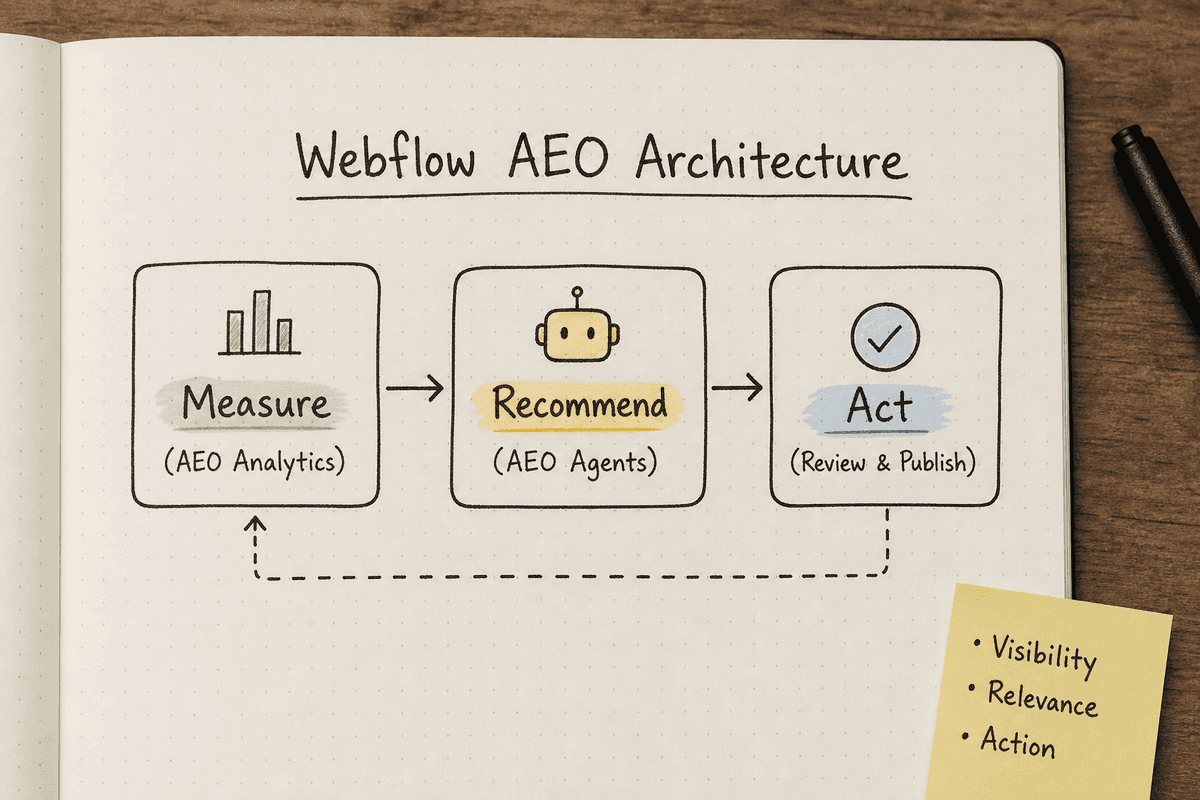
Because traditional SEO rules change when AI crawlers scrape the web, Webflow built a system to ensure your site is structured so that AI engines can easily discover, read, and cite your brand. The system functions in a "closed loop" integrated directly into the Webflow Designer and publishing workflow.
Webflow divides its AI visibility suite into three distinct phases:
Phase 1: Measure (AEO Analytics)
Integrated directly into Webflow Analyze, this dashboard helps you monitor how your site interacts with the AI ecosystem before visitors even arrive. It provides:
- Prompt Insights: Tracks how often your brand is mentioned or cited in live answer-engine responses for specific tracked keywords.
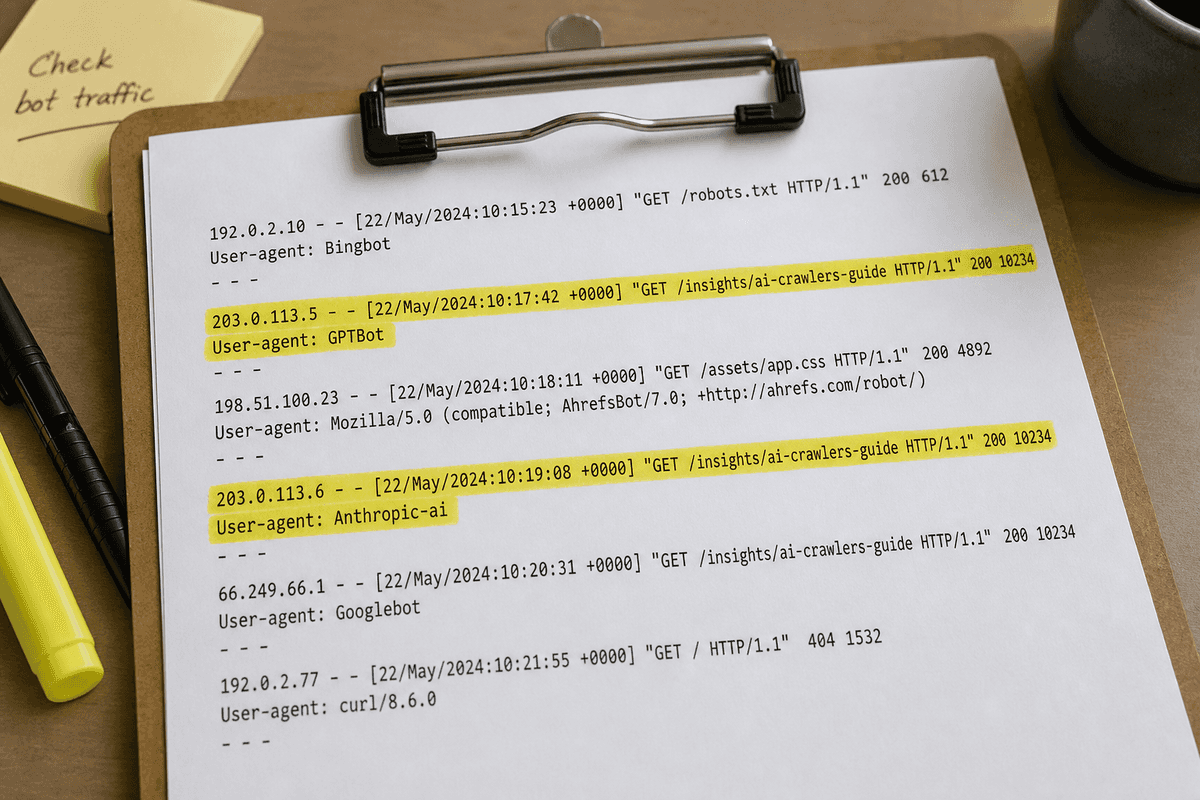
- LLM Bot Insights: Surfaces automated crawler activity directly from Webflow's hosting layer. It shows you exactly which AI bots (e.g.,
GPTBotfrom OpenAI,Anthropic-ai,Google-Extended) are visiting, which pages they prioritize, and how often they scrape your site. - AI-Referred Visitor Analytics: Filters and attributes traffic arriving specifically via generative AI tools, tracking what those users do once they land on your site.
Phase 2: Recommend (AEO Agents)
Instead of manually auditing every page, Webflow utilizes native, brand-aware AI agents to identify gaps that might confuse an LLM crawler.
- Technical Optimization: Automatically flags missing alt text, broken links, metadata issues, and poor heading structures that cause LLMs to drop context during a crawl.
- Semantic Structuring: Suggests ways to group related content so that vector databases (which power AI search) can properly map your brand to the right concepts.
Phase 3: Act (Review & Publish)
This is where Webflow shines compared to external tools. The AEO agents suggest fixes, and you can review, approve, and publish those updates live to your site with a single click, without ever leaving the Designer.
3. Specialized Technical Integrations for SPAs
If your Webflow setup operates as a headless CMS feeding a frontend framework, your visibility stack requires a different approach. AI crawlers can sometimes struggle with JavaScript-heavy rendering.
For teams running these complex stacks, optimizing the delivery of the DOM is critical. You can learn more about managing bot rendering in our guide to SEO for Single Page Applications: The Technical Checklist, or explore different rendering methods in Implementing SEO in Single Page Applications (3 Ways).
The Anatomy of an LLM-Optimized Webflow Page
When BeVisible identifies a gap—say, ChatGPT doesn't know your software integrates with Salesforce—you need to build a page on Webflow that the AI bots will eagerly digest.
Writing for an LLM crawler is entirely different than writing for a human reader or a traditional Google algorithm. LLMs are looking for high information density, clear entity relationships, and structured facts. Fluff, marketing jargon, and long storytelling introductions actively harm your chances of being cited.
Here is how to structure your Webflow pages to maximize AEO:
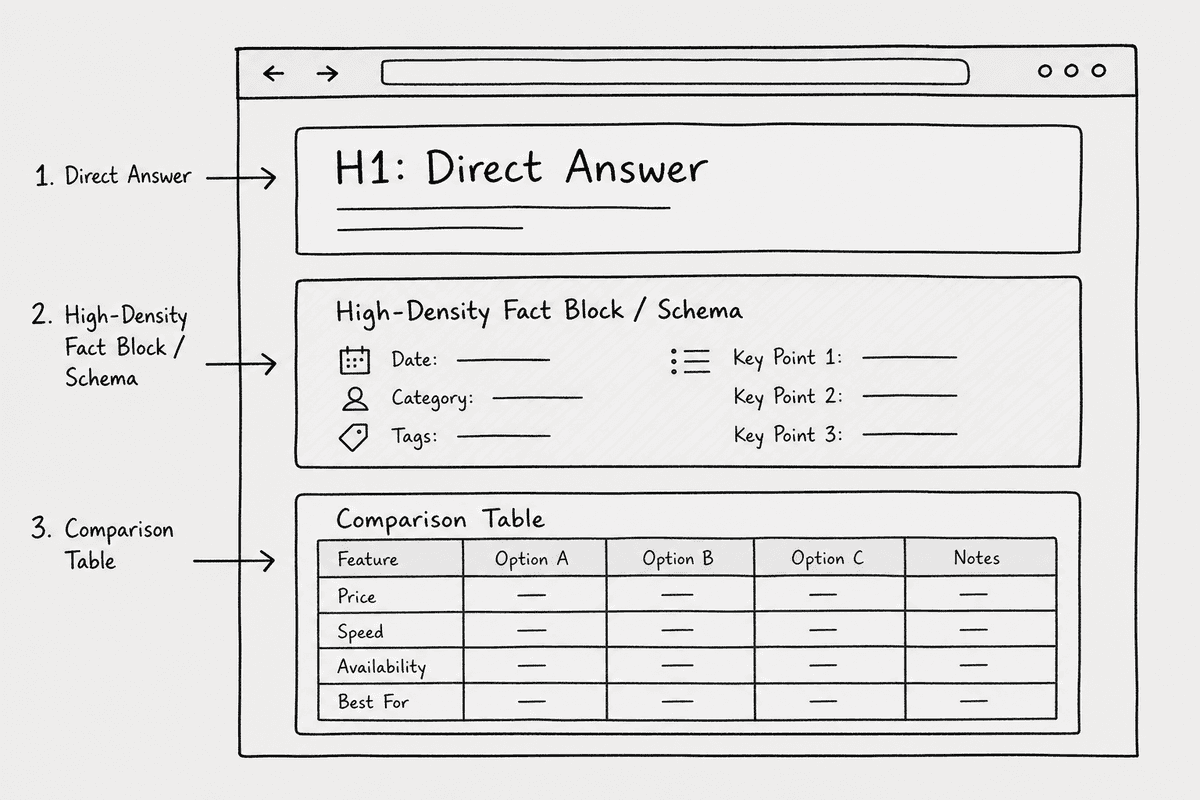
1. Semantic HTML and Heading Hierarchy
LLMs parse HTML to understand the relationship between concepts. If your Webflow site uses <div> blocks styled to look like headings instead of actual <h2> and <h3> tags, the LLM will miss the hierarchy of your arguments.
Ensure every Webflow template uses strict semantic tags. The <h1> should state exactly what the page is about (e.g., "Salesforce Integration for [Your Product]"). The <h2> tags should represent the specific questions a buyer might ask (e.g., "How data syncs between platforms").
2. High-Density Fact Blocks
LLMs love data that requires minimal processing to understand. When you publish a response to a visibility gap, include a clear, factual summary at the top of the page.
In Webflow, create a specific Component or Rich Text styling for a "Quick Facts" or "TL;DR" box. Use unstyled bullet points to list the most critical entities:
- Product Name: [Your Product]
- Category: [Category]
- Key Integrations: [List]
- Pricing Model: [Model]
3. Comparison Tables and Markdown-Friendly Structures
When users ask Gemini or Perplexity to compare two brands, the engine looks for structured comparison data across the web.
If BeVisible shows you are losing a "Brand X vs Brand Y" prompt, your published fix should include a literal comparison table. Webflow's native Table element or a CSS grid structured cleanly in the DOM allows LLM bots to extract row-and-column relationships flawlessly.
4. Direct Answers to Target Prompts
If you want to be the cited answer for a specific prompt, feature that prompt directly on the page. Create an FAQ section in your Webflow CMS collection. Use the exact phrasing you found in your tracking tool as the <h3>, and provide a concise, factual 2-3 sentence answer immediately beneath it.
The 5-Step Playbook: From Missing Mention to Webflow Publish
How do you actually run an AEO workflow week to week? Here is the exact process for growth teams using BeVisible alongside Webflow.
Step 1: Baseline Your Prompt Visibility
Start by inputting your highest-intent buyer prompts into BeVisible. Don't use traditional short-tail SEO keywords (like "CRM software"). Use the conversational queries your sales team hears every day:
- "What are the best alternatives to [Competitor] for mid-sized agencies?"
- "Which project management tools natively integrate with Webflow?"
- "What are the limitations of [Competitor]'s reporting feature?"
BeVisible will query ChatGPT, Perplexity, and Gemini, returning a baseline of who is winning these conversations.
Step 2: Analyze the Evidence and Competitor Citations
When you find a prompt where your brand is missing, look at the sources the AI did cite.
If Perplexity recommended a competitor, it will provide footnote links to the sources it used to generate that recommendation. Click those links. What does the competitor's page have that your Webflow site lacks?
Usually, you will find one of three things:
- They have a dedicated page answering the specific long-tail question, while your site only mentions the topic in passing on a feature page.
- They have clearer structured data (tables, lists) that the LLM could easily extract.
- They have stronger third-party mentions (reviews, PR) validating their claim.
Step 3: Scope the Publishing Work
Turn that insight into an execution plan. If the gap is missing content on your own site, scope a new Webflow landing page or a blog post.
If you are building a dedicated page to capture this AI traffic, refer to our comprehensive How to Build an SEO Landing Page (7-Step Guide) to ensure the foundation is sound for both traditional search and AI crawlers.
Step 4: Draft with Entity Salience
Write the content to explicitly link your brand entity to the desired topic entity. Avoid vague pronouns. Instead of saying, "Our platform makes reporting easy," write, "[Your Brand Name] provides custom reporting features for mid-sized agencies."
This explicit noun-to-noun connection helps vector databases map the relationship between your software and the buyer's query.
Step 5: Publish and Monitor the Bot Crawl
Push the page live via Webflow. Immediately, you want to know if the LLM bots are discovering the new page.
Jump into Webflow Analyze and check the LLM Bot Insights dashboard. Filter for the URL you just published. You are looking for hits from GPTBot (OpenAI's crawler that builds its training data), OAI-SearchBot (OpenAI's real-time search crawler), and Anthropic-ai.
Once the bots have crawled the new URL, return to BeVisible and re-run the initial prompt. Over the coming weeks, monitor how the AI's response shifts from ignoring your brand to citing your new, evidence-backed Webflow page.
Troubleshooting Webflow AEO Issues
Sometimes, you publish the perfect response to a visibility gap, but the AI engines still refuse to cite you. When this happens on a Webflow site, check these common technical constraints.
The Custom Code Limit
Webflow allows custom code in the <head> of your pages, which is where you should place JSON-LD schema markup. Schema markup is highly effective for AEO because it feeds facts directly to the bots in a machine-readable format.
However, Webflow has a character limit on custom code blocks in the designer. If your schema is extremely long (e.g., a massive FAQ schema), you may hit this limit. To resolve this, host your JSON file externally and call it via a lightweight script, or use Webflow's CMS to dynamically generate shorter, page-specific schema structures.
JavaScript Rendering and Bot Timeouts
If you are relying heavily on client-side interactions to load content (like a "Load More" button on a CMS grid), AI bots may not see the hidden content. LLM crawlers are aggressive but impatient; they often do not wait for complex JavaScript to execute before they scrape the DOM and leave.
Ensure that all critical evidence, facts, and answers are present in the initial HTML payload. If your Webflow setup relies on a Single Page Application architecture, you must ensure server-side rendering is handled correctly. Review Single-Page Application SEO: What Works in 2026? for specific deployment strategies.
Improper Robots.txt Configuration
Many developers accidentally block LLM crawlers while trying to block spam bots. In your Webflow site settings, under the SEO tab, check your robots.txt file.
If you see directives like User-agent: GPTBot Disallow: /, you have explicitly forbidden ChatGPT from reading your site to update its internal knowledge base. Ensure you are allowing the specific bots you want to influence.
The Role of Digital PR in the AI Ecosystem
We cannot discuss AI visibility execution without addressing the fact that LLMs don't just read your website—they read the whole internet.
Sometimes, BeVisible will reveal that a competitor is winning a prompt not because of their Webflow site, but because they are mentioned on Reddit, G2, or high-authority industry blogs.
When the visibility gap requires third-party validation, your publishing work moves off-site. You need to leverage digital PR, guest posting, and partnerships to get your brand mentioned alongside the target keywords on external domains.
If you are working with an external partner to handle off-site authority building, you can review our insights on vetting partners, such as the Top 7 Agencies for SEO in Durham (Ranked 2026) or understanding market rates in SEO Charges UK: Agency Rates vs Automation (2026), to ensure they understand the nuances of AEO, not just traditional link building.
Tracking Continuous Performance
Answer Engine Optimization is not a set-it-and-forget-it task. LLM models update continuously. A prompt that your brand dominates today might be lost tomorrow when a competitor publishes a better structured, more comprehensive page that the AI decides is a superior source of truth.
Your operational cadence should look like this:
- Daily/Weekly: Use BeVisible to monitor your core buyer prompts for any negative shifts in sentiment or missing mentions.
- Bi-Weekly: Review Webflow's LLM Bot Insights to ensure crawlers are successfully indexing your newest CMS items.
- Monthly: Audit your highest-traffic Webflow landing pages with Webflow AEO Agents to ensure no structural regressions (like missing alt text on new images) have occurred.
- Quarterly: Expand your tracked prompt list in BeVisible based on new features, new competitors, and shifting market narratives.
Staying educated on these shifts is critical. Make sure your team is regularly consuming practitioner insights. A good starting point is our curated list of the 11 Best SEO Blogs Every SaaS Founder Needs (2026), which frequently cover the evolving mechanics of AI search.
Execution is the Only Differentiator
As AI assistants continue to mediate the relationship between buyers and software, visibility is going to become harder to secure. The teams that win will not be the ones with the most expensive measurement tools or the fanciest dashboards.
Profound provides excellent enterprise data, but data without action is just overhead.
The winners in this new era will be the teams that can identify a missing mention on a Tuesday, draft the evidence-backed fix on a Wednesday, and push it live through Webflow by Thursday. By combining the conversational prompt tracking of BeVisible with the seamless publishing workflows of Webflow AEO, you build an execution loop that competitors simply cannot outpace.
Start treating every ChatGPT conversation about your niche as a competitive battleground, and build the publishing machinery required to win it.