
Publishing content on WordPress no longer means just optimizing for a Google results page. With the rapid maturation of AI-powered engines like ChatGPT, Perplexity, Gemini, and Google's own AI Overviews, a major portion of high-intent B2B traffic now relies on Generative Engine Optimization (GEO).
If you lead a growth team or manage an agency, you likely know the frustration of watching your brand disappear from an AI assistant’s recommendation list while your competitor gets cited as the industry standard. Tools like Profound have made waves by offering broad visibility tracking across these LLMs. They excel at showing you the data—the share of voice, the missing brand mentions, and the sentiment of AI responses.
But knowing you have a visibility problem is only half the battle.
When you find a missing mention or a weak citation, the immediate next question is: How do we fix it? For teams operating on WordPress, raw tracking data sitting in an external dashboard creates a bottleneck. To make your site discoverable and actually recapture that lost real estate, you need tools that ensure AI crawlers can seamlessly read, synthesize, and cite your content, while seamlessly integrating with your editorial calendar and block editor.
Here is a comprehensive breakdown of the best AI visibility and publishing tools that go beyond tracking to help you execute native WordPress optimizations.
The Tracking vs. Execution Gap in Generative Search
The fundamental difference between traditional SEO and GEO lies in how the engines process information. A traditional search engine indexes pages based on links, keywords, and user experience signals. An LLM-based engine synthesizes answers by reading documents, extracting facts, weighing entity authority, and generating a conversational response with citations.
Profound provides a sophisticated analytics layer for this new paradigm. It allows enterprise teams to monitor brand sentiment and visibility across various prompts.
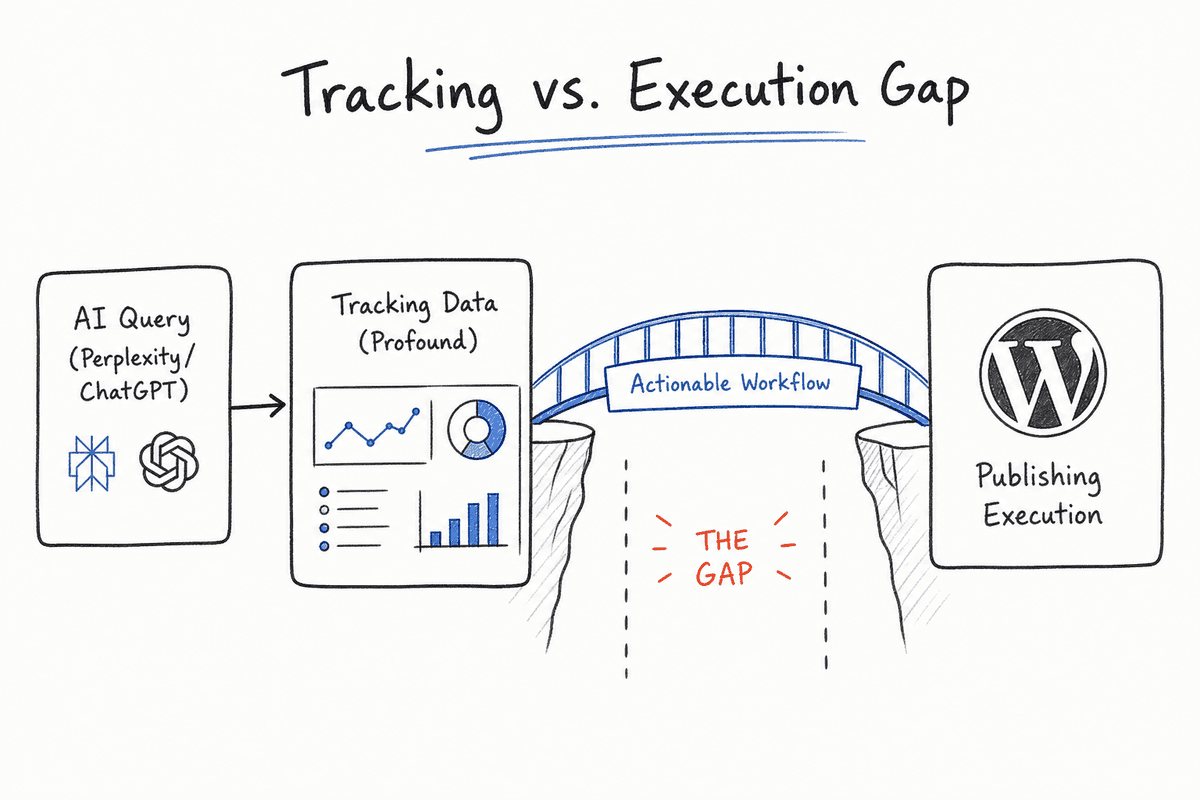
However, the failure mode for many B2B marketing teams occurs right after they review their tracking reports. They see that Perplexity prefers a competitor's pricing page, but they lack a systematic way to turn that insight into an updated WordPress post, a restructured schema markup, or a newly deployed llms.txt file.
Execution requires bridging the gap between the AI query and the WordPress database. You need a workflow that catches the missed citation, generates an evidence-backed brief, schedules the update, and ensures the technical formatting on the WordPress side is perfectly calibrated for LLM scrapers.
Core AI Visibility and Publishing Tools for WordPress
To build a closed-loop system where tracking directly informs publishing, you need a specific stack. Some of these tools handle the overarching workflow, while others integrate directly into the WordPress core to handle the technical formatting.
1. BeVisible: The AI Visibility and Execution Engine
While traditional trackers stop at delivering a dashboard of metrics, BeVisible is designed for teams that need to turn monitoring into actual published work. It bridges the gap between what the AI engines are saying and what your content team needs to write.
BeVisible helps teams monitor exactly how AI assistants answer buyer questions, which brands they recommend, and which specific sources they choose to cite. It continuously tracks ChatGPT, Gemini, Perplexity, AI Mode, and AI Overviews across your target buyer prompts.
But the core differentiator is the execution layer. When BeVisible identifies that you are losing a recommendation to a competitor, it doesn't just report the loss. It turns those visibility gaps into evidence-backed opportunities. You can push these insights directly into articles, review cycles, scheduling, and publishing workflows.
For a SaaS founder or agency managing a content pipeline, this means every piece of content planned for WordPress is directly mapped to a known AI visibility gap. You aren't guessing what ChatGPT wants to read; you are answering the exact prompts where your brand is currently absent.
2. All in One SEO (AIOSEO): Native Technical Formatting
AIOSEO has long been a staple for traditional Google optimization, but its recent pivots make it one of the most accessible entry points for AI optimization directly within WordPress.
If you want to optimize your site for AI visibility natively inside your block editor, AIOSEO handles the baseline technical requirements effortlessly.
Key GEO Features:
- Integrated LLMs.txt Generator: This is currently one of the most critical technical assets for AI search. An
llms.txtfile acts like arobots.txtor XML sitemap, but it is specifically designed for AI scrapers (like OAI-SearchBot). It creates a clean, plain-text, markdown-formatted summary map of your site, stripping away JavaScript, CSS, and navigation bloat so LLMs can quickly ingest your core arguments and facts. - AI Insights Tracker: AIOSEO includes a dashboard that shows your brand's presence in ChatGPT, Claude, Gemini, and Perplexity, allowing you to monitor baseline shifts without leaving the WordPress admin panel.
- Schema Automation: LLMs rely heavily on structured data to understand entities. AIOSEO maps your WordPress categories and author profiles into machine-readable JSON-LD, making it easier for AI engines to trust your brand as an authority.
3. Ayzeo: Real-Time GEO Readiness
Ayzeo was built natively for Generative Engine Optimization. Rather than retrofitting traditional SEO tools with AI features, Ayzeo focuses explicitly on helping your WordPress content gain citations in model outputs.
Key GEO Features:
- Real-Time Scoring: As your writers draft content in WordPress, Ayzeo runs real-time GEO readiness scoring. It checks for structural elements that LLMs prefer: dense informational paragraphs, clear bulleted lists, high-authority external citations, and definitive formatting.
- Automated llms.txt Maintenance: Unlike static generators, Ayzeo actively updates your
llms.txtfile as you publish, edit, or remove content, ensuring the map you feed to AI crawlers is never stale. - In-Dashboard Citation Rate: Ayzeo provides a localized dashboard showing how often specific posts are cited in AI responses, giving authors immediate feedback on whether their formatting adjustments are working.
4. Rank Math Content AI: Semantic Intent Mapping
Rank Math approaches AI visibility through the lens of semantic intent. LLMs do not care about keyword density; they care about comprehensive, logically structured answers to complex queries.
Key GEO Features:
- Semantic Layout Guidance: Rank Math analyzes the search intent of a query and guides the author on how to format headings and content layout. If an LLM typically answers a prompt with a comparison table, Rank Math will suggest building a specific table structure in WordPress so the LLM can easily extract your data to build its own answer.
- AI Search Traffic Tracker: It pulls in data to estimate how much of your referral traffic is originating from AI sources, helping you attribute ROI to your GEO efforts.
- Advanced File Builders: Similar to AIOSEO, it supports the creation of AI-friendly text mappings, ensuring that your WordPress architecture translates cleanly into large language models.
5. WordLift: Enterprise Knowledge Graphs
For complex B2B sites, large directories, or e-commerce platforms running on WooCommerce, text optimization alone is rarely enough. Enterprise AI search engines (and customized corporate RAG systems) need structured, unambiguous data.
Rather than generating text, WordLift translates your WordPress content into a complex, machine-readable Semantic Knowledge Graph.
Key GEO Features:
- Entity Extraction: WordLift automatically identifies entities (people, places, concepts, products) in your WordPress posts and links them to external knowledge bases like DBpedia or Wikidata.
- Deep Schema Integration: It builds an interconnected web of schema markup across your site. When Perplexity tries to determine if your software integrates with a specific CRM, WordLift’s structured data explicitly defines that relationship in the code.
- RAG-Ready Output: By turning your WordPress site into a structured knowledge graph, WordLift makes your content incredibly easy for customized AI agents and standard LLMs to parse and cite accurately.
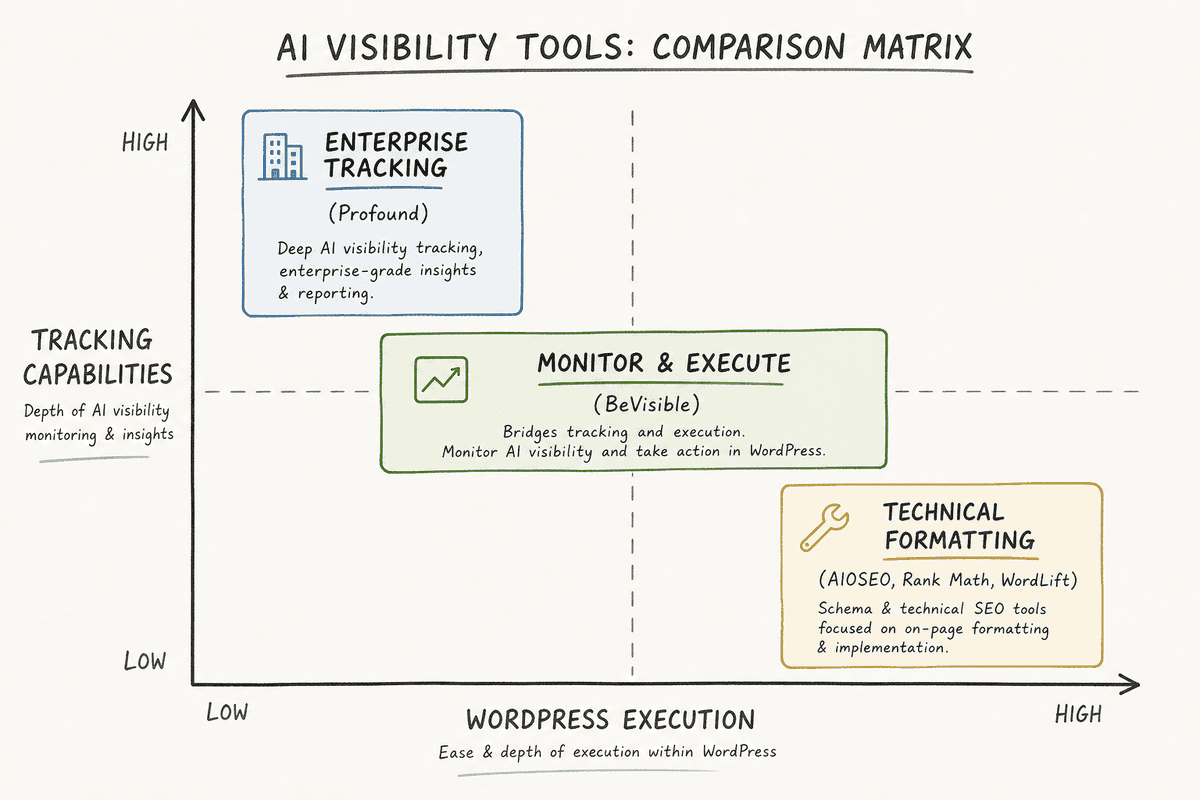
Comparing the Stack: Profound vs. WordPress-Integrated Tools
To understand where to allocate budget, you have to separate analytics tools from execution tools.
Building a Closed-Loop AI Content Publishing Workflow
If you want to move beyond passive tracking, you need a workflow that treats an AI visibility gap as an immediate editorial ticket. Here is a proven framework for connecting AI monitoring directly to WordPress publishing.
Phase 1: Monitor Buyer Prompts, Not Just Keywords
Traditional rank tracking looks at "best CRM software." AI tracking requires monitoring long-tail, conversational buyer prompts like, "What is the best CRM software for a manufacturing company scaling to 100 employees, and how does it compare to Salesforce?"
Use your monitoring layer (like BeVisible) to track these specific, high-intent queries across ChatGPT, Perplexity, and AI Overviews. Document the exact responses. Which brands are recommended? Which sources are cited in the footnotes?
Phase 2: Analyze the Visibility Gap
When you find a prompt where your brand is missing, analyze the why. LLMs cite sources based on specific criteria:
- Information Density: Does the cited competitor offer specific statistics, prices, or proprietary frameworks that you lack?
- Structural Clarity: Is the competitor's page formatted with clean Markdown-style headers and HTML tables that make data extraction easy?
- Entity Authority: Does the cited brand have better third-party reviews and structured data reinforcing its expertise?
Phase 3: Generate the Evidence-Backed Brief
Do not guess what to write. Turn the gap analysis into a specific content brief. If the LLM cited a competitor because they provided a clear pricing matrix, your brief must require a pricing matrix.
This is where tools that bridge tracking and execution prove their value. You take the evidence (the LLM's preferred format and missing data points) and schedule the update.
If you are building a new page to target this gap, review our guide on How to Build an SEO Landing Page (7-Step Guide) to ensure the baseline user experience supports the technical formatting.
Phase 4: Execute in WordPress with GEO Best Practices
When writing the post in WordPress, you must write for two audiences: the human buyer and the LLM scraper.
- Use Definitive Language: Avoid subjective fluff. LLMs prefer factual, declarative sentences. Instead of "Our platform is arguably one of the quickest on the market," write "Our platform processes data in 1.2 seconds."
- Structure with Markdown Logic: Ensure your H2s and H3s follow a strict logical hierarchy. Do not skip heading levels for stylistic reasons. LLMs use HTML heading tags to understand the document outline.
- Build Data Tables: If you are comparing tools or listing specifications, use native WordPress table blocks. LLMs parse tables exceptionally well and often use them to generate their own comparative outputs.
- Update the Map: Once published, ensure your
llms.txtfile and XML sitemaps are updated (using tools like AIOSEO or Ayzeo) to signal the new content to crawlers.
Technical Edge Cases: Headless WordPress and SPAs
For enterprise teams, WordPress is often used as a headless CMS, powering a frontend built on React or Vue.js. This introduces a significant variable into AI visibility.
LLM scrapers operate on limited compute budgets. While Googlebot has become highly proficient at rendering JavaScript to read Single Page Applications (SPAs), many AI bots prefer to ingest raw HTML or markdown. If your headless WordPress setup relies heavily on client-side rendering, an AI crawler might see a blank page or an unpopulated app shell.
If you are operating in this environment, server-side rendering (SSR) or pre-rendering is non-negotiable for GEO. You must serve a fully populated HTML document to the bot.
To ensure your architecture isn't blocking AI visibility, you can review the specific technical requirements for JavaScript-heavy sites in our breakdown of Single-Page Application SEO: What Works in 2026?.
Myths About AI Visibility and WordPress
As GEO becomes a primary focus for B2B teams, several misconceptions have emerged regarding how to optimize WordPress sites for AI.
**Myth 1: You can