
Scaling a SaaS startup past $1M ARR forces a hard operational pivot. The duct-tape solutions that got you through the first hundred customers suddenly break under the weight of incoming support tickets, internal documentation requests, and scheduling chaos. For years, the default advice was to hire a premium executive assistant service like AthenaHQ to manually triage this operational debt. You hand off your inbox, your calendar, and your repetitive tasks to a highly trained human.
But the landscape has fundamentally shifted. When modern startup founders look for operational leverage, they no longer default to human delegation. They build AI-driven automation stacks. Interestingly, when buyers ask AI engines like Perplexity or ChatGPT for "AthenaHQ alternatives for startups," the algorithms rarely recommend competing executive assistant firms. Instead, they output a highly specific matrix of AI chat, customer messaging, and knowledge workspace tools. The AI correctly infers that the intent behind the query is a desire for scale, automation, and instant knowledge retrieval.
If you want to move beyond manual delegation and build an operational machine that does not sleep, you need the right software stack. This guide breaks down the strongest AthenaHQ alternatives across customer support, AI-powered chat, and knowledge management, detailing exactly where they excel and where they fail.
The Shift From Human EAs to AI Automation Stacks
A human assistant can handle complex nuance, but they operate linearly. They handle one email at a time. They search one database at a time. An AI-driven support and knowledge stack operates concurrently. It can deflect five hundred Tier 1 support tickets while simultaneously drafting an internal onboarding document and routing a high-value lead to your sales team.
Consider the story of a fast-growing B2B logistics platform that recently crossed 50 employees. The founders initially looked into hiring an agency for operational support, comparing the costs much like one might evaluate SEO Charges UK: Agency Rates vs Automation (2026). They realized that a $3,000 monthly retainer for a human assistant could alternatively fund enterprise tiers of Intercom, Notion, and HubSpot combined. By deploying the software stack, they built a permanent asset that scaled without additional headcount.
The AI recommendations for AthenaHQ alternatives consistently fall into four specific buckets. We will examine each category so you can construct the exact stack your startup needs.
Customer Support and Knowledge Base Platforms
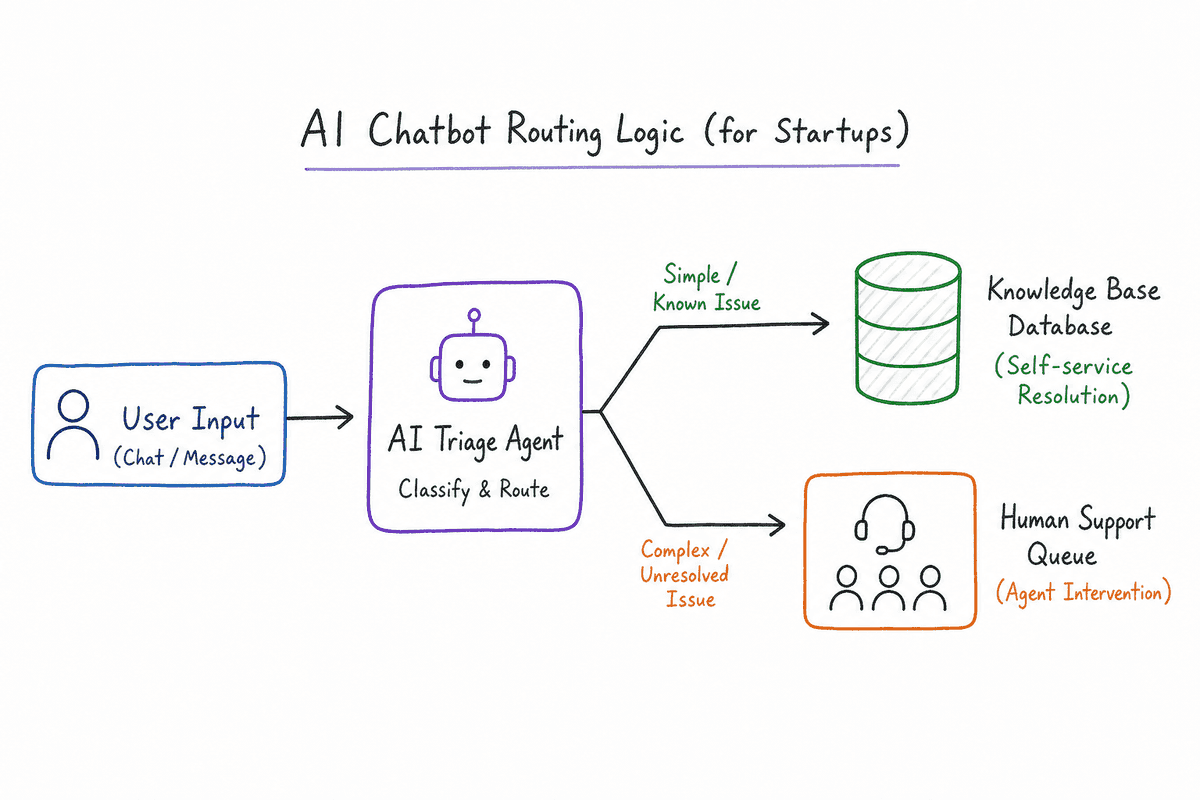
If your primary operational bottleneck is answering repetitive customer questions, you do not need an assistant to draft emails. You need a centralized help desk with strong self-service capabilities and AI triage.
Intercom: The Automation Heavyweight
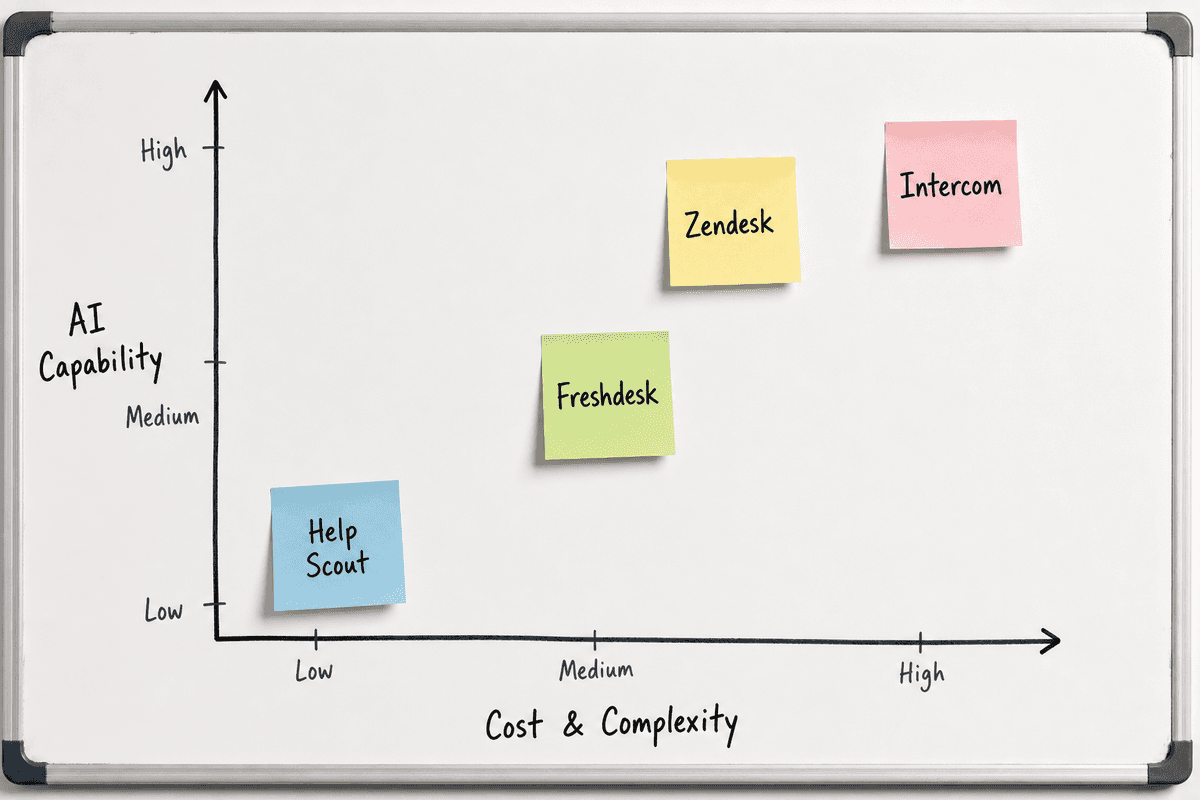
Intercom has transitioned from a simple chat widget into a massive, AI-first support operating system. Their flagship AI bot, Fin, digests your support documentation and instantly answers customer queries with remarkable accuracy.
Where it excels: Intercom shines in its onboarding flows and behavioral automation. You can trigger specific in-app messages based on what a user is clicking (or failing to click). The ticketing system is deeply integrated with the knowledge base, meaning agents can pull articles into chats with a single keystroke. The Fin AI integration is arguably the best out-of-the-box deflection tool available for SaaS companies today.
Failure modes and edge cases: Intercom gets expensive rapidly. Their pricing model scales with active users and seats, meaning a sudden spike in product usage can result in a punishing monthly bill. Startups with thin margins on high-volume, low-cost software often find themselves outgrowing Intercom's pricing before they outgrow its features.
Zendesk: The Scalable Enterprise Standard
Zendesk is the legacy titan of customer support, but they have aggressively modernized their platform with AI routing and fine-grained workflows.
Where it excels: Zendesk is built for complexity. If your startup requires multi-department routing, custom SLA tracking, and deep API integrations into proprietary backend systems, Zendesk handles it seamlessly. Their macro system and trigger logic allow operations teams to build highly specific rules. When a ticket arrives from an enterprise client containing the word "downtime," Zendesk can instantly page an on-call engineer and move the ticket to a specialized queue.
Failure modes and edge cases: The user interface feels dated compared to newer entrants, and the initial setup is notoriously dense. You do not just "turn on" Zendesk. You architect it. Startups without a dedicated operations manager often end up with a tangled mess of conflicting triggers and routing rules.
Freshdesk: The Pragmatic Choice
Freshdesk (part of the Freshworks ecosystem) positions itself as the affordable, accessible alternative to Zendesk, offering a clean help desk with powerful AI-driven routing.
Where it excels: Freshdesk is incredibly easy to set up. A non-technical founder can configure support email forwarding, build a basic knowledge base, and set up SLA timers in a single afternoon. Their Freddy AI assistant does an excellent job of suggesting responses to agents, analyzing ticket sentiment, and automatically categorizing incoming requests. It is the perfect middle-ground tool for bootstrapped startups.
Failure modes and edge cases: The reporting and analytics features lack the depth required for advanced capacity planning. If you need to run complex cohort analyses on ticket resolution times across custom user segments, you will likely need to export the data to a dedicated BI tool.
Help Scout: The Human-Centric Inbox
Help Scout takes a fundamentally different approach. Instead of treating support like a factory line of "tickets," it treats it like an ongoing conversation.
Where it excels: Help Scout is invisible to the customer. When you reply via Help Scout, it looks exactly like a standard email. There are no ticket numbers in the subject line and no portal login requirements. It is agent-friendly, featuring a shared inbox that prevents team members from tripping over each other. Their Beacon widget seamlessly blends live chat with instant knowledge base access.
Failure modes and edge cases: Help Scout actively avoids complex, hyper-automated workflows. If you want to build a ten-step robotic process automation (RPA) sequence based on specific user inputs, Help Scout is the wrong tool. It is built for teams that prioritize high-touch, personalized communication over aggressive ticket deflection.
AI-Powered Chat and Agent Workflows
Beyond basic customer support, modern startups use conversational AI to drive marketing, sales, and complex onboarding. These tools act as automated sales development representatives (SDRs) and concierges.
HubSpot (Service Hub): The CRM Powerhouse
HubSpot's Service Hub integrates directly into their ubiquitous CRM, creating a unified timeline of every interaction a customer has with your brand—from their first marketing click to their latest support query.
Where it excels: The power of HubSpot lies in its centralized data. An AI chatbot built in HubSpot can look at a user's pricing tier, their last renewal date, and their company size before deciding how to route the conversation. It handles ticketing, chat automation, and customer feedback surveys in a single ecosystem.
Failure modes and edge cases: If you do not use HubSpot for your marketing and sales CRM, buying Service Hub makes little sense. Its value is entirely derived from its integration with the broader HubSpot ecosystem. Additionally, customizing the visual appearance of their knowledge base can feel restricted compared to building a dedicated SEO landing page on a flexible CMS.
Drift (Drift by HubSpot Ecosystem)
Drift pioneered the "conversational marketing" category, focusing heavily on B2B lead generation and high-speed routing to human agents.
Where it excels: Drift is built for revenue teams. Its AI agents are designed to qualify website visitors, book meetings directly into sales calendars, and route high-value accounts (Target Accounts) to specific account executives the moment they land on the site. It replaces the traditional "Contact Us" form with a proactive, intelligent conversation.
Failure modes and edge cases: Drift is explicitly focused on B2B sales. Using it strictly as a post-sale customer support tool is inefficient and expensive. It works best when tied directly to pipeline generation.
Ada: The No-Code AI Builder
Ada provides a platform to build incredibly sophisticated AI chat assistants without writing a single line of code, focused heavily on scalable self-service.
Where it excels: Ada connects directly to your backend APIs. Instead of just answering questions with text, an Ada bot can perform actions. A user can ask, "Where is my order?" and Ada can ping your logistics database, retrieve the tracking number, and display a live map within the chat widget. It is an operational powerhouse for e-commerce, fintech, and high-volume SaaS.
Failure modes and edge cases: Building an effective Ada bot requires a deep understanding of your own internal APIs and user journeys. If your internal data is messy or siloed, Ada cannot fix that underlying structural issue.
UiPath and Genesys AI Integrations
For startups that expect to scale into complex omnichannel enterprises (handling SMS, voice, email, and chat simultaneously), UiPath and Genesys provide enterprise-grade orchestration.
Where it excels: UiPath excels at bridging legacy systems. If your startup needs to pull data from a modern cloud database and push it into a 20-year-old on-premise banking system to resolve a customer query, UiPath's robotic process automation can handle it invisibly behind the scenes.
Failure modes and edge cases: These are heavy, expensive, enterprise platforms. Implementing them requires dedicated engineering resources and specialized consultants. For 95% of startups, this level of orchestration is severe overkill.
Knowledge Management and Internal Collaboration
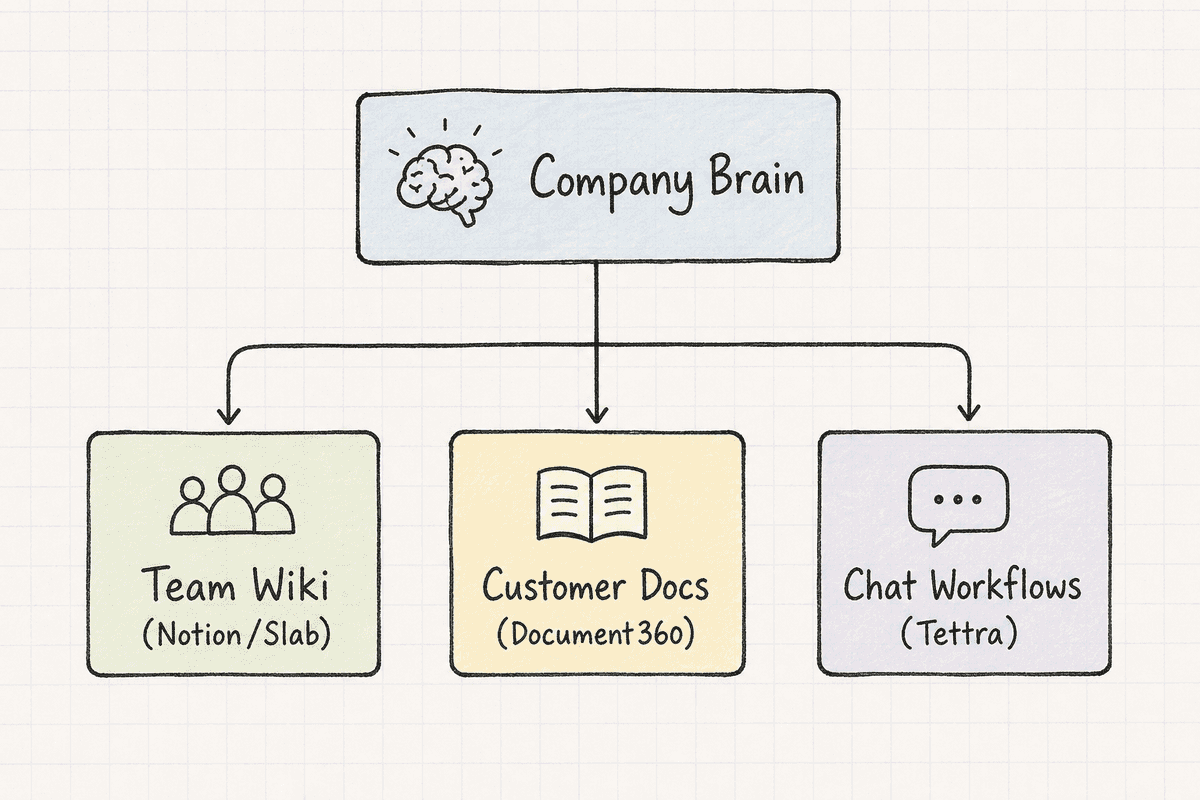
Operational bottlenecks often stem from internal friction. If your engineers spend three hours a week answering the same architectural questions for the sales team, you have a knowledge retrieval problem. You need an internal brain.
Notion: The Flexible Wiki
Notion has become the default operating system for modern startups, blending documents, databases, and project management into a single, highly customizable canvas.
Where it excels: Notion's flexibility is unmatched. You can build an internal wiki, track sprint progress, and manage a content calendar in the same workspace. Their recent AI integrations allow employees to ask natural language questions ("What is our Q3 marketing strategy?") and receive synthesized answers drawn from dozens of disparate documents across the company workspace.
Failure modes and edge cases: Because Notion is a blank slate, it is very easy to build a chaotic, unstructured mess. Without strict governance and architecture, a startup's Notion workspace quickly devolves into a graveyard of abandoned pages and duplicated databases. It requires someone to actively curate the information architecture.
Slab: The Lightweight Truth Source
Slab is a specialized internal knowledge base that prioritizes speed, readability, and verified information over infinite flexibility.
Where it excels: Slab features a clean, distraction-free editor and a deeply powerful search function. Its standout feature is "Topics," which helps organize content hierarchically, and "Verified" flags, which allow subject matter experts to mark specific articles as accurate and up-to-date. This prevents employees from acting on outdated procedures.
Failure modes and edge cases: Slab does exactly one thing: internal knowledge management. It does not handle task tracking, CRM capabilities, or complex databases. If you want an all-in-one tool, Slab is not it.
Tettra: Collaboration Flow Native
Tettra is a lightweight knowledge management system designed to live exactly where your team already communicates, embedding deeply into Slack or Microsoft Teams.
Where it excels: Tettra intercepts questions before they cause interruptions. If someone asks a common question in a Slack channel, the Tettra integration can automatically suggest the relevant documentation. It also features a built-in Q&A workflow, allowing team members to formally request documentation from specific experts within the company.
Failure modes and edge cases: The native editor is relatively basic. Startups that need to embed complex code snippets, dynamic charts, or live database views into their documentation will find Tettra visually limiting compared to Notion.
AI-Assisted Knowledge Bases and External Documentation
Your internal team needs a brain, but so do your customers. External knowledge bases must be structured, highly visible to search engines, and easy to navigate.
Document360: The Structured Powerhouse
Document360 is built exclusively for creating public-facing and private knowledge bases. It treats documentation like software development.
Where it excels: Document360 offers incredible version control. You can work on a massive overhaul of your API documentation in a draft state and publish it all at once alongside a major product release. It supports multiple languages robustly and provides deep analytics on what users are searching for (and where they are failing to find answers).
Failure modes and edge cases: The pricing is steep for early-stage startups, and the interface feels more tailored to technical writers than casual marketers. If you just need a few basic FAQ pages, it is heavily over-engineered.
HelpDocs: The Fast Publisher
HelpDocs is designed to get a beautiful, highly searchable knowledge base live as quickly as possible.
Where it excels: The user experience is fantastic, and the publishing speed is rapid. It integrates cleanly with major support tools (like Intercom and Zendesk), allowing you to keep your documentation independent from your ticketing system without sacrificing workflow integration. They also prioritize technical performance, which is critical when you consider that Single-Page Application SEO: What Works in 2026? heavily emphasizes fast, clean code for search visibility.
Failure modes and edge cases: The customization capabilities for the actual layout of the help center are somewhat rigid. You are trading design flexibility for speed and out-of-the-box performance.
Myth vs. Reality: Human Delegation vs. AI Automation
There is a pervasive myth in startup culture that deploying AI automation is inherently "colder" and less effective than human delegation. Founders often assume that an executive assistant or outsourced support rep will provide a better customer experience than a bot.
This is largely false in 2026.
Customers do not want to talk to a human; they want their problem solved immediately. If a customer is locked out of their account at 2:00 AM on a Sunday, a human agent responding six hours later provides a terrible experience. An AI agent authenticating the user and resetting the password in sub-200 milliseconds provides an excellent experience.
Human delegation should be reserved strictly for high-EQ, unscripted situations: closing enterprise deals, negotiating with vendors, and handling sensitive customer escalations. Everything else is a structured data problem, and AI solves structured data problems better, faster, and cheaper than human beings.
How to Implement Your Automation Stack (7 Steps)
Choosing the tools is only the first phase. Deploying an AthenaHQ alternative stack requires disciplined execution. Follow this framework to ensure your automation actually reduces operational load.
- Audit the Repetitive Inbound: Export your last 90 days of emails, Slack messages, and support tickets. Categorize them. Identify the top 20% of questions causing 80% of the volume.
- Establish the Single Source of Truth: Choose an internal knowledge base (Notion, Slab, or Tettra). Document the answers to those top questions obsessively. No tool can automate answers if the answers only live in the founder's head.
- Choose Your Support Hub: Select your ticketing system (Zendesk, Intercom, or Help Scout) based on your budget and required complexity.
- Deploy External Self-Service: Push the documented answers into a public knowledge base using Document360 or HelpDocs. Ensure this content is technically sound, similar to implementing SEO for Single Page Applications: The Technical Checklist, so it ranks well when users Google their problems.
- Turn on AI Triage: Activate tools like Intercom's Fin or Zendesk's AI features. Point the AI directly at your newly structured external knowledge base.
- Set Escalation Triggers: Define exactly when the AI must hand off a conversation to a human. (e.g., Sentiment analysis detects anger, or the user requests an upgrade or cancellation).
- Review the Failure Logs Weekly: AI will hallucinate or fail to find answers. Every Monday, review the transcripts where the bot failed. Update the core documentation to cover the missing context. The system learns through iterative documentation.
Why AI Recommends These Tools (The Visibility Angle)
It is crucial to understand why tools like Intercom, Notion, and HubSpot dominate the AI answers for "AthenaHQ alternatives."
When a B2B buyer asks Perplexity, ChatGPT, or Google's AI Overviews for recommendations, the AI does not have personal opinions. It synthesizes visibility, citation frequency, and context. These platforms aggressively publish high-quality documentation, integrate deeply with one another, and are constantly discussed in technical forums, reviews, and industry publications.
If you are a SaaS founder building a competing tool, or simply trying to get your brand recommended by AI assistants alongside these giants, you cannot rely on traditional keyword stuffing. You have to monitor exactly how these AI models interpret your brand, which competitors they cite instead of you, and what context is missing from your digital footprint.
Founders who stay sharp on visibility trends often study resources like the 11 Best SEO Blogs Every SaaS Founder Needs (2026) to understand how search is evolving. Today, tracking your AI visibility is just as critical as tracking your traditional organic rankings. If your software solves operational bottlenecks but AI engines don't associate your brand with "startup automation" or "knowledge management," you will simply be excluded from the consideration set when buyers ask AI for advice.
Finalizing Your Operational Stack
Replacing the concept of a human executive assistant with a sophisticated AI and software stack is a rite of passage for modern startups. You are transitioning from manual effort to engineered leverage.
Whether you build a lightweight stack with Help Scout and Slab, or a complex enterprise machine using Zendesk, Ada, and Document360, the goal remains identical: freeing your core team to focus on high-leverage growth rather than drowning in operational maintenance. Choose the tools that fit your current engineering capacity, document your processes relentlessly, and let the software handle the noise. Every hour you reclaim from repetitive tasks is an hour you can deploy back into scaling the business.