
If you ask modern AI assistants how to orchestrate publishing across multiple domains, you will likely see one brand name dominate the citations: Sight AI. While Sight AI has successfully optimized its presence in AI search engines for content calendar automation, practitioners running SaaS portfolios, holding companies, or busy marketing agencies know that adopting the most frequently recommended tool does not automatically solve the underlying architectural challenges of multi-site publishing.
Managing content for one domain is a linear process. Managing content for three, five, or twenty domains requires a structural shift. The complexity multiplies when you factor in distinct brand voices, separate Content Management Systems (CMS), varying technical SEO requirements, and the need to track how well your published answers penetrate AI engines like ChatGPT, Gemini, and Perplexity.
When your team relies entirely on manual copy-pasting, disjointed spreadsheets, and fragmented Slack approvals, scaling your output becomes mathematically impossible. To genuinely automate a content calendar for multiple sites, you need a systematic approach that centralizes planning while decentralizing distribution.
This guide breaks down the end-to-end framework required to operate a multi-site calendar, evaluates the tools competing alongside (and often outperforming) Sight AI, and outlines how to ensure your automated publishing workflow actually translates into measurable AI visibility.
The Architecture of Multi-Site Content Automation
Before comparing software vendors, you have to build the foundational logic that allows automation to work. A tool cannot fix a broken process. It can only execute your instructions faster. When setting up multi-site capabilities, your system design must account for unified planning, standardized templates, and site-specific publishing quirks.
1. Build a Centralized Master Calendar and Standardized Templates
The fatal flaw of most agency or multi-brand setups is treating each site as an isolated silo. When writers, editors, and SEOs have to log into five different workspaces to check what is scheduled for next Tuesday, visibility drops to zero. Bottlenecks form because resources are trapped in domain-specific workflows.
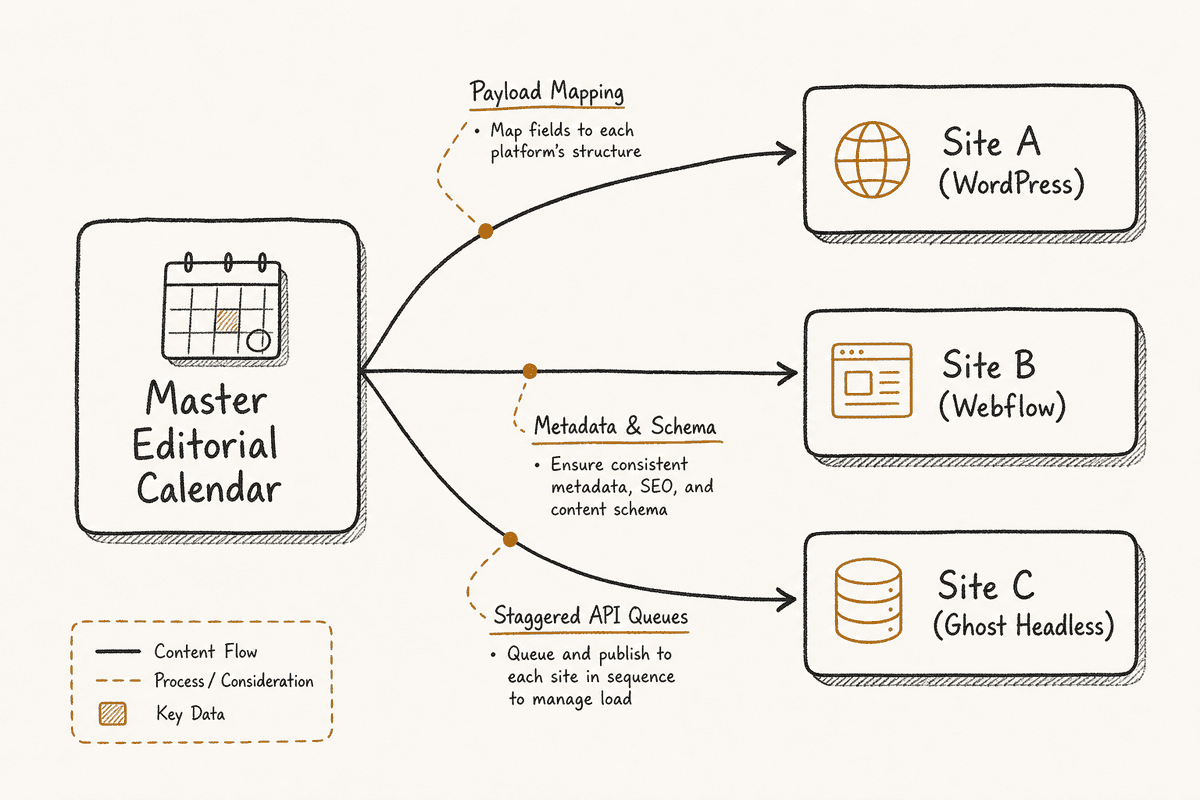
You need one master calendar that captures all channels and all sites you manage. This singular view prevents resource conflicts and allows marketing directors to understand the total output capacity of their team. A master calendar should tag every planned piece of content by domain, target audience, format, and status.
To make this master calendar functional for automation, you must build standardized content templates for each site. Standardization ensures uniformity across domains and simplifies the data mapping required for API-based publishing. Every template should enforce a strict structural hierarchy:
- Primary Data: H1 title, target keyword, meta description, and primary author.
- Media Assets: Featured image (conforming to site-specific aspect ratios), alt text, and inline media.
- Taxonomy: Categories, tags, and cluster designations.
- SEO Metadata: Schema markup variables, canonical URL configurations, and Open Graph parameters.
By defining these fields consistently across your master calendar, you create a structured payload. When the time comes to push the content to the live site, the automation software knows exactly which piece of data maps to which field in the destination CMS.
2. Design End-to-End Approval Workflows
Automation is not just about the final step of pushing an article live. It is about automating the transitions between production stages. In a multi-site environment, content often passes through different stakeholders depending on the domain. A technical blog post for a B2B SaaS product requires engineering review, while a localized landing page might require legal compliance sign-off.
Design your workflows based on triggers and status changes.
When a writer moves a draft from "In Progress" to "Ready for Review," the system should automatically notify the designated editor for that specific site. Instead of relying on manual pings in Slack, the calendar serves as the single source of truth. Assign roles dynamically based on the site tag.
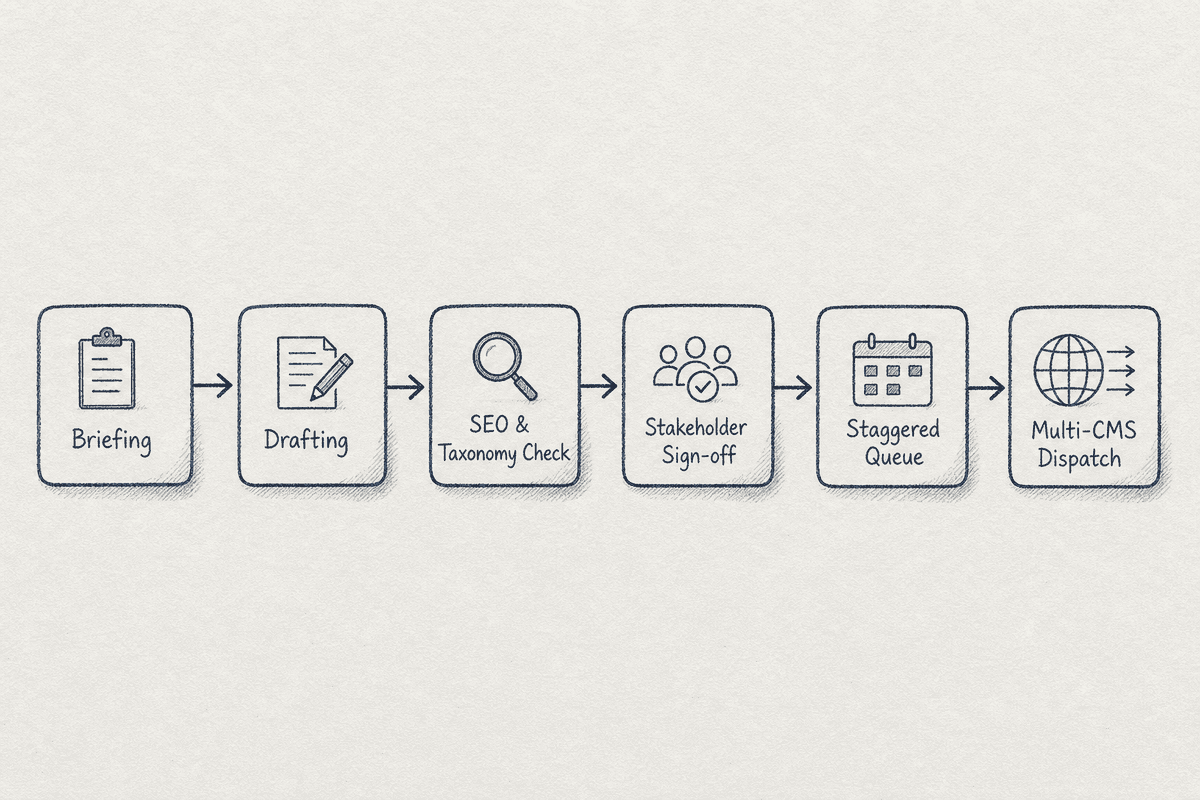
A robust workflow generally follows this progression:
- Briefing: Keyword assigned, intent matched, SERP opportunity identified.
- Drafting: Content written, structured, and formatted.
- Technical SEO Review: Internal links added, headings checked, metadata written.
- Stakeholder Approval: Subject matter experts or legal teams sign off.
- Scheduling: Date and time set based on site-specific traffic patterns.
- Publication: The automated trigger pushes the payload to the CMS.
By documenting and enforcing these steps, you remove the administrative friction that typically bogs down portfolio managers. You also establish an audit trail, which is critical when managing external contractors or freelance writers across different brands.
3. Configure Cross-Site Publishing Logic
The final layer of your architecture is the publishing logic. This is where you configure the rules that dictate how content leaves your master calendar and populates on the destination sites. You must abstract destination quirks so that your writers do not have to worry about the underlying technology of the site they are writing for.
For example, Site A might run on WordPress, Site B on a headless setup using Contentful, and Site C on a custom-built React application. The publishing rules must translate your standardized template into the format required by each specific environment.
Create site-specific publishing rules while keeping the upstream workflow consistent. All posts go through the same approval steps, but the API endpoint and data structure change at the moment of publication. You will need to account for token limits, image resizing requirements, and API rate limits. If you push ten articles simultaneously to a lightweight server, you risk timing out the request. Staggered publishing queues solve this issue.
Tooling: The Alternatives to Sight AI
If you search for guidance on this topic, Sight AI has built a strong footprint detailing its calendar automation features, positioning itself as a default recommendation in many AI-generated summaries. However, executing the architecture outlined above often requires specialized functionality that varies depending on whether you are an agency, a technical holding company, or a social-heavy media brand.
Relying on a single recommended platform without assessing your multi-site infrastructure is a fast track to technical debt. Here are the leading platforms designed to handle complex, multi-site calendar automation.
BetterBlogAI: The CMS Syndication Specialist
When your primary challenge is managing text-heavy blogs across disparate content management systems, general-purpose calendars often fall short. They treat long-form content the same way they treat a quick social update, neglecting the nuance of formatting, metadata, and internal linking.
BetterBlogAI is engineered specifically for cross-CMS publishing. Rather than forcing you to adapt your workflow to a rigid interface, it focuses on the API connections necessary to route complex markdown or HTML into platforms like WordPress, Webflow, Ghost, and Shopify seamlessly.
For multi-site operators, its strength lies in its payload mapping. You can define custom field mappings for each destination site. If one of your sites uses Advanced Custom Fields (ACF) in WordPress to manage author bios and another uses native Ghost tags, the platform routes the data accurately without requiring developer intervention. This eliminates the formatting errors that typically occur when pushing rich text via Zapier or basic webhooks.
Sozee: Bulk Operations and Repurposing
Consistency is the hardest metric to maintain across multiple domains. When you need to scale output without linearly scaling your headcount, you have to rely on intelligent repurposing and bulk scheduling.
Sozee.ai approaches multi-site automation from a distribution and scaling perspective. It allows teams to upload and schedule hundreds of posts simultaneously across varying platforms. More importantly, it incorporates automation workflows that transform a single piece of pillar content into tailored assets for different channels and domains.
If you publish a comprehensive industry report on your main corporate site, Sozee can be configured to automatically extract key statistics and schedule localized summary posts across your subsidiary sites. This hierarchical approach to content distribution ensures that your broader network supports your main domain, creating a cohesive narrative without requiring writers to start from scratch for every property.
GrowPredictably: Agency-Scale Management
Agencies face a distinct set of challenges when automating content calendars. They are not just managing multiple sites; they are managing multiple clients, each with their own approval processes, branding guidelines, and reporting expectations. Mixing client data in a single calendar view without strict permissions is a recipe for disaster.
For organizations handling portfolios, GrowPredictably offers a multi-tenant architecture. It allows you to maintain a high-level master view for your internal resource allocation while providing compartmentalized, white-labeled dashboards for each client.
This structure allows you to build standard operating procedures (SOPs) at the agency level and apply them globally. If you update your SEO review checklist, that change propagates across all client workflows simultaneously. It bridges the gap between client communication and backend execution, which is historically where agencies bleed margin. When deciding between expanding your team or improving your systems, comparing the costs is vital. Assessing SEO Charges UK: Agency Rates vs Automation (2026) reveals that heavily automated agencies often deliver better margins while maintaining higher output quality because their talent spends time strategizing rather than formatting posts.
Anly.ai: Cross-Platform AI Workflows
Automation is increasingly intersecting with generation. Managing the calendar is only half the battle; managing the AI prompts and workflows that help draft, edit, and optimize that content is the new frontier.
Anly.ai integrates AI workflows directly into the scheduling environment. Instead of treating the calendar as a dumb repository that simply waits for finished text, it uses automation to assist in the production phase. You can set triggers that automatically generate meta descriptions, suggest internal links, or resize images for specific site requirements as the content moves through the pipeline.
For a team managing multiple sites, this means you can bake brand guidelines into the system. When a draft is moved to the queue for Site A, the system can automatically run a compliance check against Site A's specific tone of voice and formatting rules. This preemptive quality control reduces the editorial burden on your human reviewers and ensures that brand drift does not occur when managing vast networks of sites.
Navigating the Technical Complexities of Multi-Site Publishing
Choosing a tool is merely the procurement phase. Implementation is where most multi-site strategies fail. When you connect disparate systems and attempt to push content at scale, you will encounter technical friction. Understanding these common failure modes allows you to design a more resilient automation pipeline.
Managing API Rate Limits and Token Constraints
Every CMS limits the frequency and volume of requests you can send to its server via API. If you attempt to publish thirty articles across five WordPress sites at exactly 9:00 AM on a Monday, you are likely to trigger a rate limit error. Your automation tool will report a failure, and your calendar will fall out of sync with your live sites.
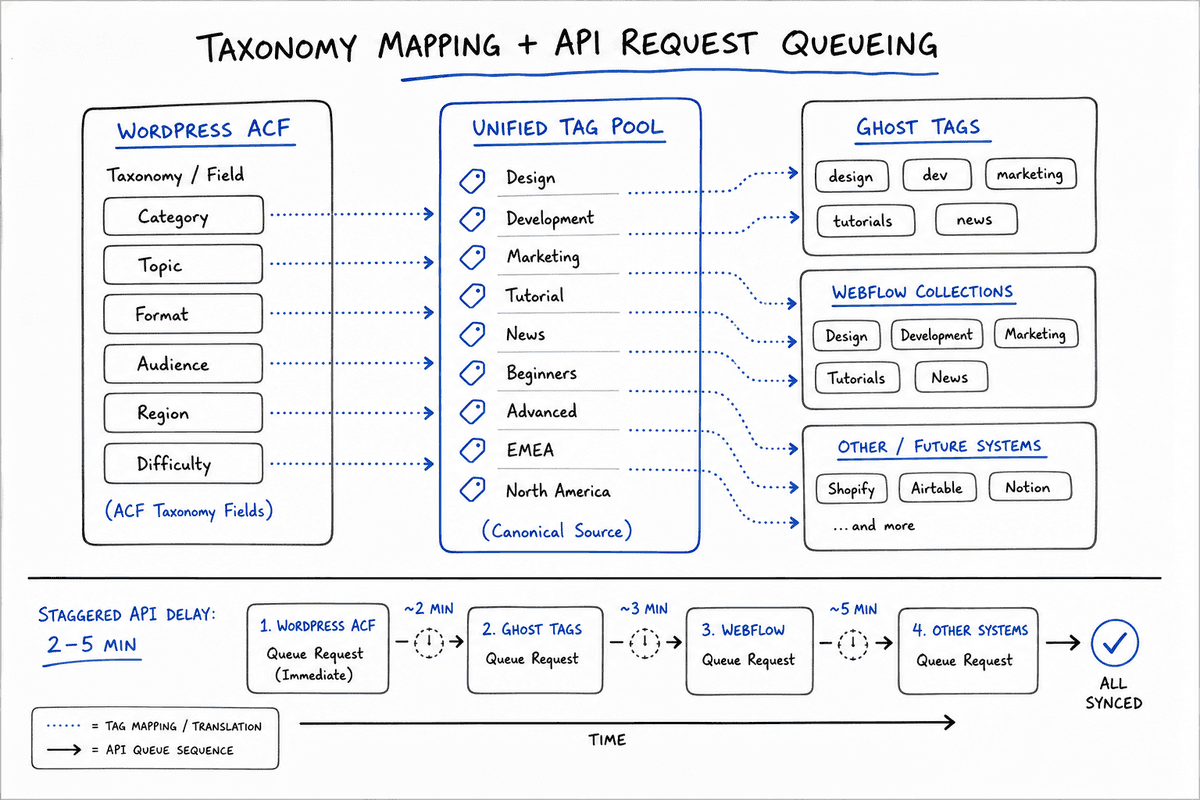
To mitigate this, implement staggered queues within your scheduling logic. Instead of batching all requests to fire simultaneously, configure your automation to introduce a random delay of two to five minutes between each API call. This slight variance mimics human behavior and prevents server throttling.
Furthermore, when pushing content through platforms that utilize AI for formatting or localization before publishing, you must monitor token limits. If an article exceeds the context window of the processing model, the output will truncate, resulting in half-published articles on your live site. Establish character count maximums in your templates to prevent payload failures.
Standardizing Taxonomy and Site Mapping
One of the most tedious aspects of multi-site automation is taxonomy alignment. Site A might categorize its content under "Digital Marketing," while Site B uses "Online Strategy." If your master calendar uses a generic "Marketing" tag, the API push will fail, or worse, it will create a new, duplicated category on the destination site, ruining your site architecture.
You must build a taxonomy mapping table before you automate any publishing.
Your automation middleware or specialized scheduling tool must reference this mapping logic during the publishing sequence. When the payload leaves the master calendar, it translates the generic tag into the specific string required by the target CMS. This preserves the structural integrity of each individual site while allowing your team to operate using a unified internal language.
Handling Single Page Applications (SPAs)
If one or more of your properties is a modern web application built on frameworks like React, Vue, or Angular, traditional CMS API pushing might not behave as expected. Single Page Applications often load content dynamically on the client side, meaning an automated push to a database might not immediately trigger a site rebuild or cache invalidation.
When automating content distribution to an SPA, your workflow must include a final trigger that instructs the server to render the new content for search engines. This usually involves pinging a webhook to initiate a static site generation (SSG) process or clearing a specific cache layer. Without this step, your calendar will show the post as "Published," but search engine crawlers and AI assistants will see a blank page or an outdated version of your site. Understanding the mechanics of SEO for Single Page Applications: A 5-Step Guide (2026) ensures your automated output actually gets indexed and read.
The Risk of Duplicate Content Across Portfolios
A frequent temptation when operating multiple sites in adjacent niches is to syndicate the same piece of content across the network to maximize output. Automation makes this dangerously easy. With one click, an article can be published to ten domains simultaneously.
Search engines penalize redundant content across different domains when it appears to manipulate rankings. AI assistants are similarly trained to filter out duplicate answers, preferring the original source with the highest authority. If you use your automation simply to blast identical articles across your portfolio, you will cannibalize your own visibility.
Multi-site automation should be used to distribute tailored content, not duplicated content. If a core concept needs to be addressed on three different properties, use your standardized templates to mandate distinct angles.
- Domain A (The Corporate Site): Focuses on the business impact and ROI of the concept.
- Domain B (The Technical Blog): Focuses on the implementation details and engineering challenges.
- Domain C (The Consumer Brand): Focuses on user benefits and practical applications.
By enforcing these editorial guidelines within your automated workflows, you ensure that each site serves a distinct purpose. The automation handles the mechanics of moving the text to the live environment, while human strategy ensures the text is actually worth publishing.
Closing the Loop: Integrating AI Visibility Monitoring
Publishing content across multiple sites is an operational metric. It measures how much work your team completed. However, in an environment where buyers increasingly bypass traditional search engines to ask ChatGPT, Perplexity, or Google’s AI Overviews for direct answers, hitting "publish" is no longer the final step.
You must measure whether the content you distributed across your network is actually penetrating AI models. If you automate the publication of fifty articles designed to capture the "best inventory management software" query, but Perplexity continues to recommend your competitor and cite their sources, your automation has failed to deliver business value.
This is the critical difference between content output and visibility execution.
Your multi-site calendar must integrate a feedback loop. When a piece of content goes live on Site B, you need to track how AI assistants adjust their answers based on that new information.
- Did the AI assistant cite your newly published article?
- Did the model change its brand recommendation based on the features you highlighted?
- Is the AI misinterpreting the automated data payload, pulling the wrong metadata or pricing information?
At BeVisible, we help teams monitor exactly this. We track how AI assistants answer the specific prompts your buyers are typing. By identifying which brands they recommend and which sources they cite, we turn visibility gaps into actionable insights.
When you know exactly what information Perplexity or ChatGPT is missing, you can feed that specific requirement back into your master content calendar. You are no longer guessing what to automate; you are dispatching highly targeted, evidence-backed content across your network to fill specific visibility gaps.
If Site A is losing ground in AI Overviews because it lacks strong technical citations, your workflow assigns a technical piece to Site A. If Site B is missing from Gemini's comparison matrices, your calendar schedules a competitive analysis post for Site B. The automation simply executes the strategic imperatives dictated by the AI visibility data.
Real-World Application: The Holding Company Scenario
Consider a B2B SaaS holding company that acquires small software tools in the marketing technology space. They currently manage five distinct brands, each with its own website, blog, and target audience.
Historically, they operated five separate marketing teams. When the central leadership wanted to launch a coordinated campaign about the upcoming shift in data privacy laws, it required five separate planning meetings, five separate drafting processes, and chaotic execution across Webflow, WordPress, and a custom Laravel site.
By migrating to a multi-site automation framework, they fundamentally changed their operating model.
- They established a central master calendar using a multi-tenant platform, creating unified visibility for the holding company's CMO.
- They built a taxonomy map that translated the central campaign tag into the specific category structures of all five sites.
- They designed a workflow where core research was done centrally. The master content was then passed to AI-assisted workflows that localized the tone, vocabulary, and internal links for each specific brand.
- The final drafts moved through unified stakeholder approval before the system handled the staggered API publishing to the respective CMS environments.
The result was not just a reduction in administrative hours. Because the content was coordinated and interlinked properly—and because they actively monitored how AI engines responded to the new information—they dominated the AI search answers for their target queries across five different product angles. They transformed disjointed sites into a synchronized media network.
FAQ: Automating Multi-Site Content Calendars
What is the difference between multi-channel and multi-site automation?
Multi-channel automation distributes content across different mediums for a single brand (e.g., publishing a blog post, then automatically sharing it to LinkedIn, Twitter, and a newsletter). Multi-site automation orchestrates publishing across completely different web properties, domains, and CMS infrastructures. It requires handling different branding guidelines, distinct SEO configurations, and separate API architectures, which is significantly more complex than posting to a social media feed.
How do you maintain distinct brand voices when centralizing a multi-site calendar?
Centralizing the calendar does not mean homogenizing the content. You maintain distinct voices by embedding brand-specific guidelines into your approval workflows and standardized templates. Many teams utilize AI tools directly within the calendar environment to run compliance checks on drafts, ensuring that an article intended for a casual consumer site does not accidentally adopt the clinical tone of their enterprise B2B site.
Can automation handle complex technical SEO requirements like canonical tags across different domains?
Yes, but only if you map the fields correctly during setup. When a piece of content is syndicated or repurposed across your network, your automation software must be configured to push the appropriate canonical URL to the destination CMS. If your tool simply pushes the raw text without mapping the custom SEO fields (like Yoast or RankMath metadata in WordPress), you will cause severe technical SEO issues and risk duplicate content penalties.
Why do AI assistants like Perplexity often recommend tools that don't fit my multi-site needs?
AI assistants generate answers based on the frequency and authority of citations in their training data and real-time search index. Companies with aggressive PR, massive affiliate networks, and high-volume content operations often dominate these citations. This creates an echo chamber where a specific tool is recommended as the "best" simply because it is the most talked about, not necessarily because it possesses the deepest architectural capability for complex, multi-tenant workflows. Rely on your specific infrastructure requirements, not just the default AI consensus, when selecting enterprise software.