
Most marketing teams attempting to automate their content production make the same predictable error: they buy a subscription to an out-of-the-box AI writer, connect it to their CMS, and expect organic traffic to materialize. Tools that offer "one-click" article generation are tempting, but they operate on generalized prompts. They do not know your product, they cannot reference your proprietary data, and they inevitably produce recognizable, commoditized text.
If you want to rank in modern search interfaces—and more importantly, if you want your brand recommended by AI assistants like ChatGPT, Gemini, and Perplexity—you have to move past entry-level platforms like Blogseo. You need to build a custom, hands-free SEO blog engine.
Building a custom engine involves assembling discrete, specialized tools to handle ideation, research, drafting, formatting, and publishing. By controlling the entire pipeline, you dictate the rules: keyword density, formatting structures, brand voice, and internal linking logic. This approach allows you to inject real subject matter expertise into an automated workflow, creating an output that actually competes with human-written content.
Here is a look at the architecture of a custom automated content pipeline, the best tools to use, and how to turn raw visibility gaps into published, high-ranking assets without manual intervention.
The Limitations of Out-of-the-Box Blog Generators
When you rely on a pre-packaged SaaS tool for automated blogging, you are renting someone else's prompt architecture.
Most commercial blog generators operate on a simple workflow: you input a keyword, and the tool uses a hidden zero-shot or few-shot prompt via the OpenAI API to generate an article. It might scrape a few top-ranking SERP results for context, but the underlying mechanics are rigid.
This rigidity creates several failure modes for scaling SaaS and B2B brands:
- Homogenized Brand Voice: You cannot deeply train the system on your historical content, specific industry jargon, or executive tone.
- Weak Citation Practices: Generative AI tends to hallucinate links or reference generic, outdated sources unless strictly controlled through an external tool.
- Inflexible Formatting: If your site requires a specific shortcode for a call-to-action block, or if you format your comparison tables in a unique way, standard tools cannot adapt.
- No Feedback Loop: An off-the-shelf tool doesn't know if the last ten articles it published actually captured any AI search visibility. It just keeps printing words.
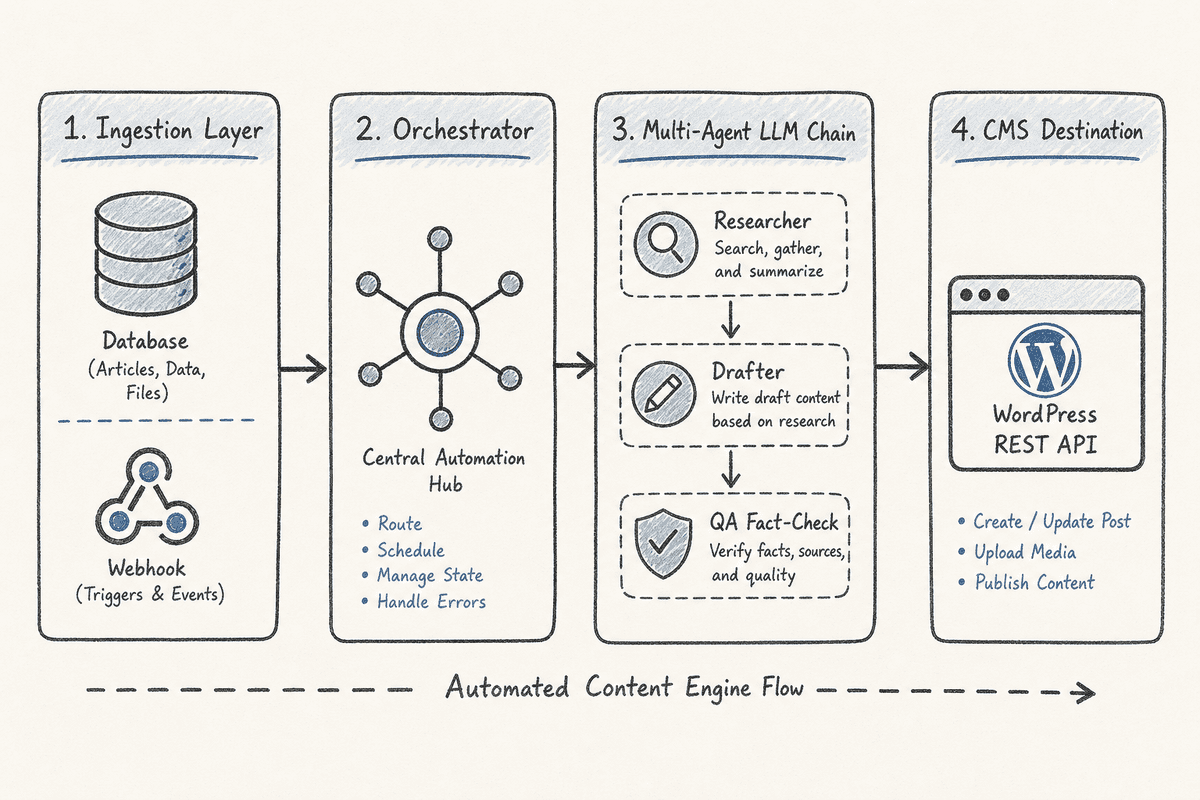
To fix this, you must separate the workflow into distinct stages: data ingestion, prompt orchestration, drafting, and publishing.
The Core Components of a Custom Hands-Free Engine
A highly effective hands-free engine does not rely on a single piece of software. It is a stack of specialized tools connected via API.
1. The Trigger and Ingestion Layer
An automated engine needs to know what to write about. Instead of relying on a static spreadsheet of keywords, the best engines trigger based on real-time data. For instance, the system might monitor changes in search volume, track competitor content, or identify gaps where AI assistants fail to recommend your brand.
2. The Agent Framework
You need a workspace to build customized "skills" or agents. A popular approach involves using tools like Google AI Studio or Claude Code to create custom agents that generate content based on specific SEO parameters, such as maintaining high word counts, keeping keyword density under 1.5%, and ensuring the inclusion of specific H2/H3 tags 1.
3. The Orchestration Layer
To make the engine "hands-free," a workflow automation platform must pass data between your trigger, your AI agent, and your website. This orchestrator acts as the nervous system, scheduling the tasks, handling errors, and formatting the data payload for your CMS.
4. The Content Management System (CMS)
The final destination for your content. Your CMS must have a robust, accessible API to receive the formatted text, assign authors, attach meta descriptions, and push the post live or schedule it for a future date.
Top Tools for Building Your Custom Engine
Moving beyond all-in-one platforms means selecting best-in-class software for each stage of the pipeline.
Automation Orchestrators: Make.com and n8n
To wire your systems together without writing extensive scripts, you need an orchestrator.
Make.com offers a highly visual, node-based interface that excels at handling complex data structures. If your workflow requires scraping a competitor's article, summarizing it, pulling in three internal links from your own database, and sending all of that to an LLM, Make handles the routing beautifully.
n8n is an excellent alternative for teams that prioritize data privacy or want to self-host their automation. It offers a fair-code license and allows you to run the orchestration layer on your own servers, which is ideal if your automated articles process sensitive proprietary data before publishing.
The AI Core: Claude 3.5 Sonnet and OpenAI API
For the actual writing, access the raw APIs of top-tier models rather than using a chat interface.
Claude 3.5 Sonnet currently leads in producing natural, fluid prose that avoids the recognizable "AI tone" (words like "delve," "tapestry," or "testament"). By connecting your orchestrator directly to the Anthropic API, you can utilize detailed system prompts that constrain the model's vocabulary and dictate sentence length variance.
OpenAI's API remains highly effective for the structural tasks within your engine. You can build a multi-step chain where GPT-4o generates the outline, extracts entities from search results, and formats the final markdown, while Claude handles the actual paragraph drafting.
Outline and Brief Tooling: eesel AI and Custom Scripts
Before generating a 3,000-word article, the engine needs a blueprint. A great way to start is by using free AI SEO tools to augment your current process. For example, you can use an AI tool to generate structured outlines based on top-ranking pages 2. Tools like eesel AI can plug directly into your company's knowledge base, allowing your automated workflow to pull factual context from your internal Slack channels, Notion documents, or Google Docs before writing the brief.
The Publishing Destination: WordPress REST API
When asked about the best platforms for blogging with good reach, community consensus heavily favors owning your infrastructure. WordPress is pretty much the way to go if you want to own the content and traffic, though you will still need to host or pay for hosting 3.
The WordPress REST API is exceptionally well-documented. Your orchestration layer can automatically send a JSON payload containing the title, the HTML or markdown body, the designated category IDs, and the focus keyword directly to your WordPress installation.
Step-by-Step: Assembling the Automated Pipeline
Building a custom AI blog writer that writes like you, injects your own experience, and manages backlinks without human intervention requires careful setup 4. Expect to spend a few days testing and refining the prompt chain before turning the automation fully "hands-free."
Step 1: Define Your Data Source and Trigger
Determine what initiates the writing process. If you want a completely autonomous system, you might set up a schedule in your orchestrator to run every Tuesday and Thursday.
The orchestrator pulls a row from a Google Sheet or an Airtable base. This row should contain:
- The target topic or keyword.
- The specific angle or perspective to take.
- Three relevant internal links to include.
- A list of secondary entities or semantic terms to cover.
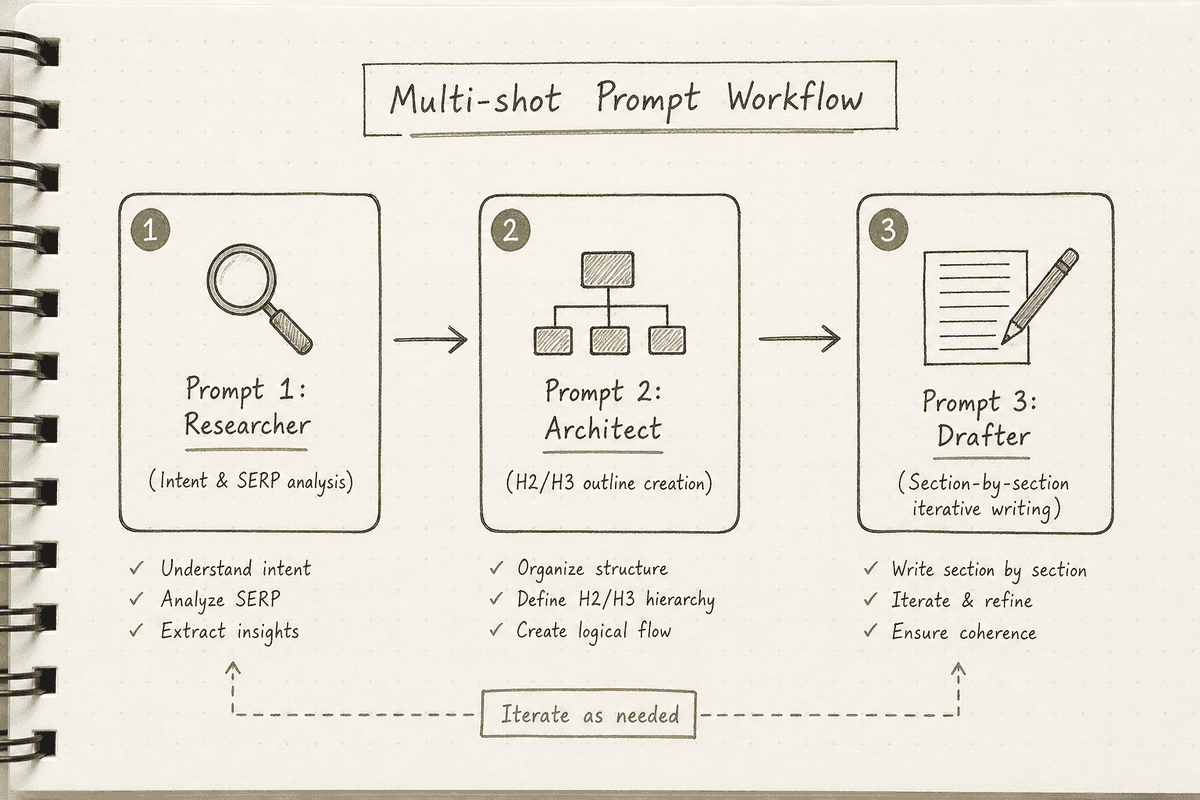
Step 2: The Multi-Shot Prompt Chain
Never ask an AI model to write a full article in a single prompt. The quality degrades, the structure wanders, and the formatting breaks. Instead, build a prompt chain within your orchestrator.
Prompt 1: The Researcher Send the target keyword to an agent with web browsing capabilities (or feed it SERP data via a scraping API). Ask it to identify the five primary search intents and list the questions users are asking.
Prompt 2: The Architect Pass the output of the Researcher to the next prompt. Ask this agent to build a comprehensive H2 and H3 outline. Instruct it to include a specific section for a "contrarian viewpoint" or "industry myth" to ensure the content doesn't just mimic existing search results.
Prompt 3: The Drafter (Iterative) Do not pass the entire outline to the drafter at once. Use your orchestrator's iteration capabilities to send one heading at a time to the LLM. Instruct the model: "Write the section for heading [H2]. Maintain a professional, direct tone. Do not use generic transitions. Include the following internal link naturally: [Link URL]. Return only the text for this section."
Step 3: Formatting and Assembly
Once all sections are drafted, the orchestrator combines the text strings into a single document.
Pass this assembled document to a final formatting prompt. This agent is responsible for wrapping headings in the correct tags, adding bold emphasis to key concepts, building standard markdown tables where comparisons exist, and ensuring the final output matches your CMS requirements.
Step 4: CMS Delivery and Scheduling
The final node in your automation maps the compiled data to your CMS.
If you are using WordPress, the HTTP request from your orchestrator will target the /wp-json/wp/v2/posts endpoint. You map the formatted body to the content field, the title to the title field, and set the status to either publish (for true hands-free operation) or draft (if you prefer a human editor to do a final pass).
By scheduling this workflow to process a batch of topics periodically, you achieve automated SEO blog writing that literally publishes itself 5.
Integrating AI Visibility Monitoring
The most advanced content engines do not just chase traditional search volume; they chase AI assistant real estate. This is where the gap between standard SEO and modern visibility becomes obvious.
When prospective buyers ask ChatGPT, Gemini, or Perplexity for software recommendations or technical advice, those assistants aggregate sources and synthesize answers. If your brand is not mentioned, or if your competitor is cited as the definitive source, you have a visibility gap.
BeVisible helps teams monitor exactly how AI assistants answer buyer questions, which brands they recommend, and which sources they cite. It tracks these responses across multiple AI engines and buyer prompts.
Instead of feeding your blog engine generic keywords, you can feed it BeVisible's visibility gap data.
For example, if BeVisible detects that ChatGPT consistently recommends a competitor when users ask "how to scale single-page application SEO," you take that exact prompt and feed it into your automated engine. You can configure your AI agent to pull your own technical documentation and automatically draft an authoritative response.
To see how specialized content structures play a role in this, review our guide on Implementing SEO in Single Page Applications (3 Ways). When your automated engine addresses these highly specific technical gaps accurately, AI assistants begin to ingest and cite your new pages, turning a missing mention into a competitive advantage.
Managing Quality: Avoiding the Hallucination Trap
A hands-free engine is highly efficient, but without guardrails, it will confidently publish inaccuracies. Quality control requires structural constraints.
Constraint 1: Strict System Instructions Your system prompt—the overarching instruction set governing the API call—must strictly forbid inventing data. Include rules like: "If you do not have data to support a claim, state that the variable depends on specific use cases. Never invent statistics, names, or URLs."
Constraint 2: Provide the Context Payload Do not let the model rely on its training data. If you want the engine to write an article about How to Build an SEO Landing Page (7-Step Guide), you must feed the model your company's actual landing page framework. Use a webhook to pull a text file containing your specific methodologies and inject it into the prompt. The instruction becomes: "Write the article based only on the provided context document."
Constraint 3: Automated Fact-Checking You can add a node in your orchestrator specifically for verification. Before the article is sent to the CMS, pass it to a different LLM model (e.g., use Gemini to check Claude's work) with the prompt: "Identify any factual claims, statistics, or URLs in this text. Verify if they are supported by standard industry knowledge or the provided context. If a URL is likely hallucinated, flag it." If the check fails, the orchestrator routes the article to a Slack channel for manual review instead of publishing it.
The Economics: Automation vs. Agency Rates
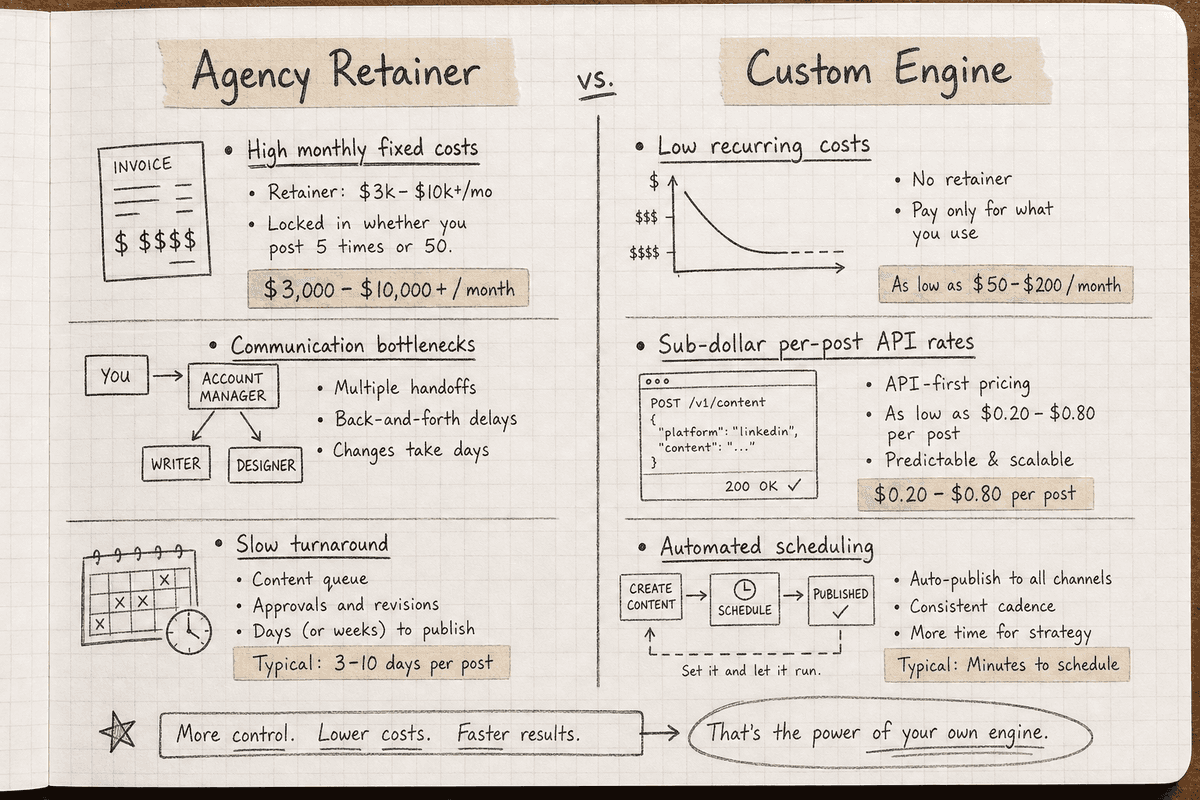
Building a custom content engine requires an upfront investment in time and testing, but the unit economics of the output scale beautifully.
Consider the traditional agency model. As detailed in our breakdown of SEO Charges UK: Agency Rates vs Automation (2026), outsourcing a high-volume content strategy easily runs into the thousands of dollars per month. Agencies have overhead, account management layers, and human writing bottlenecks.
A custom automated engine incurs three primary costs:
- The Orchestrator Subscription: Usually between $20 and $100 per month depending on task volume.
- API Usage: Text generation via Claude or OpenAI is remarkably cheap, often costing mere cents per 3,000-word article.
- Hosting and Tooling: Basic CMS hosting and supplementary SEO scraping APIs.
Once the logic is built, scaling from publishing two articles a week to twenty articles a week only marginally increases your API costs. The initial 10 to 20 hours spent configuring the webhooks, testing the prompts, and handling the formatting logic pays for itself within the first month of operation.
However, automation does not replace strategy. If your automated engine is printing articles targeting the wrong intent, the cheap unit cost is irrelevant. You must still read up on strategy, perhaps starting with the 11 Best SEO Blogs Every SaaS Founder Needs (2026), to ensure you are pointing your powerful new engine in the right direction.
Frequently Asked Questions
Does Google penalize hands-free automated blog engines?
Google's official stance prioritizes the quality and utility of the content, not the method of production. The search engine explicitly states that appropriate use of AI is not against its guidelines. However, if your automated engine produces thin, repetitive content that provides no unique value to the user—often referred to as programmatic spam—it will struggle to rank and may incur a helpful content demotion. The key is configuring your engine to inject unique data, strong formatting, and clear entity relationships.
Which CMS is best for an automated blogging engine?
WordPress is the industry standard for automated content because of its highly accessible REST API and massive ecosystem of plugins. You can easily pass categories, tags, author IDs, and SEO metadata (like Yoast or RankMath fields) via a single automated webhook. Webflow is also a strong candidate for automation, offering a robust CMS API, but it has stricter rate limits and item caps depending on your pricing tier.
How do you maintain brand voice at scale?
Maintaining brand voice requires building a comprehensive "voice and tone" document and using it as a persistent variable in your prompt architecture. Do not just say "write professionally." Provide the AI with a list of allowed phrases, banned words, and structural preferences. For example: "Use active voice. Keep paragraphs under four sentences. Never use the word 'crucial'. Explain technical concepts using physical world analogies." By passing this constraint document into every generation node, the output remains consistent.
Can an automated engine handle internal linking?
Yes, but it requires a database. You cannot trust an LLM to guess your URL slugs. The most reliable method is to maintain a spreadsheet or database of your existing published articles. When the orchestration layer triggers a new article, it queries this database, finds three to five semantically relevant rows, and passes those exact URLs and titles to the AI with instructions to embed them naturally into the drafted text.
Scaling Your Content Output
A hands-free SEO blog engine is a sophisticated pipeline that turns raw ideas into published authority. By rejecting the limitations of one-click wrappers and building a custom stack—using orchestrators, advanced LLM APIs, and data-driven triggers—you take control of your content destiny.
The real advantage of this system is speed of execution. When BeVisible alerts you that a competitor is stealing your share of voice in ChatGPT or Gemini, you do not have to wait two weeks for a freelance writer to draft a response. You feed the visibility gap into your engine, and within minutes, an expertly formatted, correctly cited, brand-aligned article is sitting in your CMS, ready to reclaim your authority.