
I've spent the better part of the last decade dissecting search algorithms, tweaking meta tags, and analyzing competitor content. But if you’re reading this in May 2026, you already know the game has changed entirely. The old approach of stuffing keywords into H2s and calling it a day is dead. Today, on-page SEO is about structuring information so efficiently that both Google's AI Overviews and engines like ChatGPT and Perplexity can instantly extract your answers.
To figure out what actually works right now, I recently audited my entire software stack. I personally tested over 20 different applications—from legacy crawlers to next-gen AI platforms—to find the tools that deliver measurable ROI without requiring a dedicated engineering team.
In this guide, I’ll show you the 9 best on-page SEO tools I'm using in 2026 to audit sites, optimize content, and drive organic marketing growth. Whether you are looking for a free on-page checker or a fully automated publishing platform, this list cuts through the noise.
At a Glance: Top On-Page SEO Tools for 2026
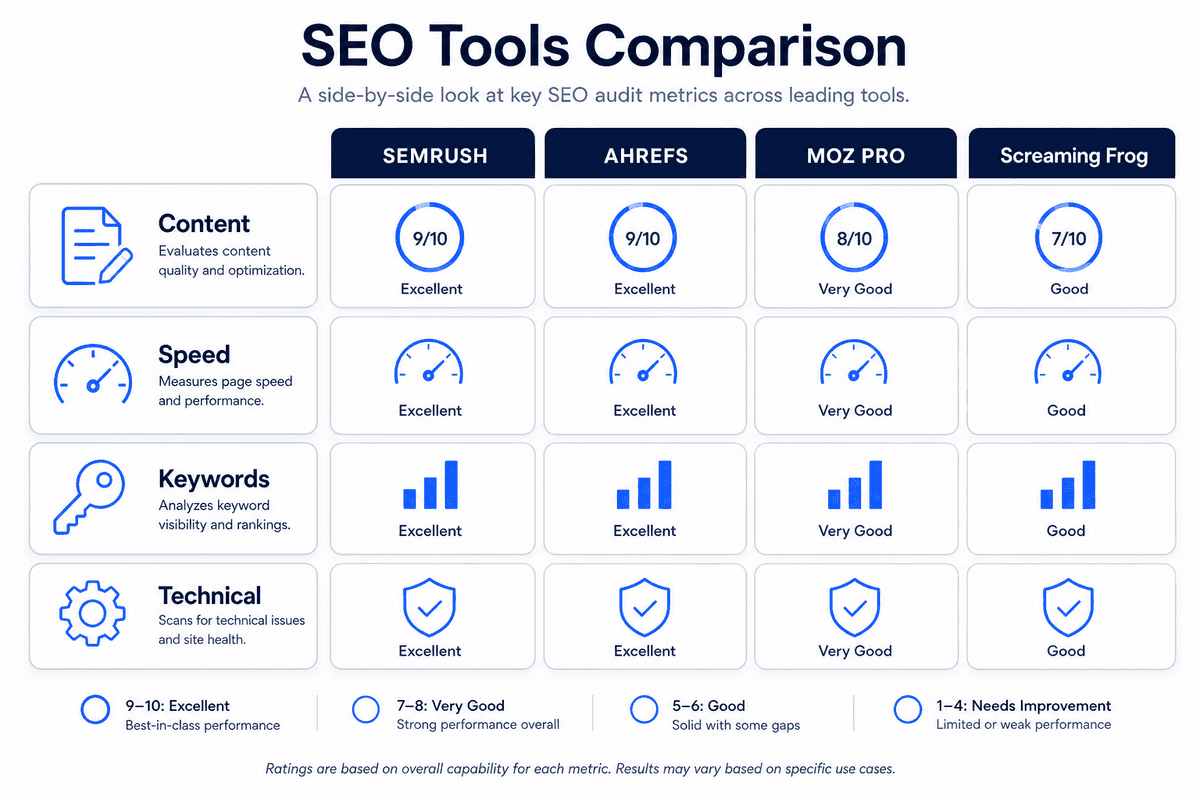
Before we dive into the detailed reviews, here is a quick comparison table summarizing the tools, their primary categories, and whether they offer a free tier.
Is On-Page SEO Still Worth It in 2026?
If you spend enough time reading marketing blogs, you’ll inevitably run into the question: Is SEO still worth it? With the rise of zero-click searches, AI-generated summaries in search results, and chatbots answering user queries directly, it’s a valid concern.
The short answer is: Yes, but only if you adapt.
On-page SEO in 2026 is no longer just about satisfying a traditional search engine index. It is about becoming the verified source material for AI models. When an AI search engine like Perplexity or ChatGPT answers a user's question, it looks for the most clearly structured, highly authoritative, and logically formatted content on the web to cite.
If your page lacks clear H2s, schema markup, an answer-first structure, and concise quotable sections, the AI simply skips you and cites your competitor. We tested the 12 best (& underrated) AI SEO tools in 2026 and found that the platforms surviving this shift are the ones treating on-page optimization as a data-structuring exercise rather than a keyword-density trick.
Solid on-page SEO ensures that when a crawler—whether it's Googlebot or an OpenAI scraper—hits your site, it immediately understands who you are, what you solve, and why your answer is the best. It remains the highest-ROI marketing investment for SaaS founders, indie hackers, and e-commerce owners building sustainable traffic.
What is an On-Page SEO Tool? (And How to Choose)
An on-page SEO tool is a software application designed to help you analyze, optimize, and improve the elements of your website that you control directly (unlike off-page SEO, which deals with external links).
However, not all tools do the same job. When evaluating your stack, it helps to understand the three distinct categories these tools fall into:
- The Checkers (Audit Crawlers): These tools crawl your website exactly like a search engine would. They show you technical on-page errors: missing H1 tags, broken internal links, oversized images, and missing meta descriptions. They are diagnostic.
- The Content Optimizers (NLP): These tools analyze the top-ranking pages for your target keyword and use Natural Language Processing (NLP) to tell you which semantic entities, secondary keywords, and topics you need to include in your article to compete.
- The Automated Platforms: A newer category for 2026. These platforms handle the research, the writing, the structural optimization (like schema and metadata), and the actual publishing to your CMS without requiring manual intervention.
When choosing your tools, avoid overlapping subscriptions. You don't need three different SEO audit tools; you need one good checker, one good content optimizer, and an automated publishing workflow.
The 9 Best On-Page SEO Tools I've Personally Tested
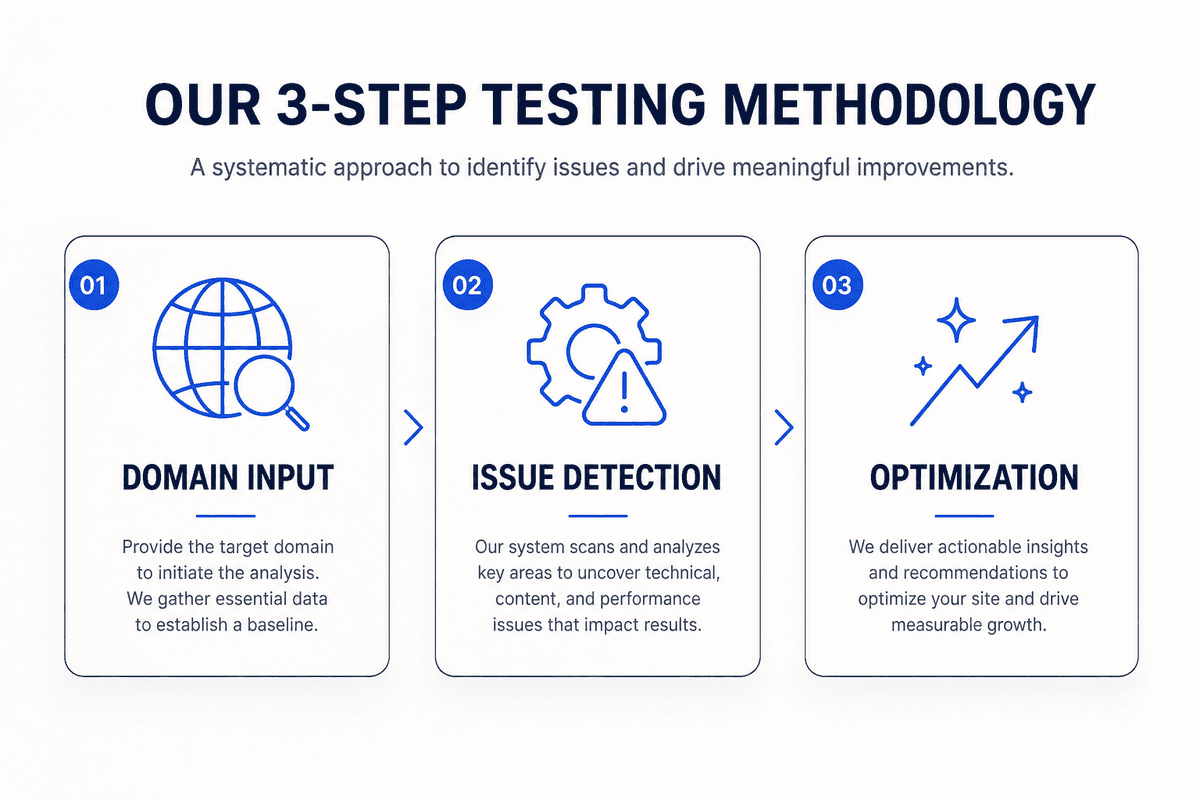
To build this list, I didn't just read feature pages. I actually ran my own domains through these platforms, testing their ability to identify issues, suggest meaningful optimizations, and ultimately drive traffic. Based on my review method, here are the top tools you should consider integrating into your workflow.
1. Google Search Console (GSC)
Google Search Console is the undisputed foundation of any SEO campaign. While third-party tools guess at your traffic and keyword volumes, GSC shows you the exact queries driving users to your site directly from Google. I consider it an on-page tool because its Performance and Page Indexing reports dictate exactly which pages need optimization.
If a page has high impressions but a low Click-Through Rate (CTR), your on-page task is to rewrite the meta title and description. If GSC shows a page isn't indexed, it points you directly to the on-page technical flaw preventing it.
- Key Features:
- Exact-match query data and click-through rates.
- Core Web Vitals reporting for page speed insights.
- Indexation troubleshooting (find out exactly why a page isn't ranking).
- Rich result status reports for schema validation.
- Pros:
- 100% accurate data straight from the source.
- Completely free to use.
- Integrates seamlessly with tools like Looker Studio and BeVisible.
- Cons:
- Data is delayed by about 24-48 hours.
- UI can be intimidating for beginners.
- Pricing: Forever Free.
2. BeVisible
If you are a SaaS founder, indie hacker, or content marketer running lean, creating perfectly optimized on-page content every day is exhausting. That's exactly why BeVisible exists. It is an automated SEO content generation and publishing platform that completely transforms how you handle organic growth.
Instead of manually researching keywords, writing drafts in a separate tool, optimizing them in an NLP checker, and manually uploading them to WordPress or Webflow, BeVisible handles the entire pipeline. You connect your site URL and niche, and BeVisible conducts the competitor analysis to build a 30-day content map. It then automatically writes, polishes, and publishes an article every 24 hours.
What makes BeVisible a powerhouse for on-page SEO is its AI-specific optimizations. Articles are generated with an answer-first structure, quotable sections, automatic internal linking, and perfectly formatted schema markup—all designed to be extracted by Google and AI engines like ChatGPT.
- Key Features:
- End-to-end automation: From keyword research to direct CMS publishing (WordPress, Webflow, Notion, Ghost, Shopify via API).
- Generates perfectly structured on-page elements: Meta titles, descriptions, categories, tags, and schema markup.
- Creates branded cover images and naturally integrates internal links.
- Daily auto-publishing commitment to build consistent topical authority.
- Google Search Console integration for real-time analytics.
- Pros:
- Eliminates the need for a massive content team or agency.
- Content is specifically structured for 2026 AI search extraction.
- Unlimited revisions ensure brand voice consistency.
- Cons:
- Requires relinquishing some day-to-day manual control over publishing schedules.
- Best suited for informational and supporting cluster content rather than highly subjective thought-leadership pieces.
- Pricing: $199/month for the Professional plan (launch discount), which includes 30 published articles per month. A 3-day free trial is available.
3. Screaming Frog SEO Spider
Screaming Frog is the industry-standard desktop crawler. When you need a highly granular, technical on-page SEO checker, this is the tool. It mimics a search engine crawler, visiting every page on your site and returning a massive spreadsheet of on-page data.
I use Screaming Frog for deep technical audits. It instantly shows me if I have duplicate H1s, meta descriptions that are too long, broken internal links (404s), or missing canonical tags. In recent updates, they’ve added fantastic features to check structured data and even use custom XPath extraction to scrape specific on-page elements during a crawl. As highlighted in discussions about the best on-page analysis tools, having a dedicated crawler is non-negotiable for large sites.
- Key Features:
- Comprehensive crawling for broken links, errors, and redirects.
- Page title and meta description analysis (length, duplication, missing).
- Custom extraction to pull specific text or code from pages.
- Integration with Google Analytics and Search Console APIs.
- Pros:
- Unparalleled depth of technical on-page data.
- One-time yearly license instead of a pricey monthly SaaS fee.
- The free version is incredibly robust for small sites.
- Cons:
- It’s a desktop application, meaning it uses your computer's RAM (can be slow on massive sites).
- The interface looks like a spreadsheet from 1998.
- Pricing: Free for up to 500 URLs. Premium license is $259/year.
4. Surfer
Surfer popularized the concept of data-driven on-page optimization. If you are writing content manually, Surfer takes the guesswork out of what to write about. It analyzes the top 10 results for your target keyword and provides a real-time "Content Score" based on how well your draft matches the semantic entities, word count, and heading structures of your competitors.
In 2026, Surfer remains highly relevant because it constantly updates its NLP algorithms to match Google's understanding of topics. I frequently use Surfer's Audit tool on older blog posts. I’ll plug in a URL that has dropped to page 2, and Surfer will show me exactly which secondary keywords my competitors have added since I last updated the post.
- Key Features:
- Real-time Content Editor with an NLP-driven scoring system.
- Detailed on-page Audit tool for existing live pages.
- Keyword research and SERP analyzer for deep competitor insights.
- Integrations with Google Docs and WordPress.
- Pros:
- Takes the subjectivity out of content optimization.
- Excellent for finding "missing entity" gaps in your copy.
- Cons:
- Pricing has become increasingly expensive over the years.
- It can encourage "keyword stuffing" if you chase a 100/100 score at the expense of readability.
- Pricing: Starts at $89/month.
5. Ahrefs Webmaster Tools (AWT)
Ahrefs is famous for its backlink data, but Ahrefs Webmaster Tools is heavily underrated as a free on-page SEO tool. AWT gives you free access to Ahrefs' Site Audit and Site Explorer tools for domains that you own and verify.
The Site Audit feature is a cloud-based alternative to Screaming Frog. It crawls your site on a schedule and gives you a beautifully designed "Health Score." It highlights on-page errors like orphaned pages, missing alt text on images, and slow-loading URLs. If you’re looking to learn how to improve your marketing — for free, setting up AWT should be your very first step.
- Key Features:
- Cloud-based Site Audit with an overall Health Score.
- Identifies over 100+ technical and on-page SEO issues.
- Provides actionable "how to fix" guides for every error.
- Tracks internal link distribution.
- Pros:
- Incredible value (it's essentially an enterprise audit tool for free).
- Cloud-based, so it doesn't slow down your computer.
- Beautiful, intuitive reporting dashboard.
- Cons:
- Only works for sites you own (you can't audit competitors for free).
- The free tier limits you to a certain number of monthly crawl credits.
- Pricing: Free for verified site owners.
6. Clearscope
Clearscope is the enterprise-grade alternative to Surfer. While Surfer is popular among affiliate marketers and bloggers, Clearscope is heavily favored by B2B SaaS companies, large agencies, and professional content marketers.
What sets Clearscope apart is its relentless focus on search intent and content relevance. Instead of just giving you a list of words to inject, it provides a comprehensive grading scale (A++ to F) based on how well your content covers the topic holistically. When users on platforms like Reddit discuss which on page seo tools practitioners use, Clearscope is frequently cited by high-end agencies as the tool that moves the needle for difficult, high-volume keywords.
- Key Features:
- Best-in-class NLP entity extraction and content grading.
- Search intent analysis and competitor outline breakdowns.
- Google Docs and WordPress integrations.
- Content inventory tracking to monitor page decay over time.
- Pros:
- Produces highly readable, authoritative content suggestions.
- Extremely clean, distraction-free interface.
- Excellent customer support and onboarding.
- Cons:
- Prohibitively expensive for solo bloggers or early-stage startups.
- Lacks the broader technical auditing features of a full suite.
- Pricing: Starts at $199/month.
7. SE Ranking
If you want an all-in-one SEO suite but don't want to pay the massive monthly fees associated with Ahrefs or Semrush, SE Ranking is the best alternative. I personally tested SE Ranking extensively for an agency project, and its On-Page SEO Checker is remarkably thorough.
You simply input a URL and a target keyword, and SE Ranking runs a comprehensive check against dozens of parameters: URL structure, meta tags, image optimization, keyword density, and internal link structure. It then gives you a prioritized to-do list. Furthermore, it includes a robust rank tracker, which is essential for measuring whether your on-page tweaks actually resulted in higher rankings.
- Key Features:
- Detailed On-Page SEO Checker with prioritized task lists.
- Highly accurate daily keyword rank tracker.
- Competitor research and backlink monitoring.
- White-label reporting for agencies.
- Pros:
- One of the most cost-effective all-in-one platforms.
- Very intuitive user interface.
- The on-page audit reports are easy to export and hand to a developer.
- Cons:
- The backlink database isn't as large as industry giants.
- Pricing can scale up quickly depending on how frequently you want rank updates.
- Pricing: Starts around $55/month, with a 14-day free trial.
8. Rank Math (WordPress Plugin)
If your website runs on WordPress, an SEO plugin is mandatory. While Yoast SEO was the standard for years, Rank Math has largely taken its place in 2026. Rank Math is an on-page execution tool—it lives inside your CMS and gives you the fields you need to optimize your pages before hitting publish.
The most critical on-page feature Rank Math offers is its robust Schema Generator. In the era of AI search, structured data (Schema) is how you tell an AI exactly what a page is about. Rank Math allows you to easily inject FAQ schema, Review schema, and Article schema without touching a single line of code.
- Key Features:
- In-editor on-page SEO scoring (checks title, keywords, readability).
- Advanced Schema Generator with multiple pre-built templates.
- Built-in redirection manager (for handling 404s).
- Instant indexing API integration for Google and Bing.
- Pros:
- Lightweight code doesn't slow down WordPress.
- The free version offers features that competitors charge for (like redirects).
- Modular design lets you turn off features you don't use.
- Cons:
- Only available for WordPress sites.
- The on-page score is basic compared to dedicated NLP tools like Surfer.
- Pricing: Core plugin is Free. Pro versions start at $59/year.
9. Claude (Anthropic)
Including a generative AI like Claude on a list of SEO tools might seem unconventional, but in 2026, it is arguably the most powerful free on-page tool in my arsenal.
I do not use Claude to write final drafts—that's a recipe for generic, detectable AI content unless you use a specialized platform like BeVisible. Instead, I use Claude for semantic structuring and intent matching.
For example, I will paste my draft into Claude and prompt it: "Act as a strict SEO auditor. Analyze this text for the keyword 'best CRM software.' Tell me what secondary subtopics I missed, where my paragraphs are too dense, and extract three key points that I should format into an FAQ section with schema." Claude's ability to analyze text structure and suggest logical flow improvements is unmatched.
- Key Features:
- Advanced natural language understanding and context retention.
- Ability to process large documents (massive context window).
- Excellent for generating code (like custom JSON-LD schema markup).
- Great for brainstorming H2/H3 structures based on search intent.
- Pros:
- Much more nuanced and less "robotic" reasoning than ChatGPT for editing.
- The free tier is incredibly powerful.
- Can create highly customized schema markup instantly.
- Cons:
- Requires strong prompt engineering skills to get good results.
- Does not have direct access to live search volume or SERP data.
- Pricing: Free core model. Claude Pro is $20/month.
Free vs. Paid: Which Tools Do You Actually Need?
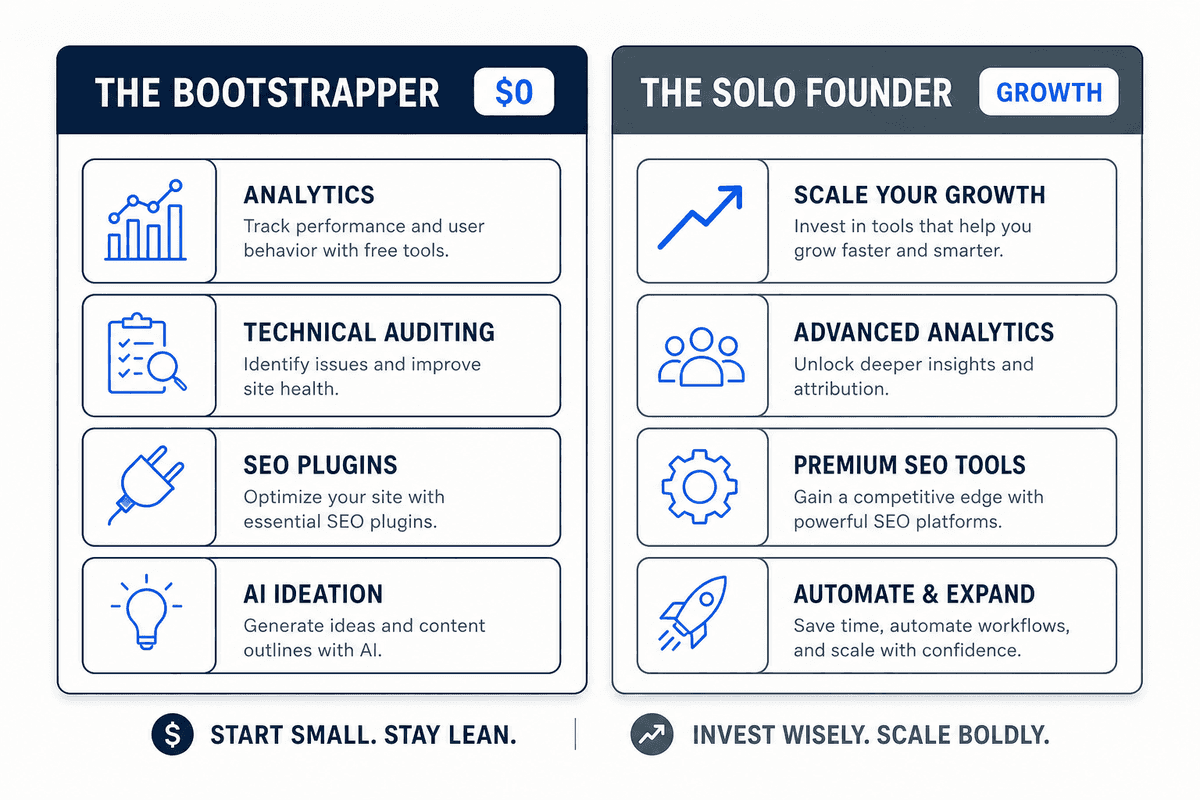
A common mistake I see among SaaS founders and indie hackers is buying an expensive software suite before they actually have a workflow in place. You do not need to spend $500 a month on software to get your pages to rank.
In the 20 best SEO tools in 2026 test by Morningscore, a key finding was that free tools are often more than sufficient for the foundational work. Here is how I recommend budgeting your stack based on your growth stage:
The Bootstrapper Stack ($0/month)
If you are pre-revenue or on a tight budget, rely entirely on free tools.
- Analytics: Google Search Console (Free)
- Technical Checker: Ahrefs Webmaster Tools (Free) or Screaming Frog (Free up to 500 URLs)
- CMS Execution: Rank Math (Free)
- Content Ideation: Claude (Free)
The Solo-Founder Growth Stack (~$200/month)
If you have validated your product and need to scale traffic, but don't have time to write and optimize content manually, automation is your best bet.
- End-to-End Automation: BeVisible ($199/month)
- Analytics: Google Search Console (Free)
- (BeVisible handles the research, writing, optimization, and publishing, eliminating the need for separate NLP and crawling tools for your content strategy.)
The Agency / In-House Team Stack ($300+/month)
If you have a dedicated marketing team manually producing complex, highly subjective thought-leadership content alongside your SEO clusters.
- Technical Audit Suite: SE Ranking ($55/month)
- Content Optimization: Surfer ($89/mo) or Clearscope ($199/mo)
- Deep Crawling: Screaming Frog ($259/year)
A 5-Step Framework for On-Page SEO in 2026
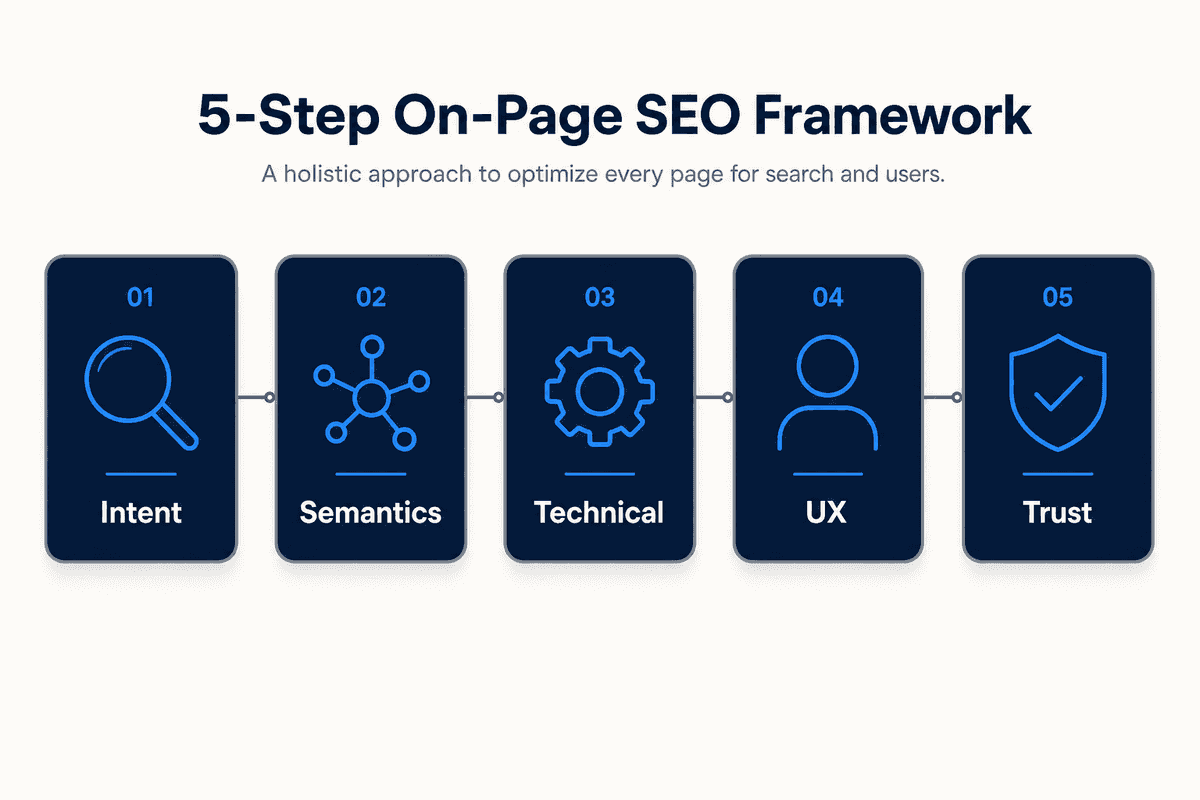
Having the best SEO audit tools doesn't mean anything if you don't have a standardized process for using them. If you want to ensure every page you publish is optimized for both Google and AI search engines, follow this 5-step checklist.
Step 1: Map the Intent and Entity Structure
Before writing a single word, define the search intent (Informational, Commercial, Navigational, Transactional). Use a tool like Claude to list the core entities associated with your topic. For example, if your topic is "email marketing software," your required entities are deliverability, automation workflows, CTR, open rates, and CAN-SPAM compliance. Ensure these are woven into your subheadings.
Step 2: Build an Answer-First Hierarchy
AI models extract answers; they don't read introductions. Structure your page so the most critical information is at the top.
- Your H1 should exactly match the search intent.
- Immediately follow the H1 with a bolded, concise 50-word summary answering the core question.
- Use H2s for major subtopics.
- Use H3s for listicle items (this specific structure is what triggers Google's Featured Snippets).
Step 3: Run a Semantic NLP Check
Once your draft is complete, run it through an optimizer like Surfer or Clearscope. Don't blindly force keywords into sentences where they don't belong. Instead, look for conceptual gaps. If the tool says you are missing the phrase "marketing budget," add a new, valuable paragraph discussing costs, rather than just shoehorning the phrase into an existing sentence.
Step 4: Validate Technical On-Page Elements
Use your CMS tool (like Rank Math) or a crawler (like Screaming Frog) to ensure the technical foundation is flawless:
- Is the meta title under 60 characters?
- Does the meta description include a clear Call-to-Action (CTA)?
- Do all images have descriptive Alt Text (crucial for accessibility and image search)?
- Is the URL slug short and keyword-rich (e.g.,
/best-on-page-seo-toolsinstead of/post-id-1234)?
Step 5: Inject Structured Data (Schema)
Finally, wrap your key components in JSON-LD schema markup. Add Article schema to the post itself, FAQPage schema to your frequently asked questions, and Review schema if you are evaluating products. This code acts as a direct translator for search engine bots, telling them exactly what data they are looking at.
Frequently Asked Questions
What is the difference between an on-page checker and a rank tracker?
An on-page checker audits the structural health and content of your web pages (e.g., checking for missing meta titles, broken links, or keyword density). A rank tracker monitors where your website appears in search engine result pages (SERPs) for specific keywords over time. You need a checker to execute the work, and a tracker to measure the results.
Can I do on-page SEO without paid tools?
Yes. The combination of Google Search Console (for performance data), Ahrefs Webmaster Tools (for technical audits), and manual SERP analysis (looking at competitor headings) is completely free and highly effective. Paid tools simply save you time by automating the analysis and data extraction.
How often should I run an on-page SEO audit?
For an active blog or e-commerce site publishing new content weekly, you should run a technical on-page crawl (using Screaming Frog or Ahrefs) at least once a month. For individual articles, you should revisit and optimize your top-performing content every 6 to 12 months using an NLP tool to ensure it hasn't decayed due to competitor updates.
Why is BeVisible different from tools like Surfer or Clearscope?
Surfer and Clearscope are analytical tools; they give you a score and tell you what to fix, but you still have to do the manual research, writing, and publishing. BeVisible is an execution platform. It handles the entire pipeline—from building a 30-day topical map to automatically generating and publishing fully structured, AI-optimized articles to your CMS daily. It replaces the manual workflow entirely rather than just grading it.