
There is a moment in every major site migration, competitive audit, or AI visibility sprint where you realize you are flying blind. You know the website has hundreds, maybe thousands, of pages. You know there are outbound citations, broken redirects, and internal linking silos. But until you extract every single link from that domain and put it into a filterable database, you are operating on assumptions.
Historically, pulling all links from a website was about standard SEO hygiene—finding 404s, mapping PageRank flow, or preparing a redirect map. Today, the stakes are completely different.
Modern search engines and AI assistants like ChatGPT, Gemini, and Perplexity rely heavily on structured data, crawlable pathways, and clear citation loops. If you want these models to cite your brand as an authority, they first need to be able to find and map your content. You cannot identify which citations AI is missing if you lack a master inventory of your own URLs. Teams using BeVisible to monitor how AI assistants answer buyer questions regularly start with this exact foundational step: mapping the entire site architecture to benchmark current visibility against missing mentions.
Whether you are auditing a massive enterprise SaaS site, dissecting a competitor's content strategy, or just trying to pull outbound links from a specific directory, you need a reliable extraction method.
This guide breaks down three distinct methods to get all links from a website, ranging from zero-code browser extensions to automated scripts.
Why Modern Link Auditing Goes Beyond Standard SEO
Before executing a crawl, it helps to understand why modern link architectures matter more now than they did five years ago.
The web has shifted from simple static HTML document retrieval to dynamic, conversational answers. When an AI model answers a buyer's prompt, it synthesizes information from across the web. To establish trust, models rely heavily on recognized sources, strong internal linking, and consistent external citations.
If your website's links are trapped behind poorly executed JavaScript, broken accordions, or orphaned pages, standard search bots struggle to index them. More importantly, AI models fail to surface them as cited sources.
A complete link audit exposes the exact pathways a machine takes through your site. It reveals:
- Orphaned Content: Pages that exist on your server but have zero internal links pointing to them. If a crawler cannot find them, neither will an AI model.
- Outbound Citation Decay: External links that point to dead domains, hurting your site's trust signals.
- Anchor Text Over-Optimization: Internal links that use unnatural, repetitive anchor text instead of contextual, helpful descriptors.
- Competitor Strategy: Extracting links from a competitor’s site allows you to reverse-engineer their content hubs, partnership networks, and outbound citation habits.
Let’s look at the three most effective ways to extract this data, based on your technical comfort level and the size of the target website.
Method 1: Desktop Crawlers (The Professional Choice)
If you need to extract links from an entire domain—whether it is 500 pages or 500,000 pages—desktop crawlers are the undisputed standard. Tools like Screaming Frog SEO Spider, Sitebulb, and Ahrefs Webmaster Tools simulate search engine bots, traversing a site link by link until every URL is mapped.
Crawlers are best used when you need comprehensive data: source URLs, destination URLs, anchor text, HTTP status codes, and link directives (dofollow, nofollow, ugc).
Step-by-Step Crawler Setup
Let's walk through the setup using Screaming Frog as the benchmark, as it remains the most common practitioner tool for raw data extraction.
1. Memory Allocation Before you paste a URL and hit start, address memory. Crawling massive sites eats RAM. If you are auditing a site with more than 50,000 pages, navigate to Configuration > System > Memory and increase the RAM allocation to at least 8GB. This prevents the crawler from crashing midway through.
2. Configure the Spider By default, crawlers check everything: images, CSS, JavaScript, and external links. If your only goal is to extract HTML links, you can speed up the crawl significantly by turning off resource rendering.
- Go to Configuration > Spider > Crawl.
- Uncheck images, CSS, and JS (unless you are dealing with a client-side rendered site, which we will cover later).
- Ensure Crawl External Links is checked if you want a list of every outbound link leaving the domain.
3. Set Boundaries (Include/Exclude) Often, you do not want all links. You might only want links within the blog directory.
- Use the Include feature and use a simple regex like
https://example.com/blog/.*. - Use the Exclude feature to ignore parameters like
?sort=or?filter=to prevent the crawler from getting trapped in infinite filtering loops.
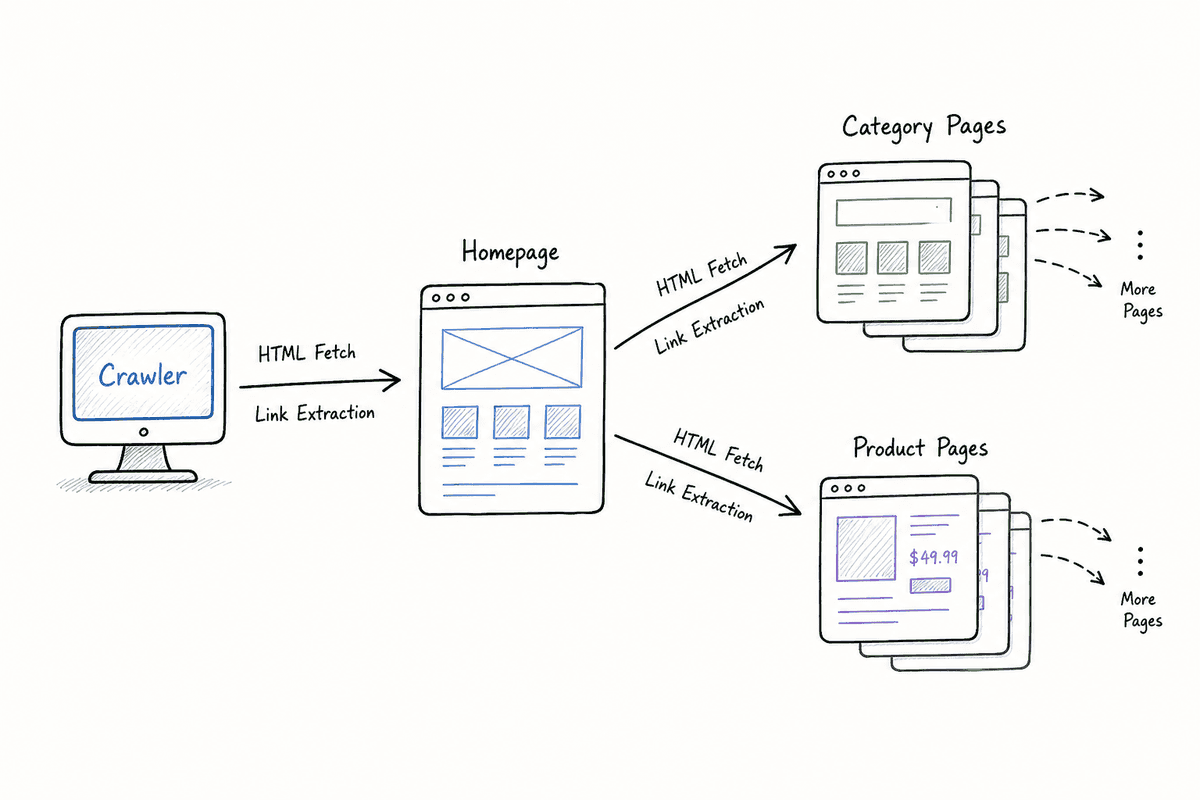
Extracting and Exporting the Data
Once the crawl finishes, you have a massive dataset. To isolate just the links:
- Navigate to the Bulk Export menu.
- Select Links > All Outlinks.
- This exports a CSV containing every single connection found on the site.
The resulting spreadsheet will have specific columns you need to master:
- Source: The page where the link lives.
- Destination: The URL the link points to.
- Anchor: The clickable text of the link.
- Status Code: 200 (OK), 301 (Redirect), 404 (Not Found), etc.
- Follow: A simple True/False indicating if the link passes equity.
Failure Modes for Crawlers
Crawlers are powerful, but they fail predictably.
- WAF Blocks: Firewalls like Cloudflare often detect desktop crawlers and block them, returning a 403 Forbidden error. You may need to change your crawler's User-Agent to Googlebot or whitelist your IP address.
- Robots.txt restrictions: If the site owner has blocked crawlers in the
robots.txtfile, your tool will stop immediately. You can choose to ignorerobots.txtin the settings, but tread carefully on external sites.
Method 2: Browser Extensions & Scripts (The Targeted Audit)
Crawlers are overkill if you only need to extract links from a single page. If you are auditing how to build an SEO landing page and just want to verify its specific outbound citations, browser tools are much faster.
This method operates directly within your browser, meaning it bypasses most firewalls and bot-protection software. If you can see the page in Chrome, you can extract the links.
Using Browser Extensions
Extensions like LinkMiner, Check My Links, and Linkclump are designed for rapid, on-page extraction.
- Linkclump: Allows you to drag a selection box around a specific part of a page (like a sidebar or a footer) and instantly copy all links within that box to your clipboard. This is highly effective for localized extraction.
- LinkMiner: Primarily built to find broken links, but it allows you to export all links on the current page to a CSV with one click. It also pulls in basic metric data if connected to an API.
The DIY JavaScript Bookmarklet
Extensions add bloat to your browser. If you want a lightweight, zero-install method, you can use vanilla JavaScript directly in Chrome DevTools.
Open any webpage, right-click and select Inspect, then navigate to the Console tab. Paste the following script and hit enter:
let allLinks = document.querySelectorAll('a');
let linkData = [];

allLinks.forEach(link => {
    if (link.href && link.href.startsWith('http')) {
        linkData.push({
            URL: link.href,
            Anchor: link.innerText.trim() || 'No Text',
            Rel: link.rel || 'None'
        });
    }
});

console.table(linkData);
This script grabs every <a> (anchor) tag on the page, filters out empty links or javascript triggers, and logs a clean, readable table right in your console showing the URL, the anchor text, and any rel attributes (like nofollow).
If you want to download this data directly from the console as a CSV, you can extend the script:
function downloadCSV(data) {
    const csvRows = [];
    const headers = Object.keys(data[0]);
    csvRows.push(headers.join(','));

    for (const row of data) {
        const values = headers.map(header => {
            const escaped = ('' + row[header]).replace(/"/g, '\\"');
            return `"${escaped}"`;
        });
        csvRows.push(values.join(','));
    }

    const blob = new Blob([csvRows.join('\n')], { type: 'text/csv' });
    const url = window.URL.createObjectURL(blob);
    const a = document.createElement('a');
    a.setAttribute('hidden', '');
    a.setAttribute('href', url);
    a.setAttribute('download', 'extracted_links.csv');
    document.body.appendChild(a);
    a.click();
    document.body.removeChild(a);
}

downloadCSV(linkData);
When to Use Browser Methods
Browser-based extraction shines during behind-login audits. If you need to map links inside a SaaS dashboard or a staged, password-protected staging environment, desktop crawlers will hit a login wall. Your browser, however, already holds the authentication cookies. Running a console script extracts the data exactly as an authenticated user experiences it.
Method 3: Custom Scripting & APIs (The Scalable Method)
For B2B marketing teams, agencies, and data engineers who need to monitor links across hundreds of sites concurrently, manual crawlers and browser scripts break down. This is where programmatic extraction using Python or Node.js becomes necessary.
Programmatic extraction allows you to automate audits, run them on a schedule (e.g., pulling a competitor's blog links every Monday), and pipe the data directly into BigQuery, Postgres, or Google Sheets.
Python and BeautifulSoup (For Static Sites)
Python remains the dominant language for web scraping. The requests library fetches the HTML, and BeautifulSoup parses it.
Here is a basic framework for extracting all links from a single URL using Python:
import requests
from bs4 import BeautifulSoup
from urllib.parse import urljoin

def get_all_links(target_url):
    # Use a standard user-agent to prevent basic blocks
    headers = {
        'User-Agent': 'Mozilla/5.0 (Windows NT 10.0; Win64; x64) AppleWebKit/537.36'
    }

    try:
        response = requests.get(target_url, headers=headers, timeout=10)
        response.raise_for_status()  # Check for 404s or 500s
    except requests.exceptions.RequestException as e:
        print(f"Error fetching {target_url}: {e}")
        return

    soup = BeautifulSoup(response.text, 'html.parser')
    links = set() # Use a set to automatically remove duplicates

    for a_tag in soup.find_all('a', href=True):
        href = a_tag['href']
        # Handle relative URLs (e.g., '/about' becomes 'https://site.com/about')
        full_url = urljoin(target_url, href)

        # Filter out mailto: and tel: links
        if full_url.startswith('http'):
            links.add(full_url)

    return list(links)

# Execution
found_links = get_all_links('https://example.com')
for link in found_links:
    print(link)
This script handles one of the most common issues in link extraction: Relative URLs. Many internal links look like <a href="/pricing">Pricing</a>. If you extract that literally, you just get /pricing, which is useless in a database. The urljoin function reconstructs the full path.
Node.js and Puppeteer (For Dynamic Sites)
Python's requests library only downloads the raw HTML sent by the server. If a website relies heavily on JavaScript to render its links (common in React, Vue, or Angular applications), the Python script above will return an empty list.
To solve this, you need a headless browser. Puppeteer (Node.js) actually opens an invisible instance of Chromium, executes the JavaScript, waits for the page to fully load, and then extracts the links.
const puppeteer = require('puppeteer');

async function extractDynamicLinks(url) {
    const browser = await puppeteer.launch({ headless: "new" });
    const page = await browser.newPage();

    // Wait until network activity settles to ensure JS has rendered
    await page.goto(url, { waitUntil: 'networkidle2' });

    const links = await page.evaluate(() => {
        return Array.from(document.querySelectorAll('a'))
            .map(a => ({
                text: a.innerText.trim(),
                url: a.href
            }))
            .filter(link => link.url.startsWith('http'));
    });

    console.log(links);
    await browser.close();
}

extractDynamicLinks('https://example-react-site.com');
 Automating your link extraction reduces overhead. If you are comparing SEO charges UK agencies vs. in-house automation, setting up Puppeteer scripts is often the most cost-effective way to handle recurring technical audits without paying hourly agency retainers.
The Single Page Application (SPA) Challenge
Extracting links from standard WordPress or Shopify sites is generally straightforward. Extracting links from a Single Page Application (SPA) is notoriously difficult.
SPAs load a single HTML document and update the body content dynamically via JavaScript as the user navigates. To a standard bot, the site looks like one page. There are no traditional internal links for a crawler to follow; clicking a button simply triggers a JavaScript function that swaps out components on the screen.
How to Audit SPA Links
If you point a standard Screaming Frog crawl at an SPA, it will crawl the homepage and stop. It will report zero internal links.
To bypass this, you must adjust your approach:
- Enable JavaScript Rendering: In your crawler settings, switch the rendering engine from Text to JavaScript. The crawler will now use a built-in headless browser to execute the JS before looking for links.
- Adjust the Timeout: SPAs take longer to render than static HTML. Increase your crawler's timeout threshold to at least 5-7 seconds to ensure the framework has time to paint the links onto the DOM.
- Check for the History API: Well-built SPAs push state changes to the browser's history API, creating clean URLs (e.g.,
site.com/featuresinstead ofsite.com/#features). If the SPA uses hash routing, extraction becomes significantly harder to map to actual content silos.
For a deeper dive into optimizing and extracting data from these complex frameworks, review exactly what works for single-page application SEO.
4 High-Value Use Cases for Full Link Audits
Extracting the links is the easy part; knowing what to do with that data separates practitioners from novices. Here is how growth teams weaponize raw link data.
1. Mapping AI Visibility and Citation Gaps
When BeVisible monitors brand visibility across AI engines, the underlying goal is to understand why an AI chose one source over another.
AI assistants heavily weight domain authority and citation frequency. By extracting all outbound links from your site and cross-referencing them against your top industry publications, you can see if you are actively participating in the citation economy. Conversely, by crawling competitor sites, you can extract their outbound link profiles to see which third-party platforms they are feeding with trust signals. If your competitors are constantly linking to a specific data hub, AI models will learn to associate that hub with industry authority.
2. De-Risking Site Migrations
Migrations are catastrophic if handled poorly. When moving from one platform to another, URLs inevitably change.
Before a migration, you must extract every single internal link on the legacy site. This creates your baseline. After the staging site is built, you crawl it again. By comparing the two link extractions using VLOOKUPs or Python dataframes, you can instantly spot dropped pages, broken internal links, or redirect loops before the new site goes live.
3. Anchor Text Normalization
Internal anchor text tells search engines and AI parsers exactly what a page is about.
When you run a full site link extraction, you can pivot the data in Excel to group by the Destination URL and count the variations in Anchor Text.
Often, you will find that a critical product page is linked to internally 50 times, but 45 of those links use the anchor text "Click Here" or "Learn More." This is wasted context. A link audit allows you to identify these wasted anchors and update them to descriptive phrases like "AI monitoring dashboard" or "enterprise pricing."
4. Competitor Content Silo Deconstruction
Want to know exactly how a competitor structures their content? Crawl their blog directory and extract all links.
Filter the export to only show links where the source and destination are both within the blog. By mapping these connections, you can visualize their "hub and spoke" model. You will quickly see which pillar pages they are aggressively pointing internal links toward, revealing their highest-priority search targets for the quarter.
Data Cleanup: Making Sense of the Raw Export
A raw export of a 10,000-page site might result in a CSV with 500,000 rows of links (since every page links to the header, footer, and navigation 50 times).
To make this actionable, you need to filter the noise.
Step 1: Remove Sitewide Links Identify the URLs mapped to your primary navigation, footer, and sidebar. In your spreadsheet, filter out these destination URLs. You are usually looking for contextual, in-content links, not the