
Bootstrapping a SaaS usually involves counting every penny. When founders start piecing together their tech stack, the search for a fast, reliable website builder inevitably leads to one highly appealing option: Google Sites. Its primary marketing hook is simple—it costs zero dollars.
But in software, "free" usually translates to "you pay with limitations."
If you are evaluating whether to build your SaaS landing page, customer portal, or internal company wiki on Google's platform, the pricing structure can seem suspiciously straightforward. There is no "Pro" tier, no premium widget marketplace, and no aggressive upsells to remove builder branding.
So, what is the catch?
This guide breaks down the true cost of using the Google Sites web building platform, the hidden expenses tied to domain ownership and Google Workspace integration, and the severe technical SEO limitations that often force growing startups to migrate.
Is Google Sites Really Free?
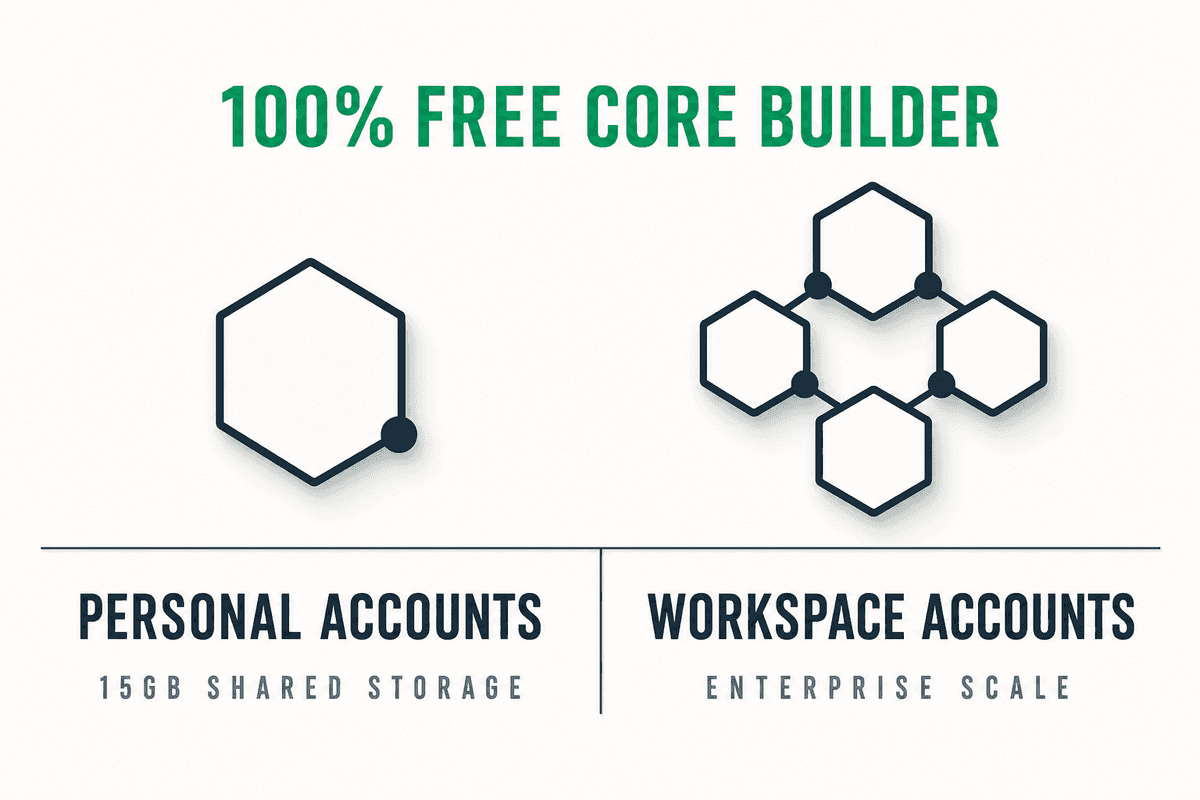
The short answer is yes. Google Sites is entirely free.
Unlike freemium website builders that lock custom domains, responsive design, or analytics behind a monthly paywall, Google Sites provides full access to its core builder out of the box. There is no hidden "Google Sites Premium" tier waiting to charge your credit card once you publish.
However, the platform exists in two distinct contexts, which dictates how your storage and administrative controls are handled:
- Personal Google Accounts (Free): If you use a standard
@gmail.comaddress, Google Sites is 100% free. The only limitation is storage. Your site's data counts against your account's shared 15GB limit across Google Drive, Gmail, and Google Photos. - Google Workspace Accounts (Paid): If your startup uses Google Workspace for custom email addresses and collaboration tools, Google Sites is included as a core service. You are technically paying for Workspace, not Sites, but your site inherits the enterprise-grade security and storage limits of your specific Workspace tier.
As noted by web developers evaluating the platform, Google Sites stands out because it doesn't arbitrarily restrict features just to force an upgrade. The limitations you encounter are simply the technical boundaries of the product itself.
Google Sites for Business: The Google Workspace Tiers Explained
If you are running a SaaS, you likely already pay for Google Workspace to host your company emails (founder@yoursaas.com). Because Google Sites is deeply integrated with Google Drive, the "pricing" of your site scales alongside your Workspace subscription.
While the building tools remain identical across all tiers, the storage capacity and administrative permissions change drastically.
1. Business Starter ($6/user/month)
- Storage: 30GB pooled storage per user.
- Sites Capability: Full access to the builder, custom domains, and SSL certificates.
- Best For: Solo founders or indie hackers spinning up an MVP landing page or a simple documentation wiki.
2. Business Standard ($12/user/month)
- Storage: 2TB pooled storage per user.
- Sites Capability: Better suited for company intranets that require embedding large video files or high-resolution assets directly from Google Drive.
- Best For: Small teams building internal knowledge bases or partner portals.
3. Business Plus ($18/user/month)
- Storage: 5TB pooled storage per user.
- Sites Capability: Advanced administrative controls over who can view, edit, and share the site outside the organization.
- Best For: Agencies and mid-sized SaaS companies managing secure client portals or proprietary investor data rooms.
The Hidden Costs of a "Free" Google Site
While the software itself has no licensing fee, running a professional, public-facing website on Google Sites still incurs direct and indirect costs.
1. Custom Domains (The Mandatory Startup Expense)
By default, a published Google Site lives on an unbranded URL that looks like sites.google.com/view/yoursaasname. For a business, this is unacceptable. It signals a lack of credibility and severely damages user trust.
To look professional, you must connect a custom domain. While Google Sites allows you to connect a custom domain for free (unlike basic plans on Wix or WordPress.com), you still have to purchase that domain from a registrar.
- Average Cost: $10 to $20 per year through registrars like Namecheap, Cloudflare, or Squarespace (which acquired Google Domains).
- SSL Certificates: Google automatically provisions and renews a free SSL certificate for your custom domain, saving you an additional $50-$100 annually compared to older, traditional hosting environments.
2. The Storage Tax
Google Sites doesn't have "hosting fees" in the traditional sense, but it does consume Google Drive storage. Every image, PDF, and embedded video hosted natively counts against your quota. If you are on a free 15GB personal plan and max it out with site assets, your Gmail will stop receiving emails until you upgrade to Google One (starting at $1.99/month for 100GB).
Google Sites vs. Other Content Management Systems (CMS)
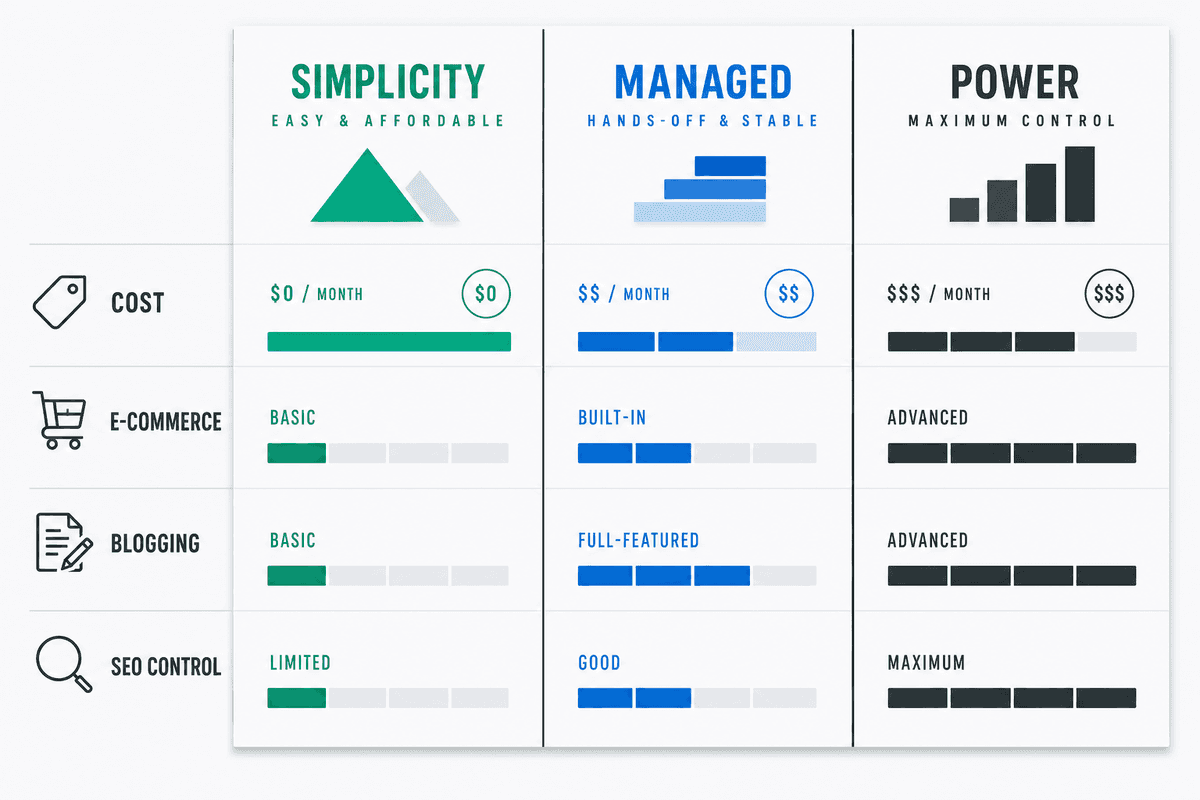
To understand if Google Sites is the right financial and operational choice, you have to compare it against dedicated site builders.
When evaluating Google Sites vs. Wix or running a WordPress vs. Google Sites comparison, the decision usually comes down to design flexibility and scalability rather than strict monetary cost.
Note: Independent analyses of platforms like Google Sites: Website Builder By Google consistently highlight that while Google Sites wins on price, it loses entirely on marketing scalability.
Deep Integration: The "No-Code" Synergy with Google Workspace
Where Google Sites genuinely shines—and justifies its existence in the SaaS ecosystem—is its deep integration with Google Workspace. It functions less like a traditional website builder and more like a visual layout layer for your Google Drive.
If you want to build a secure employee intranet, a partner resource hub, or a live reporting dashboard, Google Sites handles it brilliantly without requiring a developer.
You can instantly embed:
- Google Docs: Live-updating company policies or feature documentation.
- Google Sheets: Embedded pricing calculators or public roadmaps.
- Google Forms: Direct lead capture, bug reporting, or beta access requests.
- Google Slides: Investor pitch decks or sales enablement materials.
Because the permissions for these embeds are managed natively through Google Drive, you can easily restrict access to specific departments or external partners. This makes it an exceptional tool for internal operations, completely bypassing the need for paid intranet software.
The SEO Trade-off: Why "Free" Can Cost You Organic Traffic
For a SaaS startup, the ultimate goal of a public website is customer acquisition. This is where Google Sites pricing becomes a trap. You save $30 a month on hosting, but you lose thousands of dollars in potential organic traffic due to severe technical SEO limitations.
If you are serious about building an organic growth engine, you need to understand exactly what you cannot do on Google Sites:
1. No Scalable Blogging Architecture
Google Sites does not have a native database or content management system (CMS) for blogging. You cannot create dynamic post templates, categorize articles, use tags, or set up RSS feeds. Every "post" requires building a static page manually. If you are trying to rank for a cluster of SaaS topics, this manual overhead becomes impossible to maintain.
2. Restricted Metadata and URL Structures
You cannot edit crucial SEO metadata like specific open-graph tags for social sharing, and your control over URL slugs is limited. Furthermore, Google Sites does not support advanced schema markup (JSON-LD)—the code that helps search engines understand your content and grants you rich snippets in search results.
3. Limited Performance Optimization
While Google hosts the sites on their own infrastructure, you have zero control over caching, image compression, or lazy loading. If your site becomes heavy with embedded elements, your Core Web Vitals will suffer, and you cannot install plugins to fix it.
The Growth Solution: Moving to a Proper CMS
If your goal is to acquire customers through search, you need a platform capable of handling automated, high-velocity publishing.
This is why scaling SaaS companies migrate from Google Sites to WordPress, Webflow, or Ghost. Once on a proper CMS, you can connect an automated SEO platform like BeVisible. Instead of manually wrestling with static pages on Google Sites, BeVisible integrates directly with your CMS via API.
It handles the entire pipeline: running keyword research, building a 30-day content map, and automatically writing, polishing, and publishing answer-first articles every 24 hours. At $199 a month for 30 high-quality, auto-published articles (complete with schema markup and internal linking), the ROI of moving off Google Sites and automating your content marketing vastly outweighs the "savings" of a free static builder.
If you want to understand how deep the SEO rabbit hole goes when building modern applications, reading up on Single-Page Application SEO: What Works in 2026? provides a great contrast to the limitations of static builders.
Common SaaS Use Cases for Google Sites
Despite its marketing limitations, Google Sites is still a powerful tool when used correctly. Smart founders deploy it for specific, low-friction tasks rather than their primary marketing hub.
- Minimum Viable Products (MVPs): Validating a SaaS idea over a weekend? Spin up a Google Site with an embedded Google Form to collect waitlist emails.
- Internal Wikis and Intranets: Use premade templates to organize company onboarding materials, OKRs, and brand assets. It serves as a secure "source of truth" for your team.
- Investor Data Rooms: Create a secure, password-protected (via Google login) portal containing embedded pitch decks, financial models, and legal documents to share with venture capitalists.
- Event Landing Pages: Hosting a quick webinar or local meetup? A Google Site takes 10 minutes to build and deploy.
Frequently Asked Questions (FAQ)
Is Google Sites free for commercial use? Yes. There are no restrictions on using Google Sites for commercial purposes. You can build a business site, advertise your services, and point a custom domain to it without violating any terms of service. You can read more about this in independent reviews covering the Google Sites platform.
Can I make an ecommerce website with Google Sites? Not natively. Google Sites does not have built-in payment processing, shopping carts, or inventory management. To sell products, you must embed third-party checkout links from platforms like Stripe, Shopify Lite, or Gumroad.
Do I need a credit card to start building?
No. If you are using a standard @gmail.com account, you can create, publish, and host a Google Site without ever entering payment information. You only need a credit card if you decide to purchase a custom domain from a registrar or upgrade your Google Drive storage.
Was Google Sites discontinued? No, but it underwent a massive transition. The original "Classic Google Sites" was deprecated and fully shut down. The current version, "New Google Sites," is a completely rebuilt, modern, mobile-responsive platform.
Next Steps: Structuring Your SaaS Tech Stack
Google Sites is a masterclass in utility. Its pricing model—essentially free with your existing Google account—makes it the ultimate rapid-deployment tool for internal operations, wikis, and weekend MVPs.
However, it is not an SEO engine.
If you are currently relying on Google Sites for your primary SaaS marketing domain, you are capping your organic growth. The inability to inject schema markup, manage a dynamic blog architecture, or implement technical SEO best practices means your content will struggle to rank against competitors using proper CMS platforms.
Your next step should be evaluating your growth goals. If you need a simple digital business card or internal portal, stay on Google Sites and buy a $12 domain.
If you need to turn your website into a daily source of ranked answers for Google and AI search engines, it is time to migrate to WordPress or Webflow. From there, you can explore how to build an SEO landing page, connect automation platforms like BeVisible to scale your output without hiring a massive team, and finally stop treating your website as a static brochure.
Looking for more insights on scaling organic growth? Check out the 11 Best SEO Blogs Every SaaS Founder Needs to stay ahead of the algorithm.