
Open any SEO site audit tool, and you will almost certainly see a cluster of red warnings related to missing, duplicated, or poorly optimized H1 tags. Despite being one of the oldest and simplest HTML elements, the <h1> tag remains a frequent stumbling block for developers and content marketers alike.
The stakes for getting this right have shifted entirely. We are no longer just optimizing for Google's traditional crawler. Search engines have evolved into complex answer engines, and AI platforms like ChatGPT and Perplexity use your headings as the primary semantic landmarks to extract information. When an AI bot parses your page to answer a user's prompt, the H1 tag is its strongest contextual anchor.
If your H1 is vaguely worded, stuffed with disjointed keywords, or completely absent, your content gets skipped.
This guide covers the exact mechanics of writing, auditing, and structuring H1 tags to maximize visibility in modern search. We will break down the enduring confusion between title tags and H1s, look at real-world data on how changing an H1 impacts traffic, and provide a framework for structuring your site's hierarchy for both human users and AI extraction bots.
What Exactly is an H1 Tag?
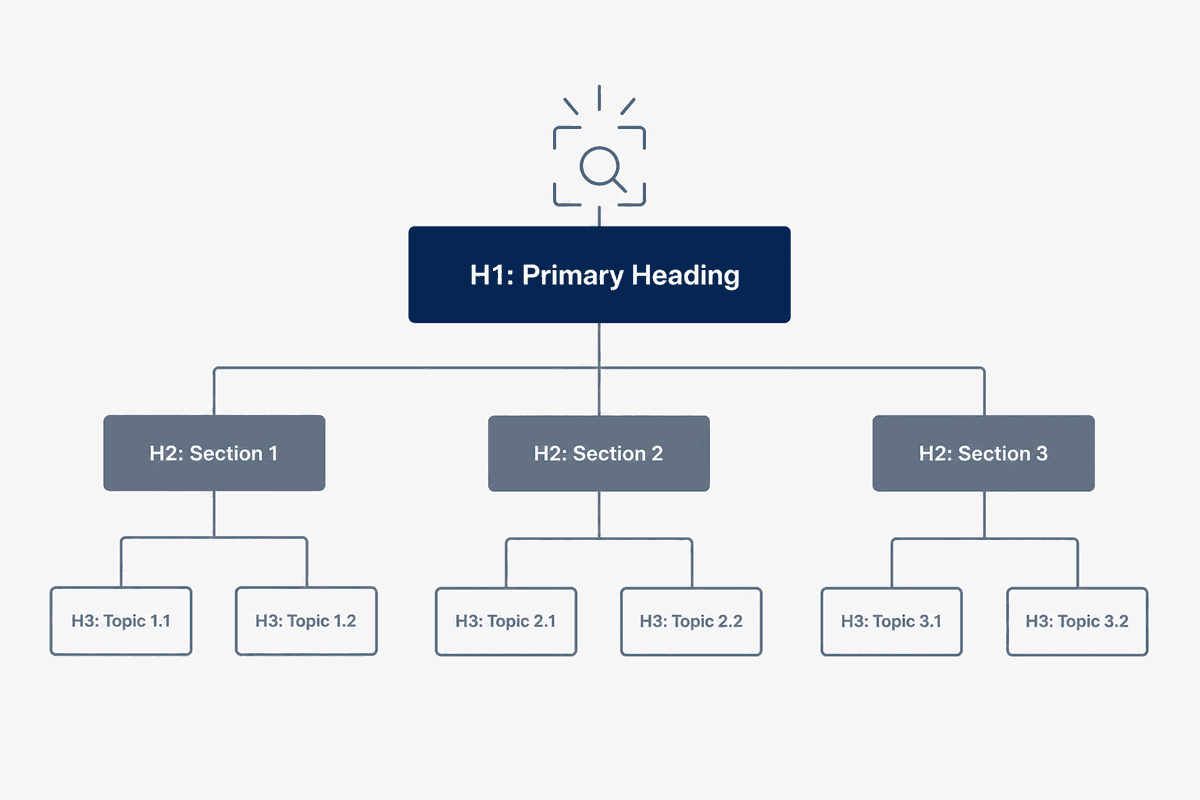
In HTML (HyperText Markup Language), heading tags range from <h1> to <h6>, used to create a hierarchical structure on a webpage. The <h1> tag represents the most important heading on the page. It is the title of the specific document or piece of content the user is currently viewing.
From a technical perspective, it looks like this in your page's source code:
<h1>Automated Content Generation for SaaS Companies</h1>
When rendered in a browser, the text inside the H1 tags is usually the largest and most prominent text on the screen. However, its value extends far beyond typography and visual design.
The Landmark for Search Engines and AI
Search engines use the H1 to understand the overarching topic of the page. While Google has become incredibly sophisticated at processing natural language, it still relies on structural clues to weigh the importance of certain phrases. The text inside an H1 is given disproportionate weight compared to standard paragraph text.
For AI search bots operating on RAG (Retrieval-Augmented Generation) systems, the H1 acts as the defining node for document chunking. When these bots ingest your page into their vector databases to formulate an answer, the H1 provides the necessary context to determine if your content directly answers the prompt.
The Foundation of Digital Accessibility
H1 tags are not just a tool for keyword visibility; they are a critical component of web accessibility. Visually impaired users relying on screen readers (like JAWS or NVDA) use heading structures to navigate a page.
When a screen reader loads a document, the user often requests a summary of the headings to jump to the relevant section. If a page lacks an H1, has multiple disjointed H1s, or skips directly from an H1 to an H4, the screen reader's navigation model breaks, severely degrading the user experience.
H1 Tag vs. Title Tag: Ending the Confusion

The most common error in on-page SEO is confusing the <title> element with the <h1> tag. While both represent the title of your content, they serve different functions and appear in completely different locations.
As explained in an analysis of the difference between Title Tags and H1 Tags, failing to optimize these two elements independently means missing out on a critical opportunity to capture user search intent.
Should Your H1 and Title Tag Be Identical?
A frequent debate among SEO practitioners is whether the title tag and H1 should be exactly the same. The short answer is: they should be strongly aligned, but not necessarily identical.
If you use a CMS like WordPress, the default behavior is often to mirror the H1 and the title tag. This is a safe baseline, but it is rarely optimal.
The title tag needs to include your brand name and fit within a strict character limit to display properly in the search results. The H1, freed from those character constraints, can be more descriptive.
Example Scenario:
- Title Tag: Best SEO Content Generation Software 2026 | BeVisible
- H1 Tag: Automated SEO Content Generation for SaaS & E-commerce
In this example, the title tag is optimized for click-through rate in the search engine results page (SERP), utilizing the year and brand name. The H1 drops the brand name (which is already obvious since the user is on the site) and expands on the target audience, providing richer context for both the human reader and parsing AI bots.
H1 Tag SEO Best Practices for Modern Sites
Writing an effective H1 tag requires balancing human psychology with technical constraints. Here are the core best practices for optimizing your primary headings.
1. The "One H1 Per Page" Rule (and the HTML5 Nuance)
For nearly two decades, the golden rule of SEO was simple: use exactly one H1 tag per page. Then HTML5 was introduced, allowing developers to use an H1 tag for each distinct <section> or <article> element on a page.
This led to significant confusion, with many asking: Are multiple H1 tags across a website bad for SEO?.
While Google's official stance (often reiterated by John Mueller) is that their crawler can handle multiple H1s without penalizing the site, best practice dictates sticking to a single H1.
Why? Because a single H1 forces you to define a clear, unambiguous topical focus for the page. It creates a bulletproof visual hierarchy. When you introduce multiple H1s, you risk diluting the semantic value of the primary topic, making it harder for AI bots and traditional crawlers to determine the most important entity on the page.
2. Match the User's Search Intent
When a user clicks a link in the SERP, they arrive with a specific expectation. Your H1 must immediately confirm that their expectation has been met. This is known as satisfying search intent. If there is a disconnect between the promise of the title tag and the reality of the H1, users will bounce back to the search results—a negative signal that can harm your rankings over time.
If your title tag promises a "Toolkit," your H1 should reflect that utility. If the SERP indicates a commercial intent (users looking for products or solutions), your H1 should lead with the solution, not a generic educational definition.
3. Front-Load Your Target Keyword
While keyword stuffing is a relic of the past, explicitly including your primary target keyword in the H1 remains a foundational SEO requirement. Whenever natural, place the keyword toward the beginning of the heading.
Search engines read from left to right (in Western languages). Words at the front of a sequence are often weighted slightly heavier in natural language processing models.
- Weak H1: Our Company Offers the Most Reliable Cloud Storage Solutions
- Strong H1: Cloud Storage Solutions for Enterprise Data Management
4. Keep Length Between 20 and 70 Characters
Unlike title tags, H1s do not get truncated by search engines. However, massive, paragraph-long H1s create a terrible user experience.
A heading that spans four lines on a mobile device pushes the actual content below the fold. Keep your H1 concise—ideally between 20 and 70 characters. If you need to add more context, use a descriptive subheading (sometimes styled as an H2 or a lead paragraph) immediately below the H1.
5. Never Use H1s for Formatting
One of the most common mistakes found during technical SEO audits is the use of H1 tags to style text. A developer or content editor might want a particular sentence in a sidebar to appear large and bold, so they wrap it in an <h1> tag instead of using CSS.
This is disastrous for SEO and accessibility. It strips the semantic meaning from the page structure. Headings must be used strictly for outlining the document hierarchy. If you need large text that isn't the primary title, use a <span> or <p> tag and apply a CSS class to handle the visual styling.
Real-World H1 Tag Examples: Good vs. Bad
To understand how these principles apply across different industries, let's look at a few examples of mismatched and optimized H1s.
Example 1: The Local Business Page
Local businesses often struggle with H1s, either forgetting to include their location or stuffing the heading with so many locations it becomes unreadable.
- Bad H1: Plumber (Critique: Too vague. Doesn't indicate location or specific services.)
- Bad H1: Emergency Plumber in Chicago, Naperville, Evanston, and Oak Park (Critique: Keyword stuffed and visually overwhelming.)
- Good H1: 24/7 Emergency Plumbing Services in Chicago (Critique: Clear, intent-driven, includes the primary keyword and the primary location.)
Example 2: The E-commerce Product Page
E-commerce sites frequently rely on dynamic H1 generation, which can lead to missed opportunities if the product database isn't optimized.
- Bad H1: Model XJ-9000 (Critique: Unless the user is already an expert on your product line, this means nothing. It lacks descriptive keywords.)
- Bad H1: Buy Cheap Running Shoes Online Free Shipping (Critique: Reads like a spammy 2010 title tag, not a credible product heading.)
- Good H1: Men's Trail Running Shoes - XJ-9000 (Critique: Combines the descriptive category keyword with the specific product identifier.)
Example 3: The Enterprise SaaS Homepage
The homepage H1 is notoriously difficult. Marketing teams want to use clever, abstract copy, while SEOs want clear, descriptive text. Discussions among SEO professionals often highlight the friction between brand positioning and organic visibility.
- Bad H1: Empowering Your Digital Journey (Critique: Meaningless corporate jargon. Neither Google nor AI bots know what this company actually does.)
- Bad H1: Welcome to BeVisible (Critique: Wastes the most important tag on the page with a greeting.)
- Good H1: Automated SEO Content Generation Platform (Critique: Tells the user and the crawler exactly what the product is immediately.)
Does Changing an H1 Actually Impact Traffic?
It is easy to theorize about on-page elements, but what happens when you actually test them?
A robust case study by SearchPilot on optimizing H1 tags demonstrated that modifying H1s to better align with user intent can yield statistically significant uplifts in organic traffic.
In testing scenarios where generic, category-level H1s were replaced with long-tail, highly descriptive H1s, the pages consistently outperformed the control groups. The data proves that while backlinks and overall domain authority get the most attention, refining your headings is one of the highest ROI technical tasks you can perform—especially when done at scale across hundreds of programmatic pages or blog posts.
How to Run an H1 Tag Audit and Fix Errors
If you have an established site, manually checking every page's source code is impossible. You need a systematic approach to audit your headings. This is where your SEO toolkit comes into play.
Step 1: Crawl Your Site
To identify mismatched or duplicate H1 tags, you must run a full site crawl. Both Moz and SEMrush offer robust site audit tools designed for this exact purpose.
- Log into your SEO platform of choice (e.g., SEMrush Site Audit, Moz Pro Site Crawl, or Ahrefs).
- Enter your domain and initiate a full crawl.
- Navigate to the "Issues" or "Errors" tab once the crawl completes.
- Filter specifically for "H1 Tags."
Step 2: Identify the Three Core Errors
Your crawl report will likely highlight three main categories of H1 issues:
- Missing H1 Tags: Pages that lack an
<h1>tag entirely. This often happens on custom-built landing pages where developers use CSS-styled<div>tags instead of semantic HTML. - Multiple H1 Tags: Pages with two or more
<h1>tags. This frequently occurs when a site's global header (like the logo) is wrapped in an H1, and the page title is also wrapped in an H1. - Duplicate H1 Tags Across Pages: Multiple distinct URLs sharing the exact same H1 text. This creates keyword cannibalization, as search engines struggle to determine which page is the canonical source for that topic.
Step 3: Prioritize and Execute Fixes
Do not try to fix everything at once. Export your audit data into a spreadsheet and prioritize the pages based on their organic traffic potential and business value.
- High Priority: Your homepage, core product/service pages, and top-converting landing pages. Fix missing or multiple H1s here immediately.
- Medium Priority: High-traffic blog posts and resource guides. Ensure the H1 aligns with the title tag and targets the correct search intent.
- Low Priority: Pagination pages (e.g.,
/blog/page/4), tag pages, or utility pages (Privacy Policy, Terms of Service). While technically they should be correct, fixing them won't move the needle on organic growth.
If manual auditing sounds like a drain on resources, consider solutions that enforce structural integrity at the point of publication. Platforms like BeVisible handle this full production pipeline automatically. When BeVisible connects to your site URL to build a 30-day content map, it ensures every piece of daily published content features an answer-first structure with perfectly mapped, AI-optimized H1, H2, and H3 tags—eliminating the need for retroactive audits.
Adding and Fixing H1 Tags in Your CMS
Implementing an H1 tag differs slightly depending on the Content Management System (CMS) you use. Here is how to manage headings across the most popular platforms.
WordPress (Gutenberg)
In WordPress, the title you enter into the main "Add Title" block at the top of the editor is automatically formatted as your page's H1 tag by almost all modern themes.
If you need to add an H1 manually within the body content (which you should rarely do, assuming the main title is already your H1):
- Click the
+block inserter icon. - Select the Heading block.
- In the block toolbar, click the heading level dropdown and select H1.
Fixing Theme Issues: If your site logo is wrapped in an H1 (a common flaw in older WordPress themes), you will need to edit your theme's header.php file or use the Site Editor (if using a block theme) to change the logo container to a <div> or <span>.
Shopify
Shopify handles H1 tags predictably:
- Product Pages: The "Title" field of the product is automatically your H1.
- Collections: The "Title" field of the collection is the H1.
- Blog Posts: The main post title becomes the H1.
Fixing Issues: If you want your SEO title (Title Tag) to be different from your H1 in Shopify, you edit the "Search engine listing preview" at the bottom of the product or post editor. The H1 remains the main title at the top, while the Title Tag changes based on your SEO settings.
Squarespace
Squarespace uses a visual editor where heading levels are clearly defined.
- Add a Text block to your page.
- Highlight the text you want to format.
- From the formatting toolbar, select Heading 1 from the dropdown menu.
Note: Be careful when designing visually in Squarespace. Do not use "Heading 1" just because you want a large font for a quote or a call-to-action. Use CSS or the site style settings to enlarge H2s or H3s if needed.
AI Search Engines: How ChatGPT and Perplexity Parse Headings
The rise of Generative Engine Optimization (GEO) requires us to think beyond traditional Google crawlers. Tools like ChatGPT, Perplexity, and Google's AI Overviews process content differently.
When a user asks an AI tool a complex question, the bot scrapes the web for sources. It doesn't read a 4,000-word article linearly like a human. It looks for specific HTML structures to validate the relevance of the document.
Your H1 serves as the master thesis for the AI bot. If the prompt is "What are the best free SEO tools for local businesses?" and your H1 is "The Ultimate Free SEO Toolkit for Local Solutions," the semantic match is incredibly high.
However, the AI also evaluates your subheadings (H2s and H3s) to see if the structure fulfills the promise of the H1. This is why "answer-first" structures are critical.
For SaaS founders, indie hackers, and content marketers seeking organic growth without large teams, adapting to this AI-first reality is daunting. Manually ensuring every post has the perfect metadata, schema markup, and heading hierarchy takes hours. BeVisible's platform differentiates itself by executing this precise AI-specific optimization automatically. For $199 a month, the Professional plan publishes daily, highly structured articles that are designed specifically to act as ranked answers for both traditional Google SERPs and AI models.
Frequently Asked Questions About H1 Tags
Does a page really need an H1 for SEO?
Yes. While a page might technically index and rank without an H1, you are fighting an uphill battle. The H1 provides essential context to search engines, drastically improves accessibility for screen readers, and serves as the visual anchor for human users. Skipping it leaves your page structure ambiguous.
Can I have more than one H1 on a webpage?
Technically, HTML5 specifications allow for multiple H1s (one per section or article element). However, SEO best practices strongly dictate using only one H1 per page. A single H1 provides a clear, undeniable topical focus. Multiple H1s can confuse crawlers regarding the primary entity or intent of the document.
Does the H1 tag have to go at the very top of the body content?
While the HTML code <h1> needs to be within the <body> of the document, visually, it does not have to be the very first pixel of text on the screen. Many sites have navigation menus, breadcrumbs, or category labels above the H1. However, the H1 should be the first major typographic element the user encounters to establish the context of the page.
How do H1 tags improve accessibility?
Screen readers and assistive technologies use HTML heading tags as a navigation menu. A user can hit a shortcut key to jump from the H1 to the first H2, skipping repetitive navigation links. If the H1 is missing or misused, visually impaired users lose their primary method of understanding the page's structure and navigating its contents efficiently.
Mastering your H1 tags is not about chasing algorithms; it is about providing unambiguous clarity. Whether it is a human user deciding to read your product page, a Google crawler cataloging your SaaS features, or an AI bot extracting data for a generated summary, the H1 is their starting point. Audit your existing tags, fix the duplicates, and ensure every headline you publish clearly answers the user's search intent.