
If you want to build a competitive SaaS product, aggregate market research, or train a custom AI model, manual data entry is a dead end. Relying solely on official APIs is not much better; they are heavily rate-limited, expensive, or routinely deprecate the exact endpoints you need.
Web scraping bridges the gap between the data that exists on the internet and the data you actually control.
However, the landscape of data extraction has fundamentally shifted. Sites are heavily fortified with advanced bot protection (like Cloudflare Turnstile), single-page application (SPA) architectures hide data behind complex JavaScript rendering, and the legal boundaries surrounding data extraction are more scrutinized than ever.
This guide breaks down exactly how to extract data from websites at scale in 2026—whether you are using point-and-click no-code extensions or building custom Python infrastructure—without crossing legal lines or getting your IP address banned.
The Legal Landscape: What Can You Actually Scrape?
Before writing a single line of code or installing a browser extension, you need to understand the legal framework of data extraction. The phrase "publicly available" is the cornerstone of legal web scraping.
In recent years, landmark rulings (such as hiQ Labs vs. LinkedIn) have reinforced a general consensus: scraping publicly accessible data that does not require a login is generally legal. However, the moment you bypass authentication, ignore restrictive Terms of Service, or extract personally identifiable information (PII), you enter dangerous territory.
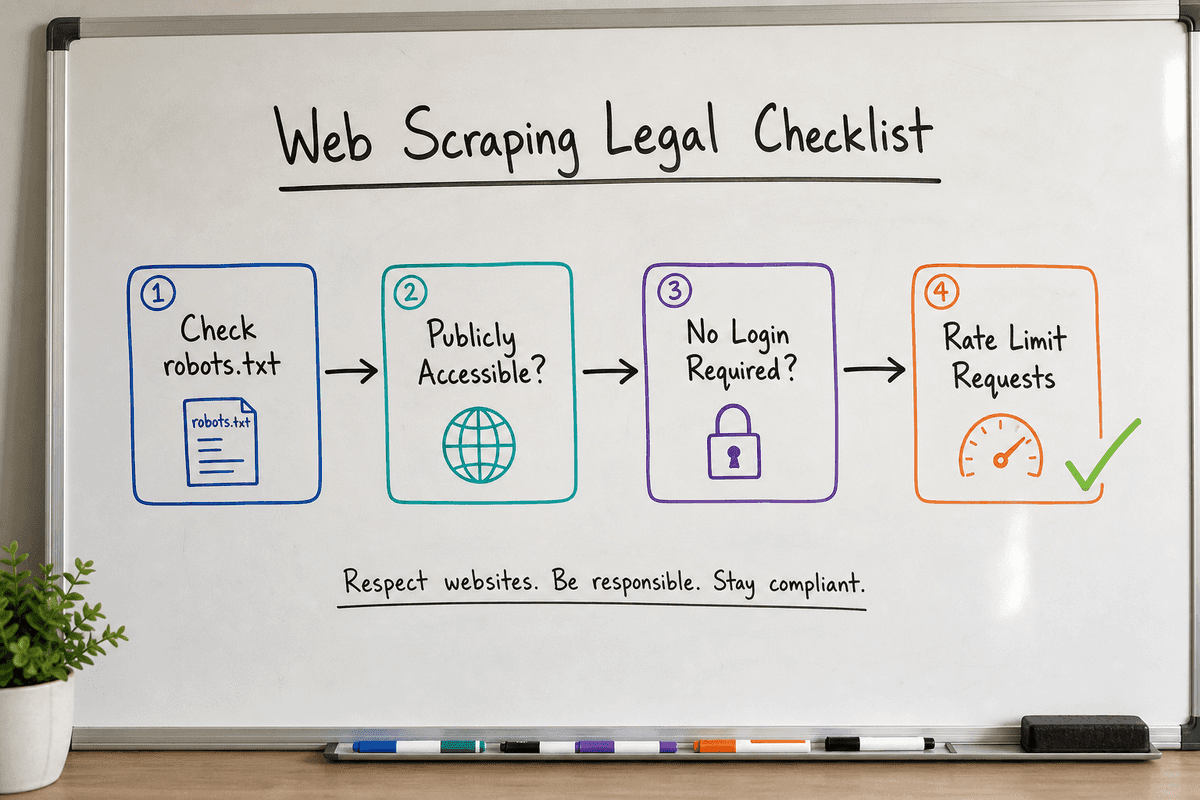
The 4 Rules of Ethical and Legal Scraping
- Respect the
robots.txtFile: Every major website has arobots.txtfile (e.g.,website.com/robots.txt). This file outlines which user agents (bots) are allowed to crawl specific directories. While it is technically a request rather than an unbreachable wall, ignoring it can be used against you in a legal dispute over aggressive crawling. - Stick to Public Data: If you have to log in, bypass a paywall, or use a session cookie to see the data, it is no longer public. Scraping behind a login violates the platform's Terms of Service and potentially falls under the Computer Fraud and Abuse Act (CFAA) in the US.
- Do Not Scrape Copyrighted Content for Resale: Extracting product prices from an e-commerce site for a competitor analysis tool is generally fair use. Scraping proprietary articles or proprietary datasets and republishing them as your own is copyright infringement.
- Throttle Your Requests: A web scraper can easily make thousands of requests per second. If your scraper overwhelms a target server and causes downtime, it can be classified as a Denial of Service (DoS) attack. Always implement rate limiting (e.g., waiting 2–5 seconds between requests).
Choosing Your Weapon: No-Code Tools vs. Custom Scripts
Your technical background and the complexity of the target site dictate how you should extract data. Modern extraction generally falls into two buckets: visual point-and-click interfaces and code-based frameworks.
Point-and-Click Extensions (Best for Beginners)
If you need to quickly grab a table of leads, extract product listings from an online store, or pull company data without opening an IDE, browser extensions are the most efficient route.
- Web Scraper: This is widely considered the #1 web scraping extension. It provides a point-and-click interface directly inside Chrome's Developer Tools. You can build "sitemaps" that navigate through pagination, click on dropdowns, and extract structured text. It handles JavaScript sites natively because it runs directly inside your active browser session.
- Instant Data Scraper: Using AI heuristics, this extension auto-detects tables and lists on a page. If you are looking at an Amazon search results page or a Zillow real estate listing page, you click the extension once, and it instantly generates a downloadable CSV or Excel file.
These tools are perfect for ad-hoc tasks but struggle when you need to scrape 50,000 pages daily, bypass complex bot challenges, or pipe data directly into a PostgreSQL database.
Custom Code (Best for Scale and Customization)
For continuous data pipelines, writing custom scripts is non-negotiable. Python remains the undisputed king of data extraction due to its massive ecosystem of parsing libraries.
If you want to dive deep into custom scripting, the Reddit ultimate guide to web scraping from the data science community offers an excellent historical baseline. Additionally, academic resources like the Web Scraping with Python guide from UT Austin provide strong foundational knowledge on handling HTTP requests and parsing HTML trees.
Common Python libraries include:
- BeautifulSoup: Parses raw HTML and XML. Ideal for simple, static websites.
- Scrapy: A massive, asynchronous scraping framework designed for spidering entire domains.
- Playwright / Selenium: Headless browsers that physically render JavaScript, click buttons, and wait for network requests to finish before extracting data.
How to Scrape Data From a Website: A 4-Step Process
Whether you are using a visual tool or writing a Python script, the fundamental process of web scraping is always the same. Here is how to execute a successful extraction campaign.
Step 1: Inspect the Target DOM (Document Object Model)
Web browsers translate raw HTML code into the visual page you see. To scrape data, you need to tell your scraper exactly where the data lives in that code.
Right-click on the exact piece of data you want (e.g., a product price on eBay) and select Inspect. This opens your browser's Developer Tools.
You will see something like this:
<span class="price-tag--large" data-test-id="item-price">$49.99</span>
Your goal is to identify the unique CSS selector or XPath that targets this specific element. In this case, targeting the class .price-tag--large or the attribute [data-test-id="item-price"] will allow your scraper to grab the text "$49.99".
Step 2: Handle Pagination and Navigation
Scraping one page is easy; scraping 500 pages requires navigation logic.
Look at the URL structure of the target site when you click "Next Page". Often, it operates on simple URL parameters:
website.com/products?page=1website.com/products?page=2
If the site uses predictable URL parameters, your scraper can simply loop through numbers 1 to 500, generating the URLs dynamically.
If the site uses an "Infinite Scroll" or a "Load More" button triggered by JavaScript, a simple HTML parser won't work. You will need a headless browser (like Playwright) to simulate a physical scroll event, or you will need to intercept the background API request the site makes when loading more items.
Step 3: Bypass Anti-Bot Protections
If you run a Python script using the default requests library, the target server will immediately see that the "User-Agent" is a bot, not a human using Google Chrome. You will likely receive a 403 Forbidden error.
To successfully extract data at scale, you must mimic human behavior:
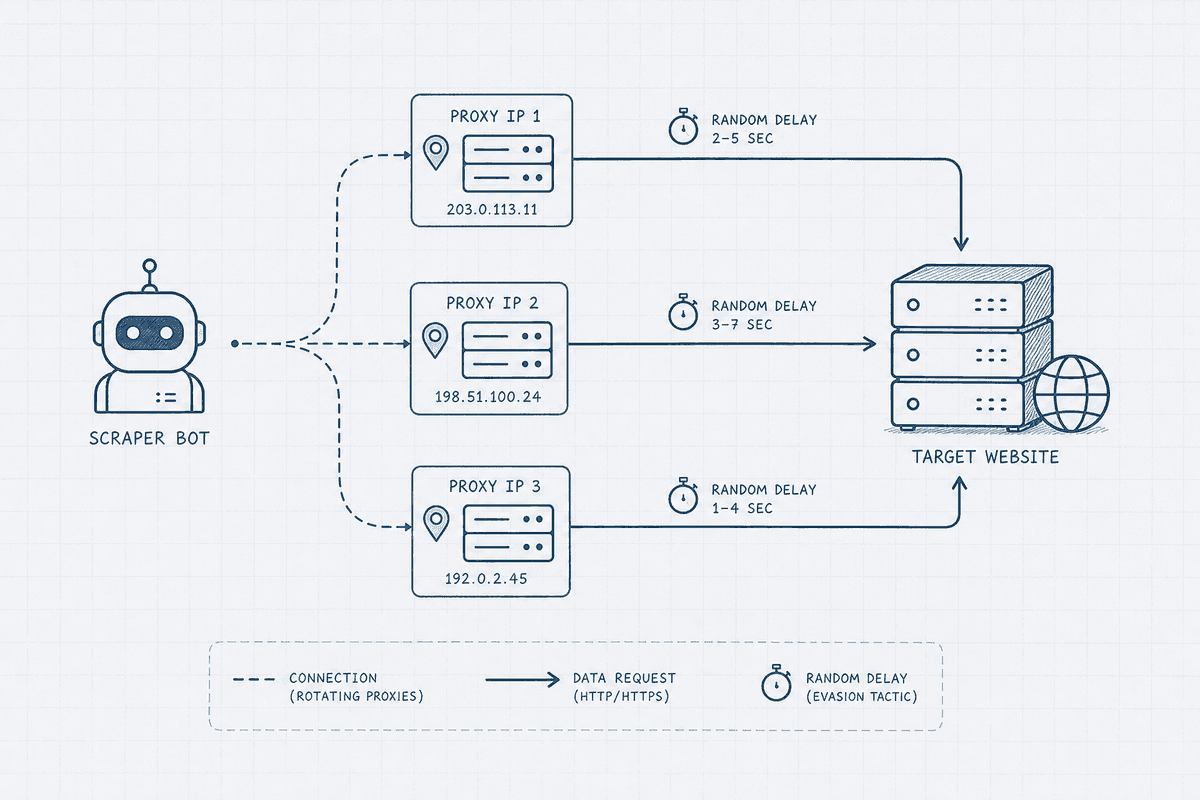
- Rotate User-Agents: Randomize your browser headers so each request looks like it's coming from a different device (Windows, Mac, iOS, Android).
- Use Proxies: If 1,000 requests come from the same IP address in five minutes, that IP will be banned. Routing your requests through a pool of residential proxies ensures your traffic looks like it's coming from regular internet users across the globe.
- Add Random Delays: Humans do not click links exactly 1.000 seconds apart. Add a random sleep delay (e.g., 2.3 seconds, then 4.1 seconds) between page requests.
Step 4: Clean and Export the Data
Raw scraped data is rarely clean. A price might come back as \n\t$49.99 USD .
Before exporting, use regular expressions (Regex) or string manipulation to strip out whitespace, currency symbols, and HTML tags. Finally, export your data into a structured format. CSV and XLSX are best if the data is going to a non-technical team member. JSON is preferred if you are piping the data into a database or an API.
The Real Challenge: Scraping JavaScript and Single-Page Applications
In the early days of the web, servers sent fully formed HTML documents. Today, modern frameworks like React, Vue, and Angular dominate the web. These are often built as Single-Page Applications (SPAs).
When you send a basic HTTP request to an SPA, you don't get the content. Instead, you get a nearly blank HTML file containing a massive JavaScript bundle that says, "Wait a second while I load the actual data."
If you try to scrape an SPA with BeautifulSoup, you will pull an empty page. You have two options to solve this:
Option A: Use a Headless Browser
A headless browser (like Puppeteer or Playwright) launches a real Chromium instance in the background. It downloads the JavaScript, executes it, waits for the dynamic content to render, and then extracts the HTML.
While highly effective, headless browsers are incredibly resource-intensive. They require significantly more RAM and processing power than basic HTTP requests, making them slower and more expensive to run at scale.
Option B: Intercept the Hidden API
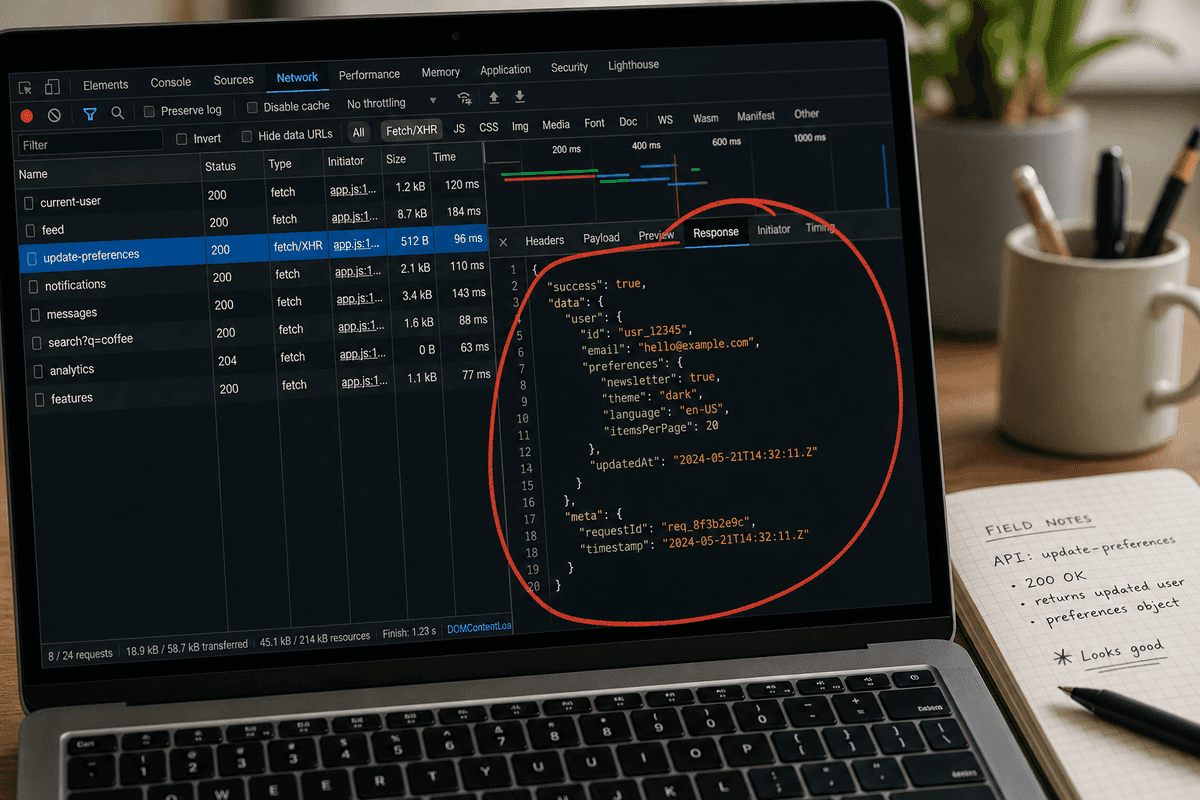
This is the secret weapon of advanced data engineers. When a JavaScript site loads, it usually fetches its data from an internal backend API.
If you open your Network tab in Developer Tools, filter by "Fetch/XHR", and refresh the page, you can often find the exact API endpoint the website uses to populate its own data. Instead of scraping the heavy frontend UI, you can send a direct request to their internal API, which typically returns clean, perfectly formatted JSON data.
(Note: Rendering JavaScript isn't just a challenge for scrapers; it's notoriously difficult for search engines, too. If you manage a complex JavaScript site and want to ensure Google bots can actually read your content, our guides on Single-Page Application SEO: What Works in 2026? and SEO for Single Page Applications: A 5-Step Guide break down the necessary rendering strategies.)
Extracting Data from Popular Marketplaces
Different websites require vastly different scraping strategies. Here is how practitioners approach the most common targets:
Amazon (Product Details and ASINs)
Amazon has some of the most aggressive anti-scraping measures on the internet. Because their DOM structure changes constantly (A/B testing different layouts), CSS selectors break frequently. Extracting Amazon data usually requires a third-party scraping API that automatically rotates proxies and solves CAPTCHAs on your behalf.
G2, Trustpilot, and Yelp (Business Listings and Reviews)
Review sites are heavily targeted for lead generation and sentiment analysis. These sites heavily employ pagination and nested data (e.g., clicking a company profile to see reviews). Using a visual tool like Web Scraper with a "Link Selector" allows you to easily click into each business profile, extract the required text, and navigate back to the main directory.
Zillow and Rightmove (Property Listings)
Real estate platforms heavily rely on interactive maps and infinite scroll mechanisms powered by hidden APIs. The most efficient way to scrape property data is almost always intercepting the JSON payloads sent to the frontend map interface, rather than trying to parse the complex frontend DOM.
Building Automated Data Pipelines
Scraping a website once is a project. Scraping it daily is infrastructure.
If you are using data to feed automated systems—like monitoring competitor pricing changes or discovering trending topics to fuel your programmatic SEO strategy—you cannot run scripts manually from your laptop.
To build a resilient pipeline:
- Deploy to the Cloud: Host your Python scripts on AWS Lambda, Google Cloud Run, or specialized platforms like Apify.
- Schedule Jobs: Use Cron jobs to trigger the scraper at off-peak hours (e.g., 3:00 AM) to minimize load on the target server.
- Implement Error Handling: Websites change their layouts constantly. Your script should include alerting (like sending a Slack message) when a CSS selector fails to find the expected data, so you can update the code before bad data enters your database.
Moving Forward
Data extraction is no longer an obscure hacker skill; it is a fundamental utility for modern business operations. Whether you are reading an intro to web scraping to build a simple extension-based workflow, or architecting a distributed crawler network to feed a large language model, the principles remain the same.
Start small. Use a point-and-click browser extension to understand how websites structure their data. As your needs grow, transition to custom Python scripts, respect the legal and ethical boundaries, and build robust pipelines that turn the chaotic web into clean, actionable intelligence.