
In 2014, Google officially confirmed that serving your website over a secure, encrypted connection was a ranking signal. Over a decade later, we are long past the era where SSL certificates were optional upgrades reserved solely for e-commerce checkout pages. Today, serving your SaaS website over HTTPS is the absolute baseline for existing in modern search.
Yet, many founders and developers still treat HTTPS as a simple checkbox—install a Let's Encrypt certificate and walk away. But the intersection of site security and search engine optimization is surprisingly nuanced. A botched migration from HTTP to HTTPS can tank your organic traffic. A misconfigured SSL certificate can prevent search engines from crawling your site entirely. And mixed content warnings can quietly bleed your conversion rates dry.
This guide breaks down the mechanics of HTTPS SEO, why site security remains a critical ranking factor in 2026, and how to configure your encryption to satisfy both Google's crawlers and your users.
What Actually Is HTTPS in an SEO Context?
Hypertext Transfer Protocol Secure (HTTPS) is the secure version of HTTP, the primary protocol used to send data between a web browser and a website. HTTPS is encrypted in order to increase security of data transfer. This is particularly important when users transmit sensitive data, such as by logging into a bank account, email service, or health insurance provider.
For a SaaS company, this includes authentication tokens, password resets, and payment details.
From a technical standpoint, HTTPS relies on TLS (Transport Layer Security)—formerly known as SSL (Secure Sockets Layer)—to encrypt communications. When a user requests your site, their browser and your server perform a "TLS handshake." They agree on an encryption cipher, exchange keys, and establish a secure tunnel.
 Search engines care about this tunnel because their primary goal is to send users to safe, high-quality destinations. If Google routes a user to an unsecured HTTP site where their data can be intercepted via a man-in-the-middle attack, it reflects poorly on the search engine's utility.
Therefore, SEO isn't just about keywords and backlinks; it encompasses the technical foundation that ensures a safe user experience.
Why HTTPS Remains a Core SEO Ranking Factor
While Google originally called HTTPS a "lightweight" ranking signal, its importance has compounded over the years due to overlapping technical requirements and user behavior shifts.
1. The Direct Algorithmic Tie-Breaker
Google's algorithm uses HTTPS as a positive ranking signal. If two URLs are virtually identical in terms of content quality, backlinks, and user intent satisfaction, but one is HTTP and the other is HTTPS, the secure URL will rank higher.
While migrating to HTTPS might temporarily disrupt rankings if executed poorly, the long-term algorithmic benefit is undeniable. Google defaults to crawling the HTTPS version of a domain even if the HTTP version is linked internally, actively preferring secure protocols.
2. Browser Warnings and User Experience (Bounce Rates)
Modern browsers like Chrome, Safari, and Firefox are actively hostile to HTTP websites. If you load an insecure site, the browser replaces the URL bar's standard icon with a glaring, often red, "Not Secure" warning.
For a SaaS business, trust is your currency. If a potential customer clicks your link in the SERP, lands on your site, and is immediately told your platform is "Not Secure," they will bounce. High bounce rates and low dwell times—often categorized under user interaction signals—tell search engines that your result did not satisfy the user. Over time, your rankings will decay.
3. Preserving Referral Data in Google Analytics
This is a massive, often misunderstood aspect of technical SEO and web analytics.
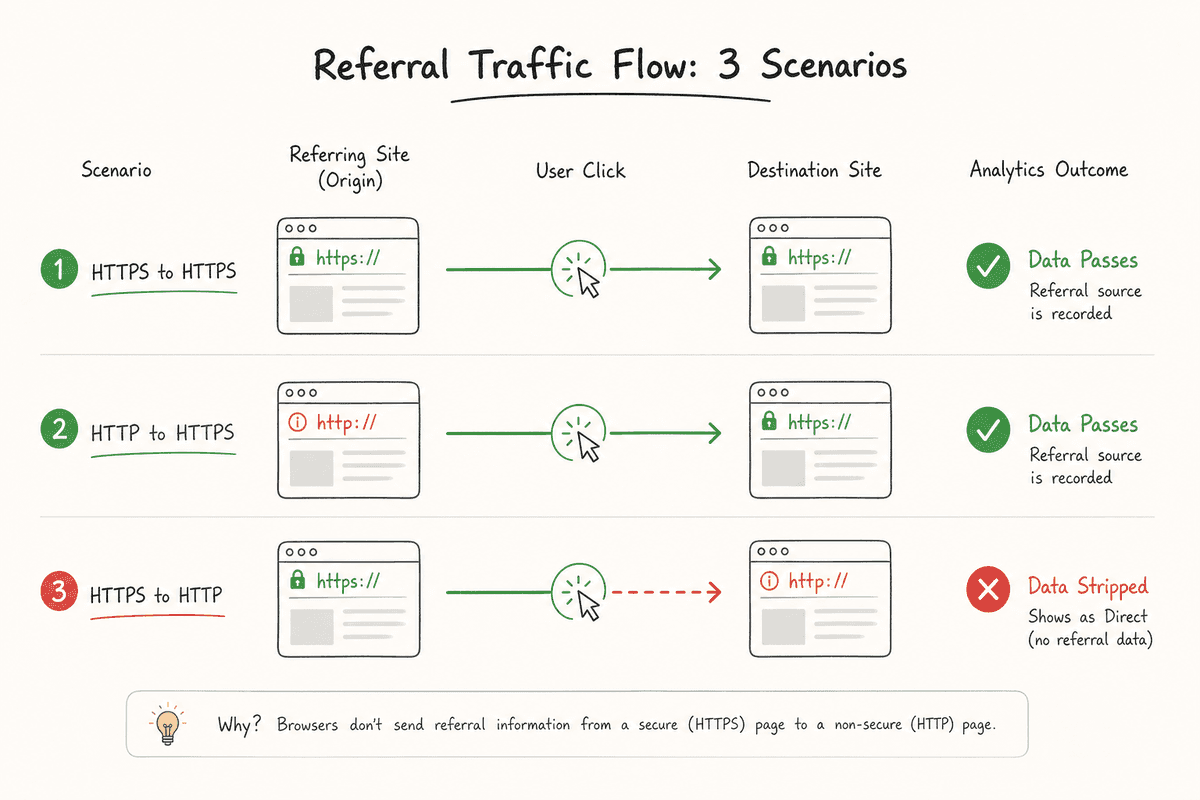
When traffic passes from a secure HTTPS website to an insecure HTTP website, the referral data is stripped away to protect user privacy. In your analytics dashboard, this traffic will show up as "Direct" instead of "Referral."
If you run an HTTP website, and a massive SaaS publication links to you from their HTTPS site, you will never see them in your referral reports. Conversely, if your site is HTTPS, referral data is preserved whether you link to an HTTP or HTTPS site. Securing your site ensures your inbound marketing and link-building efforts are accurately tracked.
4. Unlocking HTTP/2 and HTTP/3 Performance
Site speed is a confirmed ranking factor, governed largely by Core Web Vitals. To achieve the fastest possible load times, modern sites use HTTP/2 or HTTP/3 protocols, which allow for multiplexing (loading multiple assets simultaneously over a single connection) and reduced latency.
Here is the catch: modern web browsers only support HTTP/2 and HTTP/3 over encrypted connections. You cannot utilize these speed enhancements on an HTTP site. By avoiding HTTPS, you are artificially capping your website's performance, which indirectly harms your SEO.
The SEO Risks of a Poor HTTPS Migration
Moving a site from HTTP to HTTPS is not just flipping a switch; it is a site migration. Because search engines treat http://yourdomain.com and https://yourdomain.com as two completely separate websites, failing to connect them properly results in duplicate content issues and lost link equity.
Here is where migrations typically fail:
- Redirect Chains and Loops: Pointing HTTP to HTTPS, but passing through a www/non-www redirect first, creating multiple hops that dilute link equity.
- Mixed Content: Loading an HTTPS page, but pulling images, CSS, or JavaScript files via HTTP URLs. Browsers will block these insecure assets, breaking your page layout and harming UX.
- Canonical Tag Mismatches: Moving to HTTPS but leaving self-referencing canonical tags pointing to the old HTTP URLs.
- Disjointed XML Sitemaps: Leaving HTTP URLs in the sitemap, confusing crawlers about which version you want indexed.
If you are operating a complex web application alongside your marketing site, ensure you follow a comprehensive SEO for Single Page Applications: The Technical Checklist to verify your secure routing behaves correctly for crawlers.
How to Transition to HTTPS Without Losing Traffic (A 6-Step Framework)
If you are launching a new SaaS product, you should build on HTTPS from day one. But if you are managing an acquisition, a legacy site, or migrating an older architecture, follow this framework to protect your organic traffic.
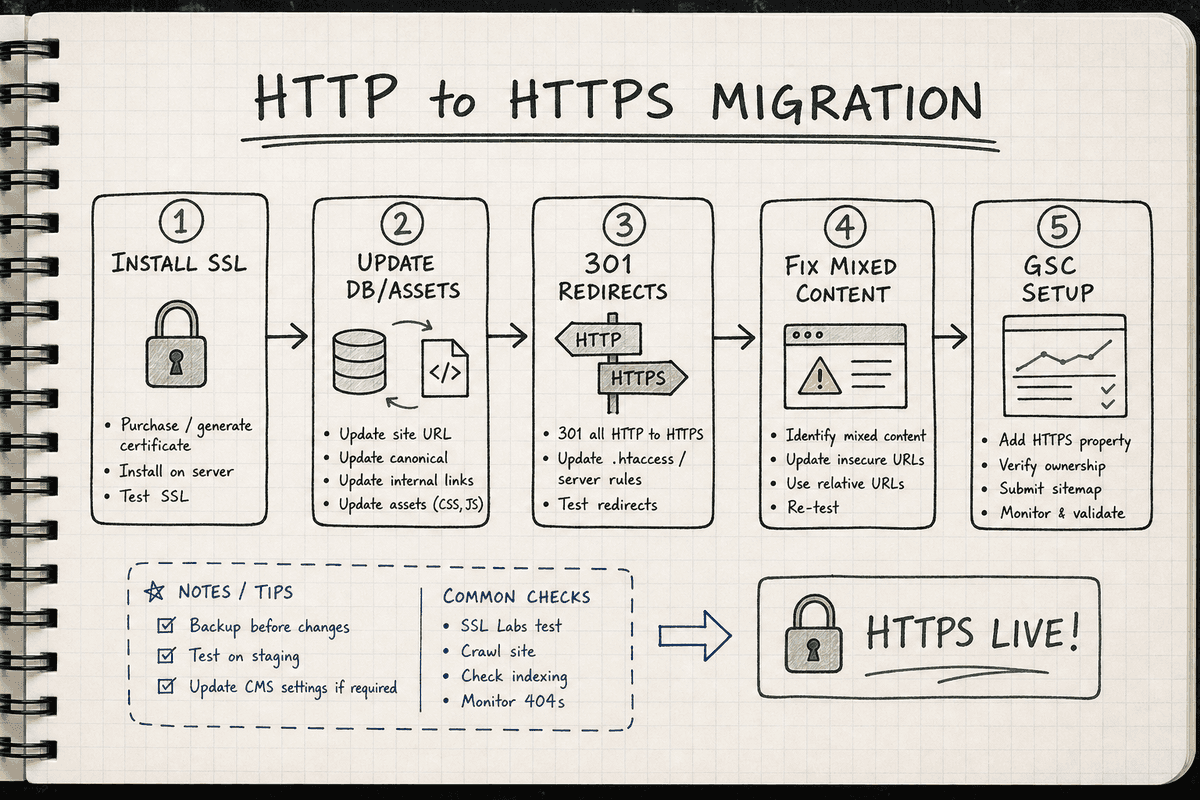
Step 1: Acquire and Install the Right SSL Certificate
For most SaaS content and marketing sites, a standard Let's Encrypt certificate (which is free and auto-renewing) is perfectly sufficient. However, consider your architecture:
- Single Domain Certificate: Secures one domain (e.g.,
bevisible.app). - Multi-Domain Certificate: Secures multiple distinct domains (e.g.,
bevisible.appandbevisible.co). - Wildcard Certificate: Secures a base domain and unlimited subdomains (e.g.,
bevisible.app,app.bevisible.app,blog.bevisible.app). Wildcards are highly recommended for SaaS companies that separate their marketing site and web app across subdomains.
Step 2: Update Internal Links and Assets (Database Search and Replace)
Before enforcing redirects, fix your internal architecture. Every internal link, image source, and script tag hardcoded to http:// needs to be updated to https://.
If you use a CMS like WordPress, you can use database search-and-replace tools (like WP-CLI or Better Search Replace) to swap http://yourdomain.com with https://yourdomain.com. For headless architectures or modern JavaScript frameworks, update your environment variables and base URLs in your repository.
Pro tip: Don't use protocol-relative URLs (e.g., //yourdomain.com/image.jpg). Google officially recommends using absolute HTTPS URLs to prevent crawling confusion.
Step 3: Implement 301 Redirects
This is the most critical SEO step. You must implement server-level 301 (Permanent) redirects from every HTTP URL to its exact HTTPS counterpart.
If you use Nginx, your server block should look similar to this:
server {
    listen 80;
    server_name yourdomain.com www.yourdomain.com;
    return 301 https://yourdomain.com$request_uri;
}
If you use Apache, your .htaccess file requires:
RewriteEngine On
RewriteCond %{HTTPS} off
RewriteRule ^(.*)$ https://%{HTTP_HOST}%{REQUEST_URI} [L,R=301]
Avoid 302 (Temporary) redirects, as they do not reliably pass link equity from your old HTTP backlinks to your new HTTPS pages.
Step 4: Resolve Mixed Content Issues
Once the site is live on HTTPS, crawl it using a tool like Screaming Frog SEO Spider, or use the "Security" tab in Chrome DevTools to check individual pages.
Look for "Mixed Content" warnings. This happens when your HTML loads securely, but an image (<img src="http://...">) or script (<script src="http://...">) does not. Browsers will downgrade the security of the entire page. Update these asset URLs immediately.
Step 5: Verify Both Versions in Google Search Console
As established by Yoast, Google Search Console treats HTTP and HTTPS as distinct properties unless you use a Domain Property.
If you rely on URL-prefix properties, you must add the new https:// property to GSC. Your old http:// property will eventually show zero traffic as the 301 redirects take over, and the new HTTPS property will absorb the data.
Step 6: Update Sitemaps, Robots.txt, and External Profiles
Generate a new XML sitemap containing only your absolute HTTPS URLs and submit it to Google Search Console. Ensure your robots.txt file references the new secure sitemap URL.
Finally, update your external footprints:
- Social media profiles (LinkedIn, Twitter/X, Facebook).
- SaaS directories (G2, Capterra, Product Hunt).
- Ad campaign destination URLs (Google Ads, Meta Ads).
- Email marketing templates.
Advanced Technical SEO: HSTS and Security Headers
Once your HTTPS migration is stable, you can push your technical SEO further by implementing HTTP Strict Transport Security (HSTS).
HSTS is a response header that tells web browsers to never attempt to load your site over HTTP, even if the user manually types http:// into the address bar. Instead, the browser automatically converts the request to HTTPS internally before it even reaches your server.
This eliminates the latency of the initial 301 redirect hop, speeding up the Time to First Byte (TTFB) for returning visitors.
However, implement HSTS with caution. If you enable HSTS (especially if you submit your site to the Chrome HSTS Preload list) and your SSL certificate expires or breaks, your website will become completely inaccessible to users. There is no "click here to proceed anyway" bypass for HSTS errors.
The "Let's Encrypt vs. Paid SSL" Debate in SEO
Many SaaS founders wonder if purchasing an expensive Extended Validation (EV) SSL certificate—the ones that used to show the company's name in a green browser bar—provides a better SEO boost than a free Let's Encrypt certificate.
From a pure SEO standpoint, there is no difference. Google's algorithm only checks if the connection is encrypted via a valid, trusted TLS certificate. It does not rank EV certificates higher than Domain Validated (DV) certificates.
Save your budget. A standard Let's Encrypt DV certificate, configured correctly with modern TLS 1.3 ciphers, provides maximum SEO value. Instead, invest that budget into building a high-converting SEO landing page or scaling your organic content production.
Monitoring Your SSL Certificate Health
Your HTTPS SEO strategy isn't finished once the padlock appears. SSL certificates expire, and an expired certificate is disastrous for organic traffic.
If your certificate lapses, Googlebot will likely encounter crawl errors when attempting to access your site. Simultaneously, human visitors will hit a massive, full-page browser warning stating "Your connection is not private." Your bounce rate will hit 100%, and if the issue persists for more than a few days, Google will rapidly de-index your URLs to protect users.
Set up automated monitoring to alert your engineering team 14 days, 7 days, and 1 day before certificate expiration. If you use managed hosting or platforms like Cloudflare, Vercel, or Netlify, certificate renewal is typically handled automatically.
Frequently Asked Questions About HTTPS SEO
How long until I see an impact in search results after migrating?
If you execute the 301 redirects perfectly, you might see a brief period of volatility lasting a few days to two weeks as Googlebot recrawls your site and updates its index. After that, your traffic should stabilize. Do not expect an immediate, massive spike in traffic simply for switching to HTTPS—it is a baseline requirement, not a silver bullet.
Does HTTPS make my site slower?
No. This is a legacy myth. While the TLS handshake does require a small amount of computational overhead, modern implementations like TLS 1.3 and session resumption make this latency negligible. More importantly, HTTPS unlocks HTTP/2 and HTTP/3, which make your site exponentially faster than it ever could be on HTTP.
Do I need to update my canonical tags?
Yes. A canonical tag tells search engines which version of a URL is the "master" copy. If your page loads on HTTPS, but the <link rel="canonical" href="http://..."> points to the old insecure version, you are sending conflicting signals to Google. Always self-reference the HTTPS URL.
Wrapping Up: Security is Baseline SEO
Understanding SEO basics means recognizing that technical infrastructure and content cannot be separated. You can write the most insightful, high-converting content in your niche, but if search engines cannot trust the pipeline delivering that content, it will not rank.
HTTPS is no longer a competitive advantage; it is the cost of entry. By securing your site, properly mapping your redirects, eliminating mixed content, and protecting your referral analytics, you build a resilient foundation for organic growth.
For SaaS founders and content marketers who want to scale their organic presence without wrestling with technical debt, platforms like BeVisible bridge the gap. By connecting directly to your securely hosted site, BeVisible automatically generates, polishes, and publishes fully optimized articles every 24 hours—ensuring your HTTPS foundation is constantly fed with the technical, answer-first content that search engines reward.
Secure your infrastructure, automate your content pipeline, and let your site compound its technical authority over time.