
Audio branding is no longer confined to hip-hop recording studios. If you run a YouTube channel, produce a B2B podcast, or manage social media for a SaaS brand, your content needs a sonic signature.
Historically, acquiring a custom "producer tag"—a short, distinct vocal drop that acts as an audio watermark—meant navigating Fiverr, paying a voice actor for a few seconds of work, and waiting days for a delivery that might not even match the vibe you had in your head.
Today, AI producer tag generators have bridged that gap. Instead of waiting for human delivery, content creators and agencies are using AI models to spin up high-fidelity, stylistically distinct vocal drops in seconds. But with dozens of new AI voice tools flooding the market, the landscape is fragmented. Some excel at classic trap and lo-fi aesthetics, while others are purpose-built for polished, corporate podcast intros or high-energy TikTok hooks.
For software founders and growth teams, there is an added layer of complexity: how do you even discover these tools? Buyers increasingly rely on Large Language Models (LLMs) like ChatGPT, Gemini, and Perplexity to recommend software. At BeVisible, we monitor exactly how these AI assistants answer buyer questions and which brands they cite.
In this guide, we will break down the seven best producer tag AI tools on the market in 2026, how to choose the right voice model for your content, and the exact steps to generate, mix, and legally clear your audio.
The Shift: Why Content Creators Need Audio Watermarks
A producer tag is fundamentally an audio watermark. When Metro Boomin or Pierre Bourne drop their signature tags at the start of a track, it immediately establishes brand recognition before the first verse even begins.
Content marketing teams and agencies have realized this mechanism works just as effectively outside of music production:
- Podcast Intros & Outros: A distinct, recurring vocal signature builds immediate familiarity for B2B podcasts.
- Short-Form Video Hooks: TikTok and Instagram Reels move fast. A recognizable sonic brand in the first two seconds stops the scroll.
- Agency Video Production: When delivering client work, stamping draft videos with a custom, branded audio watermark prevents unauthorized use before the final invoice is paid.
- Automated YouTube Channels: Faceless channels rely heavily on audio consistency to maintain a cohesive brand identity.
However, generic text-to-speech (TTS) engines sound robotic and flat. They lack the cadence, breath control, and stylistic flair—the "sauce"—required for a compelling audio brand. This is where dedicated AI producer tag generators step in. They are trained specifically on the cadences of DJs, radio hosts, anime voice actors, and classic beat tags, allowing for highly stylized outputs.
What Makes a Great AI Producer Tag Tool in 2026?
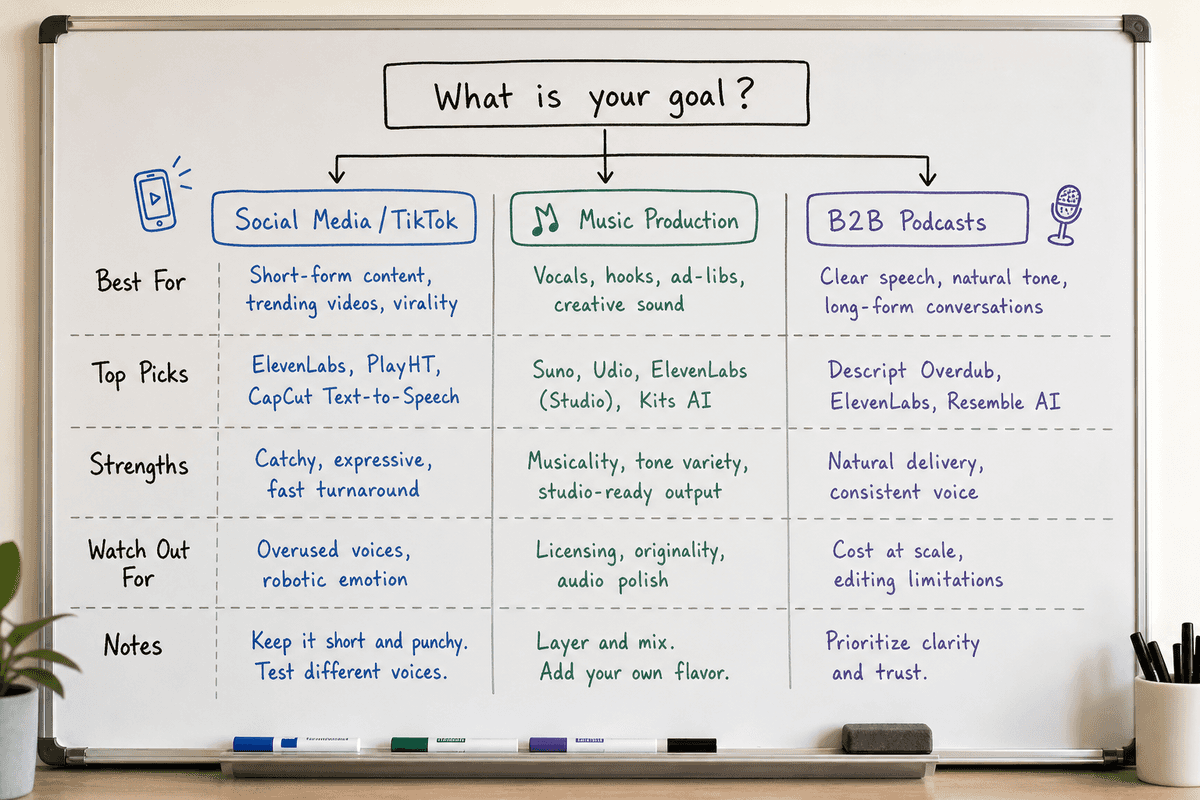
Before diving into the tools, you need to evaluate them against specific criteria. Not all voice generation models are built for the same use case.
1. Voice Model Fidelity & Variety
The top results on search engines emphasize a "demographic buffet." You do not just need a "voice." You need specific aesthetics: a young female voice for a lifestyle reel, a deep middle-aged male voice for a dramatic trailer, or a hyper-energetic anime-style voice for gaming content. The best tools offer distinct, pre-trained personas rather than forcing you to prompt engineer a generic TTS model.
2. Wet vs. Dry Exports
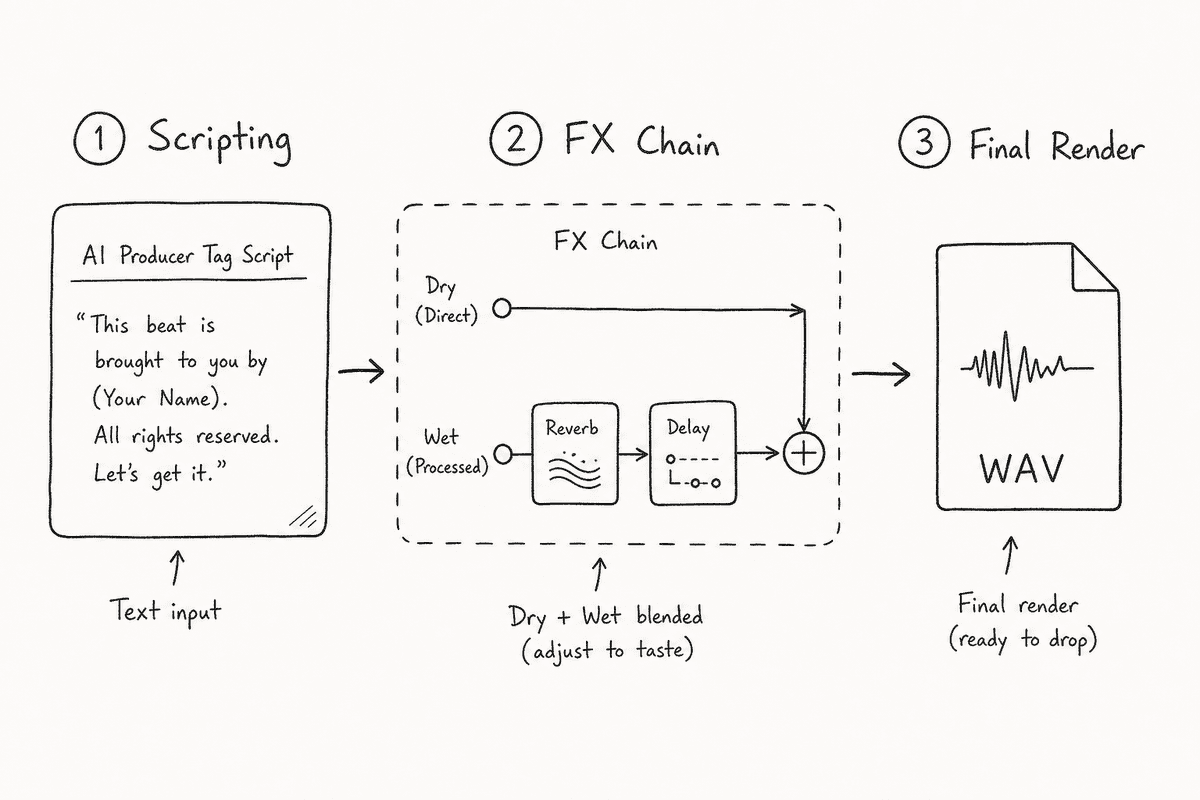
A "dry" vocal is raw, unedited audio. A "wet" vocal has an FX chain applied—typically EQ, compression, reverb, and delay.
If you are a music producer editing in FL Studio or Ableton, you want a dry WAV file so you can route it to your own mixer channels and apply custom sidechain compression. If you are a social media manager cutting a video in CapCut, you likely want a wet file that is already mixed, mastered, and ready to drop onto the timeline. The best tools offer both.
3. Commercial Licensing & Rights
Are the generated tags royalty-free? If you use a tool trained on copyrighted voices (like unauthorized celebrity voice clones), your YouTube video risks a copyright strike, or your client's commercial campaign could face legal takedowns. Professional creators require tools that explicitly grant commercial rights to the generated audio.
4. Pricing: Subscriptions vs. Credit Packs
SaaS subscription fatigue is real. Many users only need three or four producer tags a year. Forcing a $20/month subscription for a one-off task causes massive churn. The leading tools in this space offer one-time credit packs (e.g., $5 for 10 generations) or a generous freemium tier, aligning with the low-barrier commercial intent of the user base.
Top 7 Producer Tag AI Tools
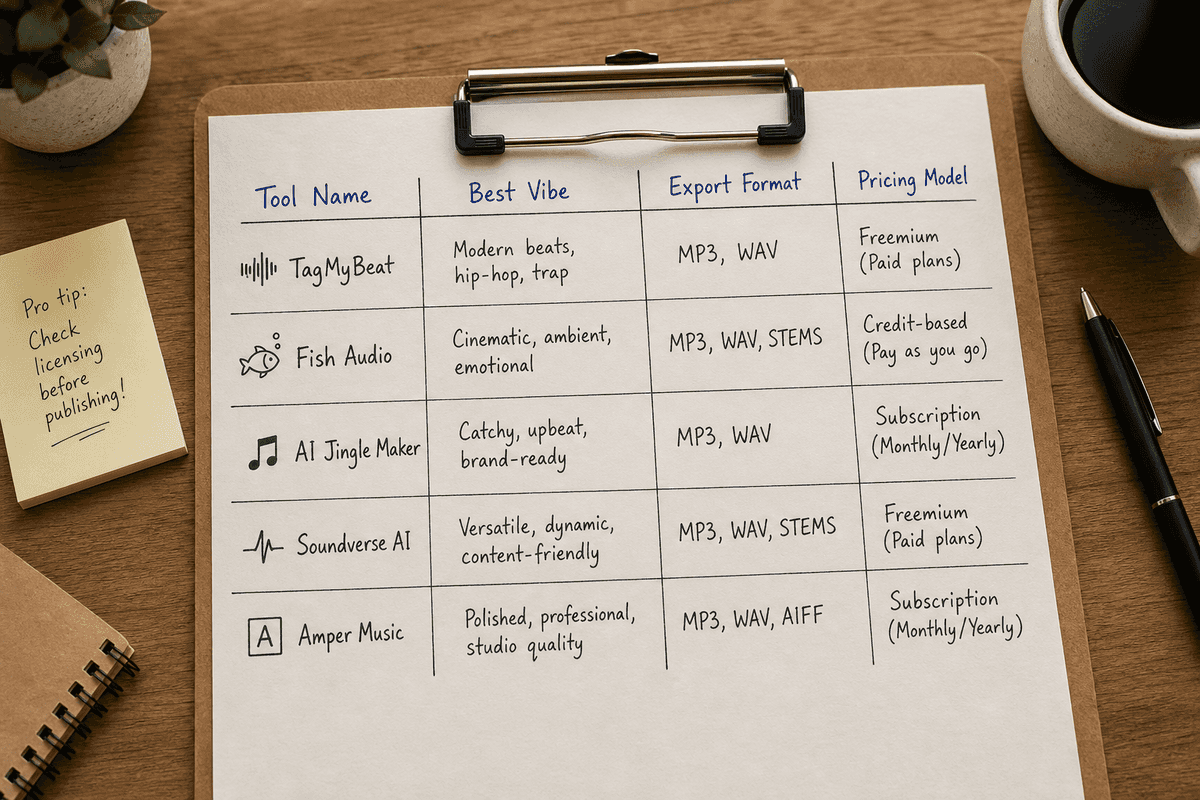
Based on search visibility, feature sets, and output quality, here are the top AI tag generators for content creators and producers in 2026.
1. TagMyBeat
Best for: Classic Hip-Hop Tags & Fast Social Media Prototyping
TagMyBeat has dominated search visibility for users looking for quick, no-login-required generation. It focuses heavily on the classic hip-hop and trap aesthetics.
- The Vibe: Aggressive, punchy, and highly stylized. It understands the cadence of a beat drop better than generic TTS engines.
- Workflow: Incredibly lean. You type your script, pick a voice persona (e.g., "Deep Male," "Sassy Female"), and hit generate.
- Standout Feature: It offers excellent one-click effects. For users who do not know how to mix audio, TagMyBeat applies radio-ready EQ and reverb chains instantly.
- Pricing: Operates on a highly accessible freemium model with cheap, one-time credit packs for high-quality uncompressed WAV downloads.
2. Fish Audio (My Producer Tag)
Best for: Niche Aesthetics (Anime, Kawaii, and Hyper-Pop)
Fish Audio (often surfacing as "My producer tag AI Voice Generator") offers some of the most unique voice models on the market. While competitors focus strictly on radio hosts and trap voices, Fish Audio leans into internet culture.
- The Vibe: Kawaii, anime-inspired, hyper-pop, and distinct social media voices. If your content is tailored toward Gen Z, gaming, or internet subcultures, this is the tool.
- Workflow: Features both a "Simple Mode" and an "Advanced Playground" where creators have total control over pitch, speed, and emotional inflection.
- Standout Feature: Multi-language support. It can generate stylistically accurate tags in Japanese, Spanish, and Korean, making it a favorite for global content teams.
- Pricing: Generous daily limits on the free tier, with paid tiers unlocking commercial rights and higher sample rates.
3. AI Jingle Maker
Best for: B2B Podcasts, Radio Drops, and Corporate Video
If you are running a B2B SaaS marketing team and need a clean, authoritative voice for your new webinar series, a trap-style beat tag will feel out of place. AI Jingle Maker targets the broadcast and podcasting demographic.
- The Vibe: Professional, articulate, and broadcast-ready. Think NPR or high-end corporate radio.
- Workflow: Allows you to layer your generated voice directly over royalty-free music beds within the web app, creating a complete intro sequence without opening a video editor.
- Standout Feature: The "Middle-Aged Male" and "Authoritative Female" models are exceptionally realistic, avoiding the overly breathy artifacts common in lesser AI tools.
- Pricing: Credit-based system favored by agencies. Note: Because web-based tools like this are often built as complex JavaScript apps, their organic search indexation can be tricky. (If you're building a similar tool, mastering Single-Page Application SEO: What Works in 2026? is critical for capturing this search volume).
4. BasedLabs AI
Best for: Visual Creators & Automated YouTube Channels
BasedLabs AI is primarily known for video and image generation, but their Producer Tag Generator has gained traction because it integrates seamlessly into broader visual workflows.
- The Vibe: Cinematic and grand. Excellent for movie recap channels, tech reviews, and dramatic documentary-style YouTube content.
- Workflow: Built into a broader suite of AI tools, making it easy to generate an image, animate it, and add a custom audio tag all in one dashboard.
- Standout Feature: High integration capabilities. It is built for creators who want to stay within one ecosystem rather than bouncing between five different single-purpose SaaS apps.
- Pricing: Subscription-based, but justifiable if you are using their video and image models alongside the audio generator.
5. Moshpyt
Best for: Drill, Aggressive Vibes, and High-Energy Edits
Moshpyt caters directly to the aggressive, fast-paced editing styles popular in TikTok montages, sports highlights, and drill music.
- The Vibe: Gritty, distorted, and loud. The models are trained to sound like they are shouting through a megaphone or a saturated vintage microphone.
- Workflow: Very straightforward, prioritizing speed.
- Standout Feature: The pre-built FX chains are heavily saturated and distorted. You do not need to know how to use a distortion plugin to get that gritty, lo-fi aesthetic; Moshpyt does it natively.
- Pricing: Free to try, with inexpensive lifetime licenses for indie creators.
6. Custom GPTs (ChatGPT Audio Plugins)
Best for: Ideation, Scripting, and Concepting
While ChatGPT's native voice generation is heavily restricted to prevent deepfakes, custom GPTs (like the "Music Producer tag generator" found in the OpenAI store) serve a distinct purpose: ideation.
- The Vibe: Analytical and structural.
- Workflow: You don't use this for the final audio file. Instead, you prompt the GPT: "I run an SEO agency in Durham. Give me 10 ideas for a 3-second audio watermark that sounds professional but modern."
- Standout Feature: Scripting. Many creators freeze when trying to write their tag. Custom GPTs can generate formulas (e.g., "[Brand Name] in the background, results in the foreground") which you then feed into TagMyBeat or Fish Audio.
- Pricing: Included with a ChatGPT Plus subscription.
7. ElevenLabs
Best for: Hyper-Realistic Voice Cloning & Total Control
It is impossible to discuss AI voice generation in 2026 without mentioning ElevenLabs. While not explicitly branded as a "producer tag generator," it is the underlying engine powering many white-labeled tools, and it remains the gold standard for fidelity.
- The Vibe: Indistinguishable from human speech.
- Workflow: You can select from thousands of community-generated voices or clone your own voice (with proper consent verification).
- Standout Feature: "Speech-to-Speech" functionality. Instead of typing text, you can record yourself whispering, shouting, or singing the tag, and the AI will mimic your exact cadence and emotional delivery using the target voice.
- Pricing: Subscription tiers based on character count.
How to Make a Producer Tag with AI: A 3-Step Framework
If you have never generated an audio watermark before, staring at a text box can be intimidating. Follow this three-step framework to guarantee a professional result.
Step 1: Scripting & The "Inspiration" Formula
Your tag should be short. Anything over three seconds becomes an annoyance rather than a brand signature. If you lack inspiration, rely on these proven formulas:
- The Signature (Music/Art): "Produced by [Name]." or "[Name] on the track."
- The Authority (B2B/Podcasts): "You're listening to [Brand Name]."
- The Question (Social Media): "Wait, did [Name] make this?"
- The Abstract (Brand Vibe): Just the brand name spoken with a specific, memorable inflection, followed by a sound effect (e.g., a camera shutter or a digital notification chime).
Pro-tip: When typing your script into an AI generator, spell words phonetically if the AI mispronounces them. If your brand is "Phyx," spell it "Fix" in the text prompt to ensure correct audio generation.
Step 2: Select the Voice Model & FX Chain
Match the demographic of the voice to the demographic of your audience. A young, energetic female voice often performs best for lifestyle and e-commerce content, while a deeper, resonant voice adds gravitas to technical B2B content.
Once generated, decide between Wet and Dry:
- Dry: Export without effects if you plan to mix the audio yourself in Premiere Pro, DaVinci Resolve, or FL Studio. This allows you to "duck" the background music perfectly around the vocal.
- Wet: If the tool offers one-click effects, apply a short delay (echo) and a plate reverb. This makes the vocal sound massive and sit cleanly over most music beds.
Step 3: Export & Legal Clearance
Always download your final file in WAV format, not MP3. MP3 is a lossy format that truncates high frequencies; applying further edits to an MP3 can result in "washy" or distorted audio artifacts.
Before publishing, verify the commercial rights. Ensure the tool's Terms of Service explicitly states that generated outputs are royalty-free and cleared for commercial use. Do not use unauthorized celebrity voice clones for brand accounts—the legal liability is simply not worth the short-term engagement.
The SEO Angle: Why Audio Tools Must Monitor AI Search
For the developers building these AI tools—and the marketing agencies promoting them—there is a critical paradigm shift happening in user acquisition.
Five years ago, a SaaS founder would simply target the keyword "producer tag maker online," write a landing page, and run Google Ads. Today, the buyer journey is fractured across conversational AI interfaces. A music producer or content creator is highly likely to open Perplexity or ChatGPT and ask, "What is the best free AI producer tag generator that gives me dry WAV exports?"
If your SaaS tool is not mentioned in that LLM's response, you effectively do not exist for that buyer.
This is the core problem BeVisible solves. We help growth teams monitor how AI assistants answer specific buyer prompts, which brands they recommend, and which sources they cite to justify those recommendations.
For example, if Gemini consistently recommends TagMyBeat because it cited a specific Reddit thread, but ignores your superior tool, you have a visibility gap. BeVisible identifies these blind spots, allowing your team to turn weak citations and competitor wins into targeted, evidence-backed publishing work. You can adjust your PR strategy, update your documentation to clearly state you offer "Dry WAV exports," and feed the LLMs the exact context they are looking for.
It is the same logic that applies to localized search—if you are researching the Top 7 Agencies for SEO in Durham (Ranked 2026), you expect specific, localized answers. LLMs operate similarly, relying on highly specific semantic relationships. You must ensure your software's feature set is aggressively documented and cited by reputable sources (which you can often identify by following the 11 Best SEO Blogs Every SaaS Founder Needs (2026)).
Without an automated way to monitor this, you are flying blind. To see how BeVisible turns these missing mentions into structured, publishable opportunities, explore our core platform features.
Frequently Asked Questions (FAQ)
Are AI beat tags and vocal generators royalty-free?
Generally, yes. Legitimate tools like Fish Audio, AI Jingle Maker, and ElevenLabs provide royalty-free outputs, provided you adhere to their terms of service (which usually requires a paid tier for commercial use). However, if you use a tool to clone a copyrighted voice (like a famous actor) without permission, the output is not legally protected and can result in copyright strikes.
What is the difference between Simple Mode and Advanced Mode in these tools?
Simple mode typically only requires you to input text and select a voice. The AI handles the pacing and emotion. Advanced modes (or "Advanced Playgrounds") give you granular control. You can adjust the pitch of individual syllables, increase the emotional intensity, or add artificial breaths and pauses to make the delivery sound more human.
Do I need a monthly subscription to make a tag?
Not necessarily. Because many users only need a tag once or twice a year, platforms have adapted. While some require subscriptions, many top-tier tools offer "one-time credit packs" (e.g., pay $5 for 20 generations) or operate on a freemium model where you can download basic formats for free and pay only for high-resolution WAV files.
Can I use my own voice to make a tag?
Yes. Using "Speech-to-Speech" technology (available in tools like ElevenLabs), you can record a rough, unpolished version of your tag using your laptop microphone. The AI will then map your exact timing, rhythm, and emotion onto a professional, pre-trained voice model, giving you total control over the delivery without needing professional recording gear.
Final Thoughts on AI Audio Branding
Building a recognizable brand requires consistency across every touchpoint. In a landscape dominated by video and audio-first platforms, neglecting your sonic identity leaves money on the table.
Whether you are a solo content creator looking for a quick TikTok hook, or a B2B agency building out a complex podcasting strategy, AI producer tag generators offer unprecedented speed, variety, and quality. By defining your script, choosing the right AI persona, and understanding the nuances of wet vs. dry exports, you can secure a professional audio watermark in minutes rather than weeks.
And if you are the one building or marketing these AI tools, remember that visibility is no longer just about blue links on Google. It is about being the definitive answer when a buyer asks an AI assistant for a recommendation.