
Imagine this: You are the founder of a growing SaaS startup. After months of user feedback, you’ve decided to revamp your core product offering, overhaul your pricing model, and completely restructure your website’s architecture. The staging site looks pristine. Your engineering team pushes the deployment on a Tuesday night. You wake up Wednesday morning, open your analytics dashboard, and your heart sinks. Organic traffic has flatlined.
What happened? You changed the URLs of your top-performing blog posts and landing pages without implementing proper redirects. Google bots hit a wall of 404 errors, your hard-earned backlinks now point to dead ends, and your search rankings evaporate overnight.
In the world of technical SEO, URLs are real estate. When you move houses without leaving a forwarding address, your mail—and in this case, your traffic, authority, and revenue—gets lost. Mastering SEO and redirects is not just an IT chore; it is a critical strategy for protecting your organic baseline during domain migrations, rebrands, and routine content pruning.
This guide breaks down everything you need to know about implementing redirects safely. We will explore the technical mechanics of status codes, server-side versus client-side setups, specific challenges for modern web frameworks, and the precise step-by-step workflows required to update URLs without causing a traffic crash.
What is a Redirect?
At its core, a redirect is a way to send both users and search engines to a different URL than the one they originally requested.
Think of a URL as a physical address. If your SaaS company moves its headquarters from Suite 100 to Suite 500, you register a mail-forwarding request with the post office. Any mail addressed to Suite 100 is automatically routed to Suite 500. A web redirect functions identically. When a browser or a search engine crawler requests https://example.com/old-page, the server intercepts that request and responds with an HTTP status code that effectively says, "That page has moved; go to https://example.com/new-page instead."
The Anatomy of an HTTP Request
To understand redirects, you must understand the conversation between a browser (or Googlebot) and a server:
- The Request: The client asks the server for
/old-pricing. - The Server Logic: The server checks its routing table or
.htaccessfile, sees a rule that says/old-pricingshould redirect to/pricing-plans. - The Header Response: The server sends back an empty page with an HTTP header status code (like 301) and a
Location: /pricing-plansheader. - The Second Request: The client reads the
Locationheader and immediately makes a second request to/pricing-plans. - The Final Delivery: The server responds with a
200 OKstatus and delivers the HTML of the new page.
All of this happens in milliseconds, completely invisible to the end user. But to search engines, that invisible conversation dictates how authority is transferred across your website.
Why Are Redirects Important for SEO?
When implemented incorrectly, redirect issues can silently destroy an otherwise perfect SEO strategy. Let's break down the three fundamental reasons redirects dictate your SEO survival.
1. Preserving Link Equity (PageRank)
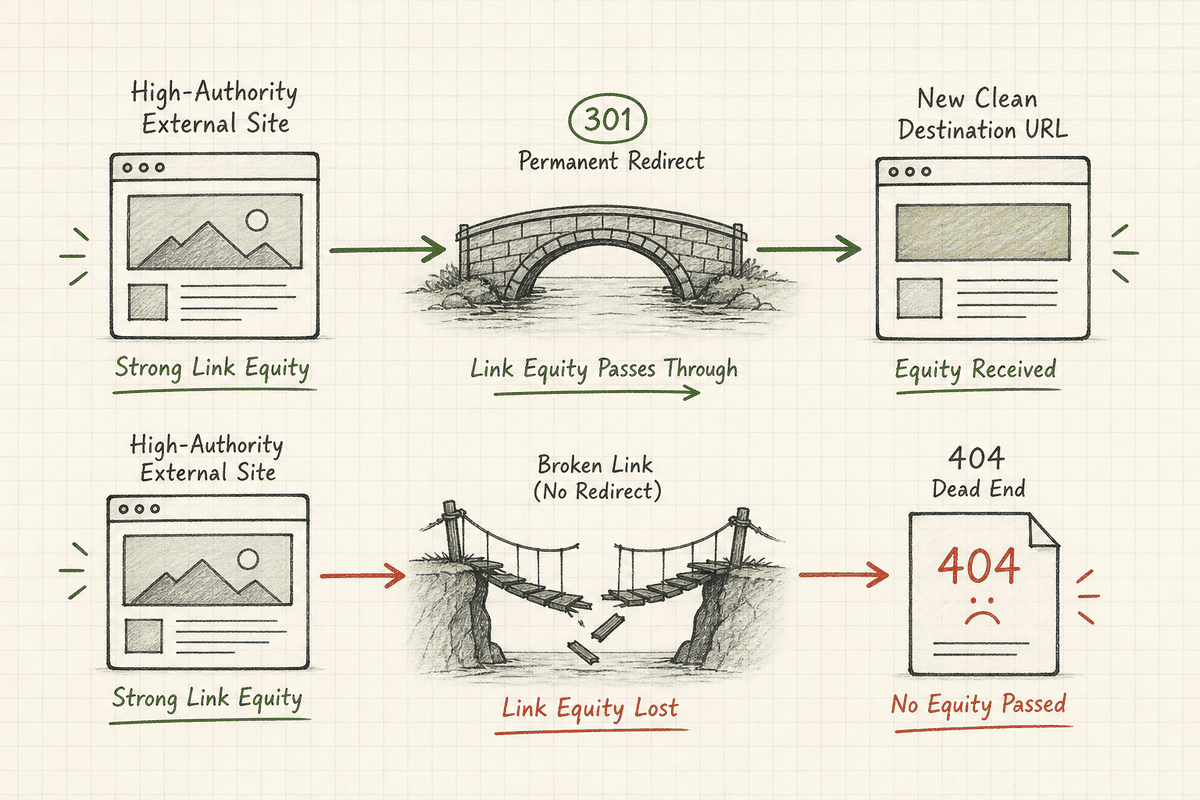
In Google’s ecosystem, backlinks act as votes of confidence. If a high-authority industry blog links to your feature page at /feature-x, that link passes "link equity" (historically known as PageRank) to your URL, helping it rank higher in search engine results pages (SERPs).
If you change that URL to /product/feature-x without a redirect, the original URL returns a 404 Not Found error. The link equity from that external backlink hits a dead end. It vanishes. A proper 301 redirect acts as a bridge, telling Google to transfer the accumulated authority from the old URL to the new one. As Google's official documentation on redirects explains, server-side redirects are the most reliable way to ensure Google Search correctly registers permanent URL changes.
2. Ensuring Seamless Crawlability and Indexing
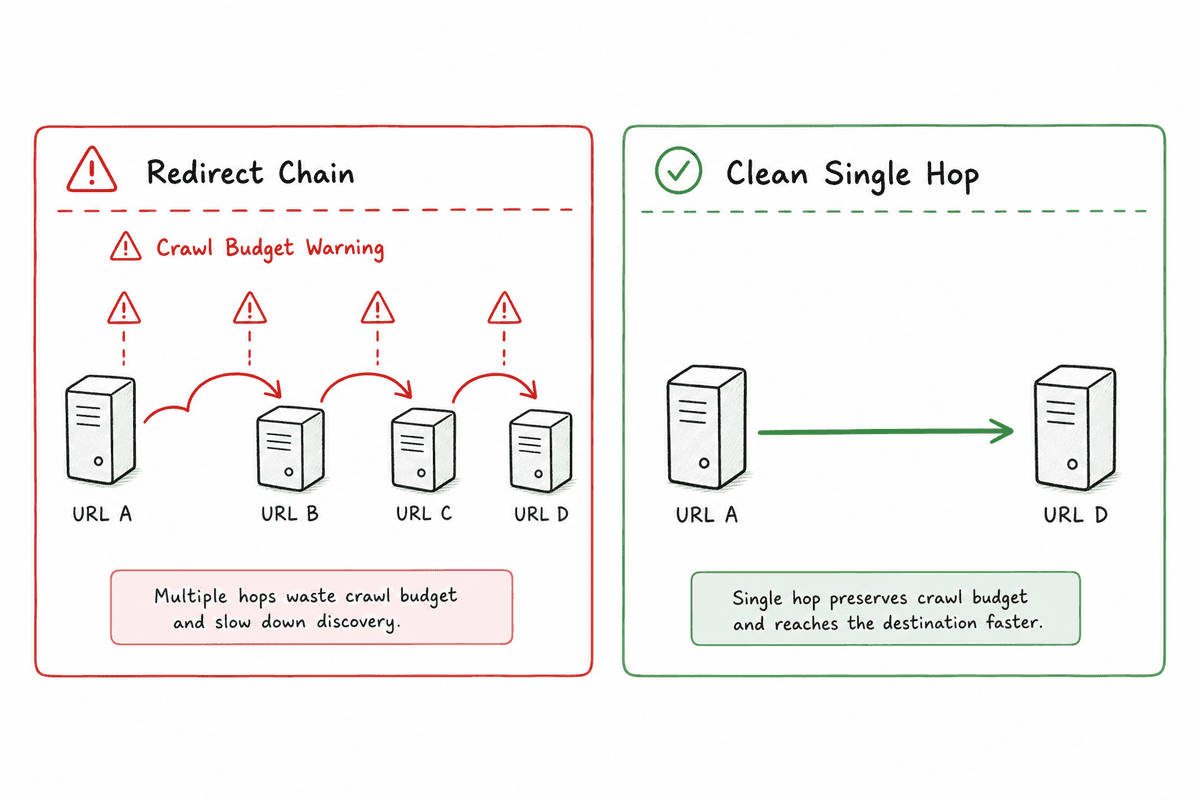
Googlebot has a limited "crawl budget"—a finite amount of time and resources it is willing to spend crawling your SaaS website. If your site is littered with broken links, 404 errors, or convoluted redirect chains (where Page A redirects to Page B, which redirects to Page C), Googlebot gets bogged down.
Clean, direct, single-hop redirects ensure that search engine crawlers can efficiently map your new site architecture. When bots can crawl your site easily, your new pages are indexed faster, and your organic performance remains stable.
3. Protecting the User Experience (UX)
Search engines optimize for user satisfaction. If a potential customer clicks a result in Google, or a link in an old email newsletter, and lands on a frustrating 404 error page, they will immediately "pogo-stick" back to the search results. High bounce rates and short dwell times send negative signals to search engines about the quality of your site.
Redirects ensure that users seamlessly arrive at the content they are looking for, protecting your conversion rates and maintaining a positive user experience.
Overview of Redirect Types: 301 vs 302 and Beyond
Not all redirects are created equal. The HTTP status code you choose tells search engines precisely how to treat the old URL in their index. Mixing these up is one of the most common catastrophic errors developers make during site migrations.
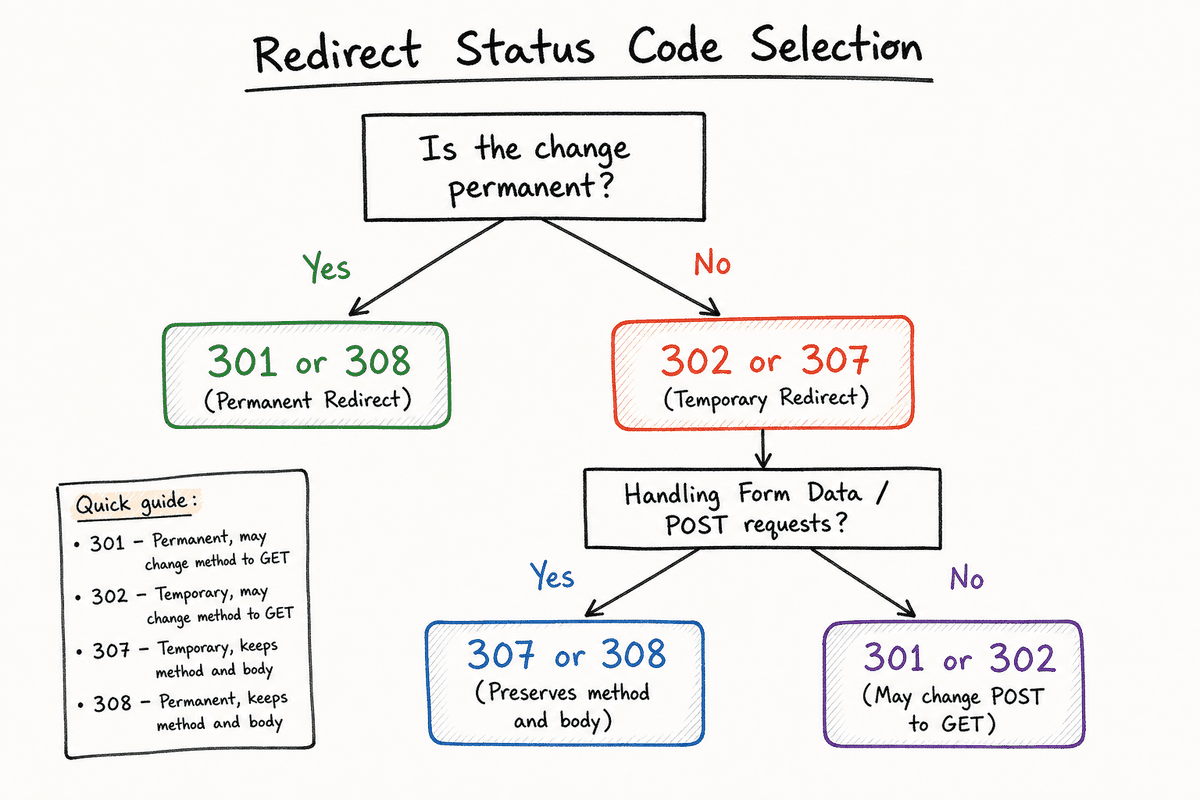
301 Moved Permanently
The 301 redirect is the absolute gold standard for SEO. It indicates that the original URL has moved permanently and will never return.
SEO Impact: A 301 redirect tells Google to drop the old URL from its index, replace it with the new URL, and pass the vast majority (historically understood as roughly 100% since 2016) of the link equity to the new destination.
When to use it:
- Migrating from HTTP to HTTPS.
- Moving to a new domain name (e.g., rebranding your SaaS).
- Consolidating two overlapping blog posts into one ultimate guide.
- Fixing trailing slash issues (e.g., redirecting
/pricing/to/pricing). - Restructuring your URL slugs for clarity.
As noted in Moz's detailed breakdown of redirection, 301s are the safest and most powerful way to ensure your SEO equity survives a URL change.
302 Found (Historically "Moved Temporarily")
A 302 redirect tells search engines and browsers that the page has moved, but only temporarily. It implies that the original URL will eventually be restored.
SEO Impact: A 302 redirect tells Google to keep the old URL indexed. Because it is viewed as a temporary measure, Google historically did not pass link equity across a 302 redirect as efficiently as a 301. While Google's handling of 302s has grown more sophisticated (eventually treating long-term 302s as 301s), using them for permanent changes introduces unnecessary risk and delays in indexation.
When to use it:
- A/B testing a new layout on a different URL without risking the original page's SEO.
- Redirecting users to a localized version of your site based on IP address or language settings.
- Hiding a product page temporarily while an item is out of stock, but expected back soon.
- Special seasonal promotions (e.g., temporarily redirecting the homepage to a Black Friday landing page).
307 Moved Temporarily (The HTTP 1.1 Successor)
The 307 redirect is the modern HTTP/1.1 equivalent of the 302. From an SEO perspective, Google treats 307s identically to 302s. However, the 307 has a specific technical distinction regarding how the browser handles the request method (POST vs. GET).
A 307 guarantees that the browser will not change the HTTP method when making the new request. If a user submitted a form via POST to the old URL, the browser will properly POST that same data to the new URL.
When to use it: Server-side form submissions, or when handling temporary redirects on sites enforcing Strict Transport Security (HSTS). Many browsers will internally execute a 307 redirect when upgrading an HTTP request to HTTPS on an HSTS-enabled domain.
308 Permanent Redirect
The 308 status code is the HTTP/1.1 equivalent of the 301. Like the 307, it ensures that the HTTP request method remains unchanged during the redirect.
SEO Impact: Google crawls and indexes 308 redirects exactly like 301 redirects, consolidating signals to the new URL.
When to use it: When you are permanently moving endpoints that handle form submissions, complex API queries, or POST requests where preserving the exact payload is critical.
Redirect Status Code Comparison Matrix
Server-Side vs. Client-Side Redirects
Redirects can be executed at different levels of your technology stack. Where the redirect happens drastically alters how quickly and reliably search engines process it.
Server-Side Redirects (The SEO Best Practice)
Server-side redirects happen before the webpage is ever loaded or rendered. When the request hits your server (Apache, Nginx) or your Content Delivery Network (Cloudflare, AWS CloudFront), the server immediately fires back the 3xx status code.
Because no HTML or JavaScript needs to be downloaded or parsed by the search engine, server-side redirects are incredibly fast. Google explicitly recommends server-side redirects as the most reliable method for passing SEO signals.
Advantages:
- Instant execution.
- Guaranteed processing by all search engine crawlers.
- Zero client-side rendering required.
- Clean, parseable HTTP headers.
Client-Side Redirects (The Danger Zone)
Client-side redirects happen after the browser has downloaded the initial HTML or JavaScript. The server sends back a 200 OK status, and the browser has to execute code on the page to trigger the redirect.
There are two main types of client-side redirects:
1. Meta Refresh
A meta refresh is an HTML tag placed in the <head> of a document. It looks like this:
<meta http-equiv="refresh" content="0; url=https://example.com/new-page">
While Google can parse a 0-second meta refresh and typically treat it like a 301 redirect, it is a highly inefficient method. It forces the crawler to download the HTML, parse the document head, and then initiate a new request. If the timer is set above 0 seconds (e.g., "You are being redirected in 5 seconds"), Google may view the redirect as temporary or fail to pass link equity entirely.
As advised by WebCEO's guide on modern SEO redirects, you should universally avoid meta refreshes in favor of server-side rules.
2. JavaScript Location Redirects
JavaScript redirects utilize scripts, such as window.location.replace('https://example.com/new-page'), to push the user to a new URL.
For SaaS companies building complex web apps, relying on JS redirects is notoriously dangerous for SEO. Googlebot must download the HTML, queue the page for rendering in its Web Rendering Service (WRS), execute the JavaScript, and only then discover the redirect. This process can be delayed by days or even weeks depending on crawl capacity.
If your SaaS relies on JavaScript frameworks, you must ensure that routing changes are accompanied by actual server-side 301 headers.
The Unique Challenge of Single-Page Applications (SPAs)
For modern SaaS products built on React, Vue, or Angular, traditional server-side redirects can be complicated because SPAs often handle routing purely on the client side without ever hitting the server for subsequent page loads.
If you change a URL inside a React app using react-router, clicking a link feels instant to the user. But if a search bot hits that old URL directly, and your server isn't configured to handle it, the bot will get a blank page or a soft 404 before the JavaScript can route it.
To safely implement routing changes in modern frameworks, you must integrate SEO-friendly Server-Side Rendering (SSR) or Static Site Generation (SSG) tools like Next.js or Nuxt.js. These frameworks allow you to define server-side redirects in configuration files (like next.config.js) before the React hydration process ever begins.
For a deep dive into configuring these frameworks, check out our SEO for Single Page Applications: The Technical Checklist, or read about Single-Page Application SEO: What Works in 2026? to understand how to handle canonicals and routing in headless environments.
4 Common SaaS Scenarios Requiring Bulletproof Redirects
In a fast-moving startup environment, URLs change constantly. Here are the four scenarios where a lack of redirect strategy will crash your organic traffic.
Scenario 1: The Total Domain Migration (Rebranding)
Let’s say you started your company as getinvoiceapp.io, and after raising a Series A, you acquired invoice.com. Migrating an entire domain is the highest-risk maneuver in SEO.
The Solution: You need a wildcard 301 redirect. A wildcard redirect ensures that every path on the old domain points to the exact matching path on the new domain.
getinvoiceapp.io/features->invoice.com/featuresgetinvoiceapp.io/blog/post-1->invoice.com/blog/post-1
If you simply redirect the entire old domain to the homepage of the new domain, Google will treat those as "Soft 404s," dropping your deep pages from the index and obliterating your long-tail traffic.
Scenario 2: Consolidating Underperforming Content (Content Pruning)
Content marketing audits often reveal "keyword cannibalization"—where three weak blog posts are competing for the same topic. For example:
/blog/what-is-marketing-automation/blog/marketing-automation-tools/blog/how-marketing-automation-works
The Solution: Rewrite one of the posts into a comprehensive, ultimate guide on [How to Build an SEO Landing Page (7-Step Guide)](https://bevisible.app/blog/seo-landing-page) (or whatever the core topic is), and permanently 301 redirect the other two URLs to the new master URL. This consolidates the backlink equity of three separate posts into one powerhouse URL, often resulting in a significant ranking boost.
Scenario 3: Flattening URL Architectures
Perhaps your original CMS forced blog posts into a date-based structure like /blog/2023/11/04/post-title, and you want to move to a cleaner /blog/post-title structure.
The Solution: You cannot do this manually if you have hundreds of posts. You must use Regular Expressions (RegEx) on your server to dynamically strip the dates out of the URL string and redirect users to the root slug.
Scenario 4: HTTP to HTTPS and Trailing Slashes
Search engines view http://example.com, https://example.com, https://www.example.com, and https://example.com/ (with a trailing slash) as four completely distinct websites. If your server allows all four variations to load the same content, Google will penalize you for duplicate content and dilute your backlink equity.
The Solution: Choose one canonical version (e.g., HTTPS, non-www, no trailing slash). Set up global server rules forcing all other variations to 301 redirect to your chosen canonical format.
The 5-Step URL Mapping Framework for Site Migrations
When conducting a complex site migration or restructuring a large e-commerce/SaaS catalog, you cannot wing your redirects. If an agency handles your migration and skips this step, fire them. You must create a master "URL Mapping" spreadsheet.
Step 1: Crawl the Legacy Site
Before touching a single line of code, run a comprehensive crawl of your existing website using a tool like Screaming Frog SEO Spider or Sitebulb. Export every internal HTML URL that returns a 200 OK status code into a spreadsheet.
Step 2: Extract High-Value External Backlink Data
Not all URLs are visible in a basic crawl (e.g., orphaned pages). Use Ahrefs or Semrush to pull a list of your "Top Pages by Links." Ensure any URL that has external backlinks is added to your mapping spreadsheet, even if it is currently hidden from your site navigation.
Step 3: Match URLs 1-to-1
Create a column next to your old URLs for the "Target Destination." Go through the list and meticulously map the old URL to the most relevant equivalent page on the new architecture.
Rule of Thumb: Never redirect to a page that isn't highly relevant to the original topic. If you redirect an old article about "Email Templates" to your pricing page, Google will flag it as a Soft 404, recognizing the intent mismatch.
Step 4: Handle Deprecated Pages (The 410 Gone Status)
If you are completely deprecating a feature and there is absolutely no relevant page to redirect to, do not redirect to the homepage. Instead, serve a 410 Gone status code. A 410 tells Google, "This page has been intentionally deleted and is never coming back. Remove it from your index immediately."
Step 5: Test the Map in Staging
Before pushing the migration live, implement the redirect map on a closed staging environment. Run a Screaming Frog crawl against your old URL list but pointing at the staging server. Ensure every single old URL returns a clean 301 redirect followed by a 200 OK on the new destination.
How to Implement Redirects (Technical Cheatsheet)
The actual implementation of redirects depends entirely on your web hosting environment and tech stack. Here are the concrete syntax examples for the most common SaaS environments.
1. Apache (.htaccess)
If your site runs on Apache (common for WordPress blogs and LAMP stack apps), redirects are handled in a hidden file in your root directory called .htaccess.
Simple 1-to-1 Redirect:
Redirect 301 /old-page /new-page
Redirecting an entire domain to a new domain:
RewriteEngine On
RewriteCond %{HTTP_HOST} ^(?:www\.)?olddomain\.com$ [NC]
RewriteRule ^(.*)$ https://newdomain.com/$1 [R=301,L]
Enforcing HTTPS:
RewriteEngine On
RewriteCond %{HTTPS} off
RewriteRule ^(.*)$ https://%{HTTP_HOST}%{REQUEST_URI} [L,R=301]
2. Nginx
For faster performance, many SaaS companies use Nginx. Redirects are configured in your server block configuration files (usually located in /etc/nginx/sites-available/).
Simple 1-to-1 Redirect:
rewrite ^/old-page$ /new-page permanent;
Redirecting an entire domain to a new domain:
server {
    listen 80;
    server_name olddomain.com www.olddomain.com;
    return 301 https://newdomain.com$request_uri;
}
3. Edge Redirects (Cloudflare)
Implementing redirects at the edge (via your CDN) is the fastest and most scalable method available today. Cloudflare processes the redirect at the DNS level before the request ever reaches your origin server, drastically reducing server load.
In Cloudflare, you can use Page Rules or Bulk Redirects:
- Go to your Cloudflare Dashboard.
- Navigate to Rules > Page Rules.
- Create a rule for
*olddomain.com/*. - Set the setting to "Forwarding URL" and choose "301 - Permanent Redirect".
- Set the destination URL to
https://newdomain.com/$1.
4. Next.js (React Framework)
For modern React apps, Next.js handles server-side redirects via the next.config.js file. This ensures the 301 is fired server-side before the client hydrates.
// next.config.js
module.exports = {
  async redirects() {
    return [
      {
        source: '/old-blog/:slug',
        destination: '/resources/:slug',
        permanent: true, // This triggers a 301 instead of a 307
      },
    ]
  },
}
For deeper insights into React-specific SEO optimization, review our guide on Implementing SEO in Single Page Applications (3 Ways).
Identifying and Fixing Critical Redirect Issues
Even with the best planning, massive sites accumulate technical debt. Two of the most toxic issues for your SEO health are redirect chains and redirect loops.
The Danger of Redirect Chains
A redirect chain occurs when there is more than one redirect between the initial request and the final destination.
- URL A -> 301 -> URL B -> 301 -> URL C -> 301 -> URL D.
Why it’s a problem:
- Latency: Each "hop" requires a new DNS lookup, TCP connection, and TLS handshake. A 4-hop chain can add over a full second to page load time, ruining your Core Web Vitals.
- Crawl Budget Bleed: Googlebot will generally follow up to 5 redirect hops before giving up and dropping the crawl entirely. If your chain is too long, the final page will never be indexed.
- Dilution: While a single 301 passes equity efficiently, a chain risks diluting that authority as Google attempts to untangle the routing mess.
The Fix: Update all internal links to point directly to the final destination (URL D). Then, update the redirect rules so that URL A, URL B, and URL C all point directly to URL D in a single hop.
The Fatal Redirect Loop
A redirect loop occurs when two or more URLs point to each other indefinitely.
- URL A -> 301 -> URL B -> 301 -> URL A.
When a browser hits a loop, it eventually throws an ERR_TOO_MANY_REDIRECTS failure. When Googlebot hits a loop, it immediately aborts the crawl and deindexes the affected URLs. Loops often happen accidentally when conflicting regex rules are deployed in an .htaccess file (e.g., forcing a trailing slash while simultaneously stripping it).
How to Audit Your Site for Redirect Errors
To find chains and loops before Google does, integrate routine audits into your deployment cycle.
- Use Google Search Console: Navigate to the "Pages" report under the Indexing section. Look for pages categorized under "Page with redirect" or "Redirect error." This tells you exactly which URLs Google is having trouble processing.
- Run Screaming Frog / Sitebulb: Set your crawler to follow redirects (up to 10 hops). Once the crawl finishes, run the "Redirect Chains" report. It will export an exact map of every chain and loop on your site, showing the specific status code of every hop.
- Monitor Server Logs: If you manage a large SaaS or e-commerce platform, analyzing your raw server access logs is the only way to see exactly how bots are interacting with your legacy URLs. If you see thousands of requests returning 301s instead of 200s, you have an internal linking problem.
5 Redirect Myths Costing SaaS Companies Traffic
The SEO industry is infamous for outdated information. Let's bust the most pervasive myths about redirects that are actively harming your site architecture.
Myth 1: 301 Redirects Lose 15% of PageRank
For years, SEOs believed that a 301 redirect "taxed" you 15% of your link equity, making webmasters terrified to update their URLs. This was true in the early 2010s. However, in 2016, Gary Illyes from Google confirmed that 3xx redirects no longer lose PageRank. A 301 passes 100% of the link authority available to it.
Myth 2: You Should Always Redirect Broken Pages to the Homepage
As discussed earlier, redirecting an irrelevant, broken page to your homepage is categorized by Google as a "Soft 404." Google's algorithms will ignore the redirect, refuse to pass link equity, and may even view the tactic as manipulative. Only redirect to a page that satisfies the specific intent of the original URL.
Myth 3: You Can Delete Redirects After a Year
Many developers complain about "redirect bloat" clogging up server config files. A common debate in the tech SEO community is when it's safe to delete old redirects.
Google's official advice is to keep redirects active for at least one year. However, the reality is that if the old URL still has valuable external backlinks pointing to it, deleting the redirect will break the link and you will lose that authority forever. The safest practice is to keep 301 redirects active indefinitely unless the old domain is completely devoid of external links. If server bloat is an issue, move your legacy redirects to edge rules (Cloudflare) rather than processing them in application logic.
Myth 4: Google Immediately Processes Redirects
Just because you set up a 301 does not mean Google instantly updates its index. It can take weeks or months for Google to recrawl the old URL, discover the redirect, crawl the new URL, and update the SERP. If you migrate domains, expect a period of volatility. This is why SEO strategies focused on rankings and redirects always emphasize maintaining site-wide structure to speed up crawl discovery.
Myth 5: Internal Links Don't Need Updating if Redirects are in Place
Never rely on redirects as a permanent internal routing system. If you migrate a blog, you must run a database search-and-replace to update all internal links to the new, final URLs. Forcing users and bots to click through internal 301s degrades performance and wastes crawl budget.
Frequently Asked Questions About Redirects
How long does it take for Google to recognize a 301 redirect? It depends on your site's crawl frequency. For high-authority news sites, it might take minutes. For smaller SaaS blogs, it can take weeks. To speed up the process, submit the old URLs to Google Search Console via the URL Inspection tool to force a recrawl.
Are redirects bad for SEO? No. As detailed resources on redirect risks often explain, proper 301 redirects protect your SEO. What is bad for SEO are broken links, 404s, redirect chains, and using temporary 302s for permanent migrations.
How do I turn off a redirect?
If you need to revert a redirect, you simply remove the rule from your .htaccess, Nginx config, or CDN. However, if Google has already indexed the new URL and dropped the old one, you may need to implement a reverse 301 redirect (pointing the new URL back to the old one) to signal the change to the search engine.
Should I use an SEO plugin for redirects on WordPress? Plugins like Redirection or Yoast are excellent for marketers who don't have server access. However, because plugin-based redirects process at the application level (PHP) rather than the server level (Apache/Nginx), they consume more server resources. For sites with tens of thousands of redirects, server-level rules are vastly superior.
Final Thoughts: Treat Redirects as Deployment Requirements
The most successful SaaS companies integrate SEO considerations deeply into their engineering pipelines. A URL change should never be pushed to production without an accompanying redirect strategy.
By understanding the critical difference between status codes, avoiding client-side workarounds, and meticulously mapping legacy content during migrations, you can confidently iterate on your site architecture. Protect your user experience, preserve your hard-earned link equity, and ensure that your next major deployment doesn't end in an organic traffic crash. SEO and redirects go hand in hand—master the mechanics, and you master the transition.