
Nothing kills a SaaS organic growth strategy faster than migrating to a new content management system only to discover it hardcodes canonical tags, forces rigid URL structures, or bloats your Document Object Model (DOM) to the point where Googlebot gives up on rendering your pages.
Founders often treat their CMS as a simple publishing utility. They choose whatever platform their frontend developer prefers or whatever builder feels easiest during a free trial. Six months later, they realize they cannot edit their schema markup, their Core Web Vitals are failing due to massive server response times, and they need an engineer just to update an SEO title tag.
The reality is that your CMS is the foundational infrastructure of your organic acquisition funnel. If the technical foundation is flawed, no amount of brilliant keyword research or high-quality backlink building will save you.
Selecting the right SEO-friendly CMS requires balancing three competing forces: the technical flexibility required by search engines, the ease of use required by your marketing team, and the architectural scalability required by your engineering team.
Let’s examine the anatomy of a truly SEO-optimized CMS, evaluate the structural tradeoffs between headless, open-source, and page builder platforms, and review the seven best options for scaling SaaS, startup, and e-commerce growth in 2026.
The Technical Anatomy of an SEO-Friendly CMS
A visual text editor and a field for a meta description do not make a CMS "SEO-friendly." Those are table stakes. When evaluating platforms, you need to look beneath the user interface at how the system actually generates, stores, and serves HTML to search engine crawlers.
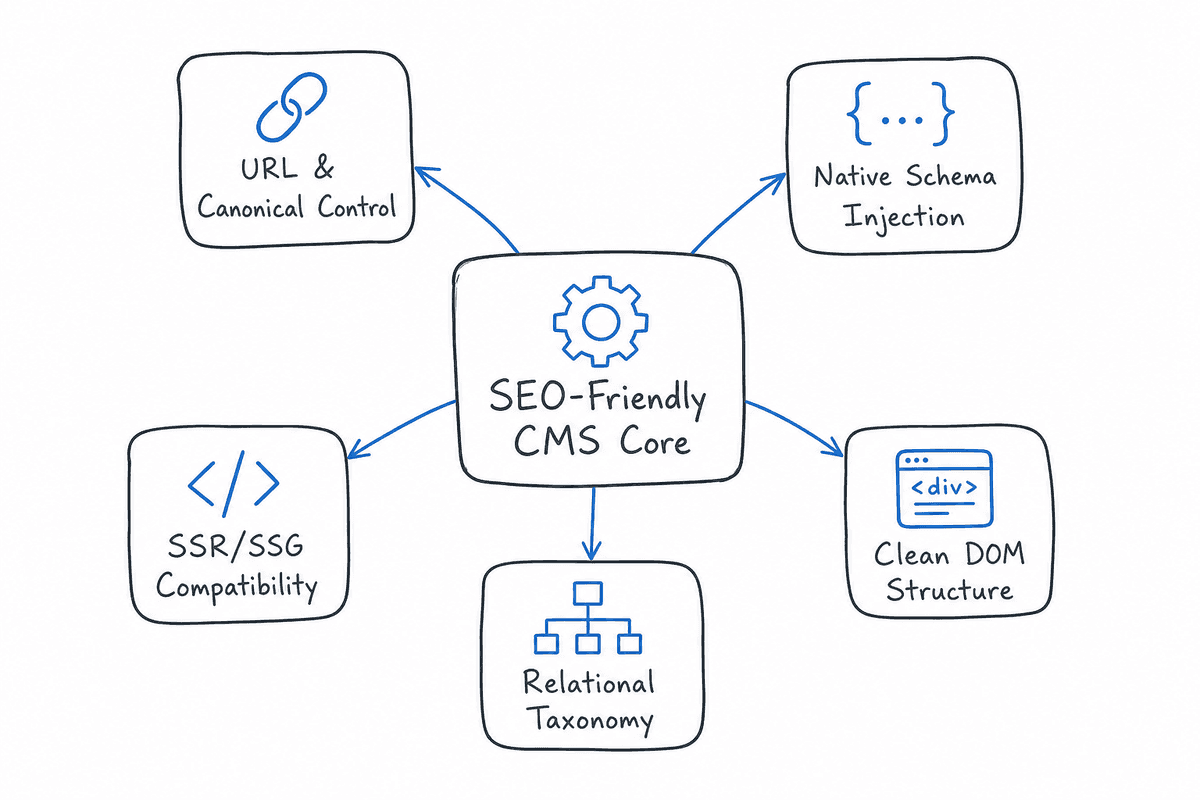
Before you commit to a platform, evaluate it against these five technical pillars.
1. Granular URL Routing and Canonical Management
Many legacy platforms and rigid e-commerce builders force your content into predefined URL structures. For example, some systems enforce paths like /posts/blog-title or /collections/product-category.
An SEO-friendly CMS allows for absolute control over URL routing. You should be able to create flat, keyword-optimized URLs (e.g., yourdomain.com/seo-software) without being forced into subdirectories.
Furthermore, the system must allow for granular canonical tag management. If your CMS automatically self-canonicalizes every URL and prevents you from pointing a canonical tag to a primary version of a page, you will face duplicate content issues as your site scales, especially if you use parameterized URLs for tracking or sorting.
2. Native Schema Markup Injection
Search engines rely heavily on structured data (Schema.org) to understand the context of your pages, populate rich snippets, and feed information into AI search tools like ChatGPT and Perplexity.
Your CMS must either natively support JSON-LD schema injection at the page level or provide customizable header fields where you can paste script tags without the editor stripping the code for "security" reasons. The best platforms allow you to dynamically generate schema based on CMS variables—for instance, automatically pulling the article's publish date, author name, and featured image into an Article schema block.
3. Server-Side Rendering (SSR) and Static Site Generation (SSG) Compatibility
JavaScript-heavy websites, particularly Single Page Applications (SPAs) common in the SaaS niche, often struggle with SEO because search engines must execute the JavaScript before they can read the content.
If you are using a headless CMS to feed content into a frontend framework like React or Vue, your CMS must integrate seamlessly with SSR or SSG frameworks like Next.js or Nuxt. This ensures that the CMS delivers pre-rendered HTML to Googlebot upon request, bypassing the need for client-side rendering. If you are building a modern web app, mastering this architecture is non-negotiable. You can explore the exact implementation details in SEO for Single Page Applications: The Technical Checklist.
4. DOM Cleanliness and Core Web Vitals
Visual drag-and-drop builders are notorious for generating "div soup"—deeply nested HTML structures that increase page weight, delay rendering, and frustrate crawlers. An SEO-friendly CMS outputs clean, semantic HTML. It uses proper <header>, <article>, <footer>, and <nav> tags rather than wrapping everything in generic containers.
Clean code directly impacts your Core Web Vitals, specifically Largest Contentful Paint (LCP) and Interaction to Next Paint (INP). If your CMS loads fifty external stylesheets and scripts before it renders the H1 tag, your organic rankings will suffer.
5. Taxonomy and Internal Linking Architecture
As your content library grows from ten articles to a thousand, flat architectures fail. You need a CMS that supports complex, relational taxonomies: categories, tags, author archives, and custom parent-child page relationships.
More importantly, the CMS should make internal linking effortless. It should allow you to map relationships between articles so you can easily build out topic clusters.
Headless vs. Traditional vs. Builders: The Strategic Divide
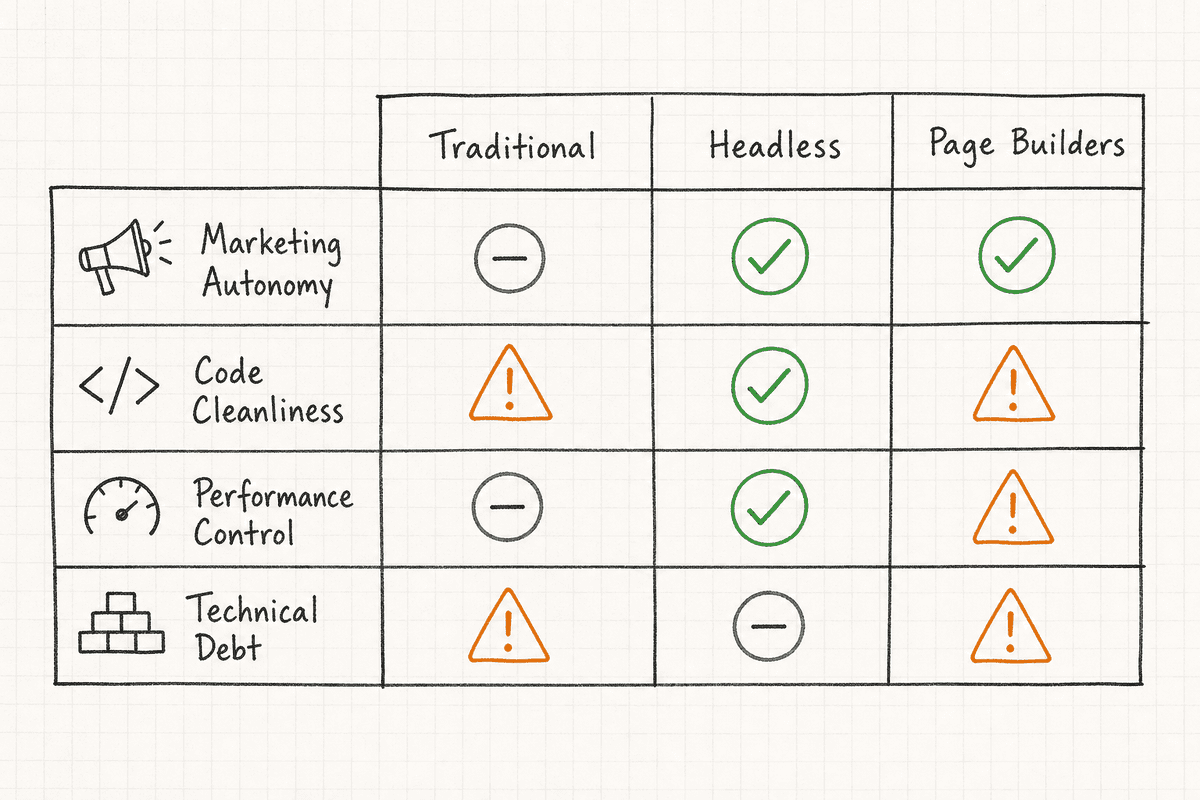
When researching CMS options, you will encounter three distinct architectural paradigms. Your choice depends heavily on your team's technical resources and your content velocity goals.
Traditional Monolithic CMS
Platforms like WordPress and Drupal tightly couple the backend (where you write content) with the frontend (how the website looks).
The SEO Advantage: They are "batteries included." You can usually install an SEO plugin, pick a theme, and start publishing without a developer. They handle routing, sitemaps, and rendering out of the box.
The SEO Liability: They are prone to code bloat. Because they rely heavily on plugins to extend functionality, it is easy to accidentally slow down your site by installing poorly coded add-ons.
Headless CMS
Headless platforms like Hygraph, Contentstack, and Storyblok decouple the backend from the frontend. The CMS is simply a database with an API. Your developers build the frontend using a framework like Next.js, and pull the content from the CMS via API calls.
The SEO Advantage: Unparalleled speed and performance. Because the frontend is custom-built, developers can optimize every single byte of code, achieving perfect Core Web Vitals scores. According to industry leaders at Hygraph, a headless approach also allows you to push the same optimized content simultaneously to a website, a mobile app, and even a smartwatch.
The SEO Liability: Massive technical dependency. Marketers cannot just "add a new page template." Everything requires engineering time. You also have to manually build out SEO functionalities like XML sitemaps and meta tag routing, which traditional platforms handle automatically.
Managed Page Builders
Platforms like Webflow, Shopify, and Wix provide a closed ecosystem. They host the site, provide a visual editor, and manage the database.
The SEO Advantage: Marketing autonomy. Content teams can design, build, and launch complex SEO landing pages without waiting on engineering sprints.
The SEO Liability: You are trapped in their infrastructure. If their servers slow down, your site slows down. If they force a specific URL structure, you have to adapt your SEO strategy to fit their rules.
7 Best SEO Friendly CMS Platforms for 2026
Based on technical capabilities, performance metrics, and workflow efficiency, here are the seven best CMS platforms for driving organic growth, categorized by their ideal use case.
1. Webflow: The Best CMS for SaaS Marketing Sites
Webflow bridges the gap between a visual page builder and strict semantic code. Unlike legacy builders that generate bloated markup, Webflow requires users to understand CSS classes, flexbox, and semantic HTML structure.
For SEO, Webflow is incredibly powerful because it gives you the visual freedom of a builder with the code cleanliness of a custom-coded site.
Key SEO Strengths:
- Custom CMS Collections: You can create relational databases for your content. For example, linking an "Authors" collection to a "Blog Posts" collection, and dynamically generating the author schema markup on the post.
- Automated WebP Conversion: Native image optimization keeps page speeds incredibly fast.
- Global Classes: Clean CSS management prevents DOM bloat.
- API Extensibility: Seamlessly integrates with external tools.
The Trade-offs: Webflow has historically struggled with native multi-language SEO, though recent updates have improved this. Additionally, there are hard limits on the number of CMS items (10,000 on standard plans), meaning enterprise sites with massive programmatic SEO libraries might outgrow the platform.
If you are using Webflow to scale your organic acquisition, mastering landing page architecture is critical. Review our guide on How to Build an SEO Landing Page (7-Step Guide) to structure your Webflow collections effectively.
2. WordPress: The Open-Source Standard
WordPress powers nearly half the web, and for good reason. It remains one of the most flexible and SEO-friendly platforms on the market, provided you configure it correctly.
Key SEO Strengths:
- The Plugin Ecosystem: Tools like Yoast, RankMath, and SEOPress provide comprehensive control over metadata, sitemaps, and basic schema without requiring code.
- Absolute Ownership: Because it is open-source, you control the server, the database, and the routing. You can optimize server-side caching and implement Redis object caching to drive TTFB (Time to First Byte) down to milliseconds.
- Content Velocity: The Gutenberg editor makes writing and formatting long-form content highly efficient.
The Trade-offs: WordPress is vulnerable to "plugin rot." SaaS founders often try to solve every problem by adding a new plugin, eventually resulting in a slow, bloated site that fails Core Web Vitals. To keep a WordPress site SEO-friendly, you must strictly limit plugins, use a lightweight theme (like GeneratePress or Astra), and invest in premium managed hosting.
3. Hygraph: The Multi-Source Headless Choice
For complex SaaS applications or enterprise platforms that need to pull data from multiple APIs and serve it to search engines, Hygraph is the premier headless option. It uses GraphQL, allowing developers to query exactly the data they need and nothing more.
Key SEO Strengths:
- Content Federation: You can pull product data from Shopify, customer data from a CRM, and marketing copy from Hygraph, combining it all into a single, high-performing SEO page.
- Sub-millisecond API Responses: Because it uses GraphQL, data fetching is hyper-efficient, leading to incredibly fast frontend rendering.
- Custom Schemas: You define the exact structure of your data models, meaning you can build fields specifically for exact Schema.org properties.
The Trade-offs: It is strictly for engineering teams. A marketer cannot build an SEO strategy on Hygraph without a dedicated frontend developer building the Next.js or Nuxt interface. If your app relies heavily on client-side routing and headless data, ensure you are not masking your content from crawlers. Read Single-Page Application SEO: What Works in 2026? to understand how to bridge this gap.
4. Storyblok: The Best Headless CMS with a Visual Editor
Storyblok solves the biggest problem with headless CMS platforms: the miserable marketer experience. It provides a headless architecture for developers, coupled with a real-time visual editor for content teams.
Key SEO Strengths:
- Visual Context: SEO managers can see exactly how a page will render, including header hierarchies and visual layout, before hitting publish.
- Component-Based Architecture: Instead of rigid page templates, you build reusable components. This allows SEO teams to inject CTA blocks, FAQ schemas, or related post modules anywhere on the site instantly.
- Edge Performance: Like all good headless systems, it integrates perfectly with edge computing networks like Vercel or Cloudflare Pages, ensuring global SEO speed.
The Trade-offs: The pricing scales based on bandwidth and user seats, which can become expensive for mid-market SaaS companies scaling massive content operations.
5. Ghost: The Indie Hacker’s Publishing Engine
If your SaaS relies entirely on long-form content, newsletters, and a fast blog rather than complex software integrations, Ghost is arguably the best platform available. Built on Node.js, it is exceptionally fast and strips away the bloat associated with WordPress.
Key SEO Strengths:
- Built-in SEO: Unlike WordPress, Ghost does not require third-party plugins for SEO. XML sitemaps, canonical tags, optimized URLs, microformats, and canonical tags are baked directly into the core code.
- Extreme Speed: Because it is hyper-focused on publishing, its default themes are incredibly lightweight, passing Core Web Vitals effortlessly.
- Clean Markdown Editing: It provides a distraction-free writing experience that natively supports markdown, making formatting for readability very easy.
The Trade-offs: Ghost is terrible at being anything other than a blog or newsletter. If you need to build complex SaaS feature landing pages, dynamic pricing tables, or multi-step funnels, Ghost’s routing and templating system will fight you.
6. Shopify: The E-commerce SEO Leader
While this article focuses heavily on SaaS, many software companies sell physical hardware alongside their subscriptions, or operate in the e-commerce space. Shopify remains the dominant CMS for transactional SEO.
Key SEO Strengths:
- Frictionless CDN: Shopify handles server speed, global CDNs, and image compression automatically, removing the technical maintenance burden.
- App Ecosystem: Tools for automated alt text, bulk redirect management, and advanced schema injection are readily available.
The Trade-offs: Shopify’s URL structure is famously rigid. It forces /products/ and /collections/ into URLs, and historically generated duplicate URLs for products that existed in multiple collections. While recent updates have mitigated the canonicalization issues, you still lack the absolute URL freedom found in WordPress or Webflow.
7. Contentstack: The Enterprise Scaler
For large-scale enterprise companies managing multiple brands, localized websites, and massive editorial teams, Contentstack provides an API-first approach designed for massive scale.
Key SEO Strengths:
- Localization at Scale: Excellent for international SEO. It allows for highly complex fallback logic (e.g., if a page isn't translated into French Canadian, fall back to global French before falling back to English).
- Workflow Automation: You can build SEO approval stages into the publishing pipeline, ensuring no content goes live without passing an SEO manager’s review.
The Trade-offs: Contentstack is an enterprise product with an enterprise price tag. It is vast overkill for a seed-stage startup or a solo founder.
The Migration Trap: Changing Your CMS Without Tanking Traffic
Perhaps you are reading this because your current CMS is holding you back. You want to move from Wix to Webflow, or from WordPress to a Headless Next.js build.
Proceed with extreme caution. CMS migrations are the number one cause of catastrophic organic traffic loss. When you change platforms, you change how search engines understand your site.
If you must migrate to a more SEO-friendly CMS, adhere to these non-negotiable rules:
- Map Every Single URL: Crawl your existing site with a tool like Screaming Frog. Export every URL. If your new CMS uses a different URL structure, you must create a 1-to-1 map and implement 301 server-side redirects.
- Audit the Rendering Path: If you are migrating to a headless CMS, test the staging environment with Google’s Rich Results Test tool. If the tool shows a blank page, Google cannot render your JavaScript, and you will lose all your rankings.
- Maintain Content Parity: Do not rewrite your content during a technical migration. Move the exact content, exact headings, and exact metadata first. Let Google index the new infrastructure. Once traffic stabilizes, then you can optimize the content.
- Test Internal Links: A new CMS often breaks relative internal links. Ensure your navigation, footer, and contextual links all point to the correct, non-redirecting URLs on the new platform.
Automating SEO Output on Top of Your CMS
Choosing an SEO-friendly CMS solves the infrastructure problem. But infrastructure alone does not generate traffic. The real bottleneck in organic growth is content velocity—the ability to research, write, format, and publish high-quality, targeted answers to user queries consistently.
Most teams build a beautiful Webflow or WordPress site, publish ten articles, and then abandon the blog because content production is too resource-intensive.
This is where the publishing pipeline must evolve. Rather than hiring massive writing teams, modern SaaS companies are integrating automated content pipelines directly into their CMS.
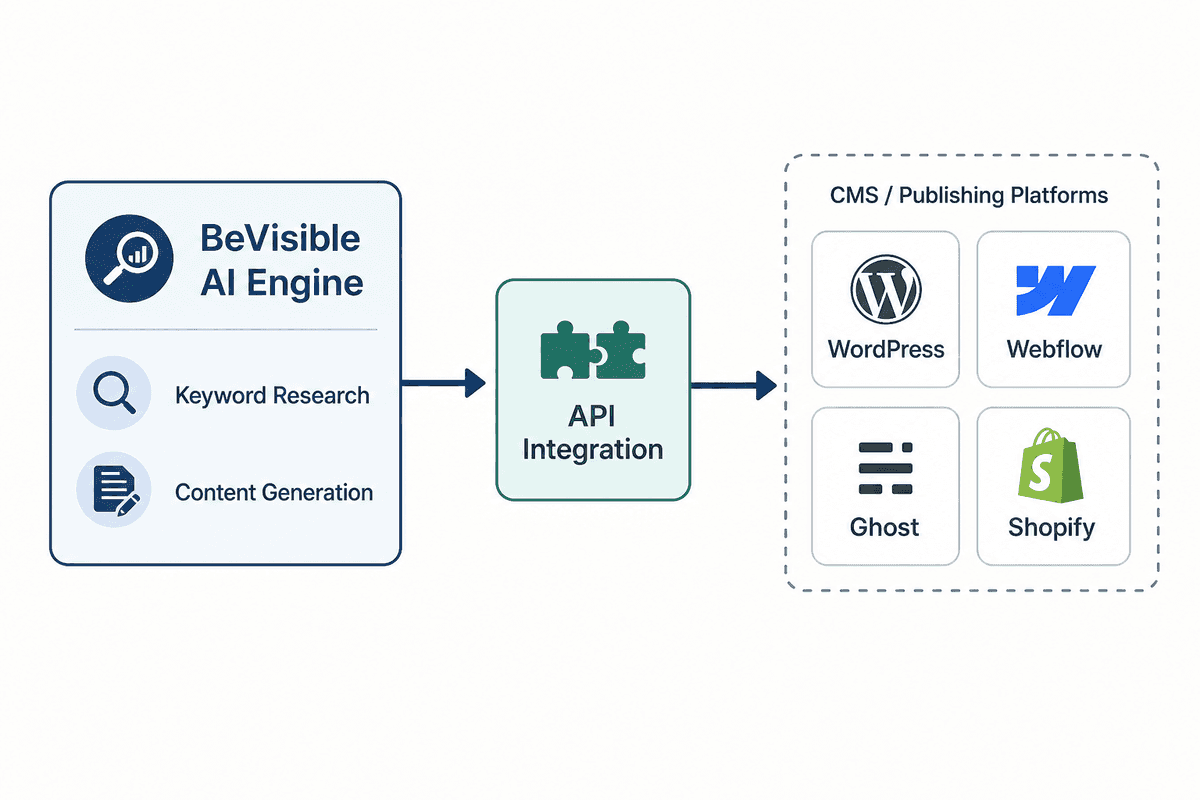
BeVisible was built specifically to solve this execution gap. Instead of managing freelance writers and manually formatting articles in your CMS, BeVisible connects directly to your site URL and niche, conducts the required keyword research, and builds a 30-day content map.
More importantly, it connects via API directly to the SEO-friendly CMS platforms discussed above—including WordPress, Webflow, Notion, Ghost, and Shopify. Every 24 hours, BeVisible automatically writes, polishes, formats (with schema markup, internal links, and answer-first structures), and publishes a new article directly to your CMS database.
Because the CMS handles the routing and metadata natively, and BeVisible handles the semantic HTML structuring and AI-optimized content generation, founders can scale organic traffic without spending hours inside the CMS editor. It fully supports custom tags, categories, scheduling, and metadata injection, ensuring the final output leverages the technical strengths of your chosen platform.
Common CMS SEO Mistakes Founders Make
Even with the best tools, implementation errors can throttle growth. Avoid these common traps:
1. Over-relying on SEO Plugins as a Crutch
A green light in an SEO plugin does not mean your content will rank. Tools like Yoast or RankMath evaluate basic keyword density and structural elements. They do not evaluate search intent, content depth, or competitive differentiation. Treat plugins as metadata managers, not as SEO strategists.
2. Ignoring Category and Tag Bloat
In WordPress and Ghost, every time you create a new tag, the CMS generates a new archive page. If you use tags haphazardly (e.g., tagging an article with "SaaS", "Software", "Cloud", "App"), you instantly create four thin, near-identical pages that dilute your crawl budget. Plan your taxonomy strictly before publishing.
3. Going Headless Without Engineering Support
The appeal of a perfect 100/100 Lighthouse score drives many founders to choose a headless CMS. But if your sole developer is focused on building your core SaaS product, they will not have time to build custom XML sitemap generators or fix metadata routing bugs in your Next.js frontend. If you do not have dedicated marketing-engineering resources, stick to a builder like Webflow or an open-source tool like WordPress.
FAQs About SEO and CMS Platforms
Does the CMS itself directly impact Google rankings?
No, Google does not rank a site higher simply because it uses WordPress instead of Joomla. However, Google does rank sites based on speed, mobile responsiveness, semantic HTML, and proper crawlability. An SEO-friendly CMS simply makes achieving those technical requirements easier and faster.
Is a visual drag-and-drop editor bad for SEO?
It depends on the output. Older visual builders generated excessive, deeply nested <div> containers that slowed down page rendering. Modern visual editors, particularly those in Webflow or headless visual editors like Storyblok, are designed to output clean, semantic code that performs exceptionally well in search.
Do I need an SEO plugin with a headless CMS?
No, because traditional plugins don't work in a headless environment. In a headless setup, your developers must build the SEO functionality (meta tag injection, canonicals, sitemaps) into the frontend framework (like React or Vue) and map those fields to data endpoints in the headless CMS.
Making Your Decision
There is no universal "best" CMS for SEO. The right choice depends entirely on your technical resources and business model.
- If you are a solo founder or small marketing team that needs autonomy and speed, choose Webflow or Ghost.
- If you have a dedicated engineering team and want absolute control over performance and multi-channel distribution, choose Hygraph or Storyblok.
- If you want the largest ecosystem of tools and don't mind managing hosting and plugins, stick with WordPress.
Whichever platform you choose, remember that the CMS is just the engine block. It needs fuel to run. Once your technical infrastructure is solid, shift your focus entirely to content velocity, semantic structuring, and consistent publishing to turn your new CMS into an actual growth channel.