URL structures are the concrete foundation of your website's architecture. Yet, in the rush to publish content, SaaS founders and content marketers frequently let their CMS auto-generate messy, truncated, or parameter-heavy slugs.
This is a missed opportunity. A meticulously crafted, SEO friendly URL does more than just help Googlebot categorize your page. It acts as a trust signal on the Search Engine Results Page (SERP). When users can accurately predict what a page contains just by glancing at the URL breadcrumbs, click-through rates (CTR) can jump by up to 15%.
Creating SEO-friendly URLs involves understanding technical constraints, search engine parsing rules, and human psychology. If you are launching a new product feature, publishing an exhaustive guide, or restructuring an e-commerce catalog, getting the URL right from day one prevents painful migration headaches down the line.
Let’s explore seven critical URL hacks that modern web platforms must implement to maximize organic visibility, starting with the baseline anatomy of a perfect URL.
The Anatomy of an SEO-Friendly URL
Before implementing specific hacks, you need to understand how search engines process the different components of your web addresses. According to Google's official URL structure best practices, URLs should ideally follow the IETF STD 66 standard, meaning they use standard ASCII characters and descriptive paths.
Every URL is a mapped path to a specific resource on your server. Search engines break this string down into distinct segments to understand site hierarchy.
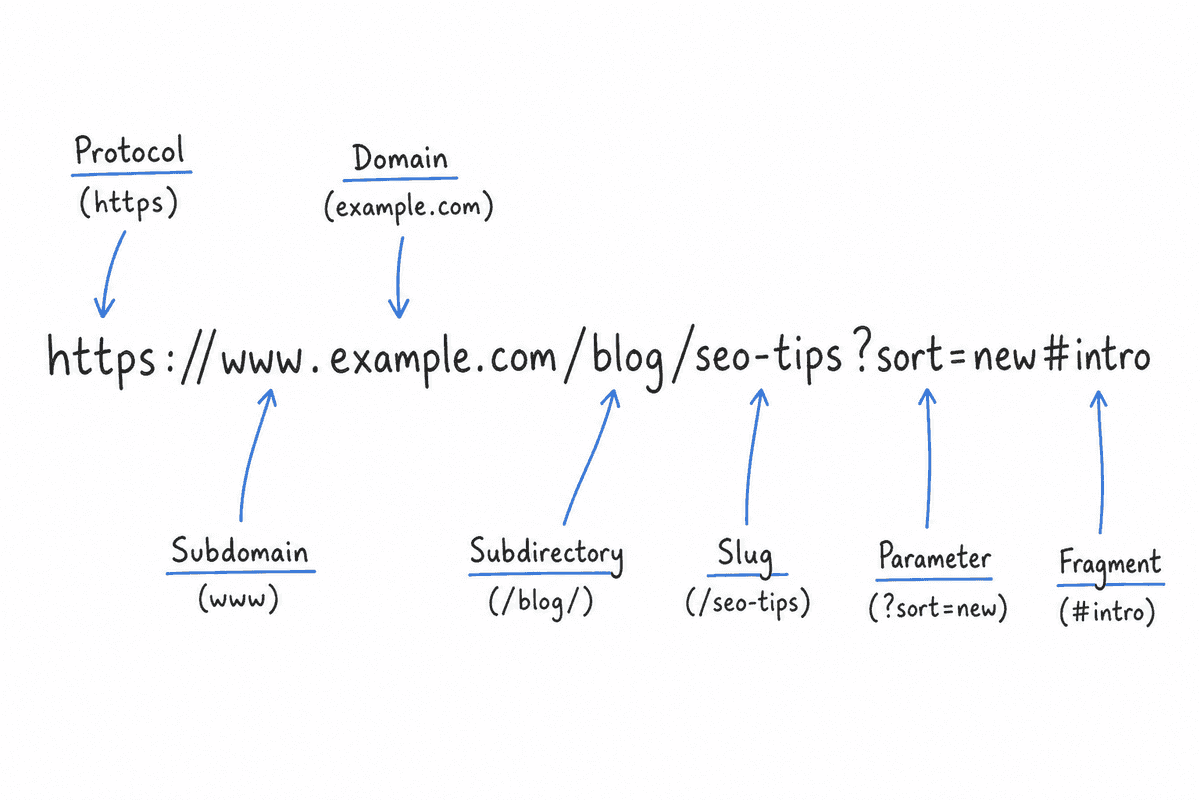
Core URL Components
- Protocol (Scheme): Almost exclusively
https://today. Google considers HTTPS a lightweight ranking signal, and modern browsers actively flaghttp://sites as insecure. - Subdomain vs. Root Domain:
www.example.comvsexample.com. From an SEO perspective, neither is inherently better, but you must choose one and 301 redirect the other. Leaving both accessible creates massive duplicate content issues. - Top-Level Domain (TLD): The
.com,.io,.app, or.co.uk. Generic TLDs (gTLDs) like.comor.appare universally understood, while country-code TLDs (ccTLDs) heavily signal regional targeting. - Subdirectories (Folders): The
/blog/or/features/section. This indicates your site architecture and hierarchical depth. - Slug (File Path): The exact page identifier, such as
/seo-friendly-url/. - Parameters: Dynamic modifiers appended to the end of a URL, such as
?sort=price&color=blue. - Fragments (Hash): The
#sectiontag that jumps the user to a specific anchor on the page.
With that baseline established, here are the seven hacks to optimize your URLs for maximum crawlability and search clicks.
Hack 1: The "2-3 Word" Path Rule (Keep it Short & Descriptive)
One of the most common mistakes is allowing your CMS to generate a URL slug directly from your article's title. If your title is "The Ultimate Guide to Automating Your SaaS Content Marketing in 2026," your default URL might look like this:
example.com/blog/the-ultimate-guide-to-automating-your-saas-content-marketing-in-2026
This is a nightmare for SEO and usability. Long URLs frequently get truncated in SERPs. Worse, they dilute the exact-match keyword signals you want to send to Google.
The Optimization Strategy
Strip the URL down to its core components. Aim for a 2-3 word slug that perfectly encapsulates the primary target keyword.
- Bad URL:
/blog/how-to-build-an-seo-landing-page-for-your-startup - Good URL:
/blog/seo-landing-page
By distilling the URL, you align perfectly with the user's search intent. When building an SEO landing page, a clean, concise URL provides an immediate scent of relevance. The user searched for "SEO landing page," and the URL confirms they have found exactly that.
Stop Words Are Wasted Space
Search engine parsers are sophisticated enough to understand natural language without the connective tissue of stop words. Words like a, an, the, and, or, but, of, in, with add unnecessary length. Remove them from your slugs unless they are an inseparable part of a branded keyword or common phrase.
Hack 2: Master Hyphens (and Banish Underscores)
When separating words in a URL, you have three primary options: hyphens, underscores, or smashing the words together. Only one of these is optimal for SEO.
Google's parsers treat hyphens (-) as spaces. They treat underscores (_) as word joiners.
How Search Engines Parse Separators
If you use the URL example.com/saas_marketing_guide, Google reads the slug as a single block of text: saasmarketingguide. While modern NLP can usually figure out what this means, you are forcing the algorithm to work harder to extract the individual keywords.
If you use example.com/saas-marketing-guide, Google reads it exactly as intended: "saas marketing guide."
The Problem with Spaces and Percent Encoding
Never use raw spaces in a URL. If you accidentally publish a URL with a space, web browsers and servers will automatically apply percent-encoding, turning the space into %20.
example.com/saas%20marketing%20guide
Percent-encoded URLs look sloppy, unprofessional, and suspicious to users. A visually messy URL acts as a friction point, causing users to hesitate before clicking. Always rely on the standard hyphen to maintain a clean, readable aesthetic.
Hack 3: Flatten Your Directory Structure
Website architecture should resemble a wide, shallow pool, not a deep, narrow well. The deeper a page is buried within subdirectories, the less importance search engines assign to it. This concept is often referred to as "crawl depth" or "click depth."
The Click Depth Penalty
Every time you add a slash (/) to your URL, you are creating a new folder level.
- Over-nested:
example.com/resources/content/blog/2026/06/seo-tips - Flattened:
example.com/blog/seo-tips
In the over-nested example, the target page is five clicks away from the root domain. Search engine crawlers operate on a "crawl budget." Pages buried deeply in the site architecture are crawled less frequently and are generally deemed less authoritative than pages residing closer to the home page.
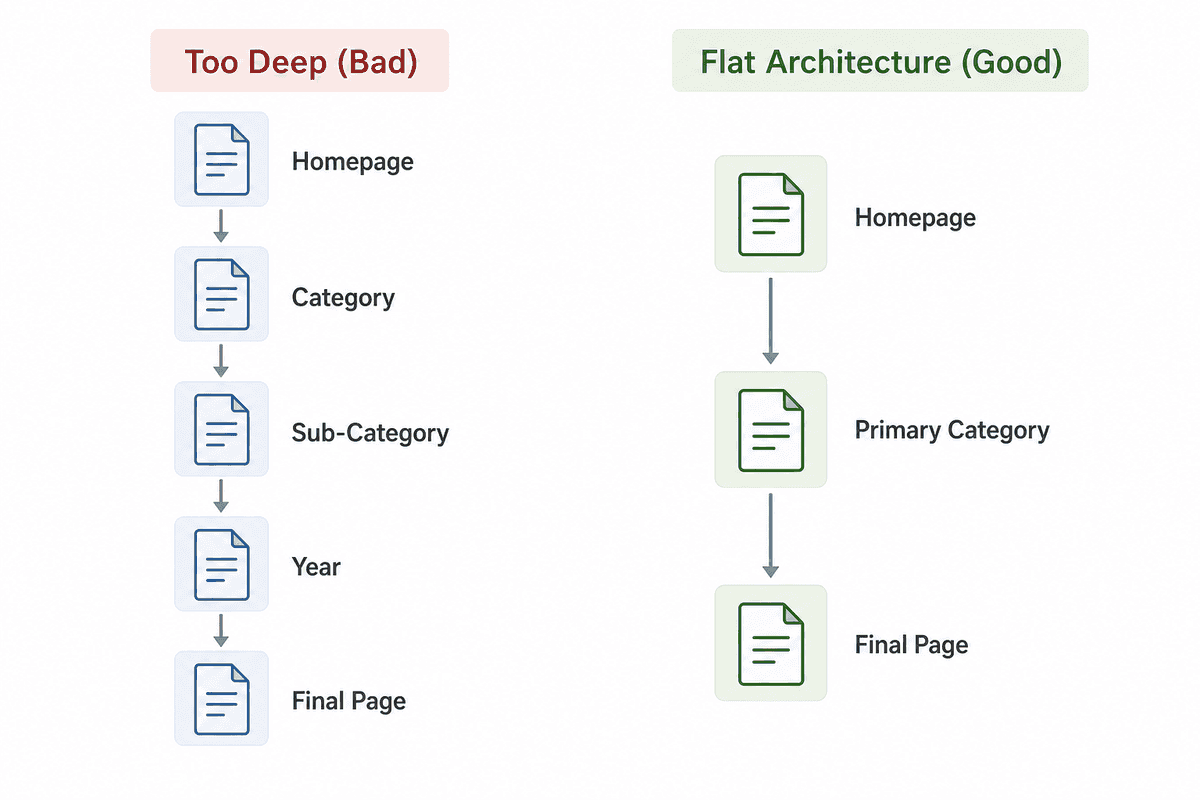
Categorization vs. Flattening
Flattening your structure does not mean putting every single page on the root domain (example.com/seo-tips). Logical categorization is still necessary for user navigation and topic clustering.
For a SaaS company, a standard, effective structure looks like this:
example.com/features/automationexample.com/integrations/slackexample.com/blog/technical-seo
Limit your architecture to a maximum of two subdirectories whenever possible. This keeps the URL short while maintaining a logical silo structure that helps Google understand semantic relationships between pages.
Hack 4: Handle URL Parameters Like a Pro
URL parameters are the dynamic variables appended after a question mark, such as ?category=shoes&color=red. While they are incredibly useful for tracking, filtering, and sorting data, they are arguably the single biggest technical SEO hazard for e-commerce sites and complex SaaS applications.
The Duplicate Content Trap
Imagine you have a directory of SEO tools. A user can sort this list by price, rating, or name. Each sorting action generates a new URL parameter:
example.com/tools?sort=price_ascexample.com/tools?sort=rating_descexample.com/tools?filter=free
To a search engine, these are three distinct URLs. However, the core content on the page is nearly identical—it's just reordered. If Googlebot crawls all of these variations, you will cannibalize your own rankings through massive duplicate content proliferation.
Canonicalizing Parameterized URLs
To prevent this, you must use canonical tags (rel="canonical"). The canonical tag explicitly tells Google which version of a page is the "master" version that should be indexed and ranked.
For all parameterized sorting and filtering URLs, the canonical tag should point back to the clean, static root URL:
<link rel="canonical" href="https://example.com/tools" />
By implementing strict canonicalization, you consolidate all ranking signals into the primary URL, ensuring that parameters do not dilute your SEO authority.
Hack 5: Single Page Application (SPA) Routing Constraints
Modern web development heavily relies on Single Page Applications (SPAs) built with frameworks like React, Vue, or Angular. SPAs are fast and provide seamless user experiences, but they introduce unique URL routing challenges that can devastate organic visibility if handled incorrectly.
The Hash Routing Mistake
Historically, SPAs used "hash routing" to load different views without refreshing the browser. A hash routing URL looks like this:
example.com/#/about-us
Google's official stance is clear: Googlebot ignores URL fragments (everything after the #).
If your SaaS app uses hash routing, Google will only ever index your homepage. It will not see /about-us, /pricing, or /features because, technically, those aren't separate URLs; they are just localized anchor jumps on the root document.
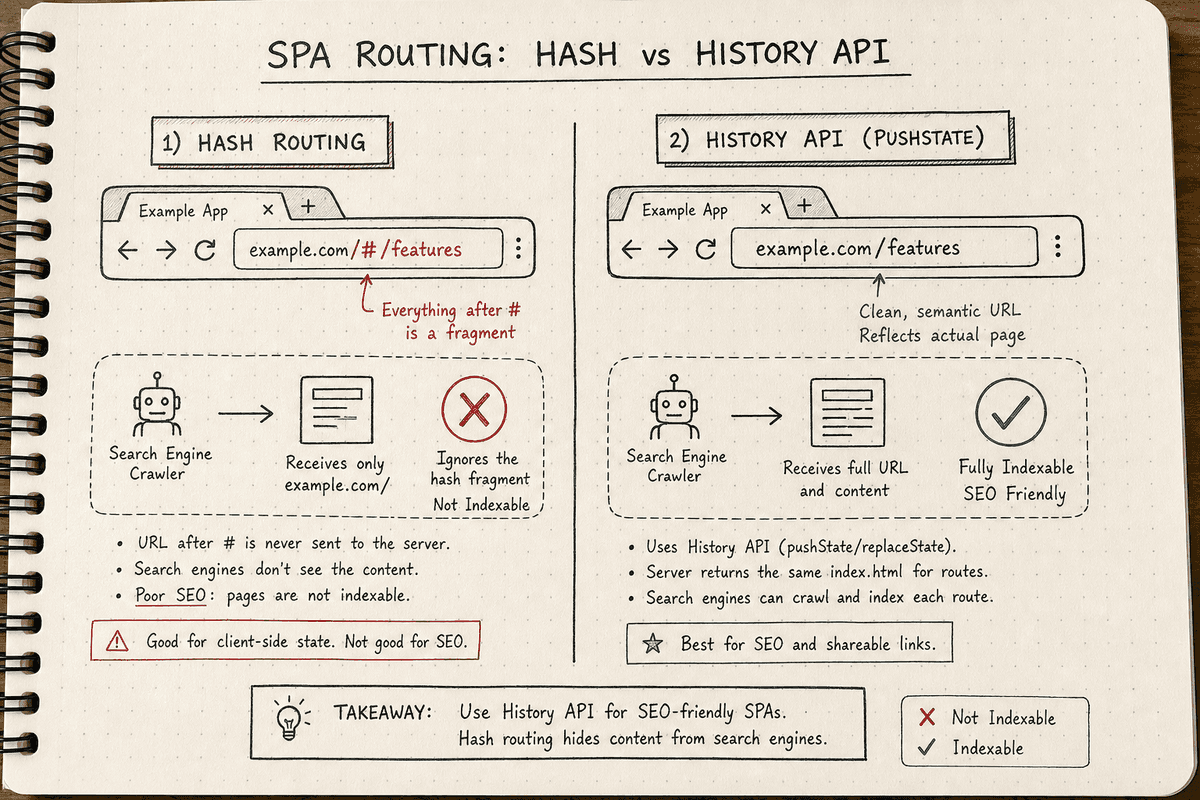
Upgrading to the History API
To make an SPA indexable, you must abandon hash routing and implement the HTML5 History API. This allows the browser to update the URL in the address bar cleanly (e.g., example.com/about-us) without requiring a full page reload.
Server-side rendering (SSR) or static site generation (SSG) frameworks like Next.js or Nuxt.js handle this natively, ensuring that search engines receive fully rendered HTML and clean, fragment-free URLs.
If you are operating a JavaScript-heavy site, ensuring your routing is clean is non-negotiable. For an exhaustive technical breakdown of this process, consult a dedicated guide on SEO for Single Page Applications to verify your rendering strategy meets Google's requirements.
Hack 6: Future-Proof Without Dates in the Slug
Content decays over time. The best SEO strategy involves continuously updating and republishing your highest-performing articles to maintain freshness—a ranking factor Google heavily rewards.
However, this process hits a massive roadblock if you include dates in your URL structure.
The Evergreen URL Principle
Consider publishing a list of the top SaaS tools in 2024. If your URL is example.com/blog/best-saas-tools-2024, you have created an expiration date for that page.
When January 2025 rolls around, you will want to update the article. You have two bad choices:
- Keep the old URL: The title tag says "Best Tools 2025," but the URL still says "2024." This mismatch destroys trust on the SERP and lowers CTR.
- Change the URL: You migrate the page to a new
/2025/slug. This requires a 301 redirect. While 301s preserve most link equity, they add latency and risk temporary ranking drops while Google re-indexes the new destination.
The Solution
Strip all dates, years, and temporal markers from your URLs. Keep the slug perfectly evergreen: example.com/blog/best-saas-tools.
You can—and should—update the year in the H1 tag and the meta title to signal freshness to users. But by keeping the URL static, you accumulate backlinks and authority on a single asset year after year without ever needing to execute risky redirect migrations.
Hack 7: Case Sensitivity and Trailing Slashes
Technical SEO is won in the margins. Two of the most overlooked aspects of URL architecture are case sensitivity and the use of trailing slashes. Both can inadvertently create duplicate content issues if your server is misconfigured.
The Lowercase Imperative
Search engines treat URLs as case-sensitive strings.
example.com/Pricingexample.com/pricing
To a Unix-based web server, these are two entirely different pages. If external websites link to both variations, or if users type them differently, you will split your ranking power across duplicate assets.
Always enforce lowercase URLs across your entire site. If a user or an external link attempts to load a capitalized URL, your server should automatically execute a 301 redirect to the lowercase version.
To Slash or Not to Slash?
Similarly, a URL with a trailing slash is distinct from a URL without one:
example.com/features/(Indicates a directory)example.com/features(Indicates a file)
Google treats these as separate URLs. You must pick one convention and stick to it site-wide. It does not matter which one you choose—just ensure that the non-preferred version 301 redirects to the preferred version to consolidate authority.
How to Audit and Migrate Your URLs Safely
If you have read through these hacks and realized your current URLs are a mess of uppercase letters, dates, and deep directories, do not panic. Do not immediately go into your CMS and start changing slugs.
Changing a URL without proper precautions is the fastest way to wipe out your organic traffic.
Step 1: Identify Non-Compliant URLs
You can use an SEO Friendly URL Checker or crawl your site with a tool like Screaming Frog to generate a list of all current URLs. Flag any URLs that:
- Contain uppercase letters
- Include underscores instead of hyphens
- Are nested more than three folders deep
- Include dates or years
- Are longer than 75 characters
Step 2: Evaluate the ROI of Changing
If a poorly structured URL is currently ranking on page one and driving significant revenue, leave it alone. The risk of a migration hiccup outweighs the benefits of a "cleaner" slug.
Reserve URL restructuring for pages that are underperforming, newly published, or undergoing a massive content overhaul.
Step 3: Implement 1-to-1 301 Redirects
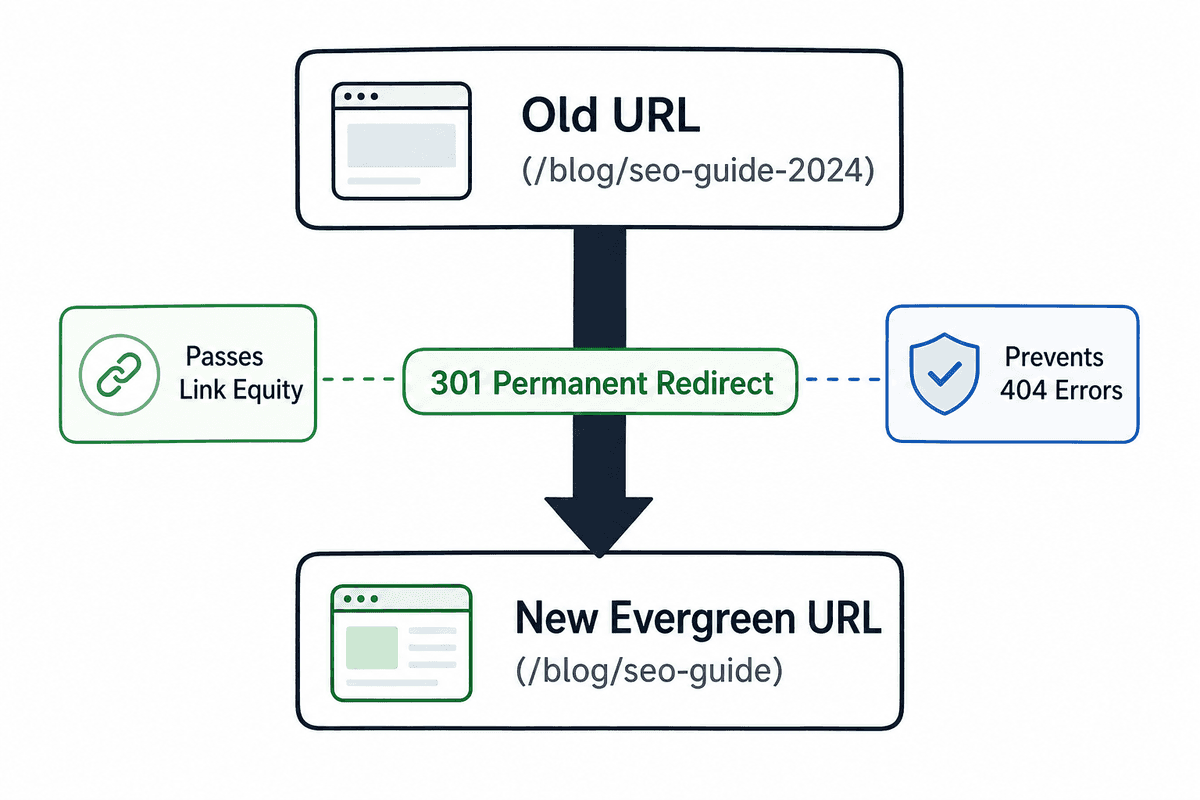
If you decide to change a URL, you must implement a server-side 301 (Permanent) redirect from the old URL to the new one. This tells Google that the page has permanently moved and passes the accumulated link equity to the new destination.
Never delete an old URL without redirecting it. If you do, users clicking on old backlinks will hit a 404 Error page, resulting in a bounce and a lost opportunity.
Step 4: Update Internal Links
After setting up redirects, crawl your site and update all internal links to point directly to the new, optimized URL. While the 301 redirect will catch traffic, forcing Googlebot to constantly hop through redirect chains wastes your crawl budget and marginally slows down page load times.
Scaling SEO Without Technical Debt
Crafting an SEO-friendly URL structure is fundamentally about removing friction. You are removing friction for Googlebot, allowing it to crawl and categorize your site efficiently. More importantly, you are removing friction for the user, providing a clear, readable signal that your page answers their specific query.
Following these modern SEO-friendly URL structure best practices requires discipline. It means resisting the urge to auto-generate slugs and taking an extra twenty seconds to manually refine the path before hitting publish.
For SaaS teams managing high-volume publishing, this technical discipline is often the difference between a cluster of articles that compounds in traffic and a cluster that stagnates. Ensure your CMS is configured to force lowercase, strip stop words, and manage trailing slashes automatically. By locking down these technical parameters at the foundation, you free your team to focus entirely on what actually drives conversions: publishing exceptional, answer-first content.