
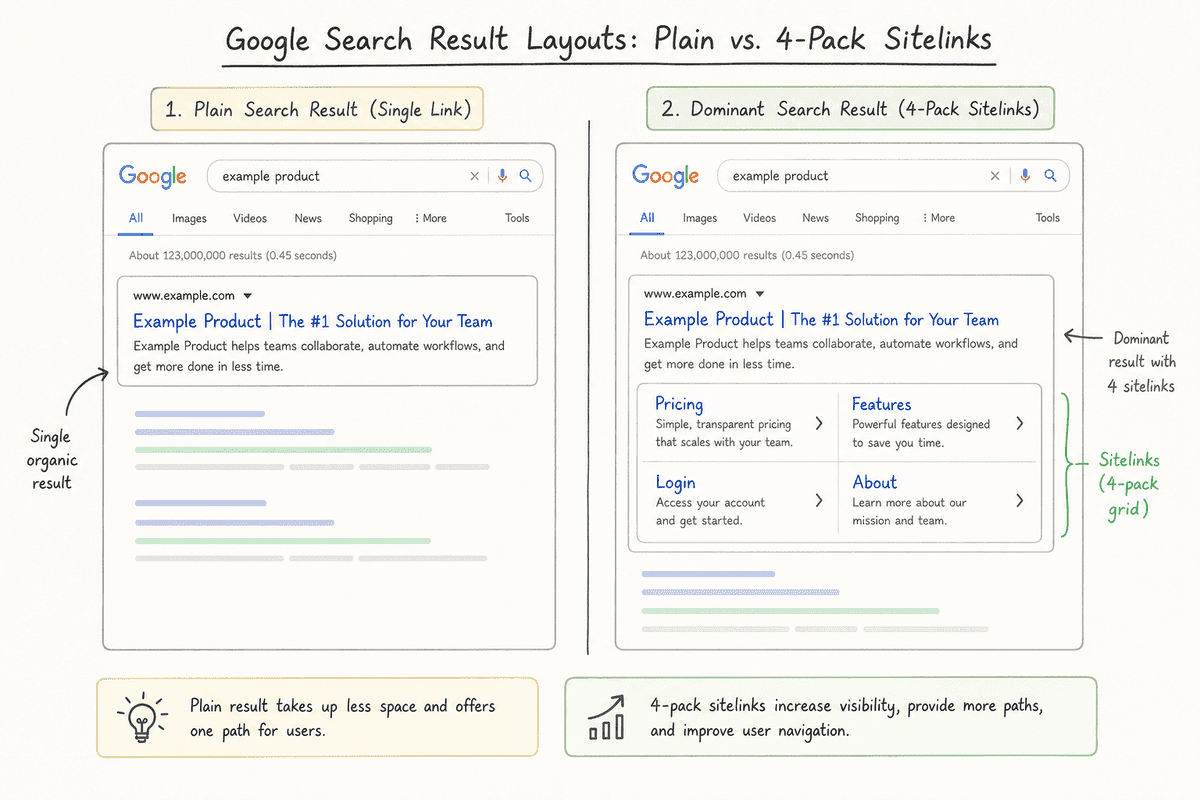
You finally rank #1 for your startup's brand name. You search for your company on Google, expecting a dominating, authoritative search presence. Instead, you see a single, lonely blue link with a couple of sentences beneath it. Meanwhile, your biggest competitor’s brand search triggers a massive block of real estate featuring links directly to their Pricing, Features, Login, and Case Studies pages.
That extra real estate is driven by SEO sitelinks.
Sitelinks do more than just make your startup look like a legitimate, established business. They act as a shortcut for high-intent users, allowing them to bypass your homepage and jump directly to the bottom of the funnel. For SaaS founders and indie hackers, capturing this SERP (Search Engine Results Page) space is one of the easiest ways to improve organic click-through rates and build immediate trust.
But there is no magic button in Google Search Console to turn them on. According to Google's official documentation, sitelinks are fully automated. Google's algorithms only display them when they believe the links are useful to the user and when your site structure allows their crawlers to find the right paths.
To get sitelinks, you don't configure them—you influence them. Here is exactly how to do that.
The Different Types of Sitelinks
Before you start optimizing, it helps to know what you are actually trying to trigger. Google doesn't treat all sitelinks identically. Depending on the search query, the user's intent, and your site architecture, your startup might qualify for a few different variations.
1. Standard Web Page Sitelinks
These are the most recognizable sitelinks. When a user searches for a specific brand name (navigational intent), Google often rewards the top result with a multi-column block of links underneath the main snippet. Semrush notes that these sitelinks can display up to six internal pages, completely taking over the space above the fold on both desktop and mobile.
For a SaaS company, standard sitelinks usually default to:
- Pricing
- Log In / Sign In
- About Us
- Features / Product Tour
- Contact
- Blog
2. Organic One-Line Sitelinks
Sometimes, your site will earn sitelinks, but they won't get the massive grid treatment. Instead, Google appends up to four horizontal links directly below your meta description. These one-line sitelinks frequently appear on non-branded searches or when your homepage isn't the primary intent. For instance, an in-depth SEO landing page might trigger one-line sitelinks pointing to related sub-services or pillar content.
3. Scroll-to Sitelinks (Jump Links)
If you publish long-form content, Google might extract the headings from your article and present them as clickable links in the SERP. When a user clicks one, they are taken directly to that specific section of the page, bypassing the intro. Research on scroll-to sitelinks highlights how heavily Google now relies on anchor links to parse and serve specific answers to long-tail queries.
4. Paid Sitelink Assets
If organic SEO seems too slow, you can force sitelinks to appear on your Google Ads. Google Ads documentation details how to add sitelink assets at the account, campaign, or ad group level. While these only show up on sponsored placements, they are an excellent short-term tactic to dominate brand real estate while waiting for organic sitelinks to kick in.
Why Startups Need to Care About Sitelinks
If you are a solo founder or running a lean marketing team, you might wonder if agonizing over site architecture is worth the effort.
It is, for three specific reasons:
- SERP Domination: On mobile, standard sitelinks push every other search result off the first screen. If a competitor is bidding on your brand name via Google Ads, having organic sitelinks pushes their ad further down, protecting your brand traffic.
- Higher Click-Through Rates (CTR): Users don't always want your homepage. A returning user might just want the login screen. A prospect evaluating you against a competitor wants your pricing page. Giving them a direct route reduces friction. Ahrefs emphasizes that sitelinks significantly improve CTR by presenting users with the exact destination they are looking for.
- Algorithmic Trust: Earning a full pack of sitelinks is a strong indicator that Google understands your site, trusts your brand entity, and views your architecture as logically sound.
How to Influence SEO Sitelinks: A 5-Step Guide
Because Google fully automates the generation of sitelinks, your job is to make your site’s hierarchy overwhelmingly obvious to web crawlers.
Step 1: Build a Logical, Hierarchical Site Structure
Google relies on your site structure to determine which pages are the most important. If your site is a flat mess where every page links to every other page indiscriminately, Google won't know whether your "Pricing" page is more important than a random blog post from 2022.
Startups often build their initial sites quickly, slapping pages together as needed. To fix this, you need a pyramid structure.
Your homepage sits at the top. The most critical pages (Features, Pricing, About, Blog, Contact) should be exactly one click away from the homepage. These top-tier pages are your primary candidates for standard sitelinks.
 If your startup uses a modern JavaScript framework, ensure your architecture is actually visible to crawlers. Client-side routing can obscure site structure. If you are struggling with this, refer to the technical checklist for single page application SEO to ensure your parent-child page relationships are crawlable.
Step 2: Optimize Your Navigation Menus and Internal Links
Google uses the anchor text of internal links to figure out what a page is about and what to label it in the search results.
If the link to your pricing page in the header says "Find out what it costs," Google might struggle to classify it. If it simply says "Pricing," the intent is unambiguous.
- Keep top navigation clean: Don't stuff your header menu with 30 links. Limit it to the core pages you actually want to see as sitelinks.
- Use descriptive footer links: Your footer is a secondary signal. Include a categorized list of links to important product pages, use cases, and company information.
- Contextual internal linking: When you mention your pricing model in a blog post, link the word "Pricing" directly to your pricing page. Consistent anchor text across your entire domain reinforces the page's identity to Google.
Step 3: Write Succinct Page Titles and Headings
When Google awards you standard sitelinks, it usually pulls the anchor text directly from your <title> tags or <h1> tags.
Sitelink text space in the SERP is extremely limited. If your page title is “Pricing Plans for Enterprise and Small Businesses | BrandName”, Google might truncate it poorly or decide it’s too messy to use as a sitelink.
Keep the titles of your core structural pages sharp and objective:
- Instead of: Read Our Company Story and Meet the Founders
- Use: About Us
- Instead of: See the Software in Action
- Use: Product Tour
You can still optimize the meta descriptions of these pages for conversions, but keep the <title> clean and predictable.
Step 4: Implement Schema Markup (Breadcrumbs & Navigation)
Structured data translates your website's visual hierarchy into a machine-readable format. While schema markup doesn't guarantee sitelinks, it feeds Google exactly the data it needs to confidently construct them.
Two specific types of JSON-LD schema are highly relevant here:
- BreadcrumbList Schema: This tells Google exactly where a page sits within your site hierarchy. If a user lands on a sub-feature page, breadcrumbs show Google the parent category, helping the search engine map out your ecosystem.
- SiteNavigationElement Schema: This can be wrapped around your main header navigation to explicitly state, “These are the most important navigational links on this website.”
If you are using a modern CMS or a programmatic SEO platform, this is often handled automatically. If not, you will need to inject the JSON-LD directly into the <head> of your core pages.
Step 5: Leverage In-Page Anchors for Scroll-to Sitelinks
Standard sitelinks are great for the homepage, but what about getting sitelinks for individual blog posts or feature pages?
To trigger scroll-to sitelinks, you need to use HTML anchor IDs on your headings and provide a Table of Contents.
When you write a comprehensive guide, structure it with clear <h2> and <h3> tags. Assign a unique ID to each heading. For example:
<h2 id="setup-guide">How to Set Up Your Account</h2>
Then, near the top of your article, create a Table of Contents that links directly to those IDs:
<ul>
  <li><a href="#setup-guide">How to Set Up Your Account</a></li>
</ul>
 Google crawls this Table of Contents, recognizes the jump links, and often pulls them directly into the SERP. This allows a user searching for "how to set up [Brand] account" to bypass your article's introduction and land exactly where they need to be. (If you're studying how other SaaS companies execute this well, reading through the best SEO blogs will reveal that almost all of them utilize sticky Tables of Contents).
Troubleshooting: Why Aren't My Sitelinks Showing?
It is incredibly common for founders to execute all of these steps perfectly and still see no sitelinks. A quick look at any Reddit SEO community reveals deep frustration over this exact issue.
If your sitelinks are missing, it usually comes down to one of these roadblocks:
- Your domain is too new: Google rarely awards standard sitelinks to brand-new domains. You need to build a baseline of domain authority and brand searches first. If people aren't searching for your brand name, Google has no reason to present navigational sitelinks.
- Your brand name isn't unique: If your SaaS is named something generic like "Tasker" or "Flow," you are competing against thousands of other entities, dictionary definitions, and established apps. It is much harder to earn brand sitelinks for generic terms.
- Crawlability issues: Check your
robots.txtfile and your meta tags. If you accidentally left anoindextag on your Pricing page, Google cannot crawl it, and therefore cannot use it as a sitelink. - The query intent isn't navigational: Standard sitelinks almost exclusively appear for brand name searches. If you search for "best task management software," you will not see standard sitelinks for your homepage, even if you rank #1. You might see one-line sitelinks or scroll-to sitelinks, but not the massive grid.
How to Remove a Bad Sitelink
What happens if Google gives you sitelinks, but one of them points to an outdated "Terms of Service" page or a deprecated feature?
Years ago, Google Search Console had a "Demote Sitelink" tool. That tool was retired. Today, the only way to remove an unwanted sitelink is to alter the page itself.
If you want a page removed from the sitelink cluster, you must either:
- Remove internal links pointing to it from your homepage and main navigation.
- Add a
noindextag to the page (only do this if you don't want the page showing up in search results at all). - Delete the page entirely and set up a 301 redirect to a more relevant URL.
Building for the Long Term
Earning SEO sitelinks is essentially a byproduct of building a user-friendly, logically structured website. You cannot force Google to display them, but by designing clear navigation menus, maintaining consistent internal linking, and structuring your long-form content with accessible anchor links, you build the exact environment Google's algorithms reward.
Treat sitelinks as a trailing indicator of technical health. If you are publishing consistent, high-quality answers to your market's questions, organizing that content sensibly, and growing your branded search volume, the sitelinks will naturally follow.