
Managing a content calendar for a single website is largely a game of discipline. You write, review, schedule, and publish. But when your portfolio expands—whether you manage a network of B2B brands, localized franchise sites, or a diverse set of client properties—discipline is no longer enough. You need engineering-grade operations.
For many marketing and growth teams, Sight AI has served as an entry point into content scheduling. However, as AI search engines like ChatGPT, Gemini, and Perplexity reshape how buyers find information, the demands on your content infrastructure have changed. You no longer just need to publish; you need to coordinate evidence, reviews, and answers across multiple domains to establish the consensus that AI models look for when forming their recommendations.
This requires a robust, multi-tenant approach to content automation. Relying on basic scheduling tools often results in broken webhooks, mismatched taxonomy, and chaotic approval workflows. If you have outgrown your current setup and are looking for Sight AI alternatives to automate a content calendar across multiple sites, you need a system that centralizes planning while decentralizing delivery.
This guide breaks down the core requirements of multi-site automation, explores the top platform alternatives, and provides a step-by-step framework to build a seamless cross-domain publishing engine.
The Intersection of AI Visibility and Multi-Site Content Operations
Before dismantling your existing content stack, it is critical to understand why multi-site automation is becoming a mandatory capability for growth teams in 2026.
AI search assistants synthesize answers by scanning the web for consensus. If a buyer asks Perplexity, "What is the best CRM for manufacturing logistics?", Perplexity looks for recurring mentions, strong citations, and consistent feature descriptions across multiple authoritative sources. If your brand only talks about manufacturing logistics on a single domain, your AI search visibility is fundamentally capped.
To dominate AI overviews, teams are leveraging multi-site strategies. They publish core features on their main SaaS site, deploy targeted use-cases on localized regional domains, push technical documentation to a developer portal, and syndicate thought leadership across partner sites.
 When BeVisible tracks your AI search visibility and flags a missing mention or a weak citation, the response cannot be a slow, manual drafting process. You need the ability to instantly route a brief to a multi-site calendar, generate the necessary evidence-backed content, and push it to the relevant domains to close the visibility gap. Automation is the bridge between detecting a missing AI citation and systematically fixing it.
Why Teams Seek Sight AI Alternatives for Multi-Site Scaling
While Sight AI and similar entry-level tools offer content calendar automation that transforms chaotic planning into basic coordinated campaigns, they often hit structural ceilings when applied to multi-site networks.
Growth teams typically seek alternatives when they encounter the following friction points:
- Single-Tenant Architecture: Many tools assume one workspace equals one brand. Forcing multiple sites into a single workspace leads to tangled tags, confusing user permissions, and accidental cross-publishing (e.g., publishing a highly technical developer post to a consumer-facing localized blog).
- Brittle CMS Integrations: Basic schedulers rely on generic connections that fail when they encounter custom post types, advanced custom fields (ACF) in WordPress, or specific reference structures in headless setups.
- Lack of Unified Governance: When managing multiple sites, legal, brand, and SEO approvals become complex. A master calendar needs dynamic routing—if the destination is Site A, it requires Reviewer X; if Site B, it requires Reviewer Y.
- Poor Handling of JavaScript Frameworks: Publishing to traditional monolithic CMS platforms is straightforward, but modern architectures require specialized handling. If you are pushing content to a React or Angular front-end, your automation must trigger specific build hooks to ensure the new content is pre-rendered and indexable, a process familiar to anyone navigating Single-Page Application SEO: What Works in 2026?.
Top Sight AI Alternatives for Multi-Site Automation in 2026
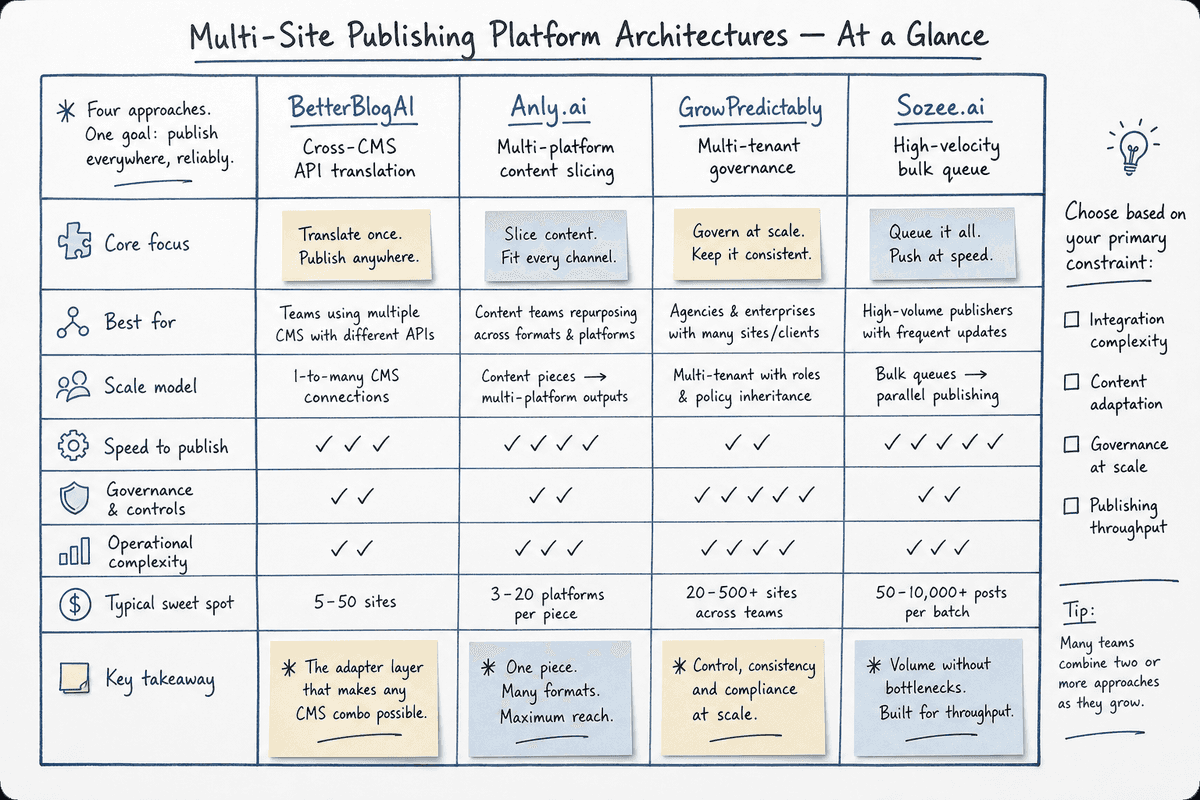
If you are graduating from basic scheduling, the market has fractured into specialized tools that handle the complexities of multi-site routing, bulk processing, and CMS abstraction.
Anly.ai: Best for Multi-Platform Workflows
For teams that need to coordinate not just blogs, but the entire distribution ecosystem around those blogs, Anly provides an intelligent layer. It focuses on smart automation for multi-platform calendars, allowing you to build workflows that take a single piece of core content and slice it for different sites, social channels, and newsletters. It excels at maintaining the logical connection between a pillar post on your main domain and the supporting content distributed across satellite sites.
BetterBlogAI: Best for Cross-CMS Routing
When your multi-site portfolio operates on a mix of technologies—such as a primary site on Webflow, an acquired brand on WordPress, and a documentation hub on Ghost—routing content becomes a nightmare. BetterBlogAI operates as an integration layer, effectively allowing teams to automate blog posting across major CMS platforms. It handles the API quirks, image compression differences, and metadata mapping required to publish seamlessly regardless of the destination CMS.
GrowPredictably: Best for Large-Scale Client Management
Agencies and holding companies require strict separation of client assets while maintaining a macro view for resource allocation. GrowPredictably is designed specifically to help operators manage large-scale content calendars for multiple clients using automation. It features robust multi-tenant permissions, allowing account managers to see everything while restricting clients to their specific workspaces.
Sozee.ai: Best for Bulk Scheduling and Repurposing
If your strategy relies on high-velocity publishing across a massive portfolio of local or niche affiliate sites, scale is your primary concern. Sozee is consistently ranked among the best content calendar automation tools for its ability to handle bulk scheduling. You can upload hundreds of posts simultaneously, apply AI-driven repurposing logic, and distribute them across a network of sites without triggering rate limits or API timeouts.
How to Automate a Content Calendar for Multiple Sites: A 4-Step Framework
Automating a content calendar across multiple sites is entirely achievable with a centralized workflow and consistent templates. However, throwing software at a disorganized process will only help you publish mistakes faster. To build a resilient system, you must engineer it from the ground up using a strict four-step operational framework.
Step 1: Define a Master Calendar and Standardized Templates
The foundation of multi-site automation is a single source of truth. You cannot have distinct spreadsheets for every site you manage. You must create one master database—often built in Airtable, Notion, or a specialized tool like Monday.com—that captures all channels, all sites, and all content types.
Within this master calendar, you must establish rigorous content templates. A template is not just a writing guide; it is a structured payload of data that your automation platform will eventually push to a CMS via API.
Your templates must standardize:
- Post Structure: Define mandatory fields such as H1, Introduction, Body Content, and Conclusion.
- Asset Specifications: Establish strict image sizes and file formats. A master calendar should automatically validate whether a featured image meets the 1200x630 requirement before allowing the status to change to "Ready to Publish."
- Metadata and SEO Fields: Title tags, meta descriptions, canonical URLs, and schema markup variables must be distinct fields, not an afterthought left in the margins of a document. If you are structuring content for high conversion, following the blueprints in How to Build an SEO Landing Page (7-Step Guide) can help you define the exact custom fields your template needs.
- Site-Specific Taxonomy: Every post must be tagged with a unique Site ID, Category ID, and Author ID that matches the destination CMS database.
Once your templates are built, map each one to specific publishing destinations and retention rules. For example, a template tagged "Q3 Feature Update" might map to both the primary SaaS blog and the customer support portal, while carrying a rule to archive the post after 12 months.
Step 2: Choose a Platform Built for Multi-Tenant Architecture
With your data structured, you must select an automation platform capable of executing the logic. When evaluating tools for multi-site environments, consumer-grade schedulers will not suffice.
Look for platforms that offer:
- Unified Multi-Channel Dashboards: You need the ability to filter your view by a specific brand, or zoom out to see the global publishing velocity across all properties.
- No-Code and Low-Code Capabilities: Hard-coding API integrations requires constant developer maintenance whenever a CMS updates its endpoints. Favor platforms with robust no-code webhook capabilities or visual workflow builders so your marketing operations team can modify flows without filing IT tickets.
- Granular Rate-Limit Handling: Publishing one post is easy. Publishing 50 posts across 10 sites simultaneously will trigger API rate limits, resulting in failed publishes and out-of-sync calendars. Ensure your chosen platform queues and throttles API requests intelligently.
Step 3: Design End-to-End Automated Workflows
Automation is not just about the final click of the "publish" button; it is about removing friction from the entire lifecycle of the content. You need to design and encode strict workflows that move a piece of content from ideation to distribution.
Map out the distinct stages: Idea → Brief → Draft → Review → Approval → Scheduled → Published → Reported.
Next, implement triggers to move content automatically between these stages:
- Status Changes: When a writer changes a document status from "Draft" to "Ready for Review," the system should automatically alert the designated editor via Slack or Microsoft Teams.
- Date-Based Triggers: If a piece of content is tied to a specific campaign launch date, the workflow should flag any assets that have not reached the "Approval" stage 48 hours prior to launch.
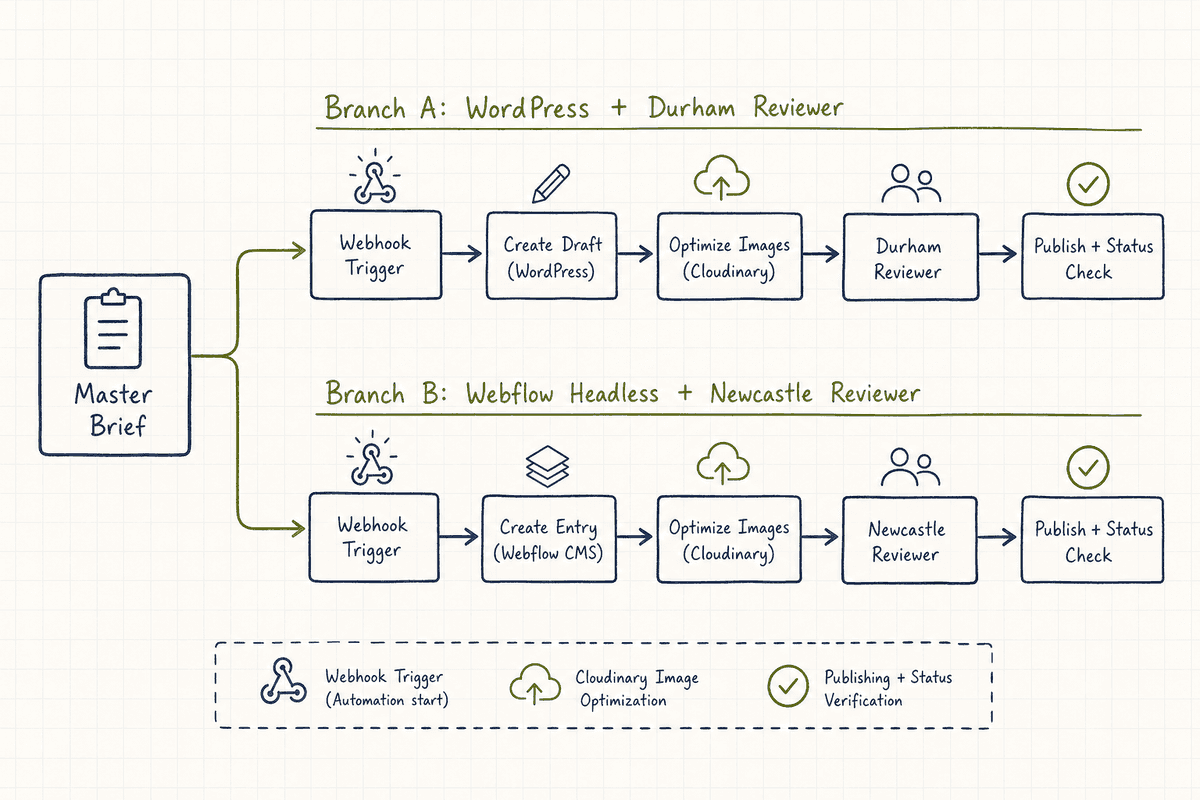
- Automated Routing and Formatting: Before a post is pushed to the CMS, the automation layer should execute final formatting tasks. This might include resizing heavy images via a Cloudinary integration, generating platform-specific social captions based on the article body, and compiling the final JSON payload.
Assigning roles and approvals dynamically is critical in a multi-site setup. If you are managing a network of local service sites, such as multiple regional pages modeled after Top 7 Agencies for SEO in Durham (Ranked 2026), your workflow must automatically assign the Durham regional manager to approve content tagged for the Durham site, while routing Newcastle content to the Newcastle manager.
Step 4: Implement Cross-Site Publishing Logic
The final step is the most technically complex: executing the cross-site publishing logic. Your goal is to keep the human workflow consistent (every post goes through the same approval steps) while the machine handles the destination variations.
You must abstract the quirks of each destination CMS. For example:
- WordPress: Requires a specific REST API call, handling featured images by first uploading them to the media library to generate an attachment ID, and then linking that ID to the post.
- Webflow: Uses a unique Collection ID system where category tags and author names must be passed as specific reference Item IDs, not just text strings.
- Contentful or Sanity (Headless): Requires pushing raw structured data and then triggering a build hook (like Vercel or Netlify) to regenerate the static pages. If you are managing these setups, integrating the technical checklists found in SEO for Single Page Applications: The Technical Checklist into your automated QA process ensures your javascript-heavy sites remain indexable upon publication.
Build your automated publishing routes to intercept the master payload from your calendar, transform it into the specific format required by the destination CMS, and deliver it. This middleware approach ensures that if you migrate a site from WordPress to Webflow next year, you only have to update the final delivery node, not your entire master calendar.
Turning AI Visibility Gaps into Published Evidence
A multi-site content engine is a powerful machine, but a machine needs precise coordinates to be effective. Publishing generic content at scale across multiple domains provides minimal returns in the era of AI search.
This is where integrating your content automation with AI visibility monitoring changes the game. When buyers prompt ChatGPT or Gemini with transactional queries, those models evaluate the web's consensus. BeVisible tracks these interactions, highlighting exactly which questions AI assistants are answering, which brands they recommend, and crucially, which sources they cite to justify those recommendations.
When BeVisible uncovers a visibility gap—for instance, Perplexity is recommending a competitor because they have extensive technical documentation that you lack—that gap should instantly trigger a workflow in your master calendar.
- Detection: BeVisible identifies that your brand is missing from the AI overview for a high-intent query.
- Brief Generation: An automation pushes a new record into your master calendar, pre-filling the target query, the missing semantic entities, and the required content format.
- Multi-Site Execution: Your team creates the necessary evidence—a technical teardown for your developer portal, a feature overview for your main site, and a case study for a partner domain.
- Automated Publishing: Upon approval, your cross-site logic deploys this synchronized narrative across your ecosystem.
By connecting visibility insights directly to your multi-site publishing engine, you move from reactive reporting to proactive execution, systematically engineering the consensus AI models require.
Common Pitfalls in Multi-Site Content Automation
Even with the best tools, scaling content operations across disparate domains introduces unique failure modes. Being aware of these pitfalls allows you to build preventative measures into your workflows.
Taxonomy Drift
Over time, the categories and tags used in your master calendar can fall out of sync with the destination CMS databases. If someone deletes the "Enterprise" category in your WordPress backend, any automated post sent from your calendar with that category ID will fail or default to "Uncategorized."
- The Fix: Schedule a monthly automated sync that pulls the current taxonomy from all your CMS endpoints and updates the dropdown options in your master calendar.
Zombie Automation Errors
When an API call fails due to a timeout or a missing image file, the automation might quietly stop. The post sits in a "Scheduled" state in your calendar but never actually goes live on the site.
- The Fix: Build a verification loop. After the automation sends the "publish" command, it should wait five minutes, query the live URL to ensure a 200 HTTP status code, and only then mark the master calendar status as "Live."
The Duplicate Content Trap
When teams first realize how easy it is to push content to multiple sites, they often make the mistake of syndicating the exact same article across five different domains. This dilutes your authority and confuses search crawlers.
- The Fix: Use your templates to enforce variation. If a core concept needs to exist on multiple sites, use AI rewriting tools within your workflow (like those offered by Sozee.ai) to adjust the framing, tone, and depth for each specific audience, while applying proper cross-domain canonical tags where necessary.
The Economics of Content Automation: Agency vs. In-House
Building this infrastructure requires an upfront investment in software, workflow design, and technical configuration. For many SaaS founders and marketing leaders, the immediate question is whether to build this automated engine in-house or outsource the multi-site management entirely to an agency.
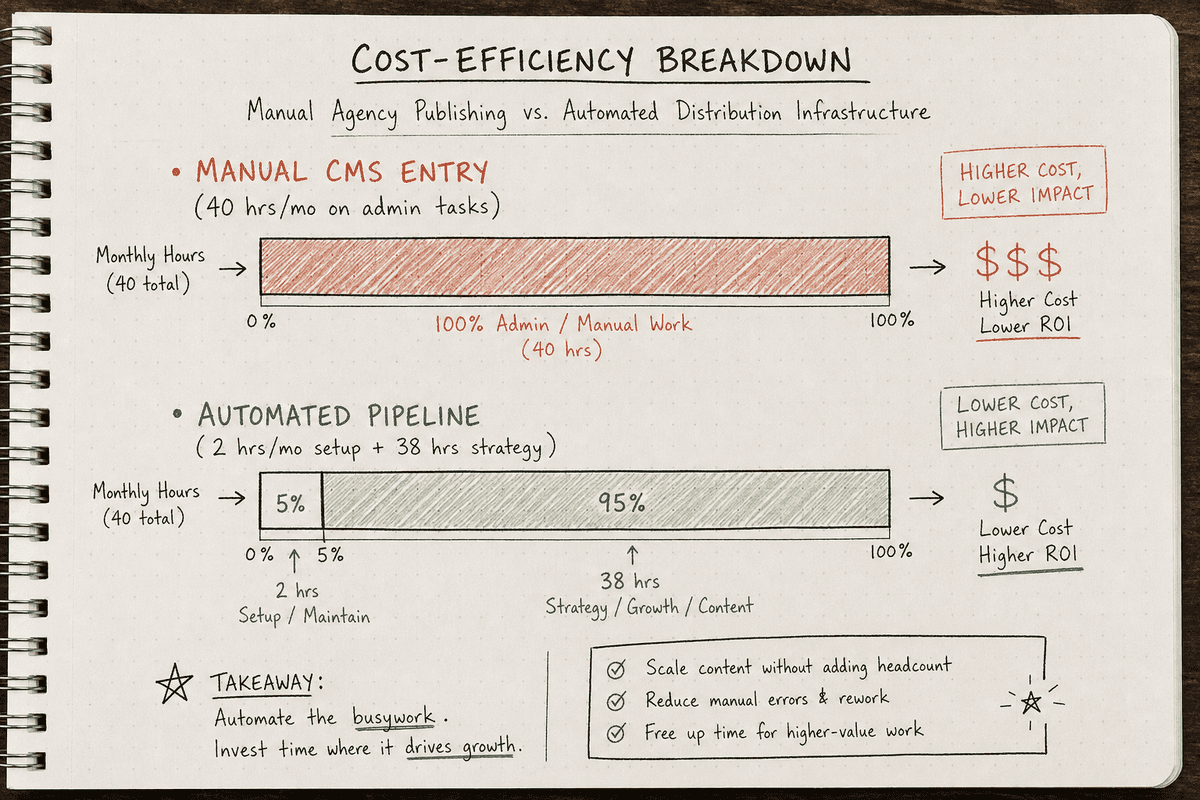
The reality is that managing multiple CMS platforms manually is incredibly labor-intensive. If you pay an agency by the hour to log into five different WordPress instances, format images, adjust meta tags, and hit publish, you are burning budget on low-leverage administrative tasks.
As explored in detail in SEO Charges UK: Agency Rates vs Automation (2026), the financial math strongly favors automating the distribution layer. By investing in a platform like BetterBlogAI or Anly to handle the cross-site publishing logic, you can redirect your agency or in-house budget away from manual data entry and toward high-level strategy, original research, and closing the precise AI visibility gaps that actually drive revenue.
Frequently Asked Questions (FAQ)
How do you prevent duplicate content penalties when publishing across multiple sites?
To avoid confusing search engines and AI models, never publish identical text across multiple domains without a clear canonical strategy. If you are syndicating a post from your main site to a partner site, ensure the automation adds a rel="canonical" tag pointing back to the original source. Ideally, use multi-platform tools to automatically rewrite or tailor the content (e.g., changing a broad industry post into a niche-specific version) before it routes to different domains.
Can AI completely automate the scheduling and publishing process?
Yes, but human oversight is still necessary for quality control. Tools can automatically determine the optimal time to post, route content to the correct CMS, resize images, and map taxonomy fields. However, the final approval—ensuring the content accurately reflects brand voice and answers the specific AI visibility gap it was designed for—should remain a manual checkpoint in your master calendar.
What is the best way to manage approvals when dealing with multiple client sites?
Use a platform with robust multi-tenant architecture and dynamic routing. In your master calendar, assign specific reviewer roles based on the target domain. When a draft targeting Client A's site moves to "Ready for Review," the automation should exclusively notify Client A's designated stakeholders, locking other clients out of the workspace entirely. This prevents cross-brand contamination and keeps approval logs audit-ready.
Building a multi-site content calendar is not just an exercise in organization; it is the deployment mechanism for your modern search strategy. By standardizing your templates, abstracting your CMS connections, and tying your publishing velocity directly to AI visibility gaps, you can turn chaotic multi-domain management into a synchronized growth engine.