
A development team pushes a major site update, deploying a sleek new faceted search for their e-commerce store. The UX is flawless, but three weeks later, organic traffic has plummeted by 40%. The culprit? The new architecture dynamically generated URLs like example.com/shop?category=shoes&color=red&sort=price_asc&sessionid=987654.
Instead of crawling the site's actual products, Googlebot got trapped in an infinite loop of parameter combinations, burning through the crawl budget while the primary pages fell out of the index.
URL SEO is rarely the most glamorous part of search engine optimization. It lacks the creative thrill of content writing and the dopamine hit of acquiring a high-authority backlink. Yet, the structure of your links is the foundational map that both web crawlers and human users rely on to navigate your data. A poorly structured URL doesn't just confuse Google's official documentation parsers; it actively destroys user trust, lowering your Click-Through Rate (CTR) wherever that link is shared.
Whether you are structuring a standalone SEO landing page or mapping out a complex SaaS product directory, this guide will break down the exact requirements for a crawlable URL structure and how to format them for maximum visibility.
Why URL Structure Still Matters in 2026
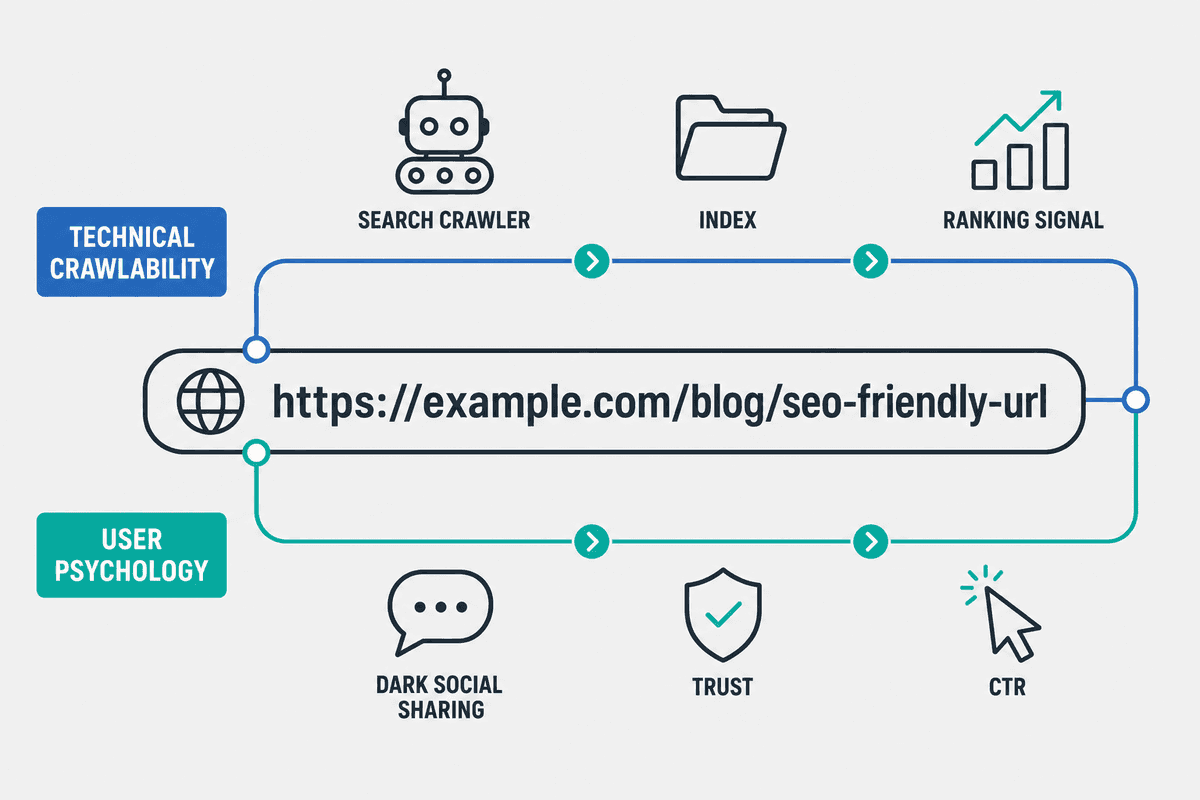
It is tempting to think that with the rise of AI search engines, semantic web parsing, and sophisticated crawlers, the actual text string of a URL no longer matters. This is a dangerous misconception.
According to Google's own documentation on URL structure, the primary job of a URL is to be a clear, crawlable pathway. Crawlability is the absolute prerequisite for indexing. If Googlebot cannot efficiently parse your web addresses, your content will not rank, no matter how authoritative it is.
But beyond the technical requirements of bots, URLs play a massive role in user psychology and Click-Through Rate. While Google often replaces raw URLs with breadcrumbs in the Search Engine Results Pages (SERPs), URLs are still highly visible in:
- Dark Social Shares: When someone drops a link into Slack, Discord, or iMessage.
- Email Newsletters: Where naked links are frequently pasted.
- Browser Address Bars: Where users subconsciously assess whether they are on a trustworthy, relevant page.
A clean, descriptive URL signals safety and relevance. A messy, parameterized string signals spam, tracking, or a poorly built website.
The Anatomy of an SEO-Friendly URL
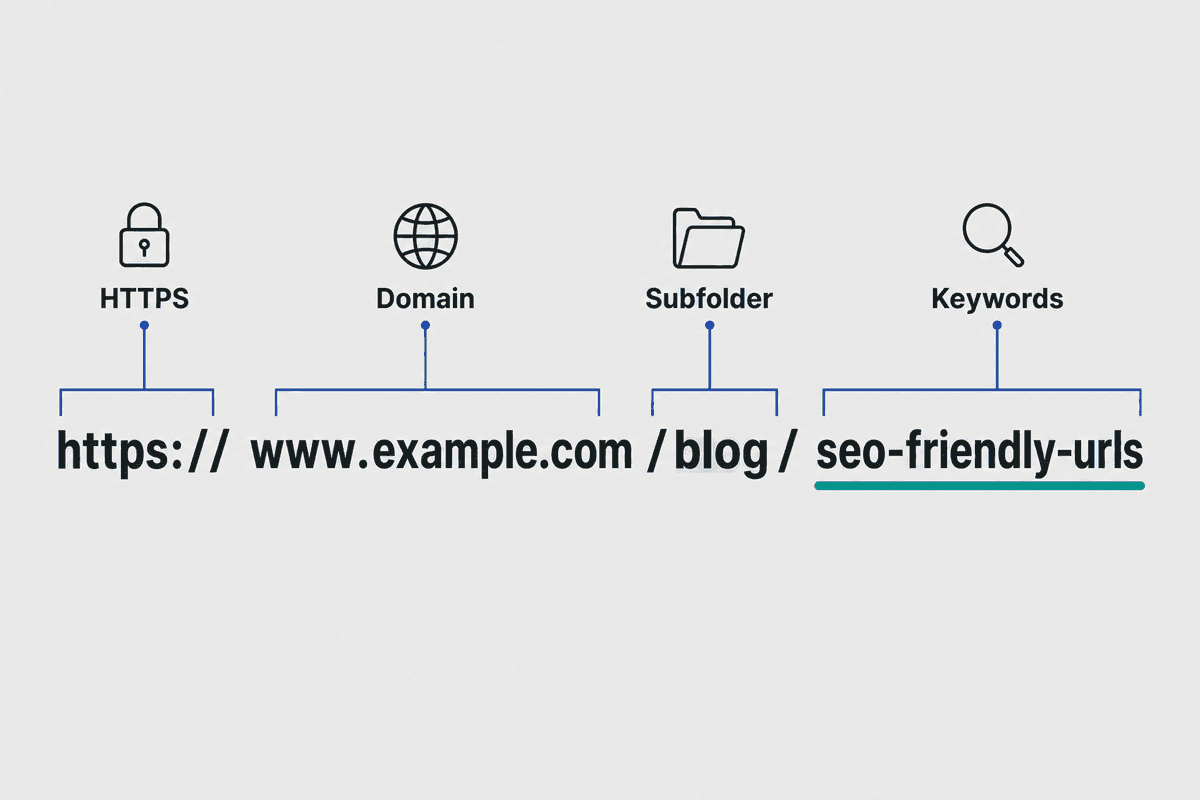
To optimize a URL, you first have to understand how machines read it. A Uniform Resource Locator is not just a string of text; it is a standardized instruction set that dictates the protocol, server, and specific file path. As outlined in comprehensive resources like Semrush's guide to URLs, the anatomy dictates how authority flows through your site.
Understanding this anatomy allows you to make deliberate choices about where your content lives. With the foundation set, let's explore the strategic implementations that maximize CTR and crawl efficiency.
7 Tips to Structure Links for Higher CTR
1. Keep It Simple and Hierarchical
Your URLs should reflect the logical architecture of your website. A flat structure (where every page lives directly off the root domain, e.g., example.com/my-specific-product) might seem simpler, but it robs search engines of critical context.
Hierarchical URLs help Google understand the relationship between different pages. If you run a SaaS company, your solutions should be logically grouped:
- Bad (Flat):
example.com/automated-seo-content-generation - Good (Hierarchical):
example.com/products/seo-automation/
The folder structure (/products/) tells the crawler that this page belongs to a specific category. This makes it easier to understand your URL structure and helps search engines generate accurate breadcrumb navigation in the SERPs, which directly boosts CTR.
2. Optimize for Human Readability (The CTR Factor)
Search engines read code, but humans click links. Seobility's breakdown on SEO-friendly URLs emphasizes that URLs should be built for the user's language.
Before publishing a page, look at the auto-generated slug. Content Management Systems (CMS) frequently generate URLs based on the exact title of your post. If your post is titled "11 Ways to Automate Your Content Marketing in 2026 for B2B SaaS", the default slug will be an unreadable mess:
example.com/blog/11-ways-to-automate-your-content-marketing-in-2026-for-b2b-saas
Trim the stop words (to, a, in, for, your) and the unnecessary context to create a punchy, readable URL:
example.com/blog/b2b-content-automation
When a user sees the optimized link on social media, they instantly know what the article is about. Clarity breeds clicks.
3. Follow IETF STD 66: Use Hyphens to Separate Words
Google's systems are built on established web standards. Specifically, you should adhere to the Internet Engineering Task Force (IETF) URI standards. The most critical takeaway from these documentation standards is how you separate words in your URL paths.
- Use Hyphens (
-):url-seo-tips(Search engines read this as "url seo tips") - Do Not Use Underscores (
_):url_seo_tips(Search engines read this as a single conjoined word "urlseotips") - Do Not Use Spaces (
%20):url%20seo%20tips(Breaks readability and causes percent-encoding errors in various browsers).
Hyphens are the universally recognized space character for URLs. Sticking to this prevents unexpected indexing issues.
4. Ditch the Dates (Unless You're a News Publisher)
A common mistake bloggers make is including publish dates in their URLs, often because older versions of WordPress defaulted to this structure:
example.com/2026/05/15/best-seo-practices/
Unless you are a daily news publication where the date is critical to the context of the article, dates in URLs actively harm your SEO.
Evergreen content requires routine updating. If you write an article about the best SEO blogs and include "2024" in the URL path, that link looks outdated the moment the calendar flips to 2025. If you change the URL to update the year, you force a 301 redirect, potentially losing link equity.
Keep dates in your <h1> and your meta description, but keep them entirely out of your URL slug.
5. Minimize Dynamic Parameters and Session IDs
URL parameters (the text that follows a ? in a web address) are useful for tracking campaigns or filtering products, but they are the natural enemy of a clean index.
When an e-commerce site uses parameters for additive filtering of a set of items (e.g., filtering a clothing category by size, color, and price), it can unintentionally generate thousands of unique URLs that all point to near-identical content.
To prevent this:
- Use a common encoding for URL parameters. Avoid complex or custom-built string structures.
- Use as few parameters as you can.
- Block irrelevant parameters via robots.txt. If a parameter only changes how a list is sorted (e.g.,
?sort=price_high), it provides no new content for Google to index.
6. Subdomains vs. Subdirectories: The SEO Verdict
One of the most persistent architectural debates in SEO is whether to place a blog or resource center on a subdomain (blog.example.com) or a subdirectory (example.com/blog/).
From a purely technical standpoint, Google states they can crawl both equally well. However, decades of practitioner data reveal a different reality. Search engines often treat subdomains as distinct, separate entities. If you build massive authority on blog.example.com, that link equity does not seamlessly transfer to your main product pages on www.example.com.
Always use subdirectories (/blog/, /resources/, /guides/) to consolidate your domain authority. All your content marketing efforts should lift the primary domain where your conversion pages live.
7. Enforce Canonical and Trailing Slash Consistency
Search engines treat URLs with absolute literalism. To Googlebot, the following are four entirely different websites:
http://example.com/pagehttps://example.com/pagehttps://www.example.com/pagehttps://example.com/page/(notice the trailing slash)
Failing to standardize these paths results in massive duplicate content issues.
You must choose one definitive structure (e.g., HTTPS, non-www, trailing slash) and rigorously enforce it. Use server-side 301 redirects to point all variations to your preferred version, and ensure your <link rel="canonical"> tags reference the exact format you've chosen.
For teams managing large sites, automation platforms like BeVisible handle this implicitly. When connecting via API to a CMS like Webflow or WordPress, the platform enforces strict structural rules, automatically generating clean, canonicalized slugs for every daily published article without manual intervention.
URL Anti-Patterns: Avoid These Common Issues
Even experienced teams fall into structural traps. If you are auditing a site's technical health, check for these common URL anti-patterns.
The Hash Routing Trap in SPAs
Single Page Applications (SPAs) built on React, Vue, or Angular often use URL fragments (#) to load different content states without refreshing the browser (e.g., example.com/#/dashboard).
As highlighted in comprehensive technical breakdowns on SEO for single page applications, Googlebot drops everything after the # when crawling.
If you use hash routing to serve distinct content pages, search engines will only see a single page. You must implement the History API to push clean URLs (without fragments) to the browser, ensuring your SPA SEO strategy is fully crawlable.
Case Sensitivity Errors
Be aware that URLs are case sensitive. While the domain name itself is not case sensitive (Google.com resolves exactly like google.com), the path following the domain is.
/Blog/URL-SEO is technically a different address than /blog/url-seo.
If your server allows mixed-casing, you risk creating duplicate content. Enforce strict lowercase rules across your entire CMS and server architecture. If a user types a capitalized URL, the server should 301 redirect them to the lowercase equivalent.
Improper Handling of Multi-Regional Sites
For companies operating internationally, using URL parameters to determine language is a massive red flag (e.g., example.com/home?lang=fr).
Instead, use dedicated URL structures for multi-regional sites. This typically means utilizing ccTLDs (example.fr), subdomains (fr.example.com), or subdirectories (example.com/fr/). Subdirectories combined with proper hreflang tags are generally the most robust and manageable approach for global SEO.
Fixing Crawling-Related URL Structure Problems
If you have audited your site and realized your URL structure is a mess, do not panic and start changing slugs indiscriminately. Altering a URL is identical to moving a physical store to a new address; if you don't leave a forwarding sign, your customers (and search rankings) are gone.
When fixing structure problems, rely on these two tools:
- 301 Redirects: If you change an ugly URL like
/p=123to a clean one like/seo-tools, you must implement a server-side 301 redirect from the old address to the new one. This tells Google that the move is permanent and passes the accumulated link equity to the new destination. - Canonical Tags: If you cannot change the URL structure due to hardcoded legacy systems (a common issue when hiring SEO services to clean up old custom builds), you can use canonical tags. Point the messy, parameterized URL's canonical tag to a clean, representative version of the page. This tells Google which version to index, even if both exist.
URL SEO FAQs: Answering the Zero-Click Questions
How long should an SEO URL be?
While browsers can technically support URLs up to 2,048 characters long, search engines and users prefer brevity. Research cited by Straight North on URL length and structure suggests that shorter URLs generally correlate with higher rankings.
Aim for URLs under 75 characters. Keep the slug to 3-5 words that clearly summarize the page's core topic. Long URLs get truncated in search results and look suspicious when shared.
Do keywords in URLs still matter for ranking?
The debate over keyword-rich URLs is a constant fixture in technical forums. As discussed extensively in community hubs like this Reddit TechSEO thread, the direct ranking weight of a keyword in a URL is practically zero in modern algorithms.
However, keywords in URLs matter significantly for context and CTR. If a user searches for "Etsy SEO Tools" and your URL is /blog/etsy-seo-tools, the user's brain registers a perfect match, increasing the likelihood of a click. The secondary benefit of the increased CTR is what actually contributes to the sustained ranking.
Note: Do not keyword stuff. A URL like /seo-tools/best-seo-tools/cheap-seo-tools will likely trigger spam filters.
When should I use absolute vs. relative URLs?
For internal linking, developers often use relative URLs (e.g., <a href="/about-us">) rather than absolute URLs (<a href="https://example.com/about-us">).
While relative URLs make staging environments easier to manage, they frequently cause broken relative links if a site is scraped, syndicated, or if canonical tags are misconfigured. Best practice for SEO is to use absolute URLs for canonical tags, XML sitemaps, and internal links whenever possible to prevent routing ambiguity.
The Ultimate URL SEO Checklist (Actionable Recap)
Before you hit publish on your next piece of content or deploy a new page architecture, run it through this technical recap. If you are using platforms like BeVisible, these steps are automated within the publication pipeline. If you are managing your CMS manually, save this checklist:
- Is the connection secure? Uses
https://protocol. - Is it lowercase? No capital letters in the path.
- Are words separated properly? Uses hyphens (
-), never underscores (_) or spaces. - Is it hierarchical? Uses logical folders (e.g.,
/blog/category/post-title). - Is it concise? Slug is 3-5 descriptive words, free of stop words (and, the, to).
- Is it evergreen? No dates or years in the path.
- Are parameters minimized? Dynamic query strings are blocked via robots.txt or canonicalized.
- Is it fragment-free for indexing? Does not rely on hash routing (
#) for core content delivery. - Is the format consistent? Trailing slashes and
wwwvsnon-wwware standardized via 301 redirects.
By treating your URLs as critical infrastructure rather than an afterthought, you ensure that search engines can map your site efficiently and users feel confident clicking your links. Perfecting URL SEO sets the stage for every piece of content you publish to perform at its maximum potential.