
The distinction between a webpage and a website usually sounds like a pedantic debate for a computer science 101 class. But if you are a SaaS founder staring at Google Search Console wondering why your organic traffic is flatlining, misunderstanding this difference is likely costing you revenue.
When most founders say, "I need to get my website to rank on Google," they are fundamentally misunderstanding how search engines work. Google does not rank websites for specific questions. It ranks individual webpages.
Your website is the ecosystem; your webpages are the individual entry points.
Understanding how to optimize the macro-environment (the website) versus the micro-environment (the webpage) changes everything about how you approach organic growth. In this guide, we will break down the exact technical, structural, and SEO differences between a webpage and a website, and show you how to structure both to build a scalable organic traffic engine.
The Book Analogy: Grasping the Basics
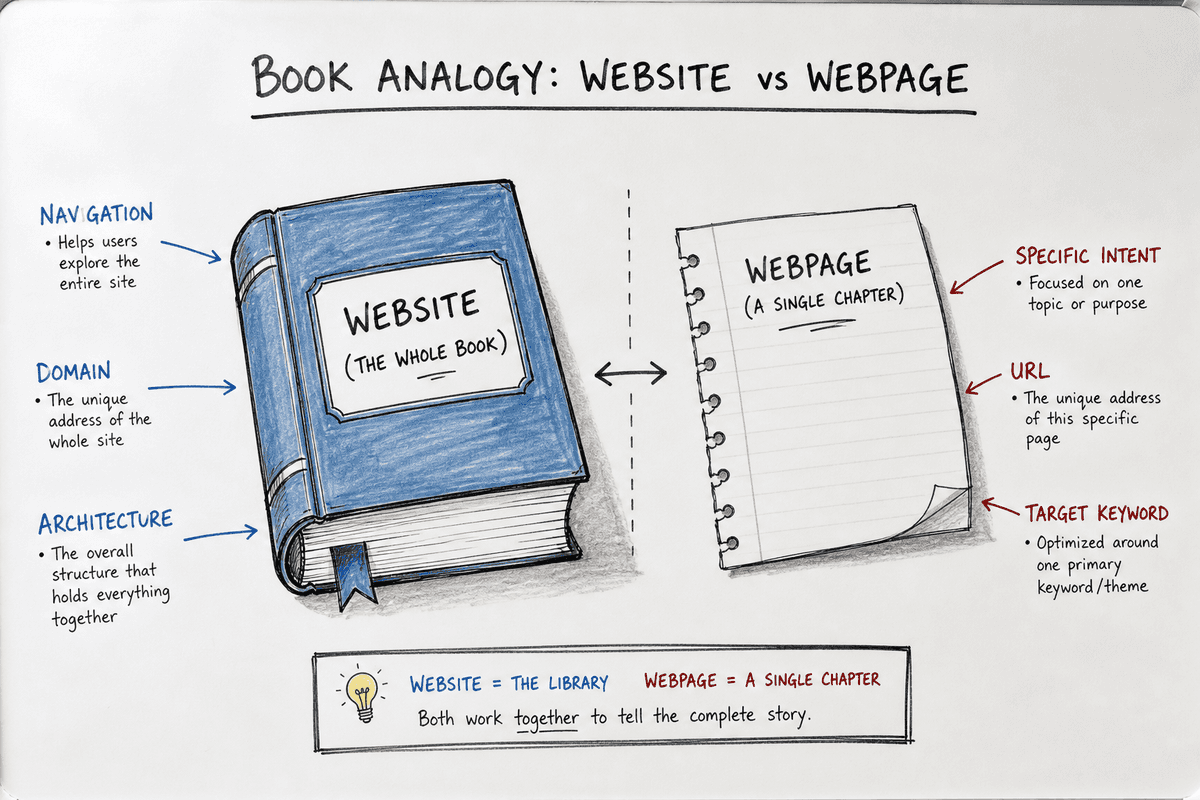
Before we get into technical SEO requirements, the easiest way to understand the difference is the classic book analogy.
- The Website is the entire book. It has a cover, a spine, a table of contents, and an overarching theme or narrative. It is the complete package.
- The Webpage is a single page (or chapter) within that book. It contains specific information about a narrow topic, but it belongs to the larger structure of the book.
If someone searches the library catalog for "how to configure API webhooks," they don't just want a book on software development (the website). They want the exact chapter and paragraph that answers their query (the webpage).
What is a Webpage?
Strictly speaking, a web page is a single document on the internet. It is written in HTML (HyperText Markup Language) and is rendered by a web browser like Chrome or Safari.
A webpage has a specific, unique URL (Uniform Resource Locator). For example, https://yoursaas.com/pricing is a single webpage. Its purpose is singular: to show users how much your software costs.
From an SEO perspective, a webpage is highly specialized. It targets one primary search intent. If you write a blog post about "how to reduce customer churn," that individual webpage must be laser-focused on that topic, containing the right keywords, headers, and answers for that specific query.
What is a Website?
According to technical definitions, like those discussed by web builders such as Elementor, a website is a collection of publicly accessible, interlinked webpages that share a single domain name.
Your website includes everything on yoursaas.com. It includes the homepage, the pricing page, the about page, the terms of service, and every single blog post you have ever published.
While a webpage focuses on a single topic, a website encompasses your entire brand identity, your site architecture, your hosting infrastructure, and your overall domain authority.
Webpage vs Website: 3 Key Differences for SaaS SEO
For content marketers and indie hackers, the difference between these two concepts dictates where you spend your time and resources. Let's explore the three most critical distinctions.
1. SEO Scope: Domain Authority vs Keyword Intent
The most important difference lies in how search engines evaluate them. You perform completely different optimization tasks for a website versus a webpage.
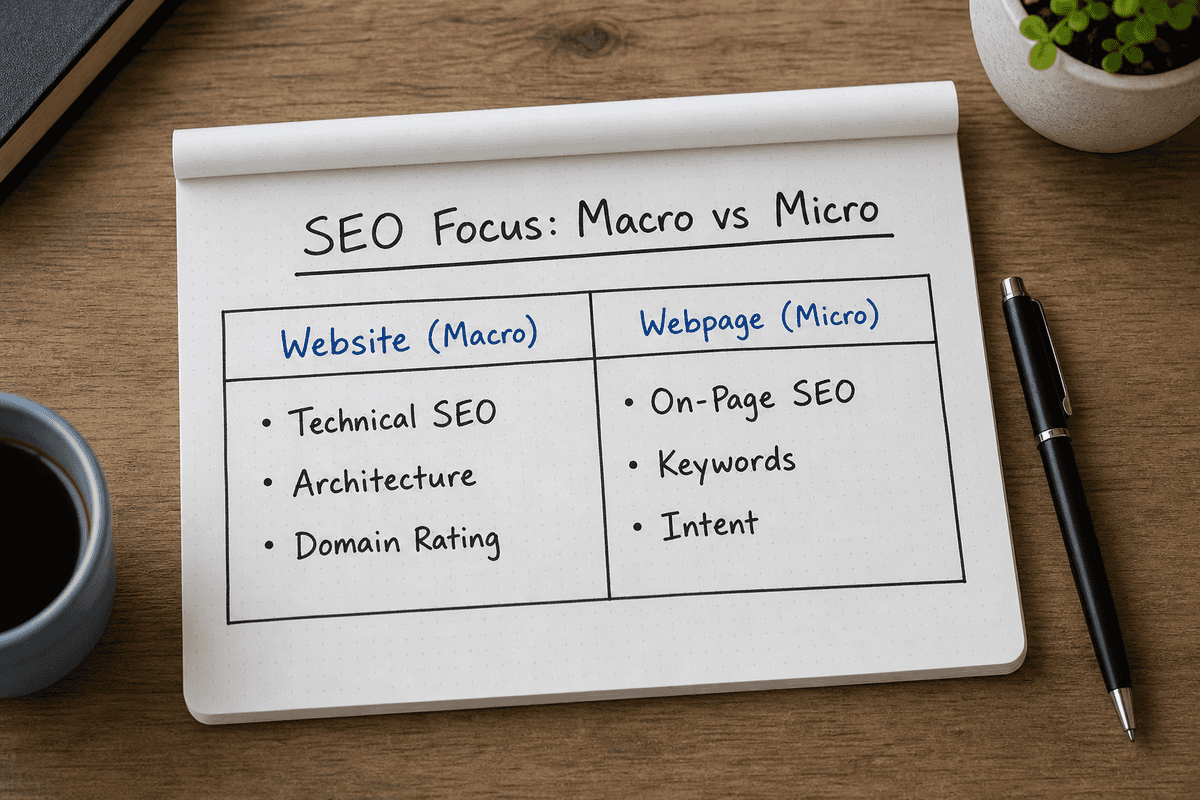
Website Optimization (Technical & Holistic SEO) When you optimize a website, you are looking at macro-level health metrics that affect every page on your domain. This includes:
- Site Architecture: How deeply buried are your pages? A good website architecture ensures no webpage is more than three clicks away from the homepage.
- Hosting and Server Speed: Upgrading your server impacts the load time of the entire website.
- Robots.txt and Sitemap.xml: These files tell Google how to crawl your entire website, not just a single page.
- Domain Rating / Authority: When a high-authority site links to your homepage, it lifts the perceived trust of your entire website ecosystem.
Webpage Optimization (On-Page SEO) When you optimize a webpage, you are entirely focused on relevance, intent, and keyword matching for a single URL. This includes:
- Title Tags and Meta Descriptions: Crafting the exact snippet that appears in Google for that specific page.
- H1, H2, and H3 Tags: Structuring the sub-topics on that page to satisfy the reader's question.
- Keyword Density and Semantics: Ensuring the specific webpage actually uses the terminology a searcher is typing into Google.
- Internal Linking: Pointing links from other pages on your website to this specific webpage to signal its importance.
If your website has terrible hosting (a macro problem), even the best-written webpage won't rank. Conversely, if you have a perfectly optimized website infrastructure but publish thin, unhelpful webpages, you will get zero traffic.
2. Structure and Hierarchy: The Container vs The Content
A website relies on a strict hierarchy to make sense of its webpages. Without a website to act as the container, webpages would be floating, disconnected documents in the void of the internet.
Think about how a user navigates your SaaS:
- They land on your homepage (Website root).
- They click "Features" in your navigation menu (Website structure).
- They click "Automated Reporting" (A specific Webpage).
The website provides the global navigation menu, the footer, the underlying CSS (styling), and the domain name. The webpage provides the actual content the user came to read.
 For SaaS companies scaling organic traffic, managing this hierarchy is critical. You might start with a 5-page website. But as you grow, you will add hundreds of programmatic SEO pages or blog posts. Your website must have categories, tags, and internal link structures robust enough to organize all those new webpages without confusing the user or the search engine.
3. The SaaS Edge Case: Single-Page Applications (SPAs)
In the SaaS industry, the line between website and webpage gets exceptionally blurry due to the prevalence of Single-Page Applications (SPAs).
Frameworks like React, Vue, and Angular allow developers to build complex software interfaces that load only one actual HTML document (a single webpage). As the user interacts with the app, JavaScript dynamically rewrites the current webpage rather than loading entirely new pages from the server.
From a user experience standpoint, an SPA feels fast and fluid—like a native desktop app. But from an SEO standpoint, an SPA is a nightmare. Google's crawlers historically struggle to execute heavy JavaScript to discover content.
If your marketing site is built as an SPA, you are effectively trying to rank a single webpage for dozens of different keywords. It doesn't work. To fix this, SaaS companies must implement specialized rendering techniques. If your product uses this architecture, you must separate your marketing website from your application, or implement server-side rendering. For a deep dive into fixing this, review the SEO for Single Page Applications: The Technical Checklist and Implementing SEO in Single Page Applications (3 Ways).
The Technical Anatomy: How They Differ Under the Hood
To fully grasp the webpage vs website divide, we have to look at how they are built and maintained.
The Infrastructure of a Website
To have a live website, you need three foundational elements that apply globally:
- Domain Name: The address people type into their browser (e.g.,
bevisible.app). You register this through a domain registrar. - Web Hosting: The physical server space where your website's files and database live. Whether you use AWS, Vercel, or WP Engine, the host powers the entire site.
- Content Management System (CMS): The software used to manage the site. Whether it's WordPress, Webflow, or Ghost, the CMS acts as the factory that produces your individual webpages.
The Anatomy of a Webpage
An individual webpage does not require its own domain name or separate hosting plan; it inherits those from the website. Instead, a webpage is composed of:
- A URL Slug: The unique path appended to the domain (e.g.,
/blog/seo-landing-page). - HTML/DOM: The specific markup that structures the text, images, and links on that page.
- Page-Level Assets: The specific featured image, inline graphics, or embedded videos unique to that topic.
This is why building an SEO landing page requires you to focus on copywriting, user intent, and call-to-action placement, rather than worrying about server configuration.
Scaling Content: Moving from "Website" to "Traffic Engine"
A common mistake among early-stage founders is treating their website like a static digital brochure. They build a homepage, a pricing page, and a contact page, and then wonder why they aren't generating leads.
A brochure website only captures branded traffic—people who already know your company name.
To capture non-branded organic traffic—people searching for solutions to their problems—you have to scale your webpages. Every new, highly-targeted webpage you publish acts as a net in the ocean of Google search results.
This is where automation becomes vital. Managing a massive website requires generating daily webpages that rank. An automated platform handles the macro (connecting to your CMS, analyzing competitors to build a site-wide content map) so that it can autonomously execute the micro (writing, formatting, and publishing optimized webpages every 24 hours).
Scaling from a 10-page website to a 1,000-page SEO engine requires you to systemize how individual webpages are researched, structured, and published. If you are reading the best SEO blogs, you will notice a common theme: volume and consistency at the webpage level dictate success at the website level.
Feature Comparison: Webpage vs Website
To summarize the operational differences, here is how you should evaluate both assets across different marketing dimensions:
Frequently Asked Questions (FAQ)
Is a URL the same as a webpage?
Colloquially, yes, but technically, no. A URL (Uniform Resource Locator) is the address of the webpage, while the webpage is the actual content that lives at that address. Think of the URL as the street address and the webpage as the house built on that lot.
Can a website be just one webpage?
Yes. This is called a single-page website (not to be confused with a Single-Page Application). A single-page website places all its content—about, services, contact forms—onto one long, scrolling URL. While these can look beautiful and work well for simple portfolios or event announcements, they are generally terrible for SaaS SEO. Because you only have one page, you can only target one primary topic. To rank for multiple search intents, you must expand a single-page site into a multi-page website.
Does Google index websites or webpages?
Google indexes webpages. Googlebot crawls your website to find links, but it stores individual webpages in its database. When a user searches for something, Google retrieves the single most relevant webpage, not your entire website.
The Strategic Takeaway for SaaS Leaders
Stop trying to "SEO your website" in a vacuum. A high-ranking SaaS business is the result of a technically sound, fast-loading website acting as the foundation for hundreds of highly targeted, expertly written webpages.
Your website is the infrastructure. Your webpages are the assets.
If you want to grow organic traffic, ensure your website infrastructure is solid, check that your CMS and hosting aren't blocking crawlers, and carefully evaluate your strategy if you are relying heavily on single-page application SEO.
Once the macro environment is healthy, shift 100% of your focus to the micro. Publish new webpages consistently, answer your customers' questions directly, and let the cumulative power of those individual pages elevate your entire website's authority.