
Few things are as terrifying for a digital marketing team as flipping the switch on a major website revamp. You spend six months locked in Figma files, debating brand colors and modernizing the user interface. The staging site looks pristine. You push to production, pop the champagne, and wake up two weeks later to find your organic traffic has flatlined.
The culprit is rarely the new design itself. Traffic crashes happen because revamps inherently disrupt the semantic structure, internal link equity, and historical URL authority that Google relied on to rank your site. When design teams strip out "ugly" long-form text in favor of minimalist whitespace, or developers migrate the site to a new JavaScript framework without rendering protocols, years of SEO equity vanish overnight.
Executing a website revamp safely is an exercise in preservation. You are transplanting a mature root system into new soil. This guide breaks down exactly how to refresh your content, restructure your architecture, and modernize your brand—without sacrificing the search engine rankings that drive your revenue.
The 3 Ways Revamps Destroy Organic Traffic
Before detailing the safe path forward, you need to understand exactly how redesigns break existing SEO. Most post-launch traffic disasters stem from three specific failure modes.
1. The URL Massacre
This is the most common and devastating mistake. During a revamp, taxonomy often changes. A directory like example.com/features/ai-automation/ gets shortened to example.com/automation/.
If you do not map the old URL to the new URL with a permanent 301 redirect, Google encounters a 404 error. The historical backlinks pointing to the old page are severed. The authority drops to zero.
2. The Content Prune
Minimalist design is the enemy of traditional SEO. Designers often look at a dense, 2,000-word educational page and slice it down to three bullet points and a parallax animation to improve the aesthetic.
While the page might look better, you just deleted the semantic context, secondary keyword mentions, and entity relationships that convinced Google the page was an authoritative answer. The page loses relevance for long-tail queries and drops out of the rankings.
3. The Technical Re-platforming Break
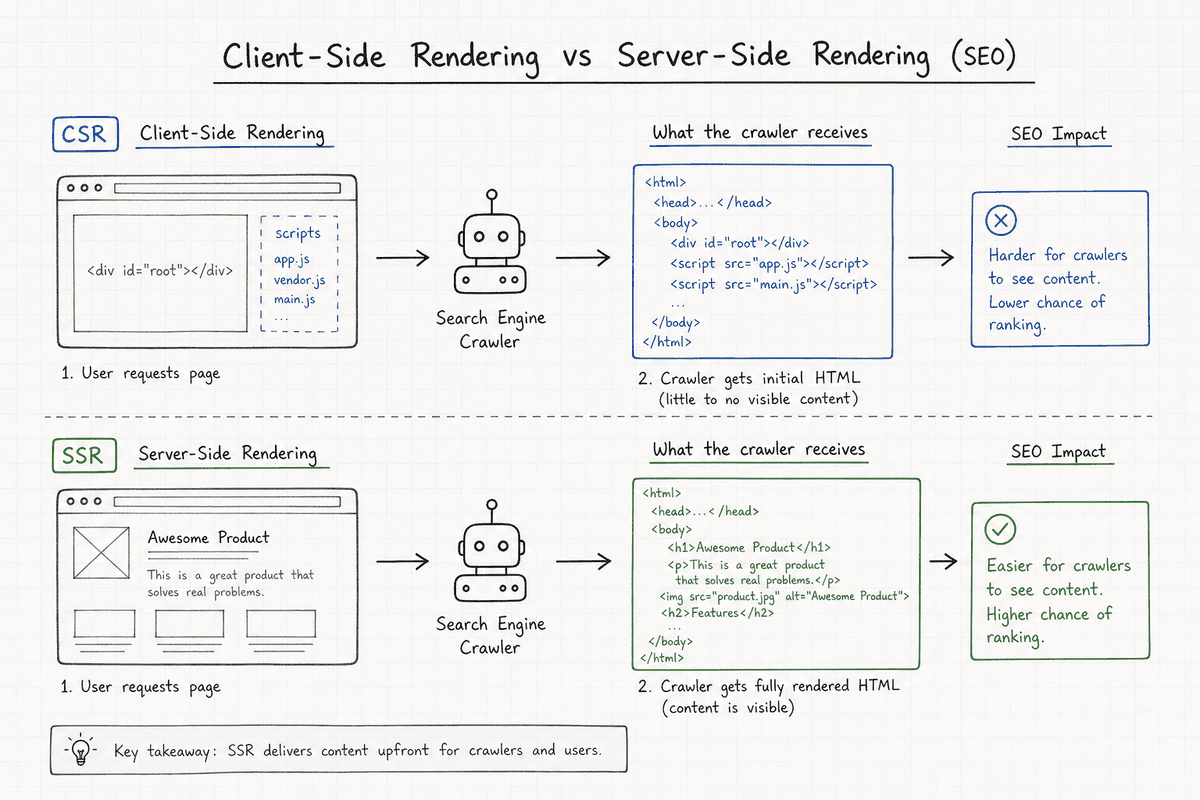
Moving from a traditional CMS like WordPress to a modern JavaScript framework (like React, Vue, or Angular) introduces massive crawlability risks. If developers implement a Client-Side Rendering (CSR) approach, Googlebot may see nothing but a blank page and a bundle of scripts.
If your revamp involves moving to a modern JavaScript stack, you must prioritize server-side rendering or static generation. For a deep dive into mitigating this specific risk, review Single-Page Application SEO: What Works in 2026?.
Phase 1: The Pre-Revamp Content Audit
The foundation of a safe website revamp happens before anyone writes a line of code. You need a comprehensive inventory of your current assets to determine what is driving value.
Export your page data from Google Analytics and Google Search Console for the last 12 months. Map every URL on your site against its organic sessions, backlink count, and conversion rate.
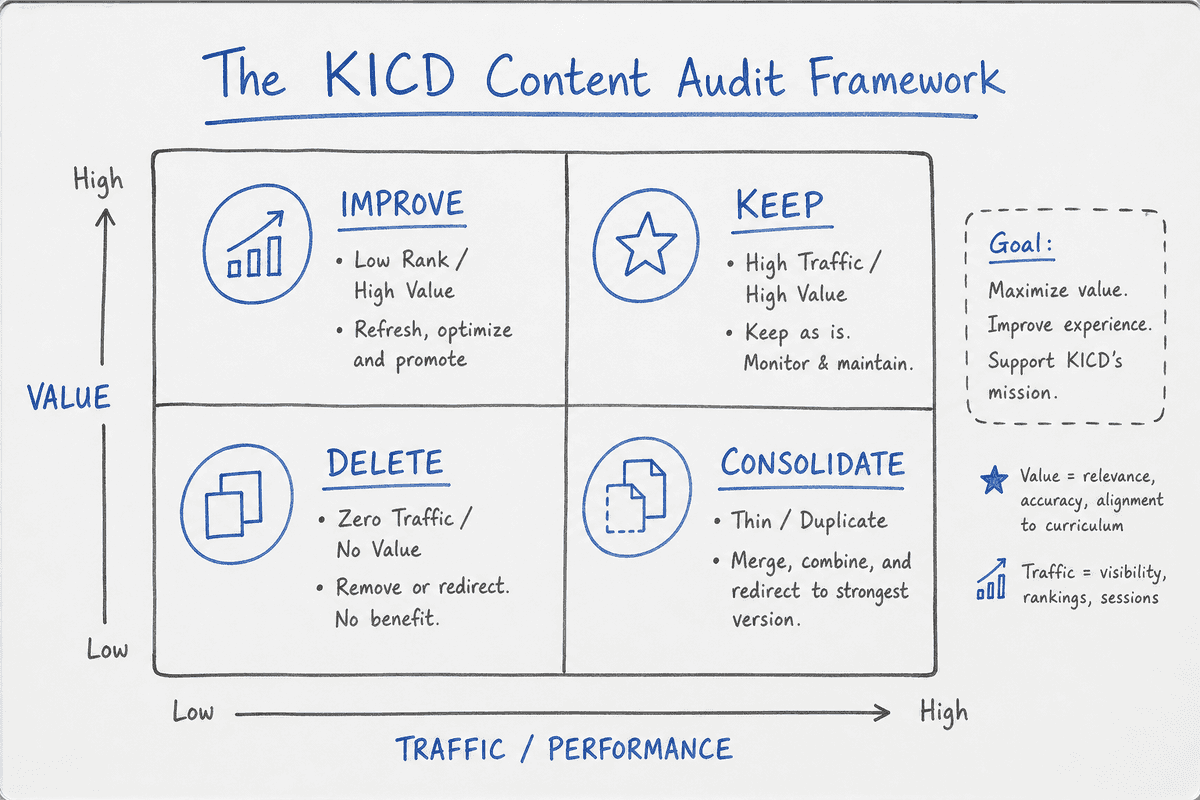
Categorize every page using the KICD Framework:
- Keep: High-traffic, high-converting pages. These pages should be ported over to the new design with minimal structural changes to the text and headings.
- Improve: Pages ranking on page 2 or 3 of Google. The revamp is an opportunity to expand this content, add missing entities, and upgrade the formatting.
- Consolidate: Multiple thin pages covering the same topic. Merge them into one comprehensive master guide and redirect the old variations to the new master URL.
- Delete: Zero-traffic, zero-backlink pages that offer no business value (e.g., a 2019 company picnic announcement). Let them 404 or 410.
Phase 2: URL Mapping and 301 Redirect Architecture
If you take away only one protocol from this guide, make it this: Never change a URL unless it is absolutely necessary.
If a page is ranking well, maintaining the exact URL slug on the new site is the safest move. However, if redesigning your site architecture forces URL changes, you must build a flawless 301 redirect map.
A 301 redirect tells search engines, "This page has permanently moved here, please pass all historical authority to the new destination."
Create a master spreadsheet with two columns: Legacy URL and Destination URL.
Rules for Safe URL Mapping:
- Map 1-to-1: Redirect old pages to their exact equivalent on the new site.
- Avoid Homepage Dumping: Do not redirect deleted pages to the homepage. This creates "soft 404s" and confuses search engines. If a page has no equivalent, redirect it to the parent category or let it 404 naturally.
- Update Internal Links: Do not rely on redirects for internal navigation. Update every internal link in your new site's menus, footers, and body copy to point directly to the new destination URL. Relying on internal redirects wastes crawl budget.
Phase 3: Refreshing Content (Without Nuking Relevance)
Refreshing content during a revamp is a delicate balancing act. You want to align the messaging with your new brand voice without stripping away the keywords holding up your rankings.
The Safe Content Refresh Protocol
When updating a high-ranking page, follow these boundaries:
- Preserve the Primary Intent: If the old page was an educational "How-To" guide, do not turn the new page into a transactional product landing page. Google ranks the URL based on the educational intent. Changing the intent will tank the ranking.
- Keep the H1 and Title Tag Aligned: You can optimize titles, but do not completely abandon the primary keyword string that historically drove traffic.
- Enhance, Don't Delete: If a section feels too long for the new design, use UI elements like accordions, tabbed interfaces, or anchored jump-links to preserve the text density while keeping the visual footprint clean.
Rebuilding the Content Moat Post-Launch
A revamp often exposes gaps in your historical content strategy. Perhaps your old blog was a disjointed collection of manual posts that lacked a cohesive cluster strategy.
Once the new site architecture is stable, the operational bottleneck immediately shifts back to content consistency. This is where automated workflows become indispensable. Platforms like BeVisible resolve this by operating as a fully automated AI-powered SEO blog engine.
Instead of scrambling to brief writers on your new site taxonomy, BeVisible autonomously analyzes competitor keyword gaps, performs SERP research, creates strategic outlines, and generates optimized, fluff-free long-form drafts. Because it publishes straight to platforms like WordPress, Webflow, Notion, or Ghost CMS, it allows SaaS founders and marketing teams to scale organic demand hands-free immediately after a redesign.
To see how top founders approach their ongoing content education, check out the 11 Best SEO Blogs Every SaaS Founder Needs (2026).
Phase 4: Navigating SPA Migrations and Technical Redesigns
If your website revamp involves transitioning to a Single Page Application (SPA), the SEO stakes are significantly higher. SPAs dynamically rewrite the current web page with new data from the web server, rather than loading entire new pages.
While this creates a blazing-fast, app-like experience for the user, it can blind Googlebot if not configured properly. Search engines struggle to execute complex JavaScript efficiently at scale.
To survive an SPA revamp, you must implement Server-Side Rendering (SSR) or Static Site Generation (SSG). This ensures that when a search engine crawler requests a URL, the server sends back a fully rendered HTML document, complete with metadata, canonical tags, and body content.
If your engineering team is pushing for a React or Vue migration, mandate that they review SEO for Single Page Applications: A 5-Step Guide (2026) and Implementing SEO in Single Page Applications (3 Ways) before finalizing the tech stack. For the specific pre-launch technical requirements, use the SEO for Single Page Applications: The Technical Checklist.
Phase 5: Revamping Your Landing Pages for Intent
Your homepage handles brand queries, but your landing pages capture unbranded search intent. A website revamp is the perfect catalyst to audit and rebuild your landing page architecture.
Many legacy sites suffer from "frankenstein" landing pages—pages that try to target three different personas and five different use cases simultaneously.
Use the redesign to break these out into highly specific, intent-driven pages. Build dedicated URLs for:
- Industry Use Cases: (e.g.,
/solutions/healthcare-automation) - Feature Deep Dives: (e.g.,
/features/predictive-analytics) - Competitor Comparisons: (e.g.,
/compare/our-brand-vs-competitor)
For a structured breakdown of how to design these assets to rank and convert, follow How to Build an SEO Landing Page (7-Step Guide).
Managing Agency Handoffs During a Revamp
Most growing companies do not execute major website redesigns entirely in-house. They hire external development or branding agencies.
The danger here is that branding agencies rarely employ technical SEOs. They will confidently tell you, "We build with SEO best practices in mind," which usually means they install an SEO plugin and call it a day. They will not map your 500 legacy URLs or check your JavaScript rendering paths.
If you are hiring an external team to handle the revamp, you must explicitly write SEO migration requirements into the Statement of Work (SOW). Require staging environment access for your internal SEO lead or an external consultant to audit the site before launch.
If you're vetting regional agencies to handle the technical heavy lifting, read up on pricing models in SEO Charges UK: Agency Rates vs Automation (2026) and learn how to spot incompetent vendors in Hiring SEO Services in Phoenix? 5 Red Flags (2026).
(Note: Even niche storefronts face these same migration risks. E-commerce operators transitioning off marketplaces to custom builds face massive indexing hurdles. See 7 Best Etsy SEO Tools to Boost Sales in 2026 for foundational concepts before migrating.)
The Launch Day SEO Checklist
Launch day is chaotic. Developers are fixing last-minute bugs, marketing is scheduling announcements, and SEO often gets overlooked. Pin this checklist to your desk for the day the new site goes live:
- Remove Staging Blocks: Ensure the
robots.txtfile on the live environment does not containDisallow: /(which blocks all crawlers). This is a shockingly common mistake when migrating from a staging environment. - Verify the
noindexTags are Gone: Check the<head>of your core pages to ensure<meta name="robots" content="noindex">hasn't accidentally been carried over from staging. - Test the 301 Redirects: Run a web crawler (like Screaming Frog or Sitebulb) against your legacy URL list. Every old URL should return a 301 status code pointing to a 200 (live) status code page.
- Submit the New XML Sitemap: Log into Google Search Console, submit your new
sitemap.xml, and trigger a crawl of the new homepage. - Check Canonical Tags: Ensure canonical tags are self-referencing the new URLs, not pointing back to the staging site domain or old HTTP versions.
Monitoring Post-Revamp Volatility (The "Google Dance")
Even with a perfect migration, prepare your executive team for turbulence.
When Google encounters massive changes to site architecture, code structure, and internal linking, it temporarily removes pages from the index, recalculates their value, and reinserts them. This period of high volatility is often called the "Google Dance."
Expect organic traffic to dip by 10% to 15% for the first two to four weeks post-launch.
 Monitor Google Search Console's "Pages" report daily. Look specifically for spikes in:
- Not found (404): Indicates missed redirects.
- Crawled - currently not indexed: Indicates Google is seeing the new pages but isn't prioritizing them yet, often due to thin content or internal linking issues.
- Duplicate without user-selected canonical: Indicates your canonical tags are misconfigured.
If traffic drops exceed 20% and last longer than four weeks, you have a structural migration failure. Re-audit your 301 map and JavaScript rendering immediately.
Frequently Asked Questions (FAQ)
How long does SEO take to recover after a website redesign?
If the migration was handled flawlessly (all URLs mapped, content preserved, server-side rendering intact), recovery typically takes 3 to 6 weeks. Google needs time to recrawl the new architecture and pass the historical equity through your 301 redirects. If traffic hasn't recovered after two months, a technical error is preventing indexing.
Should I redesign my site and change my domain at the same time?
Absolutely not. Redesigning your site and migrating to a new domain name simultaneously is a recipe for disaster. It introduces too many variables. If traffic drops, you won't know if it was the URL structure, the new code, or the domain change. Change the domain first, let the rankings stabilize (usually 2-3 months), and then execute the visual redesign.
Does a new WordPress or Webflow theme affect SEO?
Yes. Changing your theme changes the underlying HTML structure, header tags, load speed, and core web vitals of your site. Even if the text remains exactly the same, a poorly coded theme that bloats the DOM or slows down server response time can drag down your rankings.
Can I automate my blog content during a redesign?
Yes. In fact, maintaining a steady publishing velocity during a redesign signals to Google that the site is active and authoritative. Using a platform like BeVisible to automate competitor gap analysis and push high-quality, crawler-friendly content to your CMS ensures your content engine doesn't stall while developers rebuild the front end.
Final Thoughts on Redesigning for Growth
A website revamp should be a catalyst for organic growth, not a reset button on your historical progress. By auditing your legacy assets, rigidly enforcing 301 redirects, and ensuring search engines can actually render your new framework, you eliminate the risks that sink most migrations. Treat your existing SEO equity with respect, map your transitions meticulously, and use the new architecture to launch a faster, more aggressive content strategy.