
When you publish a bottom-of-funnel article designed to capture a competitor's lost AI recommendation, a countdown starts. You need that asset ingested, understood, and surfaced by generative engines as quickly as possible.
But ChatGPT, Gemini, Perplexity, and Google won't cite your new content until their crawlers actually find it. While internal linking helps, a clean, dynamically updated XML sitemap remains your most direct line to getting these bots onto your priority pages.
For SaaS growth teams and B2B marketers managing visibility in an AI-first search landscape, relying on outdated or error-ridden sitemaps creates massive indexing delays. If your latest feature release or competitor comparison page isn't in your sitemap, you are artificially delaying your own visibility.
Here is a breakdown of the five best website sitemap generators for ensuring rapid crawling, along with the specific use cases, failure modes, and technical nuances for each.
Why Fast Crawling is the Prerequisite for AI Visibility
Traditional SEO focused almost entirely on Googlebot and Bingbot. Today, visibility teams are monitoring a much wider array of user agents, including OAI-SearchBot (OpenAI), PerplexityBot, and ClaudeBot.
These crawlers share a common behavior: they look for efficiency. When an AI crawler or search engine spider hits your domain, it checks your robots.txt file for a sitemap directive. If it finds a well-structured XML sitemap, it uses that file as a prioritized hit list.
If your sitemap generator includes broken links, redirect chains, or non-canonical URLs—a concept known as a "dirty sitemap"—crawlers learn to distrust it. They will reduce their crawl frequency, meaning your newly published gap-filling content sits unread and un-cited for weeks.
Choosing the right sitemap generator ensures that every time you hit publish, the right signals are sent to the right bots.
The 5 Best Website Sitemap Generators
Not all sitemap generators are created equal. The right choice depends entirely on your tech stack, your publishing velocity, and the complexity of your site architecture.
1. Screaming Frog SEO Spider (Best for Technical Control & Audits)
Screaming Frog is technically a desktop crawler rather than a dedicated plugin, but it remains the gold standard for generating pristine XML sitemaps for complex websites.
Most automated plugins generate sitemaps based on database entries rather than actual site crawlability. This often leads to sitemaps containing orphaned pages, duplicate content, or pages blocked by robots tags. Screaming Frog flips this process: it crawls your site exactly as a search engine would, allows you to audit the findings, and then generates a sitemap based only on the pages that pass your technical checks.
Best for: Technical SEOs, agency teams, and sites migrating from one platform to another.
Implementation details:
- Crawl first: Run a full crawl of your domain.
- Filter strictly: Navigate to the "Sitemaps" export option. Screaming Frog allows you to automatically exclude pages with non-200 status codes, pages with
noindextags, and paginated URLs. - Include Lastmod: You can configure the tool to calculate the
lastmod(last modified) date based on server responses, which is a critical signal for Google to understand when content has been updated.
Failure mode to watch for: Because Screaming Frog runs locally on your machine, the sitemaps it generates are static. If you generate an XML file and upload it to your root directory, it will be out of date the moment you publish your next blog post. Use this tool for baseline audits and static architectures, not for daily publishing workflows.
2. Next.js Native Sitemap Generation (Best for SaaS & SPAs)
Modern SaaS marketing sites and web applications are heavily reliant on JavaScript frameworks. In these environments, traditional sitemap plugins do not work.
If you are managing a Single Page Application (SPA), search engines often struggle to discover content if it relies entirely on client-side routing. Generating a proper server-side sitemap ensures search engines know the routes exist even before they execute the JavaScript. (For a deeper look into this architecture, review our guide on Implementing SEO in Single Page Applications (3 Ways)).
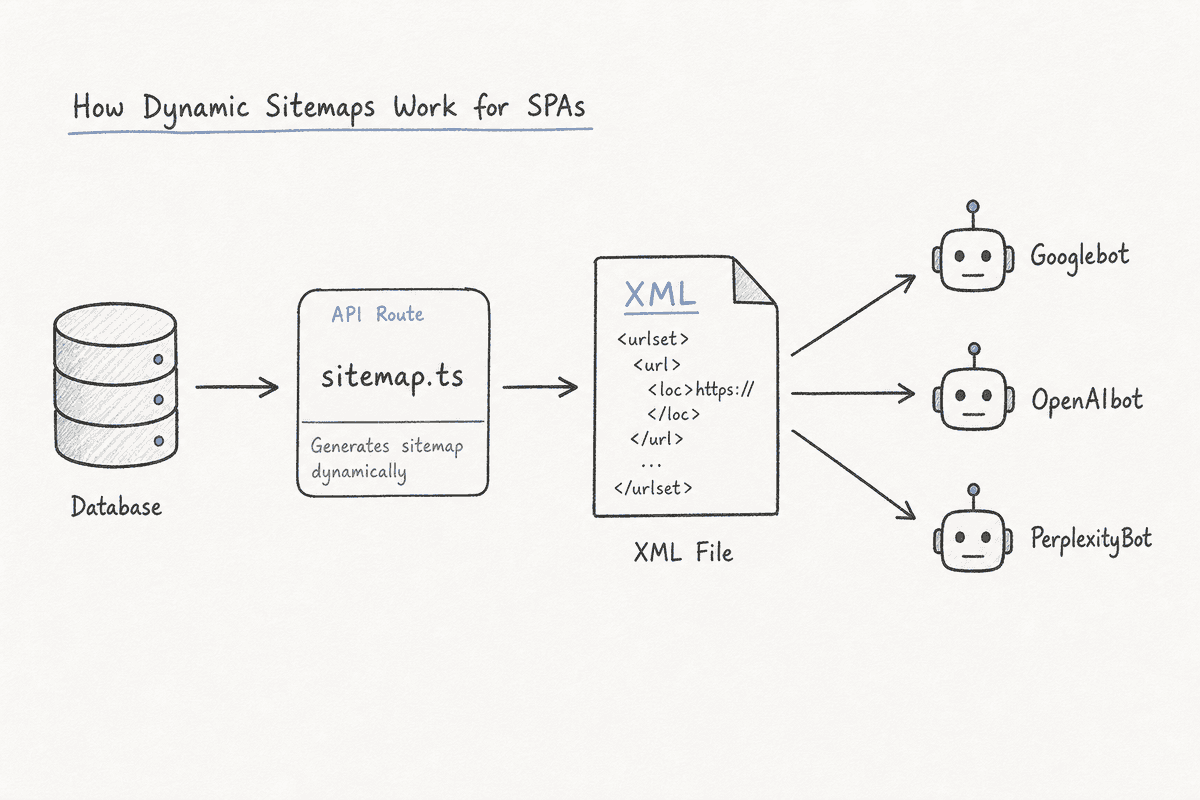
Next.js, the most popular React framework, offers native solutions for generating dynamic sitemaps via the sitemap.ts (or sitemap.js) file.
Best for: Custom-built SaaS platforms, headless CMS setups, and SPAs.
Implementation details:
- Dynamic fetching: Instead of hardcoding URLs, your
sitemap.tsfile should make an asynchronous call to your CMS database (like Sanity, Contentful, or Strapi) to fetch all live routes. - Mapping: Map the returned data to the required XML schema, attaching
url,lastModified,changeFrequency, andpriorityto each entry. - Route splitting: If your SaaS site scales beyond 50,000 URLs (the maximum limit for a single XML sitemap), Next.js allows you to use
generateSitemapsto dynamically split your sitemaps by ID or category.
Failure mode to watch for: Caching issues. If your Next.js application aggressively caches the sitemap.xml route, search engines will continue seeing an outdated file even after the database updates. Ensure your cache validation strategy clears the sitemap cache whenever new content is published. This is a common stumbling block covered extensively in SEO for Single Page Applications: The Technical Checklist.
3. Rank Math Pro (Best for Automated WordPress Environments)
For content teams operating on WordPress, automated generation is non-negotiable. While Yoast SEO has historically dominated this space, Rank Math Pro has become the preferred sitemap generator for teams that need tighter control over indexation signals without writing custom code.
Rank Math dynamically generates your sitemap on the fly. Whenever a crawler requests yourdomain.com/sitemap_index.xml, the plugin queries the database and serves an up-to-the-second XML file.
Best for: High-velocity B2B blogs, marketing teams, and content agencies.
Implementation details:
- Granular inclusion rules: Rank Math allows you to easily toggle which taxonomies (categories, tags, custom post types) belong in the sitemap. If you are learning How to Build an SEO Landing Page (7-Step Guide) using a custom post type, you can include those specifically while excluding thin "tag" pages.
- Automated pinging: When you publish or update a post, Rank Math automatically pings search engines to notify them of the change, drastically reducing the time to crawl.
- Image sitemaps: It automatically parses your content for images and nests them within the main URL entry, which is highly beneficial for visual search and AI tool processing.
Failure mode to watch for: "Ghost URLs." If you delete a post but forget to redirect it, Rank Math will remove it from the sitemap, but search engines might still try to crawl the old URL from their memory. Always ensure proper 301 redirect management alongside your dynamic sitemap.
4. Slickplan (Best for Visual Planning & Agency Workflows)
Slickplan serves a fundamentally different purpose than the other tools on this list. It is a visual site-mapping tool used primarily during the architecture planning phase of a website redesign or launch.
If you are an agency restructuring a client's site, you need to map out the hierarchy visually before generating the code. Slickplan allows you to drag and drop page relationships, define user flows, and then export that structure directly into a compliant XML sitemap ready for upload.
Best for: Web design agencies, UX teams, and massive site restructures.
Implementation details:
- Visual-to-XML: Build the site hierarchy using their flowchart interface. Once approved by stakeholders, export the XML file and use it as your initial launch sitemap.
- Crawler integration: Slickplan also includes a crawler that can ingest an existing live site and turn it into a visual map, allowing you to spot architectural flaws before generating a new sitemap for a migration.
Failure mode to watch for: Like Screaming Frog, the XML export is static. It is a fantastic tool for launch day, but you will need to implement a dynamic generator (like a CMS plugin or framework script) to handle ongoing content publishing.
5. XML-Sitemaps.com (Best for Quick, Static Site Exports)
Sometimes you do not need a complex framework or a heavyweight plugin. If you are launching a simple, five-page brochure site or a standalone promotional microsite that will rarely change, XML-Sitemaps.com remains the fastest utility on the market.
It operates as a web-based crawler. You input your URL, it crawls up to 500 pages for free, and hands you a downloadable sitemap.xml file.
Best for: Micro-sites, temporary event pages, and legacy static HTML sites.
Implementation details:
- Zero configuration: Paste the URL and wait.
- Manual upload: You must take the downloaded file and upload it to the root directory of your server via FTP or file manager.
- Robots.txt integration: Don't forget to manually add the
Sitemap: https://yourdomain.com/sitemap.xmldirective to your robots.txt file so crawlers know where you placed it.
Failure mode to watch for: Setting and forgetting. If you add a new page to the site a month later and forget to regenerate and re-upload the XML file, search engines will have to rely strictly on internal link discovery to find the new page, which can heavily delay indexation.

The “Invisible Content” Scenario: A Case Study in Sitemap Failures
Consider a B2B SaaS marketing team that recently shipped 40 new integration landing pages to capture long-tail queries. They diligently linked them in the site footer and waited.
Three weeks later, when buyers asked Perplexity and AI Overviews about these specific integrations, the AI models still recommended the competitor's platform. The SaaS team's new pages were completely invisible.
The culprit was their sitemap architecture. Their frontend React application was relying on client-side routing, and they hadn't configured a dynamic server-side XML sitemap. Googlebot eventually found a few of the pages by executing JavaScript on the homepage footer, but the AI crawlers—which often operate with lower JavaScript rendering budgets—missed them entirely.
Once the engineering team implemented a framework-native sitemap.ts generator that pulled live URLs directly from their CMS and served them as raw XML, the remaining pages were discovered and ingested within 48 hours. If your team is struggling with this exact scenario, reviewing SEO for Single Page Applications: A 5-Step Guide (2026) is a critical next step.
3 Sitemap Mistakes Delaying Your Indexation
Even with the best generators, human configuration errors can ruin your crawl efficiency. Keeping up with technical best practices is paramount—a habit reinforced by following the 11 Best SEO Blogs Every SaaS Founder Needs (2026). Here are the three most common mistakes that sabotage sitemaps.
1. The "Dirty Sitemap" (Including Non-200 URLs)
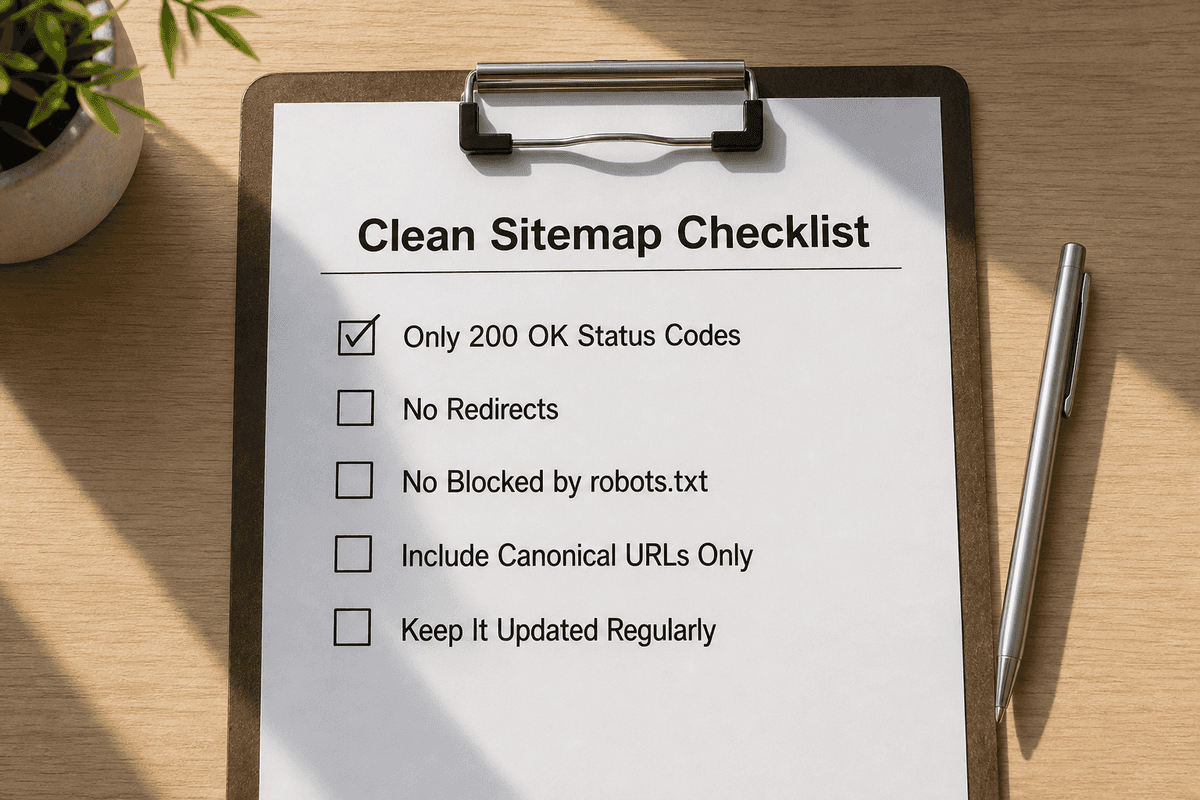
Your sitemap should be an exclusive VIP list of your best, canonical, indexable content. It should only contain URLs that return a 200 OK status code.
If your automated sitemap generator is pulling in URLs that redirect (301), return not found errors (404), or contain canonical tags pointing elsewhere, you are burning your crawl budget. Search engines will waste time processing URLs they can't index, which delays the crawling of your actual money pages.
2. Ignoring the Lastmod Attribute
The <lastmod> (last modified) tag in an XML sitemap tells search engines exactly when a piece of content was last updated. In the age of AI search, freshness matters immensely.
If you update a case study to include 2026 data, but your sitemap generator strips out the <lastmod> tag or hardcodes it to the original publication date, search engines have no trigger to recrawl that page immediately. They will eventually get to it on their standard schedule, but you lose the competitive advantage of real-time updates. Ensure your generator maps the <lastmod> tag to the actual database update timestamp.
3. Orphan Pages Living Only in the Sitemap
A sitemap is a discovery tool, not a ranking factor. If you generate a sitemap containing 1,000 URLs, but 200 of those URLs have zero internal links pointing to them from the rest of your website (orphan pages), Google will view them as low-priority or low-value content.
Just because a URL is in your sitemap does not guarantee it will be indexed. The sitemap gets the bot to the page; your internal linking and content quality convince the bot to keep it in the index.
FAQs on Sitemaps and Crawling
Do I need a sitemap if my site is small?
Yes. While Google states that sites under 500 pages might not strictly need a sitemap if they have perfect internal linking, having one guarantees faster discovery. Furthermore, smaller, newer AI bots rely heavily on sitemaps to map sites efficiently without wasting compute resources on excessive spidering.
How often should I submit my sitemap to Google Search Console?
You only need to submit your sitemap URL to Google Search Console (GSC) once. As long as the URL of the sitemap file does not change, and your generator updates the contents of the file dynamically, Google will periodically re-fetch the existing sitemap to look for new URLs. You do not need to manually resubmit it every time you publish a post.
What is a Sitemap Index file?
A single XML sitemap can only hold 50,000 URLs and cannot exceed 50MB in file size. If your site exceeds this (or if you want to organize things cleanly), you use a Sitemap Index file. This is essentially a "sitemap of sitemaps." It points crawlers to separate files, such as post-sitemap.xml, page-sitemap.xml, and product-sitemap.xml. Most dynamic generators, like Rank Math, handle this routing automatically.
Closing the AI Visibility Loop
Monitoring your AI search visibility with tools like BeVisible gives you the exact blueprint of what buyers are asking and which brands are winning the recommendations. But execution requires a seamless technical foundation.
When you uncover a missing mention, write the definitive guide to fill that gap, and hit publish, the work isn't done until the crawlers ingest it. By implementing a reliable, dynamic sitemap generator—whether that is a framework-native Next.js script or a robust CMS plugin—you ensure that your newest insights are immediately served to the AI engines shaping buyer decisions.