
You just published a 4,000-word guide. The content is rigorously researched, the formatting is pristine, and you managed to secure a spot on the first page of Google. But when you check your analytics a month later, the traffic is a trickle. The click-through rate (CTR) sits at a dismal 1.4%.
Meanwhile, a competitor with objectively thinner content ranking one spot below you is siphoning off the majority of the traffic.
The culprit is almost always the <title> tag.
For years, website titles were treated as simple keyword containers. You put your primary keyword at the front, added your brand name at the end, and moved on. But the search ecosystem has fractured. Your website title is no longer just a blue link on a traditional search engine results page (SERP). It is the first piece of text parsed by AI overviews, the primary citation anchor in Perplexity, and the context clue ChatGPT uses to decide if your link is worth summarizing for a buyer.
Optimizing titles for this dual environment—human psychology and AI retrieval—can predictably lift your organic CTR by an average of 36%. That shift does not require building new backlinks or writing more content. It simply requires framing the content you already have in a way that proves immediate relevance.
Here is exactly how modern website titles work, how AI models read them, and seven specific website title examples you can implement today to capture more clicks.
The Math Behind a 36% CTR Increase
Before examining the examples, we need to clarify what a 36% increase actually means in practice. It does not mean your CTR goes from 2% to 38%. It means a relative increase in your baseline click-through rate.
If your current page ranks in position four for a keyword with 10,000 monthly searches, and your current CTR is 4.0%, you receive 400 visitors a month. A 36% relative increase brings your CTR to 5.44%. You are now capturing 544 visitors a month.
Over a year, that single tag change yields 1,728 additional highly qualified visitors. When applied across a library of 100 or 500 articles, title optimization becomes one of the highest-leverage activities a growth team can execute. The effort-to-reward ratio is entirely asymmetric.
Why Website Titles Matter More in the AI Search Era
The introduction of AI search assistants has fundamentally changed how title tags function. When a user asks an AI tool a question, the underlying Retrieval-Augmented Generation (RAG) system runs a rapid search to find source material.
These systems do not read your entire 4,000-word article before deciding to include it in the prompt context. They rely heavily on metadata—specifically the <title> and <h1> tags—to determine semantic relevance. If your title is vague, clever, or overly branded, the AI skips your page in favor of a competitor whose title clearly answers the user's prompt.
 For B2B marketing teams, this creates a new mandate. You are no longer just writing for a human scanning a SERP. You are writing to clearly signal your utility to a machine parsing thousands of URLs in milliseconds.
BeVisible helps teams monitor exactly this process. By tracking how ChatGPT, Gemini, Perplexity, and AI Overviews answer buyer questions, you can see which brands they recommend and which sources they cite. When you notice your high-ranking page is being ignored by AI citations, a poorly optimized title is often the primary reason. You can then take those visibility gaps and turn them into targeted title revisions.
The Anatomy of a High-Converting Website Title
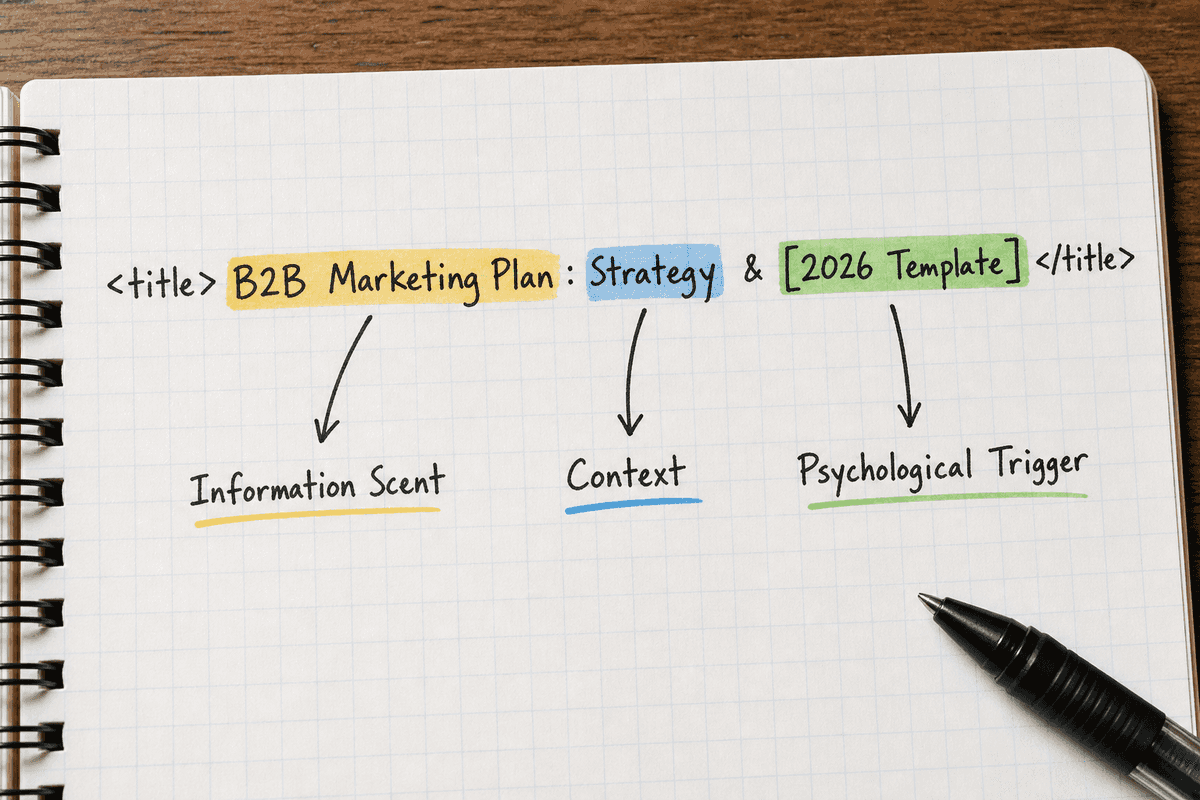
A perfect website title in 2026 balances three distinct elements:
- The Information Scent (Relevance): Does this page contain exactly what I am looking for? This is typically satisfied by the core keyword and its immediate modifiers.
- The Psychological Trigger (Curiosity/Value): Why should I click this result instead of the seven others? This is satisfied by numbers, timeframes, fresh dates, or contrarian angles.
- The Formatting (Readability): Is it easy to parse in a fraction of a second? This is satisfied by brackets, pipes, colons, and optimal character limits (usually 50-60 characters).
If you miss the keyword, you do not rank. If you miss the trigger, you do not get the click. If you miss the formatting, search engines and AI assistants rewrite your title for you, often poorly.
7 Website Title Examples That Actually Work
Below are seven proven frameworks for website titles, complete with the psychology behind them, how AI interprets them, and examples of how to deploy them effectively.
1. The Utility Bracket (The "How-To" Evolved)
The standard "How to do X" title is exhausted. Every SERP is flooded with identical "How to" variations. To stand out, you need to signal that your page offers a practical, immediate tool or shortcut, rather than just abstract theory.
Brackets visually interrupt the user's scanning pattern. They promise a specific, tangible format.
The Formula: [Action] [Keyword]: [Benefit] [Tangible Format]
Weak Example:
<title>How to Write a Marketing Plan</title>
Strong Example:
<title>B2B Marketing Plan Framework: Steps, Strategy & [2026 Template]</title>
Why it works for humans: The bracketed [2026 Template] tells the user they are not just getting a wall of text. They are getting a resource they can download and use immediately. It signals saved time.
Why it works for AI: When users prompt AI with "Give me a template for a B2B marketing plan," the AI looks for exact matches to the entity "template." Having the word explicitly in the title tag increases the likelihood of your URL being pulled into the citation payload.
2. The Data-Backed Authority (The Evidence Play)
In B2B and SaaS, buyers are highly skeptical of opinion-based content. They want proof. Titles that lead with proprietary data or massive sample sizes immediately establish authority. They signal that the content is original research, not just a rehashing of other blog posts.
The Formula: [Data Point/Sample Size]: [Keyword] Insights [Year]
Weak Example:
<title>Best Cold Email Subject Lines</title>
Strong Example:
<title>We Analyzed 1.5M Cold Emails: The 7 Best Subject Lines</title>
Why it works for humans: Curiosity is piqued by the sheer volume of the data (1.5M). The user trusts that the conclusion (The 7 Best) is statistically significant rather than just the author's personal preference.
Why it works for AI: AI models are often prompted to find "statistics," "studies," or "data" regarding a topic. Titles explicitly mentioning analysis or data size act as strong semantic signals for factual queries.
3. The Contrarian Pattern Interrupt
When every title on a SERP says the exact same thing, the best way to get a click is to say the exact opposite. Contrarian titles work by challenging a deeply held industry assumption. They create cognitive dissonance, which forces the user to click to resolve the tension.
The Formula: Why [Popular Keyword/Concept] is [Negative/Dead], and [Alternative]
Weak Example:
<title>Lead Scoring Best Practices for Sales Teams</title>
Strong Example:
<title>Why Traditional Lead Scoring is Dead (And What to Build Instead)</title>
Why it works for humans: It attacks the status quo. If a marketing director is currently struggling with lead scoring, seeing a title that validates their frustration ("it's dead") is incredibly compelling.
Why it works for AI: This is slightly riskier for AI search if the user asks a strictly informational query. However, for prompts asking for "trends," "future of," or "problems with" a concept, contrarian titles often get pulled as alternative viewpoints.
4. The Audience Qualifier (The B2B Filter)
High traffic volume is useless if it is the wrong audience. If you sell enterprise software, you do not want clicks from college students doing research or small businesses that cannot afford your product. Adding a strict audience qualifier to your title acts as a bouncer at the door, reducing bounce rates and sending stronger engagement signals to search engines.
The Formula: [Keyword] for [Specific Audience]: [Outcome]
Weak Example:
<title>Best Project Management Software</title>
Strong Example:
<title>7 Best Project Management Tools for Agencies (Not Freelancers)</title>
Why it works for humans: The explicit inclusion of "Agencies" tells the searcher the content is tailored to their specific workflow needs. The explicit exclusion "(Not Freelancers)" builds immense trust. It shows you know exactly who the tool is for.
Why it works for AI: Users frequently qualify their AI prompts (e.g., "What is the best PM tool for my 50-person agency?"). An audience-matched title provides the exact semantic clustering the AI needs to generate a highly specific answer.
5. The Time-to-Value Promise
Buyers are impatient. If they are searching for a technical tutorial, an integration guide, or a setup process, their primary fear is that the task will take hours. Titles that guarantee a short timeframe alleviate this anxiety.
The Formula: How to [Keyword] in [Timeframe] (Without [Pain Point])
Weak Example:
<title>How to Set Up GA4 Conversion Tracking</title>
Strong Example:
<title>Set Up GA4 Conversion Tracking in 15 Minutes (No Code Required)</title>
Why it works for humans: It removes the friction of starting. "15 minutes" makes the task feel manageable. "No Code Required" addresses the primary objection (needing developer resources).
Why it works for AI: AI step-by-step extractions favor clear, finite processes. When an AI summarizes a "how-to" query, titles that promise speed and simplicity are often chosen as the primary source link.
6. The "Vs" Decider (The Evaluation Shortcut)
Bottom-of-the-funnel buyers often narrow their choices down to two options. They search for direct comparisons. Most companies write weak, unbiased comparison titles. Strong comparison titles hint at a definitive outcome or a specific use case right in the search results.
The Formula: [Competitor A] vs [Competitor B]: Which is Better for [Use Case]?
Weak Example:
<title>HubSpot vs Salesforce Comparison</title>
Strong Example:
<title>HubSpot vs Salesforce: Which Fits Your 50-Person Sales Team?</title>
Why it works for humans: It moves past generic feature comparisons and promises context. A 50-person team has different needs than a 500-person team, and the title acknowledges that nuance.
Why it works for AI: AI assistants are heavily utilized for product comparisons. By framing the title around a specific organizational size or use case, you align perfectly with long-tail comparative prompts.
7. The Freshness Indicator (The Real-Time Signal)
In rapidly changing industries (like SEO, AI, or legal compliance), content from two years ago is considered obsolete. Users actively look for the current year in the title to ensure they are reading the latest guidelines.
The Formula: [Keyword] Strategy: The [Current Year] Guide
Weak Example:
<title>Google Core Update Recovery Guide</title>
Strong Example:
<title>Google Core Update Recovery: The Step-by-Step 2026 Guide</title>
Why it works for humans: It provides immediate reassurance that the advice is current and actionable.
Why it works for AI: AI systems are specifically trained to weigh recency for certain queries. Adding the year to the title tag is one of the strongest freshness signals you can provide to a RAG system.
The Technical Reality: Single Page Applications (SPAs) and Title Tags
Writing a brilliant website title is only half the battle. The search engine actually has to be able to render it. This becomes a significant issue for modern web architectures relying on Single Page Applications (SPAs) built with React, Vue, or Angular.
In a traditional server-rendered website, the <title> tag is sent in the initial HTML document. Search engine crawlers parse it instantly. In a client-side rendered SPA, the initial HTML document often contains a generic fallback title (like <title>Loading...</title> or just the brand name). The actual page-specific title relies on JavaScript executing in the browser to update the DOM.
If Googlebot or an AI crawler does not execute the JavaScript quickly enough, or exhausts its crawl budget, it will index the generic fallback title. Your meticulously crafted CTR-boosting title is never seen.
To ensure your titles actually appear in search results, you must implement proper rendering strategies. If you are operating a Javascript-heavy site, review Implementing SEO in Single Page Applications (3 Ways). It covers the exact methods (Server-Side Rendering, Static Site Generation, and Dynamic Rendering) required to ensure your <title> tags are hard-coded into the source code before the crawler arrives.
Furthermore, when managing migrations or technical audits for these frameworks, consult SEO for Single Page Applications: The Technical Checklist. A missing title tag on an SPA is one of the most common reasons a theoretically well-optimized page fails to rank or earn clicks.
For a broader understanding of how SPA architecture impacts overall search visibility, Single-Page Application SEO: What Works in 2026? provides a comprehensive overview of the current indexing landscape.
The 3 Biggest Website Title Mistakes SaaS Brands Make
Even experienced marketing teams routinely sabotage their click-through rates by falling into these three common traps.
1. The Vague Feature Dump
SaaS companies often try to describe exactly what their software does in the title tag, resulting in a cluttered, unreadable mess.
Mistake: <title>AI-Powered Predictive Analytics & Data Visualization Software Platform | TechCorp</title>
This title reads like a technical manual. It lacks a human hook. Instead of listing features, focus on the primary user intent or the category name the buyer actually uses.
Correction: <title>Predictive Analytics Software: Turn Your Data Into Revenue | TechCorp</title>
2. The Brand-Heavy, Benefit-Light Structure
Unless you are Apple or Nike, your brand name should rarely lead the title tag. Users are searching for solutions to their problems, not for your company name.
Mistake: <title>AcmeCorp - The Best CRM Software for Small Businesses</title>
Placing the brand first pushes the core keywords to the right. On mobile devices, titles are often truncated after 50-60 characters. If your brand name takes up the first 15 characters, the most critical part of the title (the solution) gets cut off with an ellipsis.
Correction: <title>CRM Software for Small Business (Built for Teams of 5-50) | AcmeCorp</title>
3. Disconnecting the Title Tag from the H1 (The Bait and Switch)
The title tag gets the user to click. The <h1> tag (the visible headline on the page) confirms they made the right choice. If these two elements are disconnected, users will immediately bounce, sending a negative signal to search engines.
For example, if your title promises a "2026 Template" but the user clicks through and the <h1> just says "Marketing Strategy Guide" with no template in sight, trust is broken immediately.
When you are building critical entry points, consistency is paramount. For a step-by-step breakdown of how to align your title, meta description, H1, and page layout, review How to Build an SEO Landing Page (7-Step Guide).
A Framework for Testing Your Website Titles
You should not guess what works. You should test it. Because search engines process title tag updates relatively quickly (often within a few days of a recrawl), you can run localized A/B tests to find the optimal CTR.
 Here is a structured framework for title testing:
- Identify the Baseline: Go into Google Search Console. Filter for pages ranking in positions 3 through 8. (Pages in positions 1-2 already get high clicks; pages on page 2 get too few impressions to provide statistically significant CTR data).
- Audit the AI Visibility: Before changing anything, use a tool like BeVisible to check if AI assistants are currently citing this URL for your target keywords. Note the baseline.
- Formulate a Hypothesis: Choose one of the seven frameworks above. If the current title is a boring "How-To," change it to a "Time-to-Value Promise."
- Update and Annotate: Update the
<title>tag in your CMS. Add an annotation in Google Analytics on that exact date. - Force a Recrawl: Go back to Google Search Console and submit the URL for inspection to ensure the new title is indexed quickly.
- Measure the Delta: Wait 14 to 28 days. Compare the CTR of the new period against the previous period. If the CTR drops, revert to the original. If it rises, keep it and apply the learning to similar pages.
For founders looking to deepen their understanding of these testing cadences and broader search strategies, exploring the 11 Best SEO Blogs Every SaaS Founder Needs (2026) can provide ongoing frameworks and testing methodologies.
If you lack the internal resources to execute this testing at scale, you may need to outsource. However, evaluate partners carefully. When reviewing pricing structures, SEO Charges UK: Agency Rates vs Automation (2026) breaks down what you should actually pay for these optimizations. If you are evaluating local agencies, resources like Top 7 Agencies for SEO in Durham (Ranked 2026) can guide your selection. Always watch for poor practices; Hiring SEO Services in Phoenix? 5 Red Flags (2026) highlights the warning signs of agencies that might neglect critical fundamentals like title optimization.
Frequently Asked Questions About Website Titles
How long should a website title be in 2026?
Keep your website titles between 50 and 60 characters (approximately 580 pixels). If your title exceeds this limit, search engines will truncate it with an ellipsis (...). While AI bots can read the full HTML regardless of length, truncated titles perform poorly with human users because the core benefit is often hidden.
Do search engines rewrite my titles?
Yes. Google routinely rewrites titles if it believes the provided <title> tag does not accurately reflect the page content or the user's intent. They often pull from the <h1> tag or internal anchor text to generate a new title. The best way to prevent rewrites is to ensure your title tag is concise, directly relevant to the page content, and accurately addresses the search query.
Should I include my brand name in every title?
Yes, but it should almost always be placed at the very end of the title, separated by a pipe (|) or a hyphen (-). The only exception is the homepage or specific "About Us" pages where branded search intent is the primary goal. For purely informational blog posts, the user cares about the answer, not your brand.
Does changing the title tag impact my actual rankings?
Yes. The title tag is one of the strongest direct ranking factors for traditional search engines, and a primary semantic weight for AI retrieval systems. Changing the core keywords in your title can cause your page to drop in rankings for those terms. Always ensure your primary target keyword remains intact when testing new CTR variations.
(Note: For e-commerce businesses operating on specific marketplaces, title optimization relies on platform-specific algorithms rather than traditional web search. If you are operating in that space, refer to the 7 Best Etsy SEO Tools to Boost Sales in 2026 for specialized guidance.)
The Final Check
A great website title respects the reader's time and the machine's architecture. It provides a clear, undeniable reason to click while serving exact semantic signals to AI retrieval systems.
Before you hit publish on your next piece of content, read the title tag out loud. Ask yourself: If I were overwhelmed, hurried, and scanning a list of ten identical blue links, would this specific combination of words force me to stop and click? If the answer is no, you have more work to do.