
Many SaaS founders and indie hackers launch their first minimum viable product (MVP) on website builders like Weebly. The platform gets a functional marketing site live in an afternoon, allowing teams to focus on product development rather than wrestling with custom code. But as your startup matures and organic search becomes a primary acquisition channel, you hit a critical inflection point.
You start asking if Weebly's native SEO infrastructure can compete with enterprise content management systems, or if your choice of builder is actively suppressing your search rankings.
Evaluating Weebly SEO requires moving past generalized advice. In 2026, search algorithms prioritize highly structured data, Core Web Vitals, and relentless content velocity. While Weebly's Ultimate SEO Guide outlines foundational practices that still hold true, a modern SaaS organic strategy demands more than just basic meta tags.
This guide breaks down exactly what Weebly can handle, where the technical bottlenecks lie, and how to maximize organic growth on the platform before pulling the trigger on a costly migration.
The Reality of Weebly's Technical Architecture
When assessing a platform for search engine optimization, you have to look under the hood. Weebly operates as a hosted, closed-ecosystem builder. Unlike headless setups or self-hosted CMS environments, your control over the server, caching layers, and database structure is virtually non-existent.
For an early-stage startup, this lack of control is a feature. It prevents you from breaking the site. For an SEO practitioner, it presents specific boundaries.
Where Weebly Succeeds
Weebly provides a reliable foundation for on-page basics. Out of the box, the platform ensures your site is indexable and secure. You do not have to worry about configuring SSL certificates, managing server uptime, or building XML sitemaps from scratch. Weebly handles these background tasks automatically.
The interface allows easy access to standard page-level optimization. You can define title tags, write custom meta descriptions, alter permalinks, and apply 301 redirects natively. For local businesses or early-stage startups targeting a handful of low-competition keywords, these native tools are often sufficient to secure initial visibility.
Where Weebly Struggles
The friction begins when you attempt to scale a sophisticated content strategy. Technical SEO forums have long debated these limitations. A quick read through community discussions, such as this classic Reddit thread on Weebly and SEO, reveals consistent frustrations among advanced marketers.
The primary technical bottlenecks include:
- Code Bloat and Render Speed: Weebly's drag-and-drop templates rely on heavy CSS and JavaScript execution. This can negatively impact Core Web Vitals, particularly First Contentful Paint (FCP) and Interaction to Next Paint (INP).
- Schema Markup Friction: Implementing dynamic structured data (like automated FAQ or Article schema) requires manual HTML injection via the header/footer code settings. There is no native database to auto-populate schema based on page variables.
- Taxonomy Limitations: Building complex hub-and-spoke content silos is manual. You cannot easily create dynamic category pages that auto-update with specific custom post types.
- Programmatic Limitations: Generating hundreds of programmatic SEO pages requires third-party workarounds or aggressive API manipulation, which Weebly's infrastructure is not naturally designed to support.
If your product is transitioning from a simple marketing site into a complex web application, you might already be exploring modern architectures. Teams adopting advanced tech stacks should review Implementing SEO in Single Page Applications (3 Ways) to understand the technical leap required when leaving static builders behind.
The 7-Step Weebly SEO Triage Framework
If you are committed to operating on Weebly for the next 12 to 18 months, you need to extract every ounce of performance from the platform. Relying on default settings is a guaranteed way to stall your traffic.
Execute this 7-step triage to ensure your Weebly site is defensively optimized.
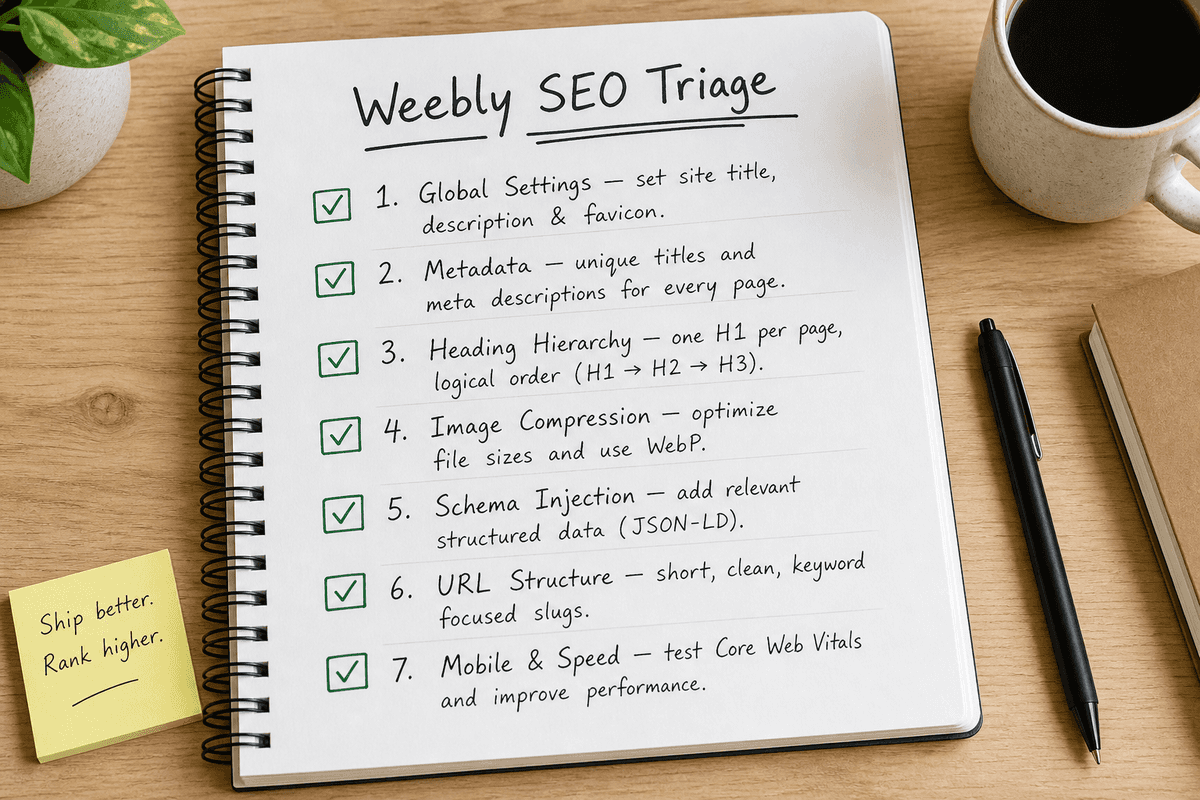
1. Reconfigure Global Site Settings
Weebly hides several crucial toggles in the main settings menu. Navigate to Settings > SEO. This is where you establish your site-wide baseline.
Ensure your Site Description is explicitly written for human searchers, not just keyword density. While Google often rewrites meta descriptions, a well-crafted site description serves as the default fallback for homepage indexing.
Pay close attention to the Footer Code section. This is your primary injection point for site-wide scripts, but overloading it with tracking pixels and redundant JavaScript libraries will devastate your load times. Audit this section quarterly. If a tracking tool is no longer in use, delete the script.
2. Optimize Page-Level Metadata
Every individual page on your Weebly site has an isolated SEO panel. In the Pages tab, click on a specific page, then select SEO Settings.
According to Weebly's own documentation on SEO Settings and Descriptions, you must populate the Page Title and Page Description fields for every published URL.
- Page Title: Keep this under 60 characters. Front-load your primary keyword and include your brand name at the end (e.g., "Automated Reporting Software | YourBrand").
- Page Permalink: Weebly allows you to customize the URL string. Remove stop words (and, the, in). Make it clean and hierarchical. Instead of
/blog/how-to-automate-your-marketing-reports-in-2026, use/blog/marketing-report-automation. - Page Description: Write a 150-character summary that acts as ad copy. It should compel the user to click from the search engine results page (SERP).
3. Enforce Strict Heading Hierarchies
Weebly's drag-and-drop text elements make it dangerously easy to misuse heading tags. Users often select "Title" (which generates an H2) simply because they want larger text, completely ignoring the structural implications for search engines.
Search crawlers use HTML headings (H1, H2, H3) to understand the topical outline of your content.
- Ensure every page has exactly one H1 tag.
- Use H2 tags for major sections.
- Use H3 tags for sub-points beneath those H2s.
If you need larger text for aesthetic reasons, use the paragraph element and increase the font size manually via the text toolbar, rather than hijacking a heading tag.
4. Implement Manual Image Compression and Alt Text
Image bloat is the single most common performance killer on Weebly sites. Weebly does compress images automatically, but its native compression algorithm is not aggressive enough for modern SEO standards.
Before uploading any asset to your media library, run it through an external compression tool (like TinyPNG or Squoosh). Convert JPEGs and PNGs to WebP formats where possible.
Once uploaded, you must assign alt text. Click on the image element, open the advanced settings, and fill out the "Alt Text" field. Describe the image functionally for visually impaired users while naturally incorporating relevant context. Never keyword stuff this field.
5. Build Dedicated SEO Landing Pages
A single homepage cannot rank for every feature your SaaS offers. To capture specific search intent, you must build isolated landing pages for individual features, use cases, and integrations.
Use Weebly's "Hide from Navigation" feature to prevent these pages from cluttering your main menu. Instead, link to them strategically from your footer or within relevant blog posts. For a deep dive on structuring these assets, review How to Build an SEO Landing Page (7-Step Guide).
6. Inject Schema Markup via Header Code
Because Weebly lacks native schema generation, you must manually inject JSON-LD markup into the page-level header code.
Use a free schema generator tool to create Local Business, Software Application, or FAQ schema. Copy the resulting JSON-LD script, navigate to the specific page's SEO Settings, and paste the code into the "Header Code" box. This structured data makes your site eligible for rich snippets in Google search results, significantly improving click-through rates.
7. Clean Up Your Redirects
As your startup evolves, you will inevitably delete outdated pages or consolidate redundant features. Deleting a page without implementing a redirect creates a 404 error, breaking internal links and bleeding domain authority.
Navigate to Settings > SEO and scroll down to the 301 Redirects section. Map the old URL string to the most relevant live page. Keep a centralized spreadsheet of all active redirects to prevent confusing redirect chains.
Solving the Content Velocity Problem
Technical settings only set the stage. The actual driver of organic growth in 2026 is content velocity—the ability to consistently publish high-quality, relevant answers to the questions your target audience is searching for.
This is where Weebly users frequently hit a wall. Weebly's blogging interface is notoriously clunky compared to specialized publishing platforms. Writing, formatting, optimizing, and scheduling 10 to 20 articles a month natively within Weebly requires massive manual effort.
The Economics of Organic Growth
Founders typically face two choices when trying to scale content on a basic platform:
- Hire an Agency: Traditional agencies will manage your keyword research and content creation, but at a premium. As detailed in SEO Charges UK: Agency Rates vs Automation (2026), monthly retainers often exceed thousands of dollars for a handful of articles, and the agency still has to manually wrestle with Weebly's editor.
- Leverage Automation: The modern alternative is automated content generation. Platforms like BeVisible integrate directly into your workflow, completely bypassing the limitations of the native CMS editor.
Bypassing Weebly's Editor with BeVisible
BeVisible solves the content bottleneck for startups operating on platforms like Weebly. Instead of spending hours fighting drag-and-drop elements to format a blog post, BeVisible handles the entire production pipeline externally.
Once connected to your niche and URL, BeVisible conducts competitor analysis and builds a 30-day content map. Every 24 hours, the platform automatically writes, polishes, and publishes an article. These articles are fundamentally designed for the modern search landscape, featuring answer-first structures, quotable sections, and internal links.
Crucially, BeVisible injects clean, semantic HTML directly into the site. This avoids the code bloat generated by Weebly's visual builder, ensuring that the published content remains lightweight, fast, and aggressively optimized for both traditional Google algorithms and AI search engines like Perplexity.
By automating the daily publishing commitment, SaaS founders can maintain an aggressive SEO presence without expanding their team or migrating off Weebly prematurely.
When to Migrate: The Tipping Point
Weebly is a stepping stone. While automation can bridge the content gap and meticulous settings can solve basic technical needs, every successful SaaS eventually outgrows a static builder.
The challenge is identifying the precise moment migration becomes necessary, rather than just a distraction.
 Watch for these three definitive migration triggers:
1. You Need Advanced Application Integrations
When your marketing site needs to seamlessly share state with your actual software product, a closed builder fails. If you need users to log in on the marketing site and immediately access a dynamic dashboard pulling data from a unified database, you require a different architecture.
At this stage, engineering teams often transition to single-page applications. If you are approaching this technical pivot, consult SEO for Single Page Applications: A 5-Step Guide (2026) to prepare for the massive SEO implications of moving to a JavaScript-heavy framework.
2. Internationalization (i18n) Becomes Critical
Weebly is fundamentally not designed for complex multilingual SEO. If your startup is expanding into Europe or Asia and requires strict hreflang tag implementation, localized subdirectories (like /de/ or /fr/), and separate regional sitemaps, Weebly will break your strategy.
Attempting to build parallel sites on Weebly subdomains creates a nightmare of duplicated effort and split domain authority. When international expansion begins, migration is mandatory.
3. You Require Custom Post Types and Relational Databases
SaaS companies frequently scale traffic using programmatic SEO—generating hundreds of pages based on a structured dataset (e.g., "Best CRM for [Industry]" or "[Tool A] vs [Tool B]").
Weebly's flat architecture cannot support relational databases natively. You cannot create a "Template Directory" or "Integration Library" that auto-populates pages based on a CSV upload. If your SEO strategy relies on scaling thousands of programmatic pages rather than editorial blog posts, you must migrate to a headless CMS or a platform with deep database capabilities.
The Verdict: Staying Competitive on Weebly
Can you run a successful SEO campaign on Weebly in 2026? Yes, under specific conditions.
As outlined in resources like the RapidWebLaunch Weebly SEO tutorial, the platform is capable of ranking high in Google if the underlying content strategy is exceptional. The search engine does not explicitly penalize the platform; it simply rewards superior architecture and content velocity.
If you are an indie hacker or an early-stage founder, migrating your CMS today will not solve a fundamental lack of content. Your time is better spent automating your publishing pipeline and building authority in your niche. Master the technical basics, optimize your page-level metadata, and leverage automation tools like BeVisible to dominate daily publishing.
Once your organic traffic reaches a volume where conversion rate optimization (CRO) and complex application routing become your primary revenue levers, you will have the capital and justification to execute a flawless migration. Until then, Weebly—when managed aggressively—is enough to get you to the next stage of growth.
FAQs About Weebly Search Engine Optimization
Is Weebly fundamentally bad for SEO? No. The platform outputs indexable HTML, provides SSL, and allows custom metadata. The "bad" reputation stems from advanced marketers expecting enterprise-level database control from a beginner-friendly visual builder.
Can a Weebly site outrank a WordPress site? Yes. Google ranks pages, not CMS platforms. If a Weebly page has superior content, better backlinks, and satisfies search intent faster than a poorly optimized WordPress page, the Weebly site will win. However, WordPress makes scaling that superior content significantly easier.
How can I stay updated on SEO strategies as a founder? SEO moves rapidly. Relying solely on platform documentation isn't enough. We recommend curating your reading list aggressively. Start with the 11 Best SEO Blogs Every SaaS Founder Needs (2026) to ensure you are receiving tactical, modern advice rather than outdated myths.