
For years, moving a serious e-commerce or SaaS business to Wix was considered a punchline in technical SEO circles. If you dig through old forums, you will inevitably stumble upon variations of the same anxious question: "Is Wix bad for SEO?".
The reality in 2026 is drastically different. Wix has overhauled its underlying infrastructure, rolling out a robust suite of technical capabilities that rival enterprise CMS platforms. From flexible URL redirect managers and custom robots.txt files to optimized server-side rendering, Wix is no longer just a drag-and-drop site builder—it is a performance-driven search engine optimization engine.
Even Google’s Search Advocate, John Mueller, has publicly praised their evolution, noting that Wix has been "raising the bar not only for their services but the industry overall."
Whether you are scaling an indie hacker project, running an e-commerce storefront, or marketing a SaaS product, treating Wix like a basic website builder will leave money on the table.
Here are the 7 proven ways to maximize your Wix SEO and rank your store in 2026.
1. Systematize the Wix SEO Setup Checklist
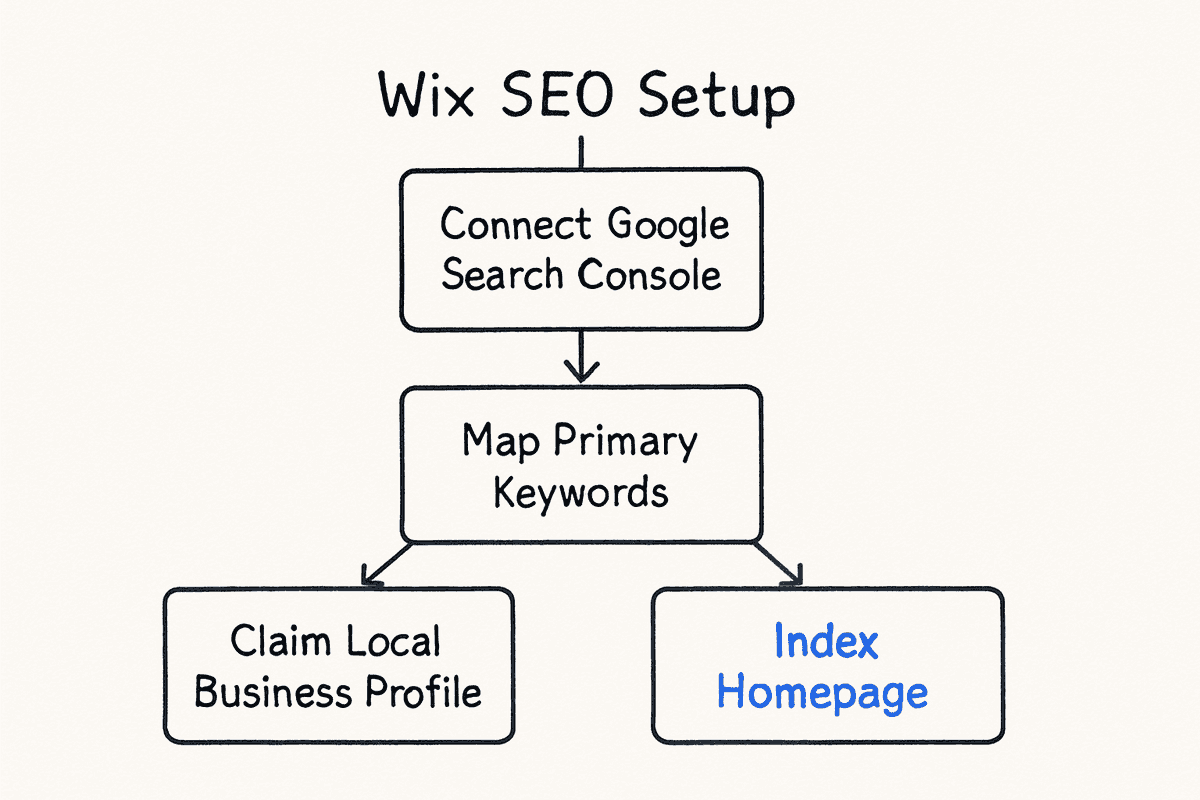
The biggest mistake site owners make is skipping the native foundations. Wix provides a built-in personalized setup checklist that serves as your technical baseline. While experienced practitioners might roll their eyes at automated checklists, this tool directly ties into Google Search Console (GSC) for immediate indexing.
Moving Beyond the Basics
The standard checklist ensures your homepage is indexed and your basic meta tags are populated. But to rank competitively, you need to operationalize this process for every new product, feature page, and category.
- Automated GSC Verification: Wix handles GSC integration natively. Ensure your sitemap is automatically submitted and monitor the indexation reports weekly.
- Keyword Mapping: The checklist will ask for your core keywords. Do not stuff these. Instead, map primary intent keywords to your homepage, and distribute secondary cluster keywords across your category pages.
- Local SEO Foundation: If your SaaS has a physical office or your store relies on regional distribution, the checklist integrates with Google Business Profile. Claim this immediately to maximize local search visibility.
For a visual walkthrough of the latest dashboard UI, this 2025/2026 setup tutorial highlights exactly where Wix hides its most valuable toggles.
2. Override Default Structured Data for Rich Results
Structured data (JSON-LD schema) is how you spoon-feed context to search engines. By default, Wix provides basic schema markup for pages and products. However, relying on default schema in 2026 is a massive missed opportunity, especially as AI search engines like ChatGPT and Perplexity rely heavily on structured data to parse facts.
Customizing Your Schema Markup
Wix allows you to override default structured data markup. This is where you separate your store from amateur competitors.
How to implement: Navigate to your Wix dashboard, select your page, open the SEO panel, and choose Advanced SEO. Here, you can paste custom JSON-LD scripts. If you are comparing Wix against standalone marketplaces, utilizing rich product schema gives you an edge that outpaces even the best Etsy SEO tools.
3. Control Your Crawl Budget via Robots.txt and Canonicals
One of the loudest historical complaints about Wix was the inability to edit the robots.txt file or set custom canonical tags. Those days are gone.
Fixing E-commerce Duplicate Content
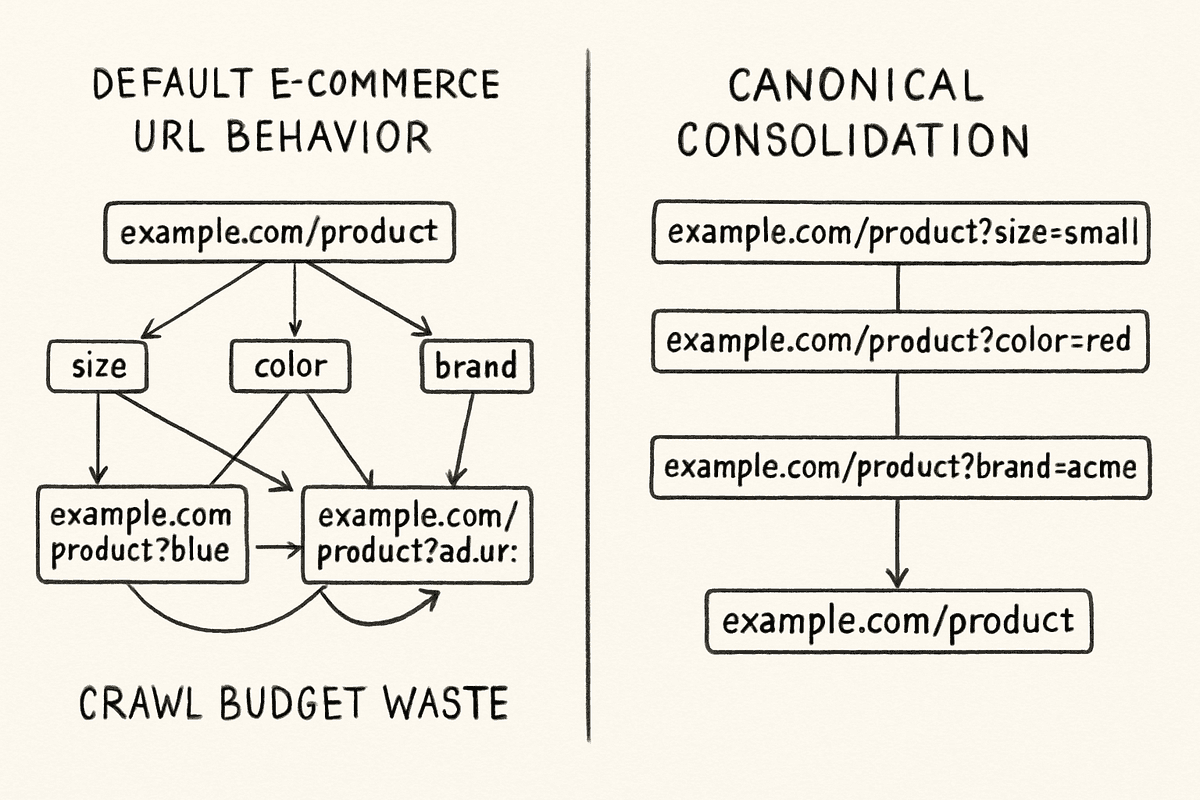
E-commerce stores and SaaS directories often generate thousands of dynamic URLs due to faceted navigation (e.g., filtering by size, color, or software integration type). If Google crawls all these parameter URLs, you dilute your page authority and waste crawl budget.
- Custom Canonical Tags: You can now set custom canonical tags on Wix. If
store.com/shoes?color=redandstore.com/shoes?color=blueboth exist, you must point the canonical tag of both pages back to the master product URL:store.com/shoes. This consolidates your ranking power. - Robots.txt Manipulation: You have full control over your
robots.txtfile. Block search engines from crawling internal search query pages, shopping cart URLs, and user account dashboards.
If you are hiring outside help to manage this technical cleanup, be cautious. Many outdated agencies still operate under the assumption that Wix is locked down. If an agency tells you they cannot edit a Wix canonical tag, that is a glaring warning sign. Read up on hiring SEO services and red flags to protect your investment.
4. Build Dedicated SEO Landing Pages for High-Intent Queries
Ranking a store isn't just about optimizing product pages. To capture middle-of-the-funnel traffic, you need dedicated landing pages targeting specific use cases or competitor alternatives.
If you are selling project management software, your homepage targets "project management software." But your SEO landing pages should target "project management software for design agencies" or "[Competitor] alternative."
Wix's dynamic pages feature allows you to scale this process by connecting page designs to a centralized CMS database. You can design one master template and populate it with dozens of variations based on a spreadsheet.
When building these pages, follow a strict SEO landing page architecture:
- H1: Exact match search intent.
- Hero Section: Clear value proposition and primary CTA.
- Trust Signals: Badges, reviews, and G2 scores.
- Feature Matrix: Direct comparison tables.
- FAQ: Marked up with
FAQPageschema.
5. Optimize Core Web Vitals and Page Rendering
Site speed is a direct ranking factor, and Google measures it via Core Web Vitals (CWV). Wix has massively optimized its site infrastructure, shifting much of the heavy lifting to server-side rendering (SSR).
If you have ever wrestled with SEO for single-page applications, you know the nightmare of client-side JavaScript rendering. Wix mitigates this natively by delivering fully rendered HTML to search engine bots, ensuring immediate indexation without waiting for the secondary JavaScript rendering queue.
How to Improve Wix CWV Further:
Even with Wix's optimized infrastructure, user error can tank your performance.
- Compress Images Pre-Upload: Wix automatically converts images to WebP, but uploading a 6MB raw PNG forces the server to work harder. Compress assets below 200KB before uploading.
- Limit Third-Party Apps: Every app you install from the Wix App Market injects external JavaScript into your
<head>. Audit your active apps quarterly and delete what you don't use. - System Fonts over Custom Web Fonts: Custom fonts require additional HTTP requests. If your LCP (Largest Contentful Paint) is lagging, switch your primary body text to a system-safe font.
6. Scale Content Velocity with AI-Driven Automation
Technical SEO gets you indexed; content gets you ranked. To build topical authority in 2026, you cannot rely on publishing one blog post a month. SaaS founders and e-commerce owners need high-velocity, high-quality content that answers specific user queries.
This is where the traditional agency model falls apart. Paying thousands a month for a handful of generic articles is inefficient. We've analyzed agency rates versus automation extensively, and the math heavily favors automation platforms for content production.
The BeVisible + Wix Workflow
Integrating an automated SEO content generation platform like BeVisible with your Wix store completely changes the organic growth equation.
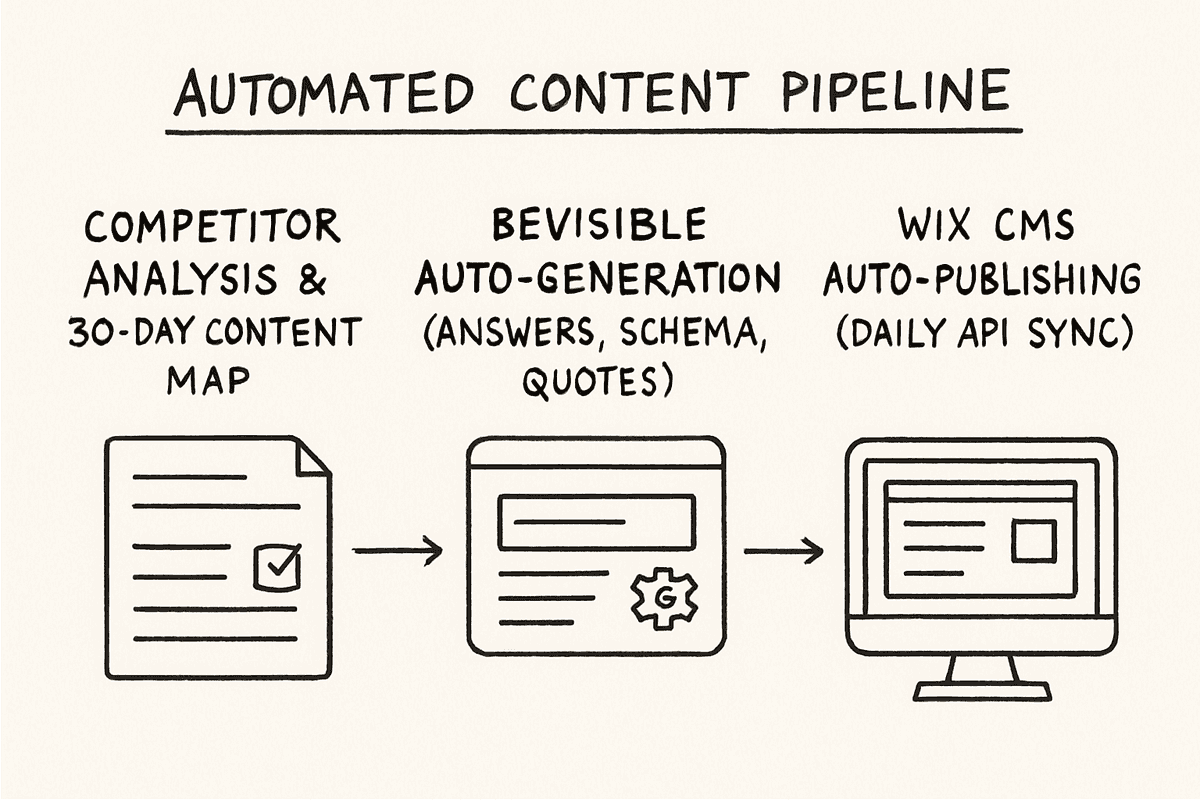
Instead of managing freelance writers, BeVisible handles the entire end-to-end production pipeline:
- Competitor & Niche Analysis: It analyzes your SaaS or e-commerce niche to build a 30-day topical map.
- Daily Auto-Publishing: It automatically writes, polishes, and publishes an article to your Wix blog every 24 hours.
- AI Engine Optimization: The platform uses an answer-first structure, quotable sections, and schema markup specifically designed to rank in Google and get extracted by AI search engines like ChatGPT and Perplexity.
- Internal Linking: It automatically cross-links your new articles to existing product pages.
For a launch discount of $79/month, you get 30 publish-ready articles seamlessly pushed to your Wix CMS via API. This creates a compounding organic traffic engine while you focus on building your product.
7. Master URL Redirects During Migrations
If you are moving your store to Wix from Shopify, WordPress, or custom builds, protecting your existing domain authority is paramount. Broken links are the fastest way to lose your hard-earned rankings.
Wix features a highly flexible URL redirect manager.
The Golden Rules of Wix Redirects:
- 1-to-1 Mapping: Never redirect all old pages to the new homepage. If you had an article about the best SEO blogs, redirect it to the exact corresponding URL on the new Wix site.
- Bulk Uploads: Use the bulk redirect tool via CSV. Map your old URLs in column A and your new Wix URLs in column B.
- Audit with GSC: After pushing your redirects live, monitor the "Pages" report in Google Search Console for any unexpected 404 errors.
Frequently Asked Questions (FAQ)
Can I customize meta tags on my Wix site?
Yes. Wix allows full customization of title tags, meta descriptions, and Open Graph tags for social sharing. You can set dynamic rules for entire folders (e.g., appending "| Free Shipping" to all product meta titles) or edit them individually at the page level. Wix's SEO learning hub details these dynamic variables extensively.
Can I edit my robots.txt file on Wix?
Yes. You have complete access to view and edit your robots.txt file via the SEO Dashboard. You can set specific crawl directives for Googlebot, Bingbot, and block specific directories from being indexed.
What kind of page rendering is supported by Wix?
Wix utilizes server-side rendering (SSR) for bots. When a search engine crawler hits your site, Wix intercepts the request and serves a fully rendered HTML snapshot. This ensures that even heavily animated dynamic pages are indexed accurately and quickly, bypassing the typical SEO pitfalls of JavaScript-heavy frameworks.
How can I optimize images on my Wix site for SEO?
Wix automatically compresses images and serves them in modern formats (like WebP) with built-in lazy loading. However, for maximum SEO impact, you should manually write descriptive Alt text for every image, ensure the surrounding text provides context, and keep original file uploads under a reasonable size limit.
Ranking a Wix store in 2026 requires moving past the outdated stigmas and leaning heavily into the platform's advanced toolset. By overriding default schema, managing your crawl budget precisely, and integrating powerful content automation pipelines like BeVisible, your Wix site will stop being just a digital storefront—it will become a daily source of ranked answers.