
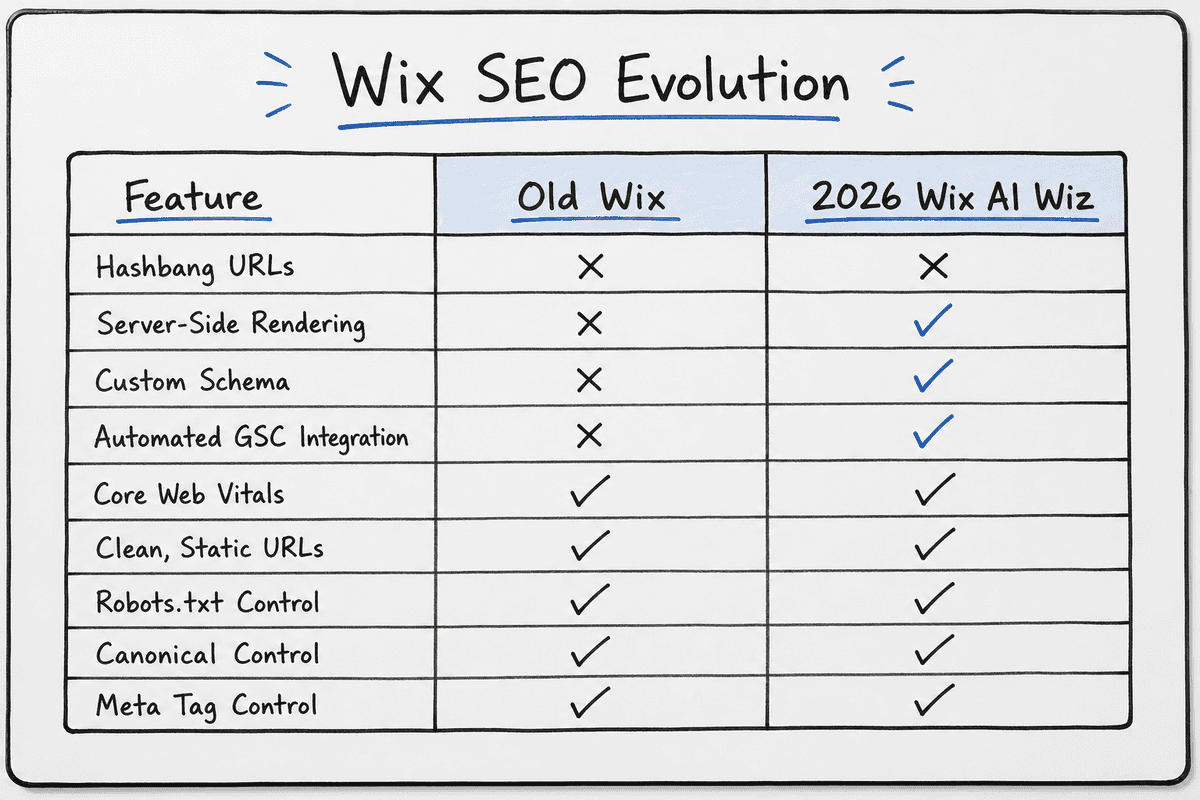
If you started building websites more than a decade ago, you probably remember the prevailing wisdom among developers and marketers: "Wix is terrible for SEO." For years, the platform relied heavily on Flash, utilized clunky hashbang URLs, and offered virtually zero control over technical optimization. Serious SaaS founders, indie hackers, and content marketers avoided it entirely, opting for custom stacks or complex CMS setups.
But that narrative is dead.
Today, Wix has fundamentally rebuilt its infrastructure. The platform now features server-side rendering, customizable structured data, flexible URL redirect managers, and an integrated suite of tools designed to satisfy both Google and emerging AI search engines. At the center of this transformation is the Wix SEO Wiz—recently rebranded and expanded into a personalized, AI-driven SEO Setup Checklist.
Even John Mueller, Search Advocate at Google, has publicly noted the shift: “Wix has been doing fantastic stuff for a number of years now. I'm impressed. They've been raising the bar not only for their services, but the industry overall.”
So, the platform is technically sound. But as a SaaS founder or e-commerce owner looking to scale organic traffic without a massive agency budget, the critical question remains: Wix AI SEO Wiz: Is It Enough for High Rankings in 2026?
In this comprehensive review, we will dissect the Wix SEO toolset, examine its limitations in an era dominated by high-velocity content, and reveal exactly how to bridge the gap between a technically optimized site and a daily engine for organic growth.
A Robust Toolset Built Into Every Site
The most significant advantage of the modern Wix ecosystem is that foundational technical SEO is no longer a plugin-dependent nightmare. Unlike older CMS platforms that require you to stitch together a dozen third-party extensions just to edit a meta description or generate a sitemap, Wix provides an optimized site infrastructure out of the box.
To understand how to optimize blog posts on your Wix website for Google Search, you first need to understand the native capabilities the platform provides.
Optimized Site Infrastructure
Technical SEO forms the foundation of any organic growth strategy. If search engine crawlers (and AI bots from ChatGPT or Perplexity) cannot efficiently parse your site architecture, your content will never rank.
Wix handles the heavy lifting of site infrastructure invisibly. Every site benefits from automatic XML sitemap generation, which updates dynamically whenever you add or remove pages. The platform also natively utilizes Server-Side Rendering (SSR). This is a critical upgrade from its past. By rendering pages on the server rather than forcing the user's browser to execute JavaScript to see the content, Wix ensures that Googlebot can instantly read your text, links, and metadata.
For SaaS companies building complex web apps, you might be debating between a platform like Wix or a custom build. If you lean toward the latter, you'll need to master SEO for Single Page Applications: A 5-Step Guide (2026). But for marketing sites, landing pages, and blogs, Wix's SSR effectively eliminates the rendering hurdles that plague many JavaScript-heavy frameworks.
Personalized SEO Setup Checklist
The core of the Wix SEO experience is the Personalized SEO Setup Checklist (formerly the Wix SEO Wiz). When you launch a new site, the tool prompts you to answer a few basic questions about your business, your target audience, and your geographic location.
Based on your inputs, the Wiz generates a step-by-step checklist. It acts as an automated consultant, guiding you through:
- Connecting your site to Google.
- Optimizing your homepage title and meta description.
- Ensuring contact information is visible.
- Adding alt text to critical images.
- Setting up mobile responsiveness.
It is designed specifically for accelerated productivity. For a non-technical founder who just needs to get a landing page indexed fast, the Setup Checklist is highly effective. You don't need to read the 11 Best SEO Blogs Every SaaS Founder Needs (2026) just to figure out how to write a title tag; the Wiz walks you through it interactively.
Google Search Console Integration
One of the most tedious parts of launching a new site is verifying domain ownership and submitting sitemaps to Google Search Console (GSC).
Wix has removed this friction entirely. Through a native API integration, you can verify your domain and submit your sitemap to Google directly from the Wix dashboard with a single click. The moment you finish the Personalized SEO Setup Checklist, Wix prompts you to "Index your site on Google" (or Indexa tu sitio en Google, as the multilingual support is excellent).
This immediate Google Search Console integration means your site can move from staging to indexed in a matter of hours, rather than days.
Customized Structured Data Markup
Structured data (Schema markup) translates your website's content into a language that search engines understand perfectly. It is the difference between Google guessing that a page is about a software product, and Google knowing it is a software product with a $79/month price tag and a 4.8-star review aggregate.
Historically, adding schema to Wix required injecting messy custom code. Now, Wix automatically applies standard structured data to product pages, blog posts, and event listings.
More importantly, they have introduced the ability to add customized structured data markup. You can generate custom JSON-LD code and inject it directly into the SEO settings of any individual page or scale it across page templates. This is vital for SaaS founders who want to implement SoftwareApplication schema, or content marketers writing reviews who need FAQPage schema to capture rich snippets in the SERP.
Flexible URL Redirect Manager
As your business evolves, your website architecture will change. You will delete old blog posts, consolidate feature pages, and rename product categories. When you change a URL, you risk creating 404 broken links, frustrating users, and losing the authoritative backlinks pointing to the old page.
Wix's flexible URL redirect manager is surprisingly robust. It allows you to set up 301 redirects individually or upload a CSV to handle them in bulk. If you are migrating a legacy WordPress site to Wix, the bulk upload feature is mandatory for preserving your existing search rankings. The system also includes an automatic redirect loop checker, preventing you from accidentally breaking your site navigation.
Maximize Your Local Search
While SaaS companies focus heavily on global software terms, many users leveraging Wix are local agencies, service providers, or brick-and-mortar stores. If your business relies on foot traffic or local service areas, local SEO is non-negotiable.
Wix integrates seamlessly with Google Business Profile (GBP). You can claim, verify, and manage your GBP directly from the Wix dashboard. This integration allows you to sync your business hours, contact info, and even respond to customer reviews without leaving your CMS.
The SEO Setup Checklist tailors its recommendations for local businesses by prioritizing geo-modified keywords (e.g., "SEO agency in Phoenix" rather than just "SEO agency"). If you are operating in highly competitive local markets, you'll need more than just a checklist. For example, understanding Hiring SEO Services in Phoenix? 5 Red Flags (2026) or checking out the Top 7 Agencies for SEO in Durham (Ranked 2026) can provide context on what local competitors are doing right.
For practical implementation, a step-by-step guide to using Wix Studio SEO Wiz for local SEO highlights that optimizing your Wix local settings correctly can dramatically increase your visibility in the Google Map Pack.
Optimize Your SEO Workflow: A Step-by-Step Guide
Having the top SEO tools and features in Wix website builder at your disposal is only half the battle. Executing a consistent workflow is where you actually gain ground on competitors.
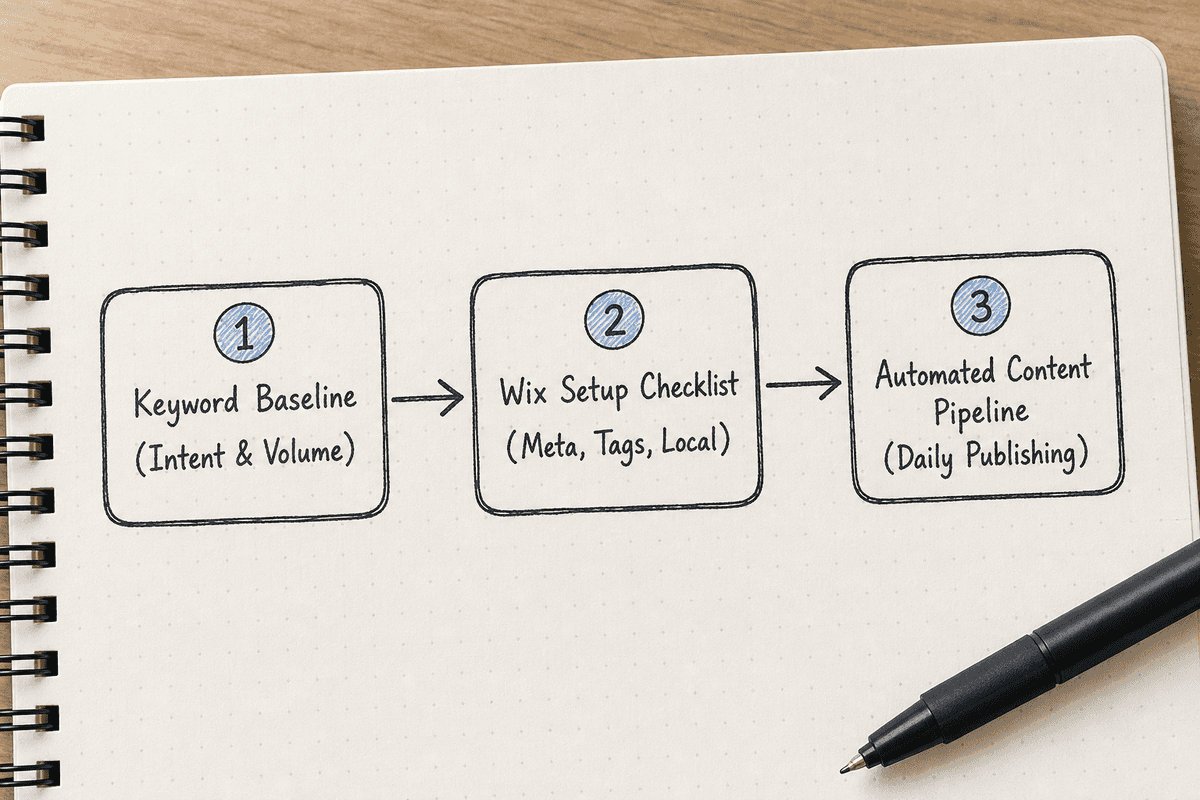
Here is how to optimize your SEO workflow using the Wix ecosystem in 2026:
Step 1: Establish Your Keyword Baseline
Before you touch the Wiz, you need a strategy. The tool will ask you for 3-5 target keywords. Do not guess these. Use a dedicated keyword research tool to find terms with high commercial intent and manageable competition. If you are building an e-commerce integration, you might research the 7 Best Etsy SEO Tools to Boost Sales in 2026 to find long-tail product queries.
Step 2: Complete the SEO Setup Checklist
Navigate to Marketing & SEO > SEO > Get Found on Google in your Wix dashboard. Enter your verified keywords. Follow every prompt the Wiz provides until the checklist shows 100% completion. This ensures your homepage, primary services pages, and brand name are fully optimized for indexing.
Step 3: Configure Default SEO Settings by Page Type
Wix allows you to set global rules for different types of pages. For instance, you can create a rule that every new blog post automatically uses the article title as the meta title, followed by a pipe (|) and your brand name.
Go to SEO Settings > Customize SEO Settings. Set up your default rules for:
- Main Pages
- Blog Posts
- Store Products
- Dynamic Pages
This step gives you back hours of time, ensuring that even if you forget to write a custom meta description for a minor update, a highly relevant, automated fallback is in place.
Step 4: Audit Core Web Vitals (CWV)
Google prioritizes sites that load fast, are visually stable, and respond quickly to user interactions. Wix has made massive strides in CWV performance, automatically compressing images and lazy-loading media out of the box.
However, you still have a responsibility to avoid overloading your pages. Use the built-in Wix Site Speed dashboard to track how your site performs on mobile and desktop. If your Largest Contentful Paint (LCP) is struggling, review your above-the-fold content. Are you using a massive, uncompressed video background? Swap it for an optimized WebP image.
Step 5: Build Dedicated SEO Landing Pages
The Wiz optimizes what exists, but organic growth requires creating new entry points. Use Wix's dynamic pages to spin up targeted landing pages for specific use cases or competitor alternatives. If you need a framework for structuring these pages for maximum conversions, follow a proven guide on How to Build an SEO Landing Page (7-Step Guide).
The Verdict: Is Wix SEO Wiz Enough for High Rankings in 2026?
We need to draw a distinct line between Technical SEO readiness and Content velocity.
The Wix AI SEO Wiz absolutely works for its intended purpose: ensuring your site's technical foundation is flawless and your core pages are formatted perfectly for search engines. It eliminates the traditional barriers to entry that previously required hiring expensive developers. If you are debating SEO Charges UK: Agency Rates vs Automation (2026), you can safely automate the foundational technical setup using Wix.
But here is the harsh reality: A perfectly optimized technical website with only five pages will not generate meaningful organic traffic.
Search algorithms in 2026—especially AI-driven interfaces like ChatGPT Search, Perplexity, and Google's AI Overviews—demand highly specific, uniquely valuable, and consistently updated answers. They do not rank "websites"; they rank answers to specific questions.
The Automation Gap
Wix gives you a great canvas, but you still have to paint the masterpiece. The Wiz cannot write your 30-day content map. It cannot analyze your niche competitors, discover their keyword gaps, and automatically publish a high-quality, schema-optimized article to your blog every single day.
To achieve aggressive organic growth without hiring a massive in-house content team, you must pair Wix's technical foundation with an automated content pipeline.
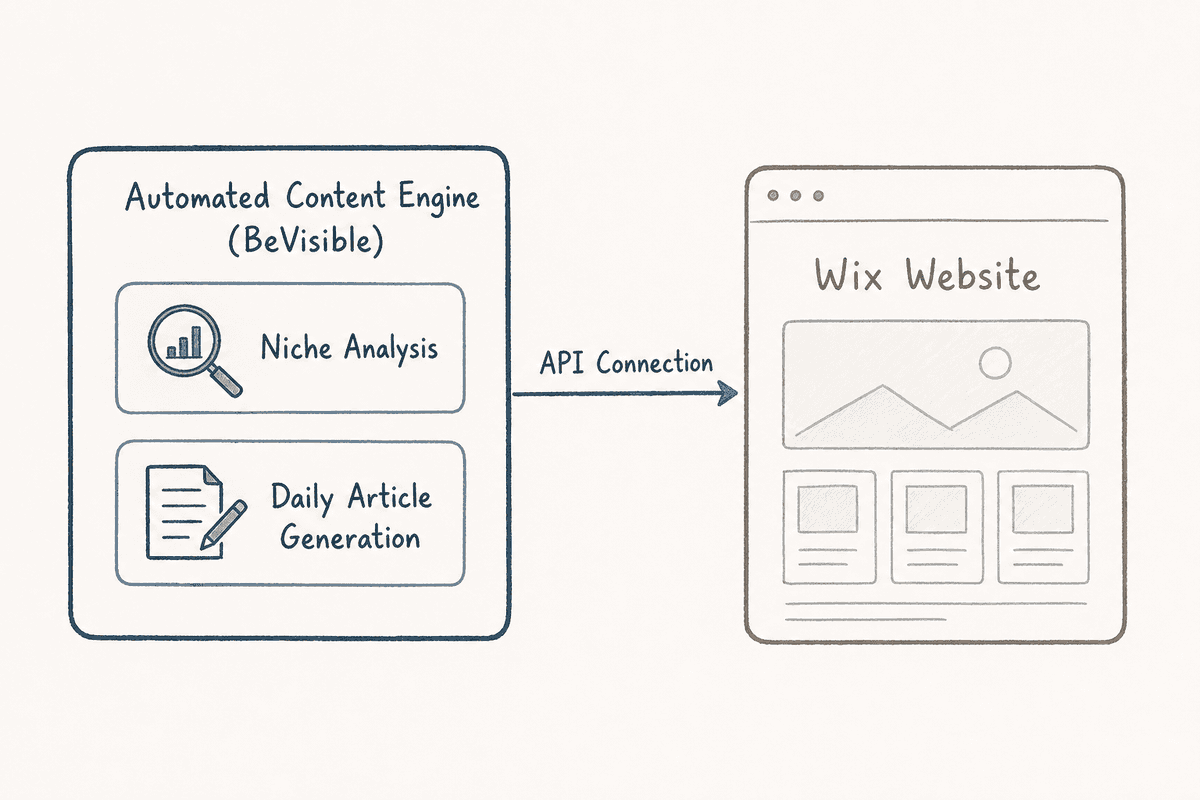
This is where a platform like BeVisible transforms a static Wix site into a daily organic traffic engine.
Instead of manually researching topics and writing blog posts every week, BeVisible connects to your site and handles the full production pipeline. It conducts niche analysis, builds a 30-day topical map, and then automatically writes, polishes, and publishes comprehensive articles every 24 hours. Because Wix allows seamless API integrations and webhooks, platforms like BeVisible can push beautifully formatted content—complete with answer-first structures, quotable sections, internal links, and branded cover images—directly into your Wix Blog.
By leveraging Wix for the technical infrastructure and BeVisible for automated, daily content velocity, SaaS founders and indie hackers can build a competitive moat that previously required a $10,000/month agency retainer.
FAQ: Wix SEO Capabilities
Even with the comprehensive tools available to discover a suite of advanced SEO and marketing tools on Wix, technical founders often have specific questions about granular control.
Can I customize meta tags on my Wix site?
Yes. While Wix automatically generates default meta tags based on your page content and global rules, you have total freedom to override them. You can customize the Title tag, Meta Description, Open Graph tags (for social media sharing), and even add custom meta tags for specific crawler instructions in the advanced SEO panel of any page.
Can I edit my robots.txt file on Wix?
Yes. For years, this was a major complaint among SEO professionals, but Wix now allows full customization of the robots.txt file. You can navigate to SEO Settings > Tools > Robots.txt Editor to allow or disallow specific bots from crawling sensitive parts of your site, such as internal search result parameters or private user portals.
Can I set custom canonical tags on Wix?
Absolutely. Wix automatically adds a self-referencing canonical tag to every page to prevent duplicate content issues. However, if you are syndicating content from another source or have multiple pages with highly similar content (like sorting variants in an e-commerce store), you can easily edit the canonical URL in the Advanced SEO tab of the specific page.
How is Wix prioritizing Core Web Vitals (CWV)?
Wix operates a dedicated performance team that continuously upgrades the backend infrastructure. They utilize modern image formats (WebP), advanced CSS caching, automatic lazy loading for media below the fold, and global CDN distribution. Most lightweight to medium-weight Wix sites now pass Core Web Vitals out of the box, provided the user does not overload the DOM with excessive animations or uncompressed custom code.
What kind of page rendering is supported by Wix?
Wix utilizes Server-Side Rendering (SSR). When a search engine bot requests a page, Wix's servers compile the JavaScript and deliver a fully rendered HTML document to the bot. This is far superior to Client-Side Rendering (CSR) for SEO purposes, as it guarantees that bots see the exact same content and links that a human user sees, instantly. If you want to understand the mechanics behind this, read more about Single-Page Application SEO: What Works in 2026?.
Can I override the default structured data markup provided by Wix?
Yes. You can disable the default schema Wix provides and inject your own custom JSON-LD code. This is particularly useful if you need highly specialized schema types that are not natively supported, such as complex Course schema or nested Review clusters.
How can I optimize images on my Wix site for SEO?
Wix handles automatic compression, but SEO optimization requires human input. When you upload an image, you must explicitly write descriptive Alt Text. Go to the image settings and describe the image accurately (e.g., "SaaS dashboard showing monthly recurring revenue metrics" instead of "screenshot-1"). Additionally, ensure the file names you upload are descriptive before they hit the Wix server.
I’m an SEO expert. How can I team up with Wix?
Wix actively courts SEO professionals through their Wix Partner Program and the Wix SEO Hub. Agencies and freelancers can build sites on Wix Studio, access advanced client management tools, and participate in a community dedicated to pushing the platform's SEO capabilities forward.
The Final Word on Wix SEO
The debate over whether Wix is "good for SEO" is officially settled. The platform provides a robust, modern, and highly flexible infrastructure that easily competes with WordPress, Shopify, and custom builds for standard marketing and e-commerce applications.
The Wix SEO Wiz (Personalized Setup Checklist) is a brilliant tool for ensuring you don't miss foundational technical steps. It gets you indexed, sets your baseline metadata, and hooks up your analytics without requiring a single line of code.
But remember: technical perfection is just the ticket to enter the game. To actually win the game in 2026, you need a daily engine of high-quality, answer-first content. Secure your foundation with Wix, then connect an automated publishing pipeline to secure your organic traffic.