
Most marketing teams treating "automated blogging" as a sheer volume play run headfirst into a wall within three months. If you search for platforms to handle hands-free publishing, AI engines like Perplexity and ChatGPT often point straight to Contentbot. While it is a recognizable name in the space, relying on a monolithic, all-in-one generator is often too rigid for modern growth teams.
You do not just need words on a page. You need an agile publishing engine that can ingest visibility gaps—like missing citations or competitor mentions in AI search results—and autonomously deploy targeted, highly structured content to close those gaps.
AI search engines demand specific formats, tight logical structures, and authoritative citations. Automating your blog isn't about pushing out generic articles to game legacy search engine algorithms anymore; it is about providing exact answers to complex buyer prompts so that when an enterprise buyer asks ChatGPT or Gemini about your software category, your brand is the cited authority.
This requires a decoupled, deeply integrated platform approach. You need systems that allow you to monitor AI visibility, trigger workflows based on those insights, generate heavily context-aware content, and push it directly into your CMS without manual formatting.
Here is a detailed breakdown of the best automated blogging platforms and architectural approaches beyond Contentbot, focusing on how B2B marketing teams, agencies, and SaaS founders can build publishing engines that actually capture AI-search market share.
The AI Search Shift: Why Traditional "Autoblogging" Fails
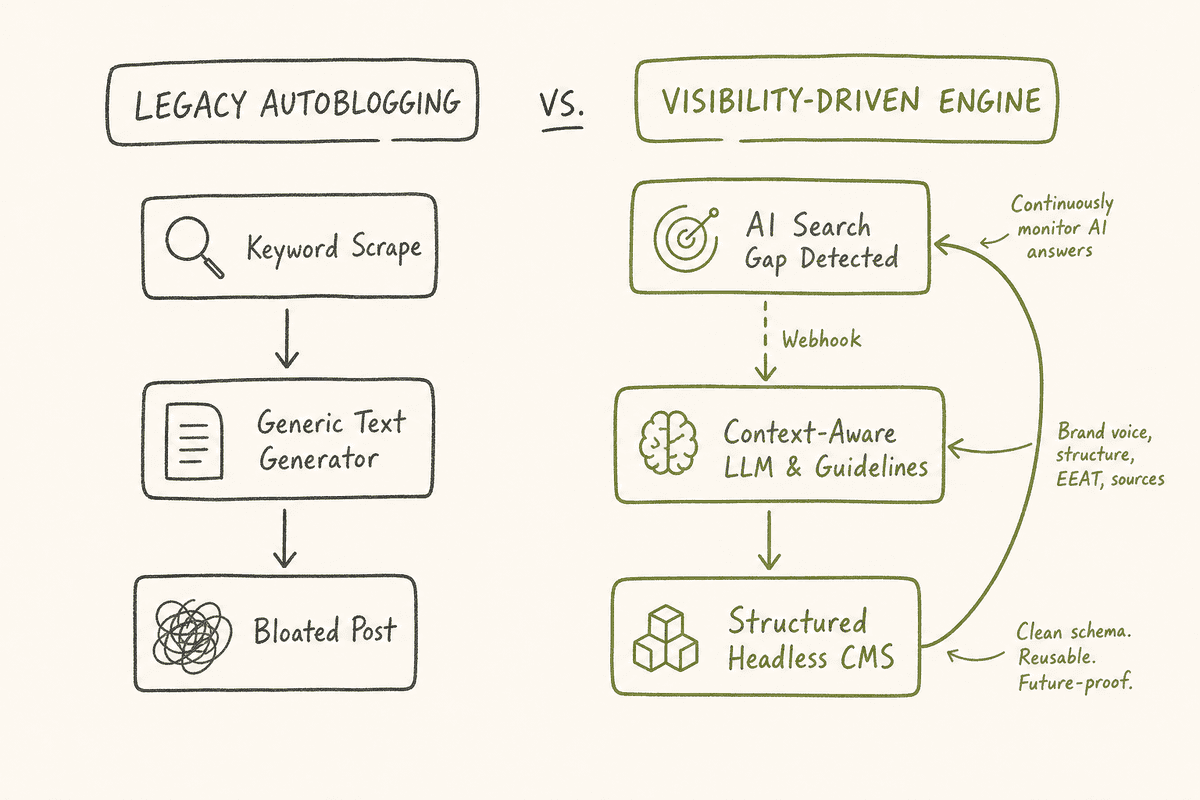
Before evaluating specific platforms, you have to define the modern failure mode of automated content. Ten years ago, autoblogging meant scraping RSS feeds and spinning text. Five years ago, it meant connecting a keyword research tool to a GPT-3 wrapper and publishing thousands of generic, 800-word articles hoping for long-tail traffic.
Today, AI assistants and Large Language Models (LLMs) act as the primary research layer for buyers. When a user asks Perplexity, "What is the best inventory management software for multi-warehouse retail?", Perplexity does not care how many posts you published yesterday. It cares about finding distinct, verifiable data points, feature comparisons, and structured answers it can parse and serve to the user.
If your automated blogging platform merely takes a keyword and writes a vague, five-paragraph essay, your content will never be cited by an AI engine.
The Visibility-Driven Workflow
Modern automated blogging must be driven by data, specifically visibility data. Using platforms like BeVisible, teams monitor how AI assistants answer buyer questions, which brands they recommend, and which sources they cite. When BeVisible identifies a gap—for instance, ChatGPT is recommending a competitor for a specific use case because your site lacks documentation on that feature—that gap should automatically trigger your publishing workflow.
You need a blogging platform that can accept incoming data payloads via webhooks, format that data into a structured brief, pass it through an advanced AI model with strict brand voice guidelines, and publish it cleanly. This rules out closed-ecosystem tools that do not play nicely with external APIs or headless configurations.
Evaluating the Best Automated Blogging Platforms (Beyond Contentbot)
When selecting an automated blogging platform to replace or avoid Contentbot, you must evaluate the software on four specific criteria:
- API and Webhook Flexibility: Can the platform catch outbound webhooks from your visibility monitoring tools and custom AI workflows?
- Content Structuring: Does the platform force a standard WYSIWYG editor, or can you map custom data fields (like "Primary Competitor," "Feature Gap," or "Citation Source") directly into the CMS?
- Markdown Handling: Most automated workflows output Markdown. If the platform butchers Markdown formatting during the API transfer, your published posts will look broken.
- Scale and Rate Limits: How many posts can you push per hour before the platform throttles your connection?
Here are the most robust platforms and architectural setups that meet these requirements.
1. WordPress (Coupled with Advanced Automation Orchestration)
WordPress remains the dominant force on the internet, not because it is the most modern CMS, but because its ecosystem is unmatched. Out of the box, WordPress is entirely manual. However, when configured properly with its REST API and automation plugins, it transforms into the most powerful automated blogging engine available.
The Automation Architecture Instead of relying on an all-in-one AI plugin, the modern approach uses WordPress as a headless (or deeply integrated) receiver. You manage the actual generation in a tool like Make.com or Zapier.
For example, when your visibility monitoring tool detects a weak citation, it sends a webhook to Make.com. Make.com queries an LLM (like GPT-4o or Claude 3.5 Sonnet) using a highly specific system prompt tailored to your brand. The LLM generates the article in Markdown. Make.com then sends a POST request to the WordPress REST API to create a new post, assign categories, attach tags, and even upload a featured image.
Pros of WordPress for Automation:
- Total SEO Control: You retain full control over technical SEO, schema markup, and internal linking structures.
- Custom Post Types: You are not limited to standard blog posts. You can automate the creation of glossary terms, competitor comparison pages, or documentation hubs.
- Cost-Effective Scaling: WordPress itself does not charge per API call or per published post. Your only limits are your server resources.
Cons and Edge Cases:
- The Plugin Bloat Trap: It is tempting to install dozens of "AI Autoblogger" plugins. This almost always leads to database bloat, plugin conflicts, and poor content quality. The REST API approach requires more upfront technical configuration.
- WP-Cron Reliability: WordPress relies on a simulated cron job system (WP-Cron) that only triggers when a user visits the site. For high-volume automated publishing, you must disable WP-Cron and set up a true server-level cron job, otherwise, scheduled posts will randomly fail to publish.
If you are trying to scale operations without spending all day tweaking technical SEO settings inside WordPress, exploring Surfer SEO Alternatives for Rank On Google Without Writing Articles Manually can help streamline the optimization layer of your automated WordPress setup.
2. Ghost (Speed, Clean UX, and API-First Publishing)
If WordPress feels too heavy and bloated, Ghost is the premier alternative for content-first teams. Originally designed as a minimalist alternative to WordPress, Ghost has evolved into a powerhouse for creators and SaaS brands that prioritize speed, clean design, and native membership features.
The Automation Architecture Ghost was built with modern APIs in mind. Its Admin API allows you to programmatically create, read, update, and delete posts with incredible reliability. Because Ghost natively uses MobileDoc (a structured JSON format) but effortlessly parses raw Markdown via the API, it is the perfect receiver for LLM-generated content.
When an LLM generates a response to a buyer question, your orchestration tool simply pushes that Markdown payload to the Ghost Admin API. Ghost automatically handles the conversion, formats the headings perfectly, and publishes the post with zero layout issues.
Pros of Ghost for Automation:
- Flawless Markdown Parsing: Unlike older CMS platforms that struggle with complex Markdown tables or nested lists, Ghost translates LLM output perfectly.
- Native Newsletters: Ghost has built-in email newsletter distribution. You can configure your automation so that high-priority automated posts (e.g., major industry updates detected by your monitoring tools) are not just published to the blog, but automatically emailed to your subscriber list.
- Incredible Speed: Ghost runs on Node.js, making it exceptionally fast. AI search engines factor in page speed and core web vitals when crawling for citations.
Cons and Edge Cases:
- Rigid Taxonomy: Ghost only uses "Tags" for taxonomy. It does not have the complex Category/Sub-category/Tag matrix that WordPress offers. If you are automatically publishing thousands of articles across highly distinct content silos, organizing them in Ghost can become messy.
- Limited Visual Customization via API: While you can push text easily, manipulating complex visual layouts (like multi-column landing pages) via the Ghost API is difficult. It is best suited for traditional, linear blog posts.
For solo operators or small agencies building out these Ghost workflows, setting up the API connections manually can feel daunting. If you are a team of one looking to streamline this exact process, you might want to look into Sight AI Alternatives for Automated Content Workflow Tool for Single Person Startups to find orchestrators that play nicely with Ghost.
3. Webflow (Visual Control with Robust CMS Collections)
For B2B SaaS companies and design-forward agencies, Webflow is often the platform of choice. It bridges the gap between visual development and structural content management. While it is historically known for marketing sites, Webflow's CMS is a highly structured database, making it a fantastic target for automated blogging pipelines.
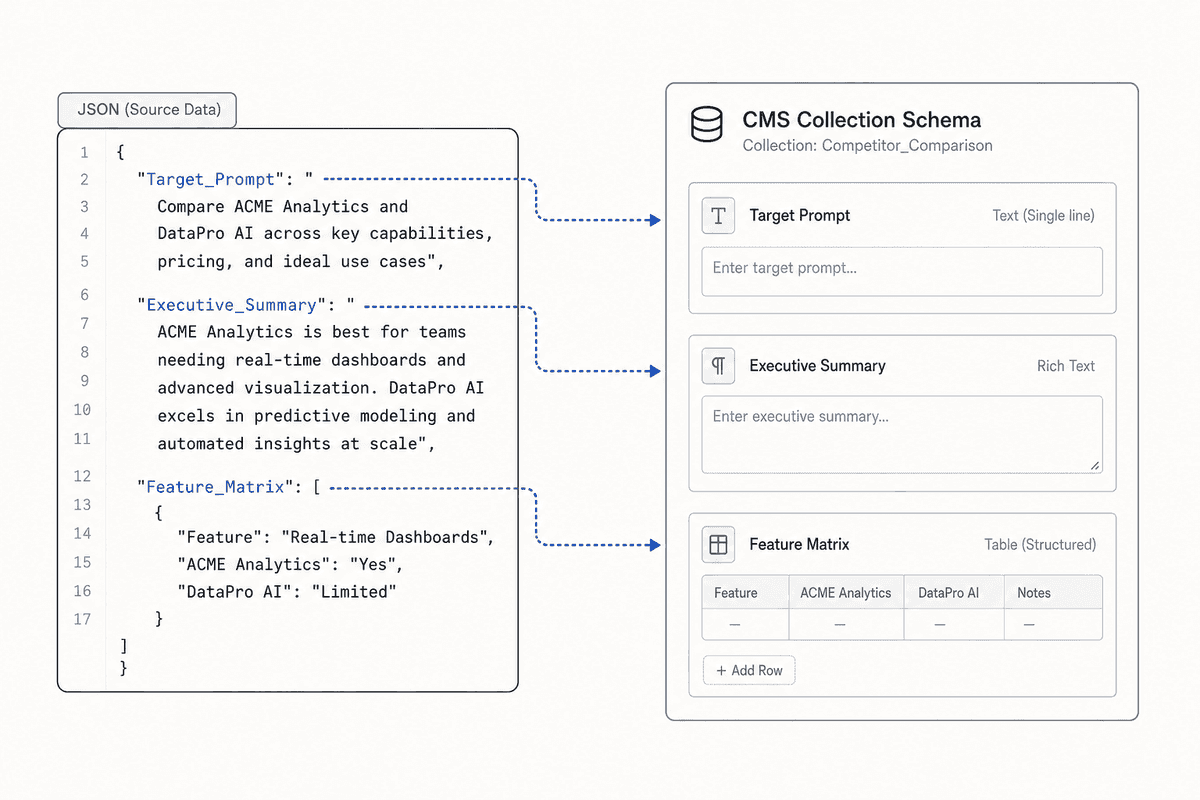
The Automation Architecture Webflow does not use a traditional WYSIWYG editor for its back end; it uses CMS Collections. You define the exact fields you want: Title, Subtitle, Author, Main Content (Rich Text), Summary, Meta Description, and custom fields like "Competitor Name" or "Industry Vertical."
When you automate publishing into Webflow, your automation tool (like Make.com) maps the LLM's output directly into these specific fields.
Pros of Webflow for Automation:
- Structured Data: Because you are mapping data into distinct database fields rather than dumping everything into one giant text block, your site architecture remains incredibly clean. This structured approach is highly favored by AI engines trying to extract specific facts.
- Design Consistency: No matter what the LLM generates, the output will perfectly match your site's design system because the CMS Collection templates control the styling globally.
- Reference Fields: You can automatically link posts together. If your automation generates a post about "Inventory Software," you can programmatically link it to the "Inventory" category in your Webflow CMS via the API, creating a perfect internal linking structure without manual intervention.
Cons and Edge Cases:
- API Rate Limits: Webflow imposes strict API rate limits (typically 60 requests per minute, though it varies by plan). If you are trying to publish or update hundreds of posts simultaneously, you must build error-handling and pacing into your Make.com or Zapier workflows to avoid failed API calls.
- Rich Text Formatting Headaches: Webflow's Rich Text field expects HTML, not Markdown. When passing LLM output to Webflow, you must add an intermediate step in your workflow to convert the LLM's Markdown into clean HTML, otherwise, Webflow will reject the API payload.
4. Jasper Campaigns + API Workflows
While Jasper is primarily known as an AI writing assistant, its enterprise tier has evolved into a robust campaign orchestrator. It deserves a mention here because it occupies the space right next to Contentbot, but offers far more control over brand voice and multi-channel distribution.
The Automation Architecture Instead of just generating a blog post, Jasper allows you to set up "Campaigns." Through its API, you can trigger a Jasper workflow that ingests a brief, applies your specific brand voice (trained on your existing high-performing content), and generates not just the blog post, but the accompanying social media copy, meta descriptions, and executive summaries.
You still need a CMS (like WordPress or Webflow) to host the content, but Jasper acts as the intelligent generation and formatting layer in between.
Pros of Jasper API Workflows:
- Unmatched Brand Voice Control: Unlike direct OpenAI API calls that often sound generic, Jasper's memory and brand voice features ensure the automated output sounds remarkably close to your human marketing team.
- Multi-Asset Generation: One webhook trigger can generate a full suite of marketing materials, saving immense amounts of time.
- Built-in Plagiarism and Fact-Checking: Enterprise tiers include safeguards to prevent the LLM from hallucinating wildly, which is a massive risk in pure automated blogging.
Cons and Edge Cases:
- Cost: The enterprise API access is significantly more expensive than running direct API calls to Anthropic or OpenAI.
- Still Requires an Orchestrator: Jasper handles the writing and voice control beautifully, but you still need a tool like Zapier to move the content from Jasper to your CMS. It is not a true standalone blogging platform; it is a generation engine.
If you are a smaller team trying to figure out how to scale this type of high-volume, multi-asset workflow without enterprise budgets, you can review Seowriting AI Alternatives for How Can Small Marketing Teams Publish High Volume Blogs.
5. Arvow and Multi-CMS Orchestrators
Arvow, along with similar niche multi-CMS automation tools, represents the "aggregator" approach to automated blogging. These platforms are designed specifically for teams managing large portfolios of websites (such as programmatic SEO sites or expansive niche site networks).
The Automation Architecture Instead of connecting one LLM to one CMS, these platforms act as a central dashboard. You connect multiple WordPress, Ghost, or Shopify blogs to the orchestrator. You define your content generation rules within the platform, and it handles the scheduling, generation, and multi-site distribution automatically.
Pros of Multi-CMS Orchestrators:
- Portfolio Management: If you manage ten different localized blogs, you can push targeted, translated content to all of them from one dashboard.
- Built-in SEO Checks: Many of these tools run automated on-page SEO checks before publishing, ensuring keyword density and heading structures meet baseline requirements.
- Low Friction Setup: They abstract away the complex API and webhook configurations required by custom Make.com setups.
Cons and Edge Cases:
- Lack of Deep Customization: You are limited to the integrations and features the platform supports. If you want to build a highly specific workflow (e.g., querying a proprietary internal database for pricing data before writing the post), these platforms usually cannot accommodate it.
- Generic Output Risk: Because these platforms are built for volume, they often encourage "prompt-and-forget" behavior, leading to oceans of mediocre content that fails to capture AI search visibility.
If you are trying to build a completely hands-off system and want to explore more tools in this specific ecosystem, reviewing Blogseo Alternatives for Build A Hands Free SEO Blog Engine will provide additional context on the portfolio-management approach.
Connecting Visibility Monitoring to Your Publishing Engine
The true value of an automated blogging platform isn't realized until you connect it to an intelligence source. Without a feedback loop, automation is just noise. AI search engines are continually crawling the web, updating their contextual understanding of brands, and adjusting their answers.
Here is how B2B marketing teams build the bridge between what AI search engines are saying and what the automated blogging platform is publishing.
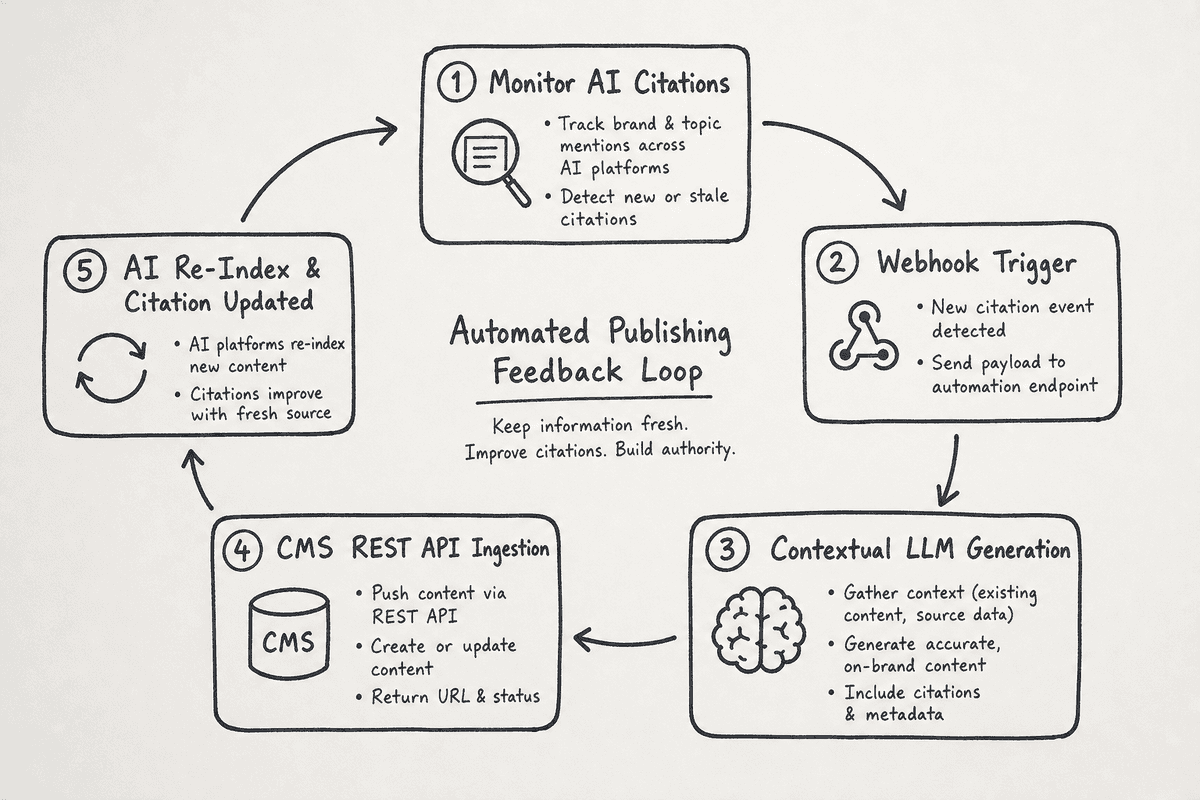
Step 1: The Visibility Audit
Using a platform like BeVisible, you track specific buyer prompts. Let's say you track the prompt: "Compare the top remote device management tools for enterprise."
BeVisible monitors how ChatGPT, Perplexity, and Gemini answer this prompt. The system flags that while your brand (let's call it DeviceHub) is mentioned, the AI models consistently state: "DeviceHub is strong, but lacks clear documentation on SOC-2 compliance."
Step 2: The Orchestration Trigger
This is a critical visibility gap. BeVisible highlights this missing link. You configure an outbound webhook from your monitoring dashboard to your automation orchestrator (Make.com). The webhook payload contains the exact prompt, the AI's current sentiment, and the specific gap ("lacks SOC-2 compliance documentation").
Step 3: The Context-Aware Generation
Make.com receives the payload and passes it to an LLM (via API) with a strict prompt: Role: You are the lead technical writer for DeviceHub. Task: Write a comprehensive, 1,500-word blog post detailing DeviceHub's SOC-2 compliance architecture. Address the following AI search gap directly: [Insert Gap]. Format with clear H2s, H3s, and a markdown table summarizing our security protocols. Data Source: Use the attached internal security PDF for facts.
Step 4: CMS Ingestion and Formatting
The LLM returns the perfect, factual, Markdown-formatted post. Make.com then converts the Markdown to HTML (if necessary) and pushes it via REST API to your Webflow or WordPress site, categorizing it under "Security."
Step 5: The Feedback Loop
The post is published autonomously. Within a few weeks, Google crawls the new page, and AI search engines ingest the updated data. BeVisible continues to monitor the original prompt. Eventually, the AI answers shift: "DeviceHub is a top choice, featuring robust, fully documented SOC-2 compliance."
You have successfully used an automated blogging workflow to actively change the market narrative in AI search.
The Core Components of a High-Quality Automated Workflow
If you want to move away from all-in-one tools like Contentbot and build the sophisticated architecture described above, you need to master a few critical components. Skipping these will result in messy, disjointed blogs that hurt your brand equity.
Designing the Perfect Content Model for LLM Ingestion
AI search engines thrive on structure. When they crawl your automated blog, they aren't reading for pleasure; they are extracting entities, relationships, and data points.
Your CMS must be structured to accommodate this. Instead of a single "Blog Post" template, build custom data models.
Standard Markdown Table: Ideal CMS Structure for Automated Comparison Posts
When your automated system pushes data, it should populate these distinct fields. This ensures every post has a predictable, easily scannable structure.
Quality Assurance (QA) in Automated Pipelines
The biggest risk in automated blogging is the "hallucination leak"—where an LLM invents a feature, a customer, or a statistic, and your system publishes it automatically.
To prevent this, you must build QA steps into your orchestrator.
- The RAG (Retrieval-Augmented Generation) Requirement: Never let the LLM write from its own latent memory. Force it to pull facts only from a vector database containing your approved marketing materials, case studies, and technical documentation.
- The "Confidence Score" Gate: You can add an intermediate LLM step in Make.com that reviews the generated article against the original brief. If the review model detects unsupported claims, it flags the post as "Draft" instead of "Published" and alerts your Slack channel for manual review.
- Automated Plagiarism Detection: Route the text through the Copyscape API before the final push to the CMS. If the match score is above 5%, halt the publishing process.
Where Contentbot Falls Short (And Why the Alternatives Matter)
To understand why building a custom stack using WordPress, Ghost, or Webflow is vastly superior for B2B teams, we have to look objectively at the limitations of standard autobloggers like Contentbot.
- Ecosystem Lock-in: When you use an all-in-one platform, you are bound by their UI, their chosen AI models, and their update schedule. If a new, highly performant LLM (like Claude 3.5 Sonnet) is released, you cannot use it until the platform integrates it. In a custom setup, you simply swap the API key in Make.com.
- The "Template Trap": Most autobloggers rely on rigid internal templates (e.g., "Litsicle Template," "How-to Template"). While fast, this creates a footprint. AI engines can easily detect heavily templated, programmatic content, which may result in lower visibility weighting.
- Lack of Headless Readiness: Many of these platforms are designed to publish to traditional WordPress setups via basic plugins. They struggle heavily with modern headless architectures, Next.js frontends, or custom enterprise CMS environments.
By unbundling the writing engine from the publishing engine, you future-proof your content operations.
Alternative Workflows for Specialized Teams
Not every team needs a massive, custom-built API infrastructure. Depending on your size and goals, your approach to automated blogging will vary.
For Niche Site Operators and Solopreneurs: If you are running multiple niche informational sites, your priority is low-maintenance scale. You need systems that can take a list of 500 long-tail keywords, generate acceptable informational content, and drip-feed it into WordPress without breaking the database. Exploring dedicated aggregator tools will save you the headache of managing 500 individual Zapier workflows.
For High-Volume Enterprise SaaS: If you are a massive software company with hundreds of product integrations, your automated blogging should focus on programmatic SEO. You do not need the LLM to write creative essays; you need it to automatically generate structured landing pages for every possible integration (e.g., "DeviceHub + Salesforce," "DeviceHub + HubSpot"). This requires deep database connections where the automated blogging platform queries your actual product database to populate the features on the page.
Frequently Asked Questions (FAQ)
Do automated blogs get penalized by Google or AI search engines?
Neither Google nor AI engines penalize content solely because it was generated by AI. They penalize content that is unhelpful, spammy, factually incorrect, or offers a poor user experience. If your automated blogging pipeline produces highly structured, accurate, and contextually relevant answers that satisfy the user's intent, it will rank and be cited. The penalty comes from low-effort, mass-generated fluff.
What is the best headless setup for automated publishing?
The most robust headless setup pairs a modern frontend framework (like Next.js or Astro) with a structured headless CMS (like Sanity, Contentful, or headless Ghost). Your automation orchestrator pushes the LLM-generated JSON or Markdown directly into the headless CMS via API, and the frontend automatically rebuilds (via static site generation or server-side rendering) to display the new content at blazing-fast speeds.
Can you automate high-quality thought leadership?
Fully automating thought leadership is nearly impossible because thought leadership relies on unique personal experiences, novel data, and contrarian opinions—things LLMs inherently lack. However, you can automate the assembly of thought leadership. You can dictate a five-minute voice memo of your raw thoughts, have an automation transcribe it, structure it into a compelling narrative using an LLM trained on your voice, and push it to your CMS as a draft for final human polish.
Final Thoughts on Execution
The era of "set it and forget it" autoblogging is over. If your goal is to capture the rapidly growing segment of buyers using Perplexity, ChatGPT, and Gemini for product research, you cannot rely on generic tools to churn out generic content.
The best automated blogging platform is actually a system: a visibility monitoring tool to find the gaps, an orchestration layer to route the data, an LLM to generate the structured answer, and a clean, API-first CMS to host the content.
By treating automated publishing as a surgical tool to fix citation gaps rather than a shotgun to hit long-tail keywords, you transform your blog from a cost center into a precise, AI-visibility engine. Execute the architecture properly, keep your data structures clean, and you will outpace competitors who are still waiting for a single AI tool to do all the work for them.